
dev的documentManager,多个tab窗体
private void AddDocument(Funcation CurrentModel)

        {

            if (!string.IsNullOrWhiteSpace(CurrentModel.FunctionKey))

            {

                //如果旧版本名称与新版本不一样,用‘,’分开

                var typeFullNames = CurrentModel.FunctionKey.Split(',');

                foreach (var typeFullName in typeFullNames)

                {

                    var type = Reflector.Reflect(typeFullName);//反射窗体类型

                    if (type != null)

                    {

                        foreach (BaseDocument fdocument in tabbedView1.Documents)

                        {

                            if (fdocument.Tag == type)

                            {

                                tabbedView1.Controller.Activate(fdocument);//是否已经打开窗体

                                return;

                            }

                        }

                        var obj = Activator.CreateInstance((Type)type);

                        Form form = (Form)obj;

                        form.Text = CurrentModel.FunctionName;//窗体

                        tabbedView1.BeginUpdate();//开始加载窗体

                        tabbedView1.Manager.MdiParent = this;

                        BaseDocument document = tabbedView1.AddDocument(form);

                        document.Footer = Directory.GetCurrentDirectory();

                        document.Tag = type;

                        tabbedView1.Controller.Activate(document);

                        tabbedView1.EndUpdate();

                        break;

                    }

                }

            }
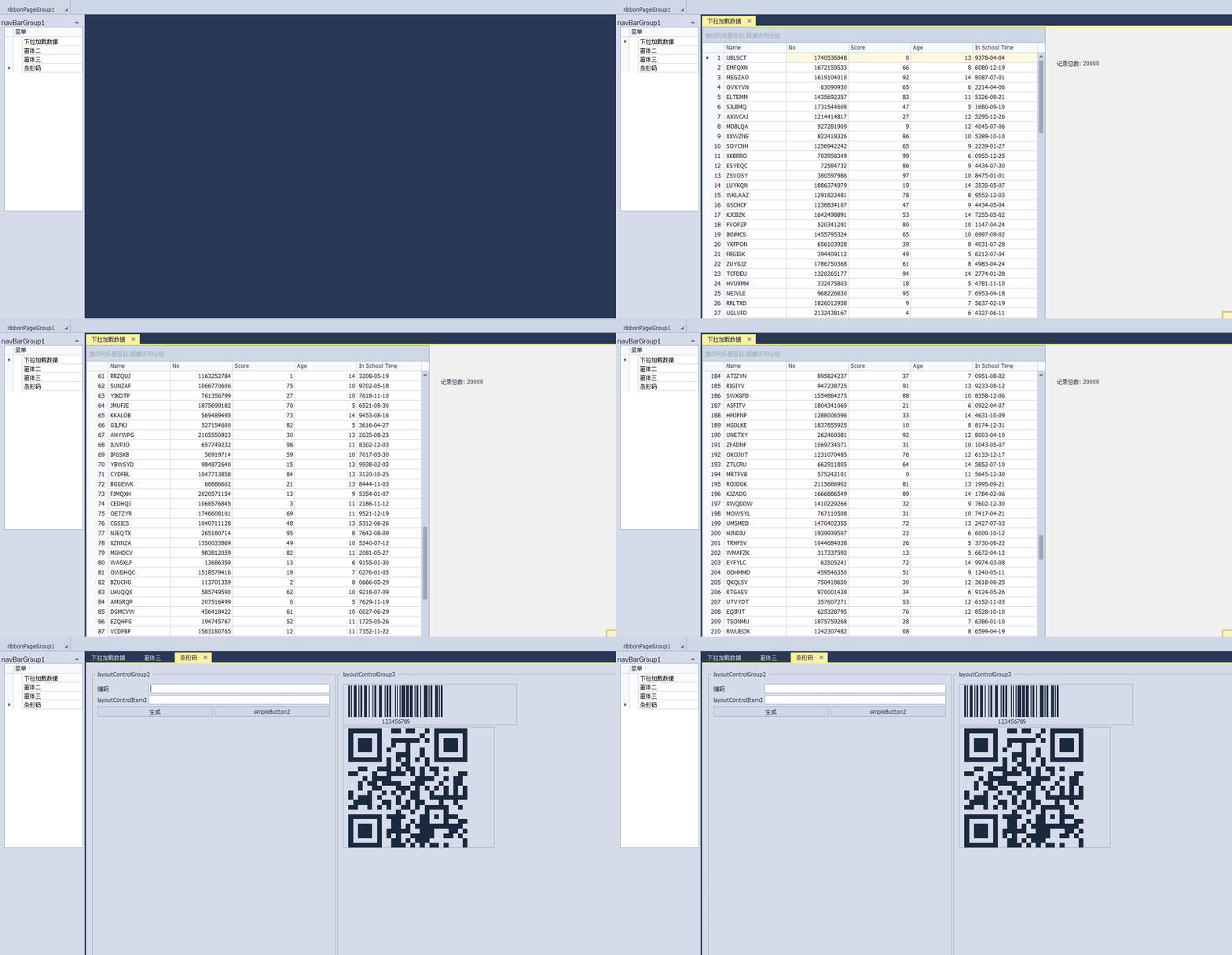
效果如下
private void AddDocument(Funcation CurrentModel)
{
if (!string.IsNullOrWhiteSpace(CurrentModel.FunctionKey))
{
//如果旧版本名称与新版本不一样,用‘,’分开
var typeFullNames = CurrentModel.FunctionKey.Split(',');
foreach (var typeFullName in typeFullNames)
{
var type = Reflector.Reflect(typeFullName);//反射窗体类型
if (type != null)
{
foreach (BaseDocument fdocument in tabbedView1.Documents)
{
if (fdocument.Tag == type)
{
tabbedView1.Controller.Activate(fdocument);//是否已经打开窗体
return;
}
}
var obj = Activator.CreateInstance((Type)type);
Form form = (Form)obj;
form.Text = CurrentModel.FunctionName;//窗体
tabbedView1.BeginUpdate();//开始加载窗体
tabbedView1.Manager.MdiParent = this;
BaseDocument document = tabbedView1.AddDocument(form);
document.Footer = Directory.GetCurrentDirectory();
document.Tag = type;
tabbedView1.Controller.Activate(document);
tabbedView1.EndUpdate();
break;
}
}
}
dev的documentManager,多个tab窗体的更多相关文章
- Dev的DocumentManager添加窗体
1.DocumentManager要设置自己的MdiParent属性 2.主窗体设置IsMidContainer为True 3.要生成的窗体设置MdiParent为主窗体 4.正常创建窗体,然后就可以 ...
- Dev的DocumentManager 相关问题
1.改变DocumentManager包含的窗体的排列方式 if (this.documentManager1.View.Type != ViewType.NativeMdi) { this.docu ...
- WPF 窗体在Alt+Tab中隐藏
问题: 近段时间由于项目上的需求,需要在WPF中使用COM组件,并且由于软件界面设计等等原因,需要将部分控件显示在COM组件之上,由于WindowsFormsHost的一些原因,导致继承在WPF中的W ...
- 网络采集软件核心技术剖析系列(7)---如何使用C#语言搭建程序框架(经典Winform界面,顶部菜单栏,工具栏,左边树形列表,右边多Tab界面)
一 本系列随笔概览及产生的背景 自己开发的豆约翰博客备份专家软件工具问世3年多以来,深受广大博客写作和阅读爱好者的喜爱.同时也不乏一些技术爱好者咨询我,这个软件里面各种实用的功能是如何实现的. 该软件 ...
- 使用Minicom基于串口调试HiKey
虽然通过adb shell调试方便,但是有些时候不得不借助于串口进行调试,比如测试suspend to ram之类的功能时,adb服务被关闭. 同时在minicom中也可以进入shell,进行操作. ...
- TabActivity 切换Activity界面
TAB切换先上图,tab标题没有添加样式,因为setIndicator可以直接接收View,所以可以自己编辑样式: 也可以实现OnTabChangeListener监听tab的点击,改变tab点击后的 ...
- 将u盘的文件复制到虚拟机上的linux系统上面—》文件挂载(文字+图解)
虚拟机中操作系统.CentOs(无图形界面) 没有图形界面的linux,我也没有配置网络,现在需要把文件复制到linux系统上面,我这里就使用了u盘挂载的方式,获得了U盘中的文件. 1.VMware中 ...
- 生产环境下案例 No space left on device (inode使用满的情况)
第一种情况: 问题: 如果想磁盘写入数据提示如下错误: No space left on device. 通过df -h查看磁盘空间,发现没满,请问可能原因是什么? 解答: 可能是inode数量被消耗 ...
- ubuntu10.04+win7双系统,重装win7后,恢复grub引导菜单以及命令行引导linux
我在我的小Y上安装了ubuntu10.04和win7旗舰版的双系统,采用的是grub引导.今天win7不知道哪儿出了问题,windows update更新一直报错,(当然360也是打不上滴)网上查了很 ...
随机推荐
- linux进程的一些日常处理
linux 下查看一个进程运行路径的方法 在linux下查看进程大家都会想到用 ps -ef|grep XXX 可是看到的不是全路径,怎么看全路径呢? 每个进程启动之后在 /proc下面有一个于pid ...
- oracle创建表空间并赋予权限
CREATE TEMPORARY TABLESPACE 表空间 TEMPFILE 数据存储路径('D://oracle//NEW_NAMESPACE.DBF') SIZE 32M AUTOEXTEN ...
- Mybatis 接口传入多个参数 xml怎么接收
mybatis 在接口上传入多个参数 1.如果传入的参数类型一样. Map<String, String> queryDkpayBindBankCidByOriBindAndBankCid ...
- ansible源码解读
Ansible源码获取 Ansible Github:https://github.com/ansible Ansible目录结构 $ tree -L 2 ansible-2.0.0.0 ansibl ...
- #JS attr和prop的区别
HTML元素固有属性:使用prop方法 HTML元素自定义属性:使用attr方法
- NOIP2018濒死记
已经复课常规三个多星期了...终于有时间来写Noip2018游记了.当时的一些想法可能都不记得了...我的OI生涯也时日无多了.也许一开始我的选择就是错的,我之前就这么想,只不过现在更加确信了而已.等 ...
- Docker容器与镜像管理
目录 容器管理 运行容器 容器的启停操作 容器导入导出 容器生命周期管理 容器资源限制 内存限制 CPU限制 io 限制 镜像管理 镜像命名规范 镜像基本操作 容器管理 运行容器 1.运行一个容器示例 ...
- linux学习笔记-3.文件相关命令
1.进入到用户根目录 cd ~ 或者 cdcd ~hadoop回到原来路径cd - 2.查看文件详情 stat a.txt 3.移动 mv a.txt /ect/改名mv b.txt a.txt移动并 ...
- 学习ABP遇到的问题汇总
1,在abp官网下载的模板(asp.net+ef)写Application层的时候需要使用AutoMapper.结果ObjectMapper一直为null 解决:需要在当前项目的Module依赖Abp ...
- android studio 使用总结
网站1:http://stormzhang.com/posts.html 网站2:http://blog.csdn.net/hyr83960944/article/details/38388429