
Android App组件之Fragment说明和示例
Android App组件之Fragment说明和示例
1 Fragement介绍
Android从3.0开始引入Fragment,主要是为了支持更动态更灵活的界面设计。
Fragment是activity的界面中的一部分或一种行为。你可以把多个Fragment们组合到一个activity中来创建一个多面界面,你也可以在多个activity中重用一个Fragment。你可以把Fragment认为模块化的一段activity,它具有自己的生命周期,接收它自己的事件,并可以在activity运行时被添加或删除。
需要注意的是:Fragment不能独立存在,它必须嵌入到activity中,而且Fragment的生命周期直接受所在的activity的影响。例如:当activity暂停时,它拥有的所有的Fragment们都暂停了,当activity销毁时,它拥有的所有Fragment们都被销毁。
2 Fragment生命周期
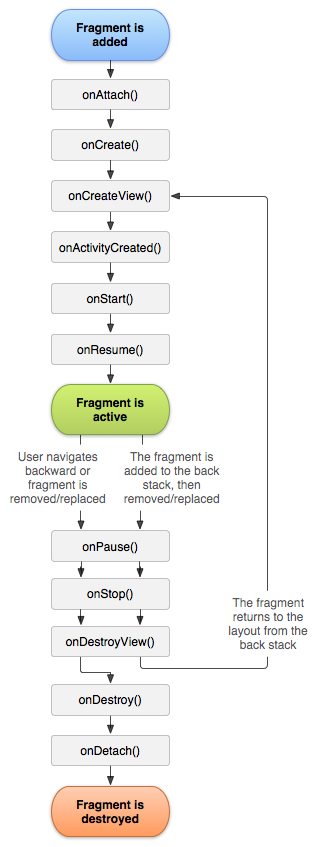
3 Fragment实现方法
一般情况下,fragment把它的layout作为activitiy的loyout的一部分合并到activity中,有两种方法将一个fragment添加到activity中。
方法1:在activity的layout.xml文件中声明fragment
下面以一个应用实例来说明方法1。应用实例要求:创建一个activity,activity中包含Fragment。
layout文件fragment_layout_test.xml的代码如下:
<LinearLayout xmlns:android="http://schemas.android.com/apk/res/android"

    xmlns:tools="http://schemas.android.com/tools"

    android:layout_width="match_parent"

    android:layout_height="match_parent"

    android:orientation="vertical" >

   <fragment android:name="com.skywang.app.FragmentLayoutTest$ExampleFragment"

        android:id="@+id/list"

        android:layout_weight="1"

        android:layout_width="match_parent"

        android:layout_height="match_parent"/>

</LinearLayout>
说明:
(01) 该layout仅仅只包含了一个fragment元素。
(02) fragment的属性 android:name="com.skywang.app.FragmentLayoutTest$ExampleFragment" 。意思是该layout包含一个fragment,这个fragment是定义在包名为"com.skywang.app"中类"FragmentLayoutTest""的内部类"ExampleFragment"中的。
FragmentLayoutTest.java的代码如下:
package com.skywang.app;

import android.os.Bundle;

import android.app.Activity;

import android.view.View;

import android.view.ViewGroup;

import android.view.LayoutInflater;

import android.widget.TextView;

import android.app.Fragment;

public class FragmentLayoutTest extends Activity {

    @Override

    protected void onCreate(Bundle savedInstanceState) {

        super.onCreate(savedInstanceState);

        // fragment_layout_test只包括ExampleFragment对象。

        setContentView(R.layout.fragment_layout_test);

    }

    // 继承与Fragment

    public static class ExampleFragment extends Fragment {

        @Override

        public View onCreateView(LayoutInflater inflater, ViewGroup container,

                                 Bundle savedInstanceState) {

            return inflater.inflate(R.layout.example_fragment, container, false);

        }

    }

}
说明:
(01) FragmentLayoutTest通过 setContentView(R.layout.fragment_layout_test) 来调用fragment_layout_test.xml来作为布局文件。
(02) 而上面的fragment_layout_test.xml布局文件仅仅值包括1个Fragment,该Fragment是通过ExampleFragment实现的。
(03) ExampleFragment继承于Fragment,在onCreateView()方法中通过 return inflater.inflate(R.layout.example_fragment, container, false); 来将example_fragment.xml作为其布局文件。
所以,相当于FragmentLayoutTest直接调用example_fragment.xml来显示。那为什么要费这么大劲,非要用到Fragment呢?原因是因为Fragment的可扩展性,它能作为一个独立的显示单元添加到activity中。本文仅仅只是为了说明fragment的layout实现方法;实际应用中,可能比这复杂很多。
layout文件example_fragment.xml的代码如下:
<LinearLayout xmlns:android="http://schemas.android.com/apk/res/android"

    xmlns:tools="http://schemas.android.com/tools"

    android:layout_width="match_parent"

    android:layout_height="match_parent"

    android:orientation="vertical" >

    <TextView

        android:text="@string/example_fragment"

        android:layout_width="wrap_content"

        android:layout_height="wrap_content"/>

</LinearLayout>
说明:
(01) 采用LinearLayout线性布局,仅仅显示一个TextView。
点击下载:源代码
效果图:
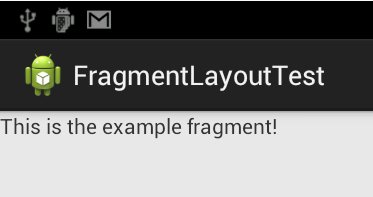
方法2:在activity的layout.xml文件中声明包含
下面以一个应用实例来说明方法1。应用实例要求:创建一个activity,activity中包含一个Fragment,该Fragment采用动态加载的方式。
FragmentTransactionTest的代码:
package com.skywang.app;

import android.os.Bundle;

import android.view.LayoutInflater;

import android.view.View;

import android.view.ViewGroup;

import android.app.Activity;

import android.app.Fragment;

import android.app.FragmentManager;

import android.app.FragmentTransaction;

public class FragmentTransactionTest extends Activity {

    @Override

    protected void onCreate(Bundle savedInstanceState) {

        super.onCreate(savedInstanceState);

        setContentView(R.layout.fragment_transaction_test);

        // 获取FragmentManager

        FragmentManager fragmentManager = getFragmentManager();

        // 获取FragmentTransaction

        FragmentTransaction fragmentTransaction = fragmentManager.beginTransaction();

        // 获取ExampleFragment

        ExampleFragment fragment = new ExampleFragment();

        // 将fragment添加到容器about_fragment_container中

        fragmentTransaction.add(R.id.about_fragment_container, fragment);

        fragmentTransaction.commit();

    }

    // 继承与Fragment

    public static class ExampleFragment extends Fragment {

        @Override

        public View onCreateView(LayoutInflater inflater, ViewGroup container,

                                 Bundle savedInstanceState) {

            return inflater.inflate(R.layout.example_fragment, container, false);

        }

    }

}
说明:
(01) 在onCreate()中该activit调用fragment_transaction_test作为其布局文件。
(02) 在onCreate()中,通过获取FragmentManager和FragmentTransaction,来将ExampleFragment对象添加到R.id.about_fragment_container中,about_fragment_container是一个Fragment。
(03) ExampleFragment的onCreateView()中,将example_fragment作为其布局文件。
fragment_transaction_test.xml的代码:
<LinearLayout xmlns:android="http://schemas.android.com/apk/res/android"

    android:layout_width="match_parent"

    android:layout_height="match_parent"

    android:orientation="vertical" >

    <FrameLayout

        android:id="@+id/about_fragment_container"

        android:layout_width="match_parent"

        android:layout_height="match_parent"/>

</LinearLayout>
example_fragment.xml的代码:
<LinearLayout xmlns:android="http://schemas.android.com/apk/res/android"

    xmlns:tools="http://schemas.android.com/tools"

    android:layout_width="match_parent"

    android:layout_height="match_parent"

    android:orientation="vertical" >

    <TextView

        android:text="Hello Fragment"

        android:layout_width="wrap_content"

        android:layout_height="wrap_content"/>

</LinearLayout>
点击下载:源代码
效果图:
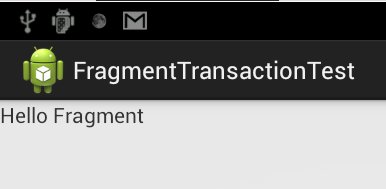
Android App组件之Fragment说明和示例的更多相关文章
- Android App组件之ListFragment -- 说明和示例
Android App组件之ListFragment -- 说明和示例 1 ListFragement介绍 ListFragment继承于Fragment.因此它具有Fragment的特性,能够作为a ...
- Android App组件之ListFragment -- 说明和示例(转载)
转自:http://www.cnblogs.com/skywang12345/p/3160260.html 1 ListFragement介绍 ListFragment继承于Fragment.因此它具 ...
- Android App组件之Activity
Android App组件之Activity 1 activit介绍 Activities 是Android的四大组件之一,其余三大组件是service.broadcast和content provi ...
- Android APP架构设计——MVP的使用示例
0. 前言 为了更好地进行移动端架构设计,我们最常用的就是MVC.MVP和MVVM,作为三个最耳熟能详的三大架构,应用可谓非常广泛.对于这三种架构设计以及优缺点已经在Android APP架构设计-- ...
- Android做法说明(3)---Fragment使用app袋或v4包解析
Android做法说明(3)---Fragment使用app袋或v4包解析 1)问题简述 相信非常多的朋友在调用Fragment都会遇到以下的情况: watermark/2/text/aHR0cDov ...
- android开发之路12(android四大组件&Fragment&AsyncTask类)
一.Activity组件1.简介:Activity组件是Android四大组件之一,通常一个Activity相当于一个用户界面,我们可以通过加载布局文件将Android提供的各种控件及自定义控件显示到 ...
- App 组件化/模块化之路——Android 框架组件(Android Architecture Components)使用指南
面对越来越复杂的 App 需求,Google 官方发布了Android 框架组件库(Android Architecture Components ).为开发者更好的开发 App 提供了非常好的样本. ...
- android.support.v4.app.Fragment和android.app.Fragment区别
1.最低支持版本不同 android.app.Fragment 兼容的最低版本是android:minSdkVersion="11" 即3.0版 android.support.v ...
- android四大组件学习总结以及各个组件示例(2)
上篇博文讲解了activity.content provider,此篇博文来仔细总结service.broadcast receiver: 3. Service >什么是服务?>windo ...
随机推荐
- 『记录』Android参考资料
欢迎留言推荐好的教程.资料.博客及作者等. 『记录』Android参考资料 1.前期环境 Android Studio使用Git Android Studio快捷键总结 Android Studio及 ...
- PyCharm 2018实现远程调试代码
pycharm是一个非常强大的python开发工具,现在很多代码最终在线上跑的环境都是linux,而开发环境可能还是windows下开发,这就需要经常在linux上进行调试,或者在linux对代码进行 ...
- Python实现 -- 冒泡排序、选择排序、插入排序
冒泡排序 冒泡排序(Bubble Sort),是一种计算机科学领域的较简单的排序算法. 冒泡排序的原理: 比较两个相邻的元素,如果第一个比第二个大,就交换他们 对每一对相邻的元素做同样的工作,从开始第 ...
- react-router 4 路由的嵌套
1.在component组件内部需要嵌套的位置直接嵌套Route标签 这个方法会使得路由标签比较分散,子组件我们必须直接将Route标签写入到父组件之中,而且路由必须包含根路径. // Dashboa ...
- 【windows】在控制面板卸载软件的时候,出现2502,2503的问题
1. 打开“任务管理器”,找到“详细信息”的页签,将“explorer.exe”的进程结束任务 2.菜单栏的“文件”-->"建立新任务"--> 输入Explorer.e ...
- MFC命名规范
属性部分 全局变量:g_ 常量:c_ c++类成员变量:m_ 静态变量:s_ 类型部分 指针:p 函数:fn 无效:v 句柄:h 长整型:l 布尔:b 浮点型(有时也指文件):f 双字:dw 字符串: ...
- hdu 2545 求当前结点到根节点的距离
求当前结点到根节点的距离 Sample Input 2 1 //n m 1 2 1 2 //询问 5 2 1 2 1 3 3 4 3 5 4 2 //询问 4 5 0 0 Sample Output ...
- Linux系统运维笔记(二),Linux文件编辑命令
Linux系统运维笔记 Linux文件编辑命令 首先我们使用命令 vi filename 打开一个文件,这个时候进入到的是命令模式 接下来我们按i,然后键盘随便输入写内容. 然后按ESC重新进入到命令 ...
- 再议mysql 主从配置
1.创建用户: grant replication slave,replication client on *.* to repl@'192.168.1.%' IDENTIFIED By 'p4ssw ...
- THUSC 2018 酱油记
THUSC 2018 酱油记 游记分类:游记 Day \((-inf,-2]\) 自CTSC和APIO挂烂以后,仍然在停课集训,不过好像这两波考试让我的RP涨了一大波,因此模拟赛大多都考的不错,虽然经 ...