
js 弹窗的实现
原理:
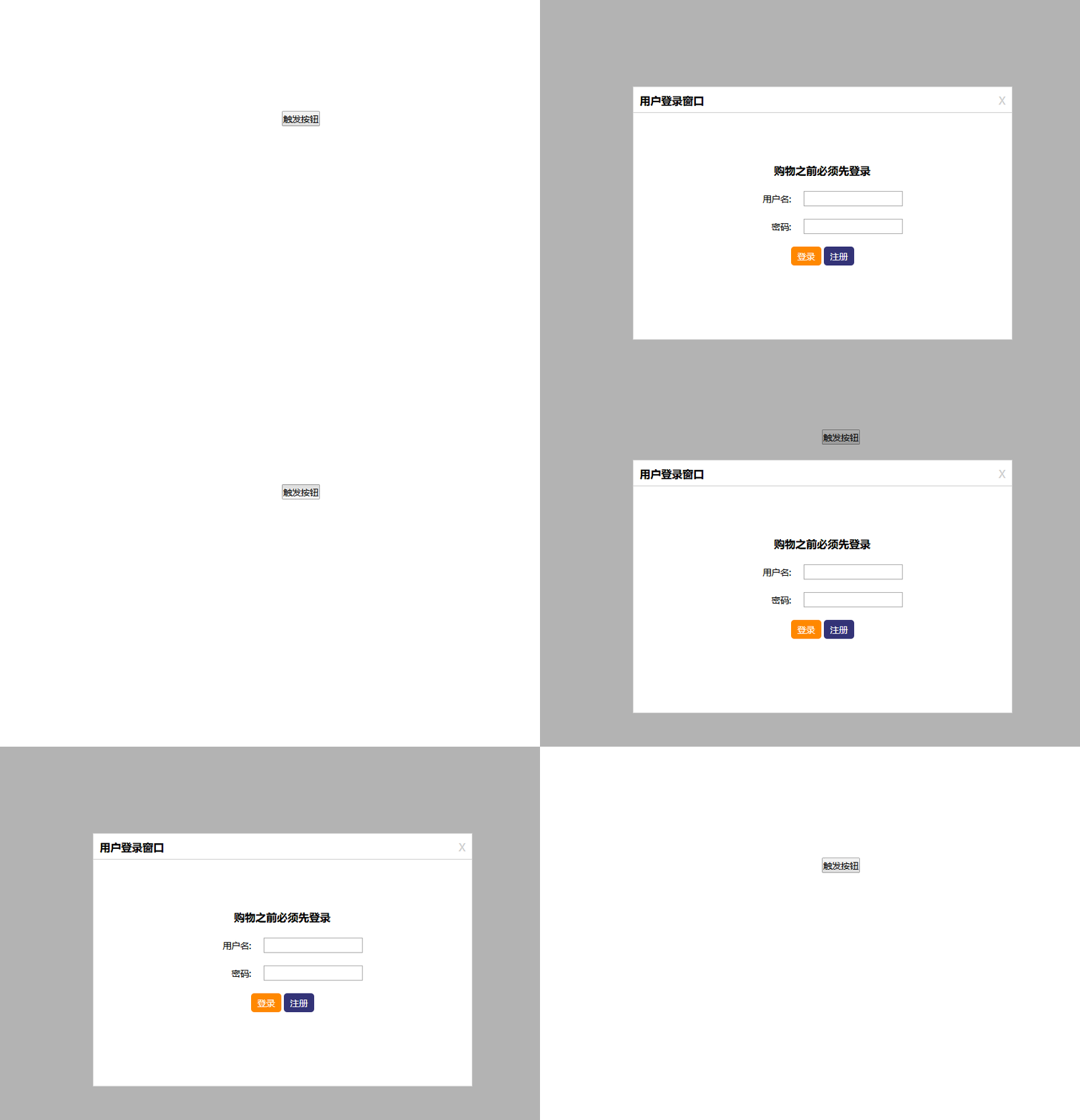
1. 点击按钮,触发窗口显示,遮罩层显示,并设置窗口的位置
2. 为弹出的窗口绑定鼠标滚动事件和视窗改变事件
3.点击关闭按钮,弹窗消失,遮罩层消失
html 代码:
 <!DOCTYPE html>

 <html lang="en">

 <html>

     <head>

         <meta charset="utf-8" />

         <link rel="stylesheet" href="./css/tanchuang.css" />

         <script src="./js/tanchuang.js"></script>

     </head>

     <body style="height:3000px;">

         <input type="button" id="btn" value="触发按钮" /><br/>

         <div id="login">

             <div class="header">

                 <h3 id="move">用户登录窗口</h3>

                 <a href="javascript:;" class="close" id="close">X</a>

             </div>

             <div class="body">

                 <h3>购物之前必须先登录</h3>

                 <ul>

                     <li><span>用户名:</span><input type="text" name="user" /></li>

                     <li><span>密码:</span><input type="text" name="userPwd" /></li>

                     <li class="act"><input type="submit" value="登录" class="log"/> <input type="submit" value="注册" class="zhuce"/></li>

                 </ul>

             </div>

         </div>

         <div class="mask" id="mask"></div>

     </body>

 </html>
css 代码:
 * {

     margin:;

     padding:;

     list-style-type:none;

     font-family:微软雅黑;

     font-size:14px;

 }

 a {

     text-decoration:none;

     color:#ccc;

 }

 h3 {

     font-size:1.2em;

 }

 #btn{

     position:absolute;

     left:50%;

     top:300px;

 }

 #login {

     width:600px;

     height:400px;

     border:1px solid #ccc;

     background:#fff;

      /* position:fixed;  */

      position:absolute;

     z-index:;

     display:none;

 }

 #login .header {

     height:40px;

     border-bottom:1px solid #ccc;

 }

 #login .header  h3{

     float:left;

     margin:10px 0px 0px 10px;

 }

 #login .header .close {

     float:right;

     margin:10px 10px 0px 0px;

     font-size:1.2em;

 }

 #login .body {

     width:300px;

     margin:80px auto;

 }

 #login .body h3 {

     margin-bottom:20px;

     text-align:center;

 }

 #login .body ul li {

     margin:20px;

 }

 #login .body ul li span {

     display:inline-block;

     width:80px;

     text-align:right;

     padding-right:20px;

 }

 #login .body ul li.act {

     text-align:center;

 }

 .log {

     background:#ff8800;

     color:white;

     border:none;

     padding:5px 10px;

     -moz-border-radius: 5px; /* Firefox */

     -webkit-border-radius: 5px; /* Safari 和 Chrome */

     border-radius: 5px; /* Opera 10.5+, 以及使用了IE-CSS3的IE浏览器 */

     cursor:pointer;

     cursor: hand;

 }

 .zhuce {

     background:#337;

     color:white;

     border:none;

     padding:5px 10px;

     -moz-border-radius: 5px; /* Firefox */

     -webkit-border-radius: 5px; /* Safari 和 Chrome */

     border-radius: 5px; /* Opera 10.5+, 以及使用了IE-CSS3的IE浏览器 */

     cursor:pointer;

     cursor: hand;

 }

 .mask {

     width:100%;

     height:100%;

     position:fixed;

     left:0px;

     top:0px;

     background:#000;

     opacity:0.3;

     filter:alpha(opacity:30);

     z-index:;

     display:none;

 }
js 代码:
 window.onload = function () {

     // 获取对象属性的兼容 obj.currentStyle[attr] 为ie的方式,getComputedStyle(obj,false)[attr]为谷歌的方式

     function getStyle(obj,attr){

         // if(obj.currentStyle){

         //     return obj.currentStyle[attr];

         // }else{

         //     return getComputedStyle(obj,false)[attr];

         // }

         return obj.currentStyle ? obj.currentStyle[attr] : getComputedStyle(obj,false)[attr] ;

     };

     // 参数为两个时,是获取对象的属性值,为三个时,是设置对象的属性值

     function css(obj,attr,value){

         // if(arguments.length == 2){

         //     return getStyle( obj , attr );

         // }else{

         //     obj.style[attr] = value;

         // }

         return arguments.length == 2 ? getStyle( obj , attr ) :  obj.style[attr] = value ;

     };

     // 构造弹窗

     function pop_window(){

         this.Obtn = document.querySelector('#btn');

         this.Oclose = document.querySelector('#close');

         this.Ologin = document.querySelector('#login');

         this.Omask = document.querySelector('#mask');

     };

     // 绑定弹窗事件

     pop_window.prototype.bind = function(){

         var that = this ;

         this.Obtn.onclick = function(){

             css(that.Ologin,'display','block');

             css(that.Omask,'display','block');

             that.setposition();

         };

         this.Oclose.onclick = function(){

               css(that.Ologin,'display','none');

               css(that.Omask,'display','none');

         };

         window.onresize = document.body.onscroll = function(){

               css(that.Ologin,'display','block');

               css(that.Omask,'display','block');

               that.setposition();

         };

     };

     // 设置弹窗的位置:设置left 和 top 值即可决定弹窗的位置

     pop_window.prototype.setposition = function(){

         var OlogWidth = css(this.Ologin,'width');

         var OlogHeight = css(this.Ologin,'height');

         var scrollTop = document.documentElement.scrollTop || window.pageYOffset || document.body.scrollTop;

         var wind_Width = document.body.clientWidth||document.documentElement.clientWidth;

         var wind_Height = window.innerHeight;

         css(this.Ologin,'left',(parseInt(wind_Width)-parseInt(OlogWidth))/2 + 'px' );

         css(this.Ologin,'top',( (parseInt(wind_Height)-parseInt(OlogHeight) )/2 + parseInt(scrollTop) ) + 'px'  );

     }

     var opop = new pop_window();

     opop.bind();

 }
运行结果:弹出一个居中对齐的窗口
js 弹窗的实现的更多相关文章
- cefsharp重写默认js弹窗(alert/confirm/prompt)
1.设置js弹窗控制器 webView.JsDialogHandler = this; //js弹窗控制 this表示本类对象,所以本类要实现IJsDialogHandler接口 2.实现IJsDi ...
- js弹窗
常用人JS弹窗,lhgDialog 4.20
- js弹窗登录效果(源码)--web前端
1.JS弹窗登录效果 <!DOCTYPE html><html lang="en"><head> <meta charset=" ...
- 一行js弹窗代码就能设计漂亮的弹窗广告
接到一个设计需求,要求xmyanke在网站右侧挂一个弹窗广告宣传最近的活动,找了半天都没看到合适的,自己鼓捣了一行js弹窗代码就能设计漂亮的弹窗广告,来瞧一下,欢迎拍砖提意见,js弹窗广告代码如下: ...
- js弹窗 js弹出DIV,并使整个页面背景变暗
1.首先写一个遮罩层div,然后再写一个弹窗的div <!-- 遮罩层 --> <div id="cover" style="background: # ...
- (转)js弹窗&返回值(window.open方式)
本文转载自:http://hi.baidu.com/z57354658/item/5d5e26b8e9f42fa7ebba93d4 js弹窗&返回值(window.open方式) test.h ...
- asp.net 后台使用js弹窗失效问题
1.这些事件输出来前后都变成JS代码了,看到到这样的代码的了.会变成<script>alert('合同号XXX已存在')</script>首先后台调试一下看看Page.Clie ...
- JS弹窗带遮蔽的功能
很不错的JS原生自定义弹窗,很实用! function myAlert(str,click,useCancel){ var overflow=""; var $hidder=nul ...
- 原生Js弹窗插件|web弹出层组件|对话框
wcPop.js 是一款基于原生javascript开发的前端 web版 弹窗组件,遵循原生 H5/css3/JS 的书写规范,简单实用.拿来即用(压缩后仅10KB).已经兼容各大主流浏览器.内含多种 ...
随机推荐
- 判断浏览器是否IE(IE11可用)
function isIE() { //ie? if (!!window.ActiveXObject || "ActiveXObject" in window) { ...
- python动态绑定属性和方法
基于Python 2.7.13测试. Python是动态语言,在类定义了之后,还可以动态地绑定属性和方法. 下面先来看怎么给类的实例动态地绑定属性和方法. >>> class Stu ...
- laraval一键安装包的下载地址
http://laravelacademy.org/resources-download
- 微信7.0以上版本fiddler、Charles抓包报HTTPS证书信任问题通报
通报:微信更新到7.0以后抓包公众号会有证书问题,抓包小程序直接不能打开 各位不用到处找了,也不用怀疑人生了,你没有问题.win10也没有问题.fiddler和Charles也没有问题,是因为微信更新 ...
- 关于微信小程序如何解决多层循环嵌套
http://www.jianshu.com/p/87cdf985b2b9 附加:小程序里面一些功能示例 http://blog.csdn.net/column/details/13721.html
- Jmeter(二十二)Jmeter-Question之“不同线程组之间传递变量”
Jmeter中增添原件是以线程组为‘基本单位’的,贴张图,显而易见: 测试计划节点下的内容 线程组节点下的内容 因此,变量只能在当前的线程组下进行传递.做个小Demo,立即试试: 测试结论:不同线程组 ...
- iOS @property语句
@property声明的形式是: @property ( attributes ) type name; type和name的含义一目了然,attributes描述了如何编写访问器. 一.assign ...
- spring boot controller设置 @Transactional 不回滚的解决办法
@Transactional @ApiOperation(value = "添加一个用户信息") @RequestMapping(value = "/create&quo ...
- Android:真机调试遇到的问题(INSTALL_FAILED_CANCELLED_BY_USER和INSTALL_FAILED_INSUFFICIENT_STORAGE)
Android:真机调试遇到的问题(INSTALL_FAILED_CANCELLED_BY_USER和INSTALL_FAILED_INSUFFICIENT_STORAGE) 刚开始做Android开 ...
- Flume+HBase+Kafka集成与开发
先把flume1.7的源码包下载 http://archive.apache.org/dist/flume/1.7.0/ 下载解压后 我们通过IDEA这个软件来打开这个工程 点击ok后我们选择打开一个 ...