
使用STM32CubeMX生成RTC工程[闹钟中断]
使用的硬件为正点原子的MINISTM32。
需要主要注意:
STM32F1系列
<UM1850 User manual Description of STM32F1xx HAL drivers >
WARNING: Drivers Restrictions
RTC version used on STM32F1 families is version V1. All the features supported by V2(other families) will be not supported on F1.
As on V2, main RTC features are managed by HW. But on F1, date feature is completely managed by SW.
好了我们开始吧
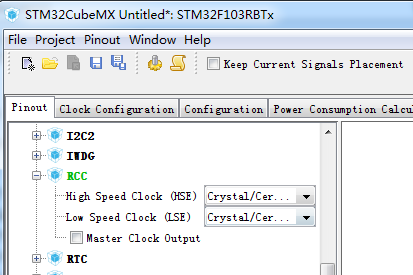
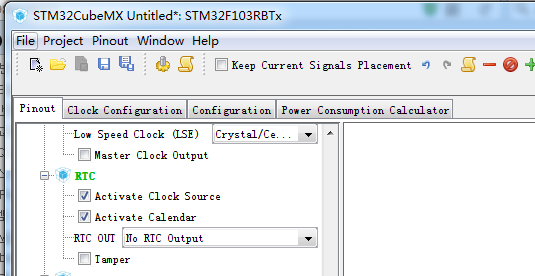
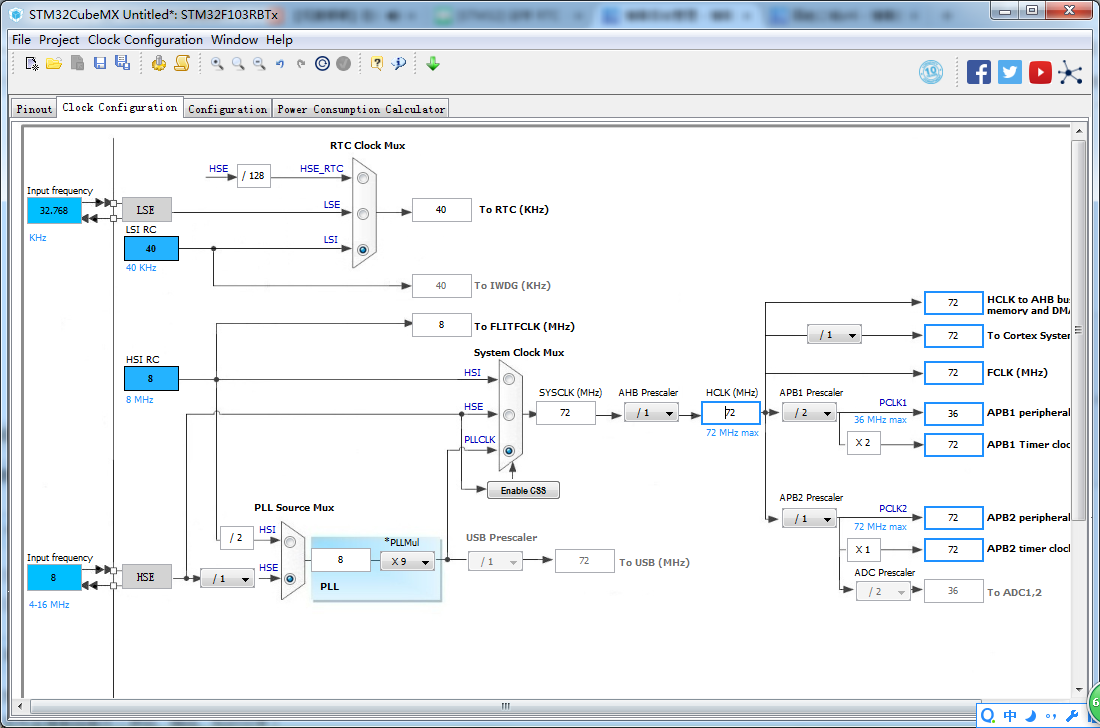


工程测试代码
/**

  ******************************************************************************

  * File Name          : main.c

  * Description        : Main program body

  ******************************************************************************

  ** This notice applies to any and all portions of this file

  * that are not between comment pairs USER CODE BEGIN and

  * USER CODE END. Other portions of this file, whether

  * inserted by the user or by software development tools

  * are owned by their respective copyright owners.

  *

  * COPYRIGHT(c) 2017 STMicroelectronics

  *

  * Redistribution and use in source and binary forms, with or without modification,

  * are permitted provided that the following conditions are met:

  *   1. Redistributions of source code must retain the above copyright notice,

  *      this list of conditions and the following disclaimer.

  *   2. Redistributions in binary form must reproduce the above copyright notice,

  *      this list of conditions and the following disclaimer in the documentation

  *      and/or other materials provided with the distribution.

  *   3. Neither the name of STMicroelectronics nor the names of its contributors

  *      may be used to endorse or promote products derived from this software

  *      without specific prior written permission.

  *

  * THIS SOFTWARE IS PROVIDED BY THE COPYRIGHT HOLDERS AND CONTRIBUTORS "AS IS"

  * AND ANY EXPRESS OR IMPLIED WARRANTIES, INCLUDING, BUT NOT LIMITED TO, THE

  * IMPLIED WARRANTIES OF MERCHANTABILITY AND FITNESS FOR A PARTICULAR PURPOSE ARE

  * DISCLAIMED. IN NO EVENT SHALL THE COPYRIGHT HOLDER OR CONTRIBUTORS BE LIABLE

  * FOR ANY DIRECT, INDIRECT, INCIDENTAL, SPECIAL, EXEMPLARY, OR CONSEQUENTIAL

  * DAMAGES (INCLUDING, BUT NOT LIMITED TO, PROCUREMENT OF SUBSTITUTE GOODS OR

  * SERVICES; LOSS OF USE, DATA, OR PROFITS; OR BUSINESS INTERRUPTION) HOWEVER

  * CAUSED AND ON ANY THEORY OF LIABILITY, WHETHER IN CONTRACT, STRICT LIABILITY,

  * OR TORT (INCLUDING NEGLIGENCE OR OTHERWISE) ARISING IN ANY WAY OUT OF THE USE

  * OF THIS SOFTWARE, EVEN IF ADVISED OF THE POSSIBILITY OF SUCH DAMAGE.

  *

  ******************************************************************************

  */

/* Includes ------------------------------------------------------------------*/

#include "main.h"

#include "stm32f1xx_hal.h"

/* USER CODE BEGIN Includes */

/* USER CODE END Includes */

/* Private variables ---------------------------------------------------------*/

RTC_HandleTypeDef hrtc;

/* USER CODE BEGIN PV */

/* Private variables ---------------------------------------------------------*/

/* Buffer used for displaying Time */

uint8_t aShowTime[50] = {0};

uint8_t rtc_alarm_flag = 0;

/* USER CODE END PV */

/* Private function prototypes -----------------------------------------------*/

void SystemClock_Config(void);

static void MX_GPIO_Init(void);

static void MX_RTC_Init(void);

/* USER CODE BEGIN PFP */

/* Private function prototypes -----------------------------------------------*/

/* USER CODE END PFP */

/* USER CODE BEGIN 0 */

uint8_t BIN2BCD(uint8_t byte)

{

    uint8_t low, high;

    low = byte & 0x0F;

    high = ((byte >> ) & 0x0F) * ;

    return high + low;

}

uint8_t BCD2BIN(uint8_t byte)

{

    return ((byte/)<<) + (byte%);

}

/**

  * @brief  Configure the current time and date.

  * @param  None

  * @retval None

  */

static void RTC_AlarmConfig(void)

{

    RTC_AlarmTypeDef salarmstructure;

    /*##-1- Configure the RTC Alarm peripheral #################################*/

    /* Set Alarm to 01:17:30

       RTC Alarm Generation: Alarm on Hours, Minutes and Seconds */

    salarmstructure.Alarm = RTC_ALARM_A;

    salarmstructure.AlarmTime.Hours = 0x1;

    salarmstructure.AlarmTime.Minutes = 0x17;

    salarmstructure.AlarmTime.Seconds = 0x30;

    if(HAL_RTC_SetAlarm_IT(&hrtc,&salarmstructure,RTC_FORMAT_BCD) != HAL_OK)

    {

        /* Initialization Error */

        Error_Handler();

    }

}

/**

  * @brief  Display the current time.

  * @param  showtime : pointer to buffer

  * @retval None

  */

static void RTC_TimeShow(uint8_t* showtime)

{

    RTC_DateTypeDef sdatestructureget;

    RTC_TimeTypeDef stimestructureget;

    /* Get the RTC current Time */

    HAL_RTC_GetTime(&hrtc, &stimestructureget, RTC_FORMAT_BIN);

    /* Get the RTC current Date */

    HAL_RTC_GetDate(&hrtc, &sdatestructureget, RTC_FORMAT_BIN);

    /* Display time Format : hh:mm:ss */

    sprintf((char*)showtime,"%02d:%02d:%02d",stimestructureget.Hours, stimestructureget.Minutes, stimestructureget.Seconds);

}

/* USER CODE END 0 */

int main(void)

{

    /* USER CODE BEGIN 1 */

    /* USER CODE END 1 */

    /* MCU Configuration----------------------------------------------------------*/

    /* Reset of all peripherals, Initializes the Flash interface and the Systick. */

    HAL_Init();

    /* USER CODE BEGIN Init */

    /* USER CODE END Init */

    /* Configure the system clock */

    SystemClock_Config();

    /* USER CODE BEGIN SysInit */

    /* USER CODE END SysInit */

    /* Initialize all configured peripherals */

    MX_GPIO_Init();

    MX_RTC_Init();

    /* USER CODE BEGIN 2 */

    /*##-1- Configure Alarm ####################################################*/

    /* Configure RTC Alarm */

    RTC_AlarmConfig();

    /* USER CODE END 2 */

    /* Infinite loop */

    /* USER CODE BEGIN WHILE */

    while ()

    {

        /* USER CODE END WHILE */

        /* USER CODE BEGIN 3 */

        /*##-2- Display the updated Time #########################################*/

        RTC_TimeShow(aShowTime);

    }

    /* USER CODE END 3 */

}

/** System Clock Configuration

*/

void SystemClock_Config(void)

{

    RCC_OscInitTypeDef RCC_OscInitStruct;

    RCC_ClkInitTypeDef RCC_ClkInitStruct;

    RCC_PeriphCLKInitTypeDef PeriphClkInit;

    /**Initializes the CPU, AHB and APB busses clocks

    */

    RCC_OscInitStruct.OscillatorType = RCC_OSCILLATORTYPE_LSI|RCC_OSCILLATORTYPE_HSE;

    RCC_OscInitStruct.HSEState = RCC_HSE_ON;

    RCC_OscInitStruct.HSEPredivValue = RCC_HSE_PREDIV_DIV1;

    RCC_OscInitStruct.HSIState = RCC_HSI_ON;

    RCC_OscInitStruct.LSIState = RCC_LSI_ON;

    RCC_OscInitStruct.PLL.PLLState = RCC_PLL_ON;

    RCC_OscInitStruct.PLL.PLLSource = RCC_PLLSOURCE_HSE;

    RCC_OscInitStruct.PLL.PLLMUL = RCC_PLL_MUL9;

    if (HAL_RCC_OscConfig(&RCC_OscInitStruct) != HAL_OK)

    {

        _Error_Handler(__FILE__, __LINE__);

    }

    /**Initializes the CPU, AHB and APB busses clocks

    */

    RCC_ClkInitStruct.ClockType = RCC_CLOCKTYPE_HCLK|RCC_CLOCKTYPE_SYSCLK

                                  |RCC_CLOCKTYPE_PCLK1|RCC_CLOCKTYPE_PCLK2;

    RCC_ClkInitStruct.SYSCLKSource = RCC_SYSCLKSOURCE_PLLCLK;

    RCC_ClkInitStruct.AHBCLKDivider = RCC_SYSCLK_DIV1;

    RCC_ClkInitStruct.APB1CLKDivider = RCC_HCLK_DIV2;

    RCC_ClkInitStruct.APB2CLKDivider = RCC_HCLK_DIV1;

    if (HAL_RCC_ClockConfig(&RCC_ClkInitStruct, FLASH_LATENCY_2) != HAL_OK)

    {

        _Error_Handler(__FILE__, __LINE__);

    }

    PeriphClkInit.PeriphClockSelection = RCC_PERIPHCLK_RTC;

    PeriphClkInit.RTCClockSelection = RCC_RTCCLKSOURCE_LSI;

    if (HAL_RCCEx_PeriphCLKConfig(&PeriphClkInit) != HAL_OK)

    {

        _Error_Handler(__FILE__, __LINE__);

    }

    /**Configure the Systick interrupt time

    */

    HAL_SYSTICK_Config(HAL_RCC_GetHCLKFreq()/);

    /**Configure the Systick

    */

    HAL_SYSTICK_CLKSourceConfig(SYSTICK_CLKSOURCE_HCLK);

    /* SysTick_IRQn interrupt configuration */

    HAL_NVIC_SetPriority(SysTick_IRQn, , );

}

/* RTC init function */

static void MX_RTC_Init(void)

{

    RTC_TimeTypeDef sTime;

    RTC_DateTypeDef DateToUpdate;

    /**Initialize RTC Only

    */

    hrtc.Instance = RTC;

    hrtc.Init.AsynchPrediv = RTC_AUTO_1_SECOND;

    hrtc.Init.OutPut = RTC_OUTPUTSOURCE_NONE;

    if (HAL_RTC_Init(&hrtc) != HAL_OK)

    {

        _Error_Handler(__FILE__, __LINE__);

    }

    /**Initialize RTC and set the Time and Date

    */

    if(HAL_RTCEx_BKUPRead(&hrtc, RTC_BKP_DR1) != 0x32F2)

    {

        sTime.Hours = 0x1;

        sTime.Minutes = 0x17;

        sTime.Seconds = 0x0;

        if (HAL_RTC_SetTime(&hrtc, &sTime, RTC_FORMAT_BCD) != HAL_OK)

        {

            _Error_Handler(__FILE__, __LINE__);

        }

        DateToUpdate.WeekDay = RTC_WEEKDAY_FRIDAY;

        DateToUpdate.Month = RTC_MONTH_JULY;

        DateToUpdate.Date = 0x14;

        DateToUpdate.Year = 0x17;

        if (HAL_RTC_SetDate(&hrtc, &DateToUpdate, RTC_FORMAT_BCD) != HAL_OK)

        {

            _Error_Handler(__FILE__, __LINE__);

        }

        HAL_RTCEx_BKUPWrite(&hrtc,RTC_BKP_DR1,0x32F2);

    }

}

/** Configure pins as

        * Analog

        * Input

        * Output

        * EVENT_OUT

        * EXTI

*/

static void MX_GPIO_Init(void)

{

    /* GPIO Ports Clock Enable */

    __HAL_RCC_GPIOC_CLK_ENABLE();

    __HAL_RCC_GPIOD_CLK_ENABLE();

}

/* USER CODE BEGIN 4 */

/**

  * @brief  Alarm callback

  * @param  hrtc : RTC handle

  * @retval None

  */

void HAL_RTC_AlarmAEventCallback(RTC_HandleTypeDef *hrtc)

{

    rtc_alarm_flag++;

}

/* USER CODE END 4 */

/**

  * @brief  This function is executed in case of error occurrence.

  * @param  None

  * @retval None

  */

void _Error_Handler(char * file, int line)

{

    /* USER CODE BEGIN Error_Handler_Debug */

    /* User can add his own implementation to report the HAL error return state */

    while()

    {

    }

    /* USER CODE END Error_Handler_Debug */

}

#ifdef USE_FULL_ASSERT

/**

   * @brief Reports the name of the source file and the source line number

   * where the assert_param error has occurred.

   * @param file: pointer to the source file name

   * @param line: assert_param error line source number

   * @retval None

   */

void assert_failed(uint8_t* file, uint32_t line)

{

    /* USER CODE BEGIN 6 */

    /* User can add his own implementation to report the file name and line number,

      ex: printf("Wrong parameters value: file %s on line %d\r\n", file, line) */

    /* USER CODE END 6 */

}

#endif

/**

  * @}

  */

/**

  * @}

*/

/************************ (C) COPYRIGHT STMicroelectronics *****END OF FILE****/

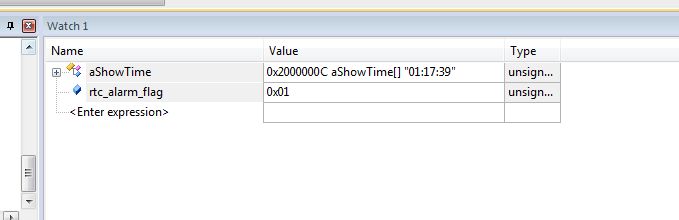
使用STM32CubeMX生成RTC工程[闹钟中断]的更多相关文章
- 使用STM32CubeMX生成RTC工程[闹钟中断2]
在上次使用STM32CubeMX生成RTC工程[闹钟中断]基础上实现周期间隔的闹钟 一些场合需要周期性的闹钟 现在为了方便设置每十秒来一次. 备注: 当然可以直接修改HAL库static HAL_St ...
- 使用STM32CubeMX生成RTC工程[秒中断]
现在我们在之前的工程(http://www.cnblogs.com/libra13179/p/7170791.html)中修改 /** ******************************** ...
- 使用STM32CubeMX生成USB_HOST_HID工程[添加对CAPS_LOCK指示灯的控制][SetReport]
在之前(使用STM32CubeMX生成USB_HOST_HID工程)的基础上进行修改 在结合之前在pc上的测试 USB之HID类Set_Report Request[调试手记1] 测试代码如下: /* ...
- 使用STM32CubeMX生成USB_HOST_HID工程
使用开发板为STM32F105开发板. 原本想将具体步骤给写出来.时间有限.直接将STM32F105_USBH_HID.IOC上传files.cnblogs.com/files/libra13179/ ...
- mini2440裸机试炼之—RTC闹钟中断,节拍中断
版权声明:博客地址:http://blog.csdn.net/muyang_ren.源代码能够在我的github上找看看 https://blog.csdn.net/muyang_ren/articl ...
- 利用STM32CubeMX来生成USB_HID_Mouse工程【添加ADC】(1)
现在原来的基础上添加ADC的功能. 现在(利用STM32CubeMX来生成USB_HID_Mouse工程)基础上新增硬件 JoyStick Shield 游戏摇杆扩展板 与STM32F103C8的连接 ...
- stm32+lwip(一):使用STM32CubeMX生成项目
我是卓波,很高兴你来看我的博客. 系列文章: stm32+lwip(一):使用STM32CubeMX生成项目 stm32+lwip(二):UDP测试 stm32+lwip(三):TCP测试 stm32 ...
- 《STM32CubeMX配置STM32H743XI工程》第一讲《初始化UART,重定义printf函数,点亮一个LED灯》
1.打开STM32CubeMX软件->新建一个工程(软件自行到ST官网下载安装) 2.输入对应的芯片型号(本次基于野火STM32H743XI Pro 开发板)点击Start Project生成项 ...
- spring boot 快速生成demo工程 官网生成
最近一直在弄springboot的项目,居然最近才知道快速生成springBoot工程,原来可以这么简单, 而且官网还提供了生成java或是web项目,需要jpa,模板等服务,直接一键集成.话不多说, ...
随机推荐
- awk中使用shell的环境变量
awk中使用shell的环境变量一:"'$var'"这种写法大家无需改变用'括起awk程序的习惯,是老外常用的写法.如:var="test"awk 'BEGIN ...
- quartz里job不执行的解决方案(并发量太低原因)
这里写链接内容 使用框架spring3+quartz1.8 生产环境中碰到会有job一直不执行的情况,后来分析是因为quartz中线程总数太少,而项目中所有的job都是并发执行的就会导致当到达时间节点 ...
- 发现TCP的一种错误----客户端连接失败(10055错误号)
在客户端连接7302TCP端口失败,关闭程序,启动sockettool也不行,出现错误号为 10055(发现队列满了或者空间不足).通过查网上资料,发现有两个方法:设置 ( TcpTimedWaitD ...
- .NET使用HttpRuntime.Cache设置程序定时缓存
第一步:判断读取缓存数据 #region 缓存读取 if (HttpRuntime.Cache["App"] != null) { return HttpRuntime.Cache ...
- [转].NET Framework、C#、CLR和Visual Studo之间的版本关系
原文地址:http://www.xcode.me/more/microsoft-net-framework-version-define C#版本 .NET Framework版本 CLR版本 Vis ...
- 【C#】C#操作Excel文件(转)
实现C#与Excel文件的交互操作,实现以下功能: 1.DataTable 导出到 Excel文件 2.Model数据实体导出到 Excel文件[List<Model>] 3.导出数据到模 ...
- P1616疯狂的采药
传送 它不是可爱的01背包了!!!这个题中一种药可以采无限次!!! 它进化成了完全背包.完全背包中的内循环从m到v[i]改成了从v[i]到m 既然如此,代码如下: #include<iostre ...
- 廖雪峰Java1-4数组操作-1遍历数组
1.遍历数组 for循环通过下标遍历数组 for each直接遍历数组所有元素 int[] ns1 = {1, 34, 9, 16, 25}; for(int i = 0;i<ns1.lengt ...
- 判断浏览器是否IE(IE11可用)
function isIE() { //ie? if (!!window.ActiveXObject || "ActiveXObject" in window) { ...
- Oracle 官方文档地址
官方文档地址: https://docs.oracle.com/cd/E11882_01/index.htm