
使用html+css+js实现弹球游戏
使用html+css+js实现弹球游戏
效果图:
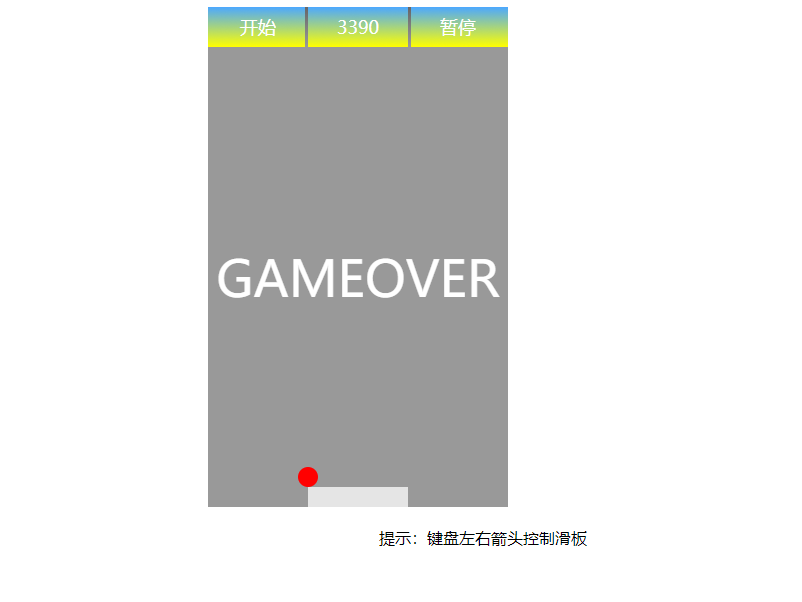
代码如下,复制即可使用:
<!doctype html>

<head>

    <style type="text/css">

        .panel{

            position: relative;

            z-index: 0;

            top:0px;

            left: 400px;

            width: 300px;

            height: 500px;

        }

        .console{

            position: absolute;

            z-index: 1;

            top:0;

            left:0;

            width:100%;

            height: 40px;

            background-color: #bbb;

        }

        .message{

            position: absolute;

            z-index: 1;

            top:40px;

            left:0;

            width:100%;

            height: 460px;

            color: white;

            font-size: 50px;

            text-align: center;

            line-height: 460px;

            background-color: #999;

        }

        .start,.score,.pause{

            position: absolute;

            z-index: 2;

            top: 0;

            width: 100px;

            height: 100%;

            font-size: large;

            color: white;

            text-align: center;

            line-height: 40px;

            background: -webkit-linear-gradient(top,#4ca8ff,yellow);

        }

        .start{

            left: 0px;

        }

        .score{

            left:100px;

            background-color: red;

        }

        .pause{

            left:200px;

        }

        .start:after,.pause:before{

            content: "";

            position: absolute;

            z-index: 2;

            top: 0;

            width: 3px;

            height: 100%;

            background: -webkit-linear-gradient(top,#666,#999);

        }

        .start:after{

            left: 97px;

        }

        .pause:before{

            left: 0px;

        }

        .start:hover,.pause:hover{

            cursor: pointer;

            background: -webkit-linear-gradient(top,#4ca8ff,red);

        }

        .panel span{

            position: absolute;

            z-index: 0;

            top:50%;

            left: 50%;

            font-size: 50px;

            color: blue;

        }

        .ball,.secondBall{

            position:absolute;

            z-index: 2;

            border-radius:50%;

            width: 20px;

            height: 20px;

        }

        .ball{

            top: 460px;

            left:140px;

            background-color: red;

        }

        .secondBall{

            top: 40px;

            left:140px;

            background-color: red;

        }

        .plate{

            position: absolute;

            top:480px;

            left: 100px;

            z-index: 2;

            width: 100px;

            height: 20px;

            background-color: #e5e5e5;

        }

        .promte{

            margin-top: 20px;

            text-align: center;

        }

    </style>

</head>

<body>

    <div id="panel" class="panel">

        <div class="console">

            <div id="start" class="start">开始</div>

            <div id="score" class="score">0</div>

            <div id="pause" class="pause">暂停</div>

        </div>

        <div id="message" class="message"></div>

        <div id="ball" class="ball"></div>

        <div id="plate" class="plate"></div>

    </div>

    <div class="promte">提示:键盘左右箭头控制滑板</div>

    <script     type="text/javascript">

        (function(){

            document.onkeydown = function(e){

                var e = e || window.event;

                if(e.keyCode == 37){

                    //键盘向左键

                    plateMove("left");

                }else if(e.keyCode == 39){

                    //键盘向右键

                    plateMove("right");

                }

            }

        })();

        var panel = document.getElementById("panel"),

            message = document.getElementById("message"),

            plate = document.getElementById("plate"),

            ball = document.getElementById("ball"),

            start = document.getElementById("start"),

            score = document.getElementById("score"),

            pause = document.getElementById("pause"),

            secondBall;

        var startGame, x = x2 = -1, y = y2 = -1, speed = 1, positionArr = [], pauseActive = false,

            //一个标志:表示难度是否还能增加

            flag = true,

            //球的起始位置

            ballX, ballY, secondBallX, secondBallY,

            //边界

            minX = 0,

            maxX = panel.offsetWidth - ball.offsetWidth,

            minY = 40;

            maxY = panel.offsetHeight - ball.offsetHeight - plate.offsetHeight;

        window.onload = function(){

            if(window.addEventListener){

                start.addEventListener("click",startClick,false);

                pause.addEventListener("click",pauseClick,false);

            }else if(window.attachEvent){

                start.attachEvent("onclik",startClick);

                pause.attachEvent("onclik",pauseClick);

            }else{

                start.onclik = startClick;

                pause.onclik = pauseClick;

            }

        }

        function plateMove(direction){

            if(direction == "left"){

                if(plate.offsetLeft > 0){

                    plate.style.left = (plate.offsetLeft-30 < 0? 0 : plate.offsetLeft-30)+"px";

                }

            }

            if(direction == "right"){

                if(plate.offsetLeft < 200){

                    plate.style.left = (plate.offsetLeft+30 > 200? 200 : plate.offsetLeft+30)+"px";

                }

            }

        }

        function startClick(){

            if(!pauseActive){

                resetGame();

            }else{

                pauseActive = !pauseActive;

            }

            startGame = setInterval(function(){

                //console.log(ballX+"======"+ballY);

                positionArr = setPosition(ballX,ballY,true);

                if(positionArr == "GAMEOVER"){

                    return;

                }

                ballX = positionArr[0];

                ballY = positionArr[1];

                //设置球的位置

                ball.style.left = ballX+"px";

                ball.style.top = ballY+"px";

                if(!flag){

                    positionArr = setPosition(secondBallX,secondBallY,false);

                    secondBallX = positionArr[0];

                    secondBallY = positionArr[1];

                    secondBall.style.left = secondBallX+"px";

                    secondBall.style.top = secondBallY+"px";

                }else{

                    addDifficulty();

                }

            },30);

        }

        function pauseClick(){

            pauseActive = true;

            clearInterval(startGame);

        }

        function resetGame(){

            clearInterval(startGame);

            message.innerHTML="";

            score.innerHTML="0";

            ball.style.left = "140px";

            ball.style.top = "460px";

            plate.style.left = "100px";

            plate.style.top = "480px";

            ballX = ball.offsetLeft;

            ballY = ball.offsetTop;

            speed = 1;

            flag = true;

            //第二个球设置隐藏

            if(secondBall){

                secondBall.style.display="none";

                secondBall.style.left = "140px";

                secondBall.style.top = "40px";

            }

        }

        function addDifficulty(){

            if(parseInt(score.innerHTML) > 500 && parseInt(score.innerHTML) < 2000){

                speed = 1.2;

            }else if(parseInt(score.innerHTML) > 2000 && parseInt(score.innerHTML) < 5000){

                speed = 1.5;

            }else if(parseInt(score.innerHTML) > 5000){

                if(typeof secondBall != "undefined"){

                    secondBall.style.display="";

                }else{

                    secondBall = document.createElement('div');

                }

                secondBall.className = 'secondBall';

                panel.appendChild(secondBall);

                secondBallX = secondBall.offsetLeft;

                secondBallY = secondBall.offsetTop;

                flag = false;

            }

        }

        function setPosition(_x,_y,firstball){

            if(_x == minX || _x == maxX){

                //x*=-1;

                firstball? x*=-1 : x2*=-1;

            }

            if(_y == minY || _y == maxY){

                //y*=-1;

                firstball? y*=-1 : y2*=-1;

            }

            if(_y == maxY){

                //判断挡板的位置是不是在球的范围内

                if(plate.offsetLeft > _x || (plate.offsetLeft + plate.offsetWidth) < _x){

                    clearInterval(startGame);

                    message.innerHTML="GAMEOVER";

                    return "GAMEOVER";

                }

            }

            if(firstball){

                _x+=4*x*speed;

                _y+=5*y*speed;

            }else{

                _x+=4*x2*speed;

                _y+=5*y2*speed;

            }

            //边界处理

            _x = _x < minX? minX : _x;

            _x = _x > maxX? maxX : _x;

            _y = _y < minY? minY : _y;

            _y = _y > maxY? maxY : _y;

            //设置分数

            score.innerHTML=parseInt(score.innerHTML)+10*speed;

            return [_x,_y];

        }

    </script>

</body>

</html>
如果您有更好的方法或更多的功能,可以和我们大家一起分享哦,如有错误,欢迎联系我改正,非常感谢!!!
使用html+css+js实现弹球游戏的更多相关文章
- html+css+js实现网页拼图游戏
代码地址如下:http://www.demodashi.com/demo/14449.html 项目描述 使用 html+js+css 实现一个网页拼图游戏,可支持简单,中等,困难三种难度. 演示效果 ...
- html+css+js实现狼吃羊小游戏
html+css+js实现狼吃羊小游戏 一.总结 一句话总结:给动的元素下标记,这里表现为将要活动的标签动态增加class,这是一种很好的思想. 1.如何实现棋子走动的时候简单精确定位? 用重构坐标系 ...
- JS写小游戏(一):游戏框架
前言 前一阵发现一个不错的网站,都是一些用html5+css+js写的小游戏,于是打算学习一番,写下这个系列博客主要是为了加深理解,当然也有一些个人感悟,如果英文好可以直接Click Here. 概述 ...
- JS开发HTML5游戏《神奇的六边形》(一)
近期出现一款魔性的消除类HTML5游戏<神奇的六边形>,今天我们一起来看看如何通过开源免费的青瓷引擎(www.zuoyouxi.com)来实现这款游戏. (点击图片可进入游戏体验) 因内容 ...
- JS开发HTML5游戏《神奇的六边形》(二)
近期出现一款魔性的消除类HTML5游戏<神奇的六边形>,今天我们一起来看看如何通过开源免费的青瓷引擎(www.zuoyouxi.com)来实现这款游戏. (点击图片可进入游戏体验) 因内容 ...
- JS开发HTML5游戏《神奇的六边形》(四)
近期出现一款魔性的消除类HTML5游戏<神奇的六边形>,今天我们一起来看看如何通过开源免费的青瓷引擎(www.zuoyouxi.com)来实现这款游戏. (点击图片可进入游戏体验) 因内容 ...
- Vue.js实现拼图游戏
Vue.js实现拼图游戏 之前写过一篇<基于Vue.js的表格分页组件>的文章,主要介绍了Vue组件的编写方法,有兴趣的可以访问这里进行阅读:http://www.cnblogs.com/ ...
- 使用JS实现俄罗斯方块游戏
简单的JS俄罗斯方块游戏源码 效果图: 代码如下,复制即可使用: <!DOCTYPE html> <html> <head> <meta charset=&q ...
- 一款基础模型的JS打飞机游戏特效代码
<!DOCTYPE html> <html lang="en"> <head> <title>一款基础模型的JS打飞机游戏特效代码& ...
随机推荐
- golang curl
/** 1.可设置代理 2.可设置 cookie 3.自动保存并应用响应的 cookie 4.自动为重新向的请求添加 cookie */ package curl import ( "net ...
- php面试问答
结合实际PHP面试,汇总自己遇到的问题,以及网上其他人遇到的问题,尝试提供简洁准确的答案 包含MySQL.Redis.Web.安全.网络协议.PHP.服务器.业务设计.线上故障.个人简历.自我介绍.离 ...
- Vue中methods(方法)、computed(计算属性)、watch(侦听器)的区别
1.computed和methods 共同点:computed能现实的methods也能实现: 不同点:computed是基于它的依赖进行缓存的.computed只有在它的相关依赖发生变化才会重新计算 ...
- Jenkins之手动安装
Download and run Jenkins Download Jenkins. Open up a terminal in the download directory. Run java -j ...
- Struts2 分割字符串标签s:generator
有些时候会从后台返回一个字符串,可以通过Strut2的标签s:generator进行分割. generator标签,该标签可以将指定字符串按指定分隔符分割成多个字串.生成的多个字串可以用iterato ...
- CF375D Tree and Queries
题意翻译 给出一棵 n 个结点的树,每个结点有一个颜色 c i . 询问 q 次,每次询问以 v 结点为根的子树中,出现次数 ≥k 的颜色有多少种.树的根节点是1. 感谢@elijahqi 提供的翻译 ...
- gcc 与 glibc 的关系 glibc版本查看
glibc是什么,以及与gcc的关系?glibc是gnu发布的libc库,也即c运行库.glibc是linux 系统中最底层的api(应用程序开发接口),几乎其它任何的运行库都会倚赖于glibc.gl ...
- noip2017颓废记
作为一个从初中就开始学信息的蒟蒻,自然要去提高组了~~~ 比赛前day1 跟平常一样在机房颓废着,上午在洛谷看到了站长大人的忠告后,看了看模板题,发现没几个会打的(正常). 下午想一想发现自己的dp垃 ...
- 用JS制作博客页面背景随滚动渐变的效果
今天颓了一会,用JavaScript给我的博客园博客写了一个页面背景随滚动而渐变的效果,做完之后自我感觉良好-- 下面就以我的博客园博客为例,介绍一下如何制作这个效果! 准备 [x] 申请博客园的JS ...
- LJ 5月6日A组考试考试题解
[题目] T1(L2837) 晚餐队列安排 [题面] 为了避免餐厅过分拥挤,FJ要求奶牛们分2批就餐.每天晚饭前,奶牛们都会在餐厅前排队入内,按FJ的设想,所有第2批就餐的奶牛排在队尾,队伍的前半部分 ...