
USB2.0 速度识别--区分低速-高速-全速
USB2.0是向下兼容USB1.X的,即USB2.0支持高速,全速,低速的USB设备
(HIGH-SPEED,FULL-SPEED,LOW-SPEED),而USB1.X不支持高速设备。
因此如果高速设备接在USB1.X的hub上,也只能工作在全速状态。
因此对速度的识别是很重要的,否则没办法以想要的速度通信。
**************************************************************************************
全速和低速区分
根据规范,全速和低速很好区分。因为在设备端有一个1.5K的上拉电阻,
上电后,有上拉电阻的那根数据线会被拉高,
根据 D+或D-的电平状态来检测是全速还是低速设备。
全速,高速的识别比较简单,但是USB2.0,USB1.X只有一对数据线,
就没办法有第三种状态来表示高速设备了,所以高速设备的识别稍微复杂。
**************************************************************************************
高速设备是以一个全速设备的身份出现的,即和全速设备一样,高速设备也在D+端有一个1.5K的上拉电阻。
USB2.0的HUB把设备当成一个全速设备,然后进行一系列的握手信号来确认双方的身份,
一方面HUB要检测设备是高速还是全速,另一方面设备也要检测HUB是USB2.0还是USB1.X的,
如果HUB是USB2.0,设备也是高速的 就工作在高速模式,否则只能工作在全速模式。
HUB连接到设备或上电时,向主机报告,主机通过发送Set_port_feature请求让hub复位新插入的设备。
设备复位操作是驱动数据线到复位SE0(D+,D-都为低电平),并持续至少10MS。
高速设备复位后,通过内部的电流源向D-持续灌17.78MA大小的电流。
因为此时D+端的1.5K上拉电阻还没撤销,在hub端,全速/低速驱动器形成一个45欧姆的终端电阻,
两电阻并联约形成45欧姆的阻抗,所以在HUB端可以看到一个 800ma(17.78*45)的电压,
这个就是Chirp K信号。Chirp K 的持续时间是 1ms - 7ms.
在HUB端,虽然下达了复位信号,并一直驱动着SE0,但usb2.0的高速接收器一直在检测 Chirp K信号,
如果没有检测到,就继续复位操作,直到复位结束,然后就工作在全速状态。
如果只是一个全速的hub,不支持高速设备,那么hub也不会理会Chirp k信号,之后设备也不会切换到高速模式。
如果是高速 HUB,设备在发送的Chirp k信号结束后的100us内,HUB必须回复一连串的KJKJKJ........序列,
向设备表明这是一个usb2.0的hub,这里的kj序列式连续的,且不能中断,每个K或J的持续时间是 40us--60us.
再回到设备端,设备检测到6个hub发送的 Chirp信号(3对KJ)后,它必须在500us内切换到高速模式。
切换动作有:
1.断开1.5K的上拉电阻
2. 连接D+/D-上的高速终端电阻(high-speed termination),其实就是全速/低速差分驱动器。
3.进入默认的高速状态
执行完 1,2两步后,USB信号线上看的到现象就发生变化了:
HUB发动的 Chirp降到原来的一半,400mv。
这是因为设备端挂载新的终端电阻后,并联原来的终端电阻,结果为22.5欧姆,
17.78*22.5为 400mv,以后高速设备操作的 信号幅值就是 400mv而不是 全速/低速的 3.3V。
至此高速设备与usb2.0握手完毕,开始进行480Mbps的通信。
**************************************************************************************
高速设备的连接检测刚开始是在全速信号环境下进行的。
通过高速设备和高速集线器之间传输一个握手信号来指示设备是否为高速设备。
如果握手信号传输失败,则默认为全速设备。
设备连接到集线器Hub或主机时,全速和高速设备在D+线上有一个1.5KΩ的上拉电阻,
由于下拉电阻为15KΩ,D+会加到近似 90%的直流电平,
当集线器探测到D+的高电平,就认为连接到全速设备。
此时,软件就会通过复位命令发送一个RESET信号到集线器,
让集线器驱动一个 SE0信号(D+和D-都为低电平)超过10ms。
高速设备检测到RESET信号后发送一个Chirp K信号给集线器(1~7ms的时间)。
集线器的高速接收器若在设备发出Chirp K序列后2.5微秒内检测到,
则响应传送一个交替的Chirp K和Chirp J信号序列。
设备检测到这6个线性调频脉冲Chirp序列(3个交替的KJ信号对),
集线器将连接端口置入高速启用状态,并从D+断开上拉电阻,
启用高速设备终端,设置高速设备默认状态。
**************************************************************************************
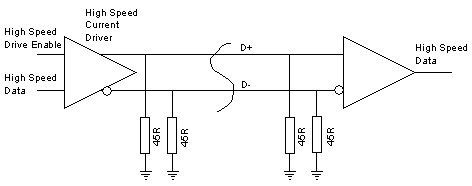

Data Transmission
The data rate achieved by High Speed is 480 Mb/s.
This needs to be transmitted down cables which were originally specified for a 12 Mb/s transmission rate,
To achieve this, when the link is conveying high speed data, each end of D+ and each end of D- is
terminated with a 45 Ohm resistance to ground.
Data is sent by steering a current of 17.78 mA (derived from the positive supply) : 17.78*22.5 = 400mv
into either the D+ or the D- line. This results in a voltage of 400mV on the line being fed with current.
The differential state of the line is detected at the receiving end by a differential receiver.
This arrangement is able to reliably receive data sent at 480 Mb/s.
In fact the 45 Ohm resistors are provided by the Full Speed / Low Speed driver,
at each end of the link, applying a Single Ended Zero.
The FS/LS driver is designed to provide as accurate a termination resistance as possible.
By switching off the high speed transceiver current source, the line conditions are as defined for full speed / low speed.
In addition to the differential receiver, there is also a 'transmission envelope detector' and a 'differential envelope detector'.
The transmission envelope detector produces a 'squelch' signal if there is less than 100uV between the data lines,
which means that there is no data being received.
The differential envelope detector detects if the far end has been unplugged,
as the differential voltage will double to about 800 mV if the far end terminating resistors are not present.
(Further down the page you will see how this is used by the host to detect the unplugging of a high speed device.)
Negotiating High Speed
To maintain the required compatibility, a high speed device will always present itself
initially as a Full Speed device (by a 1.5K pullup resistor on D+).
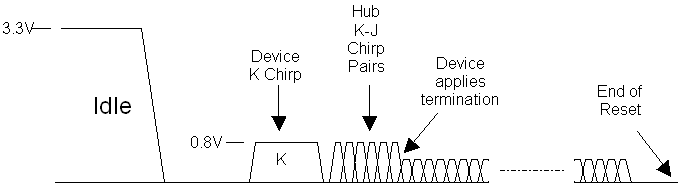
The negotiation for High Speed takes place during the Reset, which is, as we remember,
the first thing a host must do to a device before attempting data communication.
The high speed detection handshake is initiated by the device.
The hub will respond to it, if it is high speed capable.
What the device does
The device leaves its D+ 1.5K pullup resistor connected,
and does not terminate the lines with 45 Ohm resistors as it would for high speed.
But it drives high speed current (17.78mA) into the D- line for at least a millisecond.
Now, remember that the hub is applying a reset condition to the lines,
so effectively is already terminated as for high speed data.
As only one end of the link is terminated, the hub will see about 800 mV on D-.
This condition is called a K-chirp.
A full / low speed hub will pay no attention to this condition,
but a high speed hub will detect it using its differential receiver and the absence of a squelch signal.
If the hub does not respond, then the rest of the reset,
and subsequent data transmissions will take place as is normal for a full speed device.
Hub Response
If the hub is high speed capable then it will monitor the K-chirp from the device until it sees it completing.
It must, within 100us, send a series of K-J chirp pairs to the device.
This means that it will inject 17.78 mA alternately into the D- and the D+ lines.
Each of these chirps lasts around 50us, and there are no gaps between them.
The device has to see at least 3 chirp pairs before assuming that the hub is high speed capable.
Switching to High Speed
At this point the device disconnects its 1.5K pullup resistor,
applies the 45 Ohm high speed terminations (using its full speed data driver in SE0 mode),
and is thus in a state to perform high speed data transmission and reception.
The hub will continue to send chirp pairs up until 100 - 500 us before the end of reset,
and the device will monitor these chirps.
At the point in time when the device termination is applied,
the amplitude of the chirp signals, viewed on an oscilloscope would be seen to halve in amplitude from 800mV to 400mV.
USB2.0 速度识别--区分低速-高速-全速的更多相关文章
- USB2.0速度识别
我们知道USB2.0向下兼容USB1.x,即高速2.0的hub能支持所有的速度类型的设备,而USB1.x的hub不能支持高速设备(High Speed Device).因此,如果高速设备挂到USB1. ...
- usb2.0与usb3.0的区分
USB 2.0 USB2.0技术规范是有由Compaq.Hewlett Packard.Intel.Lucent.Microsoft.NEC.Philips共同制定.发布的,规范把外设数据传输速度提高 ...
- [原创]免固件开发USB2.0 FPGA方案 速度40Mbyte/s+
USB 2.0接口,实测速度40Mbyte/s: 一个接口实现两种功能(USB2.0+FPGA配置): 免固件开发: 完整的FPGA代码,即拿即用: FPGA逻辑工程师开发USB接口福音: 平台可移植 ...
- BL8810|USB2.0高速闪存读卡器|BL8810芯片
BL8810是由台湾旺玖半导体推出的一款USB2.0 SD/MMC闪存读卡器单芯片.支持USB2.0高速传输,并符合通用串行总线规范.该芯片集成了一个高速的8051微处理器和一个最好的数据引擎,它的引 ...
- BL8810|USB2.0高速闪存读卡器芯片|BL8810规格书
1.说明 BL8810是一款USB 2.0读卡器控制器,采用高度集成的单芯片解决方案,旨在提供USB2.0和SD.SDHC.mini SD.Micro SD(T-Flash)接口规范之间的高速数据传输 ...
- USB2.0规范
USB是一种支持热插拔的高速串行传输总线,它使用差分信号来传输数据,最高速度可达480Mb/S. USB支持“总线供电”和“自供电”两种供电模式.在总线供电模式下,设备最多可以获得500mA的电流.U ...
- usb2.0 协议分析
转:https://blog.csdn.net/u011594613/article/details/48291307 一.USB硬件介绍1.1.概述 一条USB传输线分别由地线.电源线.D+和D-四 ...
- USB2.0协议学习笔记---基本概念
概念 USB是一种串行通信总线(Universal Serial Bus),经历的版本有USB1.0,USB1.1.USB2.0等.USB是一种主从模式的结构,因此它无法在设备与设备.主机与主机之间 ...
- 【转载】USB2.0接口差分信号线设计
引 言 通用串行总线(Universal Serial Bus)从诞生发展到今天,USB协议已从1.1过渡到2.0,作为其重要指标的设备传输速度,从1.5 Mbps:的低速和12 Mbps的全速,提高 ...
随机推荐
- grep 正则表达
常见的 grep 正则表达参数 -c # 显示匹配到得行的数目,不显示内容 -h # 不显示文件名 -i # 忽略大小写 -l # 只列出匹配行所在文件的文件名 -n # 在每一行中加上相对行号 -s ...
- js深复制
一般来讲深复制主要是为了复制js对象中的引用类型,引用类型在普通的赋值操作下相当于是引用,修改复制对象也会影响原对象,简单的方法的话可以使用JSON.parse(JSON.stringify(obj) ...
- 普通用户修改root密码【转】
在普通用户下修改root用户密码 1 从普通用户切换到root用户 sudo -s 再输入密码.2 输入passwd ,会提醒你输入当前用户密码,验证后会提醒你输入root用户密码.3 切换到ro ...
- TCxGrid 把列移上移下。
T
- Online DDL工具的安装与使用
最近经常在线上经常遇到有性能问题的SQL,有些表没有合理添加索引,有些表添加的索引不合理,各种各样的问题,导致SQL的执行效率不高.这时DBA们不得不重构SQL,使其达到最好的性能,这时我们往往要在线 ...
- CSS------当内容超出div宽度后自动换行和限制文字不超出div宽度和高度
如图: 1.自动换行 </div> 2.限制宽高度 </div> (注意:如果div放在li中还需要加上display:inline-block属性)
- 【noip模拟赛3】编码
描述 Alice和Bob之间要进行秘密通信,他们正在讨论如何对信息进行加密: Alice:“不如采用一种很简单的加密方式:’A’替换成1,’B’替换成2,„„,’Z’替换成26.” Bob:“这种加密 ...
- 循序渐进学.Net Core Web Api开发系列【0】:序言与目录
一.序言 我大约在2003年时候开始接触到.NET,最初在.NET framework 1.1版本下写过代码,曾经做过WinForm和ASP.NET开发.大约在2010年的时候转型JAVA环境,这么多 ...
- Nessus漏洞扫描教程之安装Nessus工具
Nessus漏洞扫描教程之安装Nessus工具 Nessus基础知识 Nessus号称是世界上最流行的漏洞扫描程序,全世界有超过75000个组织在使用它.该工具提供完整的电脑漏洞扫描服务,并随时更新其 ...
- web实践小项目<一>:简单日程管理系统(涉及html/css,javascript,python,sql,日期处理)
暑假自学了些html/css,javascript和python,苦于学完无处练手几乎过目即忘...最后在同学的建议下做了个简单日程管理系统.借第一版完成之际,希望能将实践期间犯过的错误和获得的新知进 ...