
linux:Apache服务器相关
安装apache服务器
(推荐方法)
安装前清确保已安装gcc、g++
1)安装依赖包apr-1.6.5.tar.gz,下载地址:http://apr.apache.org/download.cgi
tar -xvf apr-1.6.5.tar.gz
cd apr-1.6.5
./configure --prefix=/usr/local/apr
make && make install
2)安装依赖包apr-util-1.6.1.tar.gz,下载地址:http://apr.apache.org/download.cgi
tar -xvf apr-util-1.6.1.tar.gz
cd apr-util-1.6.1
./configure --prefix=/usr/local/apr-util --with-apr=/usr/local/apr/bin/apr-1-config
上述问题可能会出现此问题:
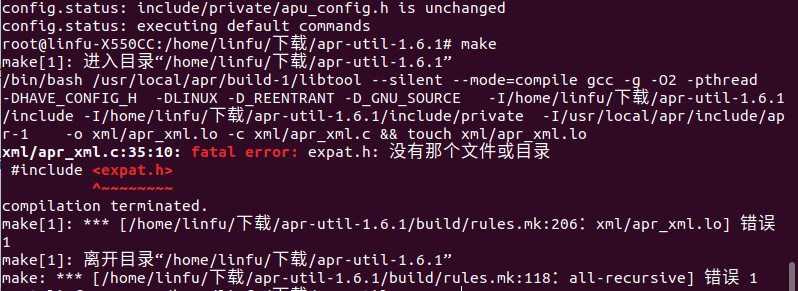
通过apt-get install libexpat-dev解决此问题
make && make install
3)安装依赖包pcre-8.42.tar.gz,下载地址:https://sourceforge.net/projects/pcre/files/
tar -xvf pcre-8.42.tar.gz
cd pcre-8.42
./configure --prefix=/usr/local/pcre
4)安装apache
下载apache:http://httpd.apache.org/download.cgi
tar -xvf httpd-2.4.37.tar.gz #解压
cd httpd-2.4.37
./configure --prefix=/usr/local/apache2 --with-apr=/usr/local/apr --with-apr-util=/usr/local/apr-util --with-pcre=/usr/local/pcre
make && make install
5)测试
•启动Apache:/usr/local/apache2/bin/apachectl start
•停止Apache:/usr/local/apache2/bin/apachectl stop
•重启Apache:/usr/local/apache2/bin/apachectl restart
将apache添加到服务中(ubuntu适用,其他系统未知):
cp /usr/local/apache/bin/apachectl /etc/init.d/apache
systemctl daemon-reload
如果启动apahce的时候报了这个错误:
httpd: Could not reliably determine the server's fully qualified domain name, using 127.0.1.1. Set the 'ServerName' directive globally to suppress this message
请尝试按照以下方法解决:
nano /usr/local/apache/conf/httpd.conf
#修改ServerName为localhost:80
ServerName localhost:80
如果上述方法不可行,请尝试下列方法:
安装apache2:apt-get install apache2
•启动apache:/etc/init.d/apache2 start 或 service apache2 start
•停止apache:/etc/init.d/apache2 stop 或 service apache2 stop
•重启apache:/etc/init.d/apache2 restart 或 service apache2 restart
linux:Apache服务器相关的更多相关文章
- linux apache服务器优化建议整理(很实用)
转载:http://www.cnblogs.com/zhongbin/archive/2013/06/11/3131865.html 1.apache服务器的time_wait过多 fin_wait1 ...
- linux apache服务器
apache服务器 服务端功能是侦听和响应客户端的http请求.http协议的默认端口是80. 1996年以来,apache成为最流行的web服务器. IIS web服务器只能安装在windows上. ...
- 浅谈Linux ftp服务器相关配置
首先我们需要在Linux系统下安装FTP服务器 Ubuntu sudo apt-get install....... centos yun....... 然后,我们要配置vsftpd.conf文件 ...
- CentOS 6.3安装配置LAMP服务器(Linux+Apache+MySQL+PHP5)
服务器系统环境:CentOS 6.3 客户端系统环境:Windows 7 ultimate(x86)sp1 简体中文旗舰版 ※ 本文档描述了如何在Linux服务器配置Apache.Mysql.PHP ...
- 在Linux系统中如何设置APACHE服务器里的后台页面只允许某个IP地址访问
补充资料 本网络中使用LINUX服务器,web服务器是由APACHE搭建,IP地址为192.168.1.5,后台页面为/admin/login.jsp . 如何设置后台页面LOGIN.JSP只允许19 ...
- 分享:linux下apache服务器的配置和管理
linux下apache服务器的配置和管理. 一.两个重要目录: Apache有两个重要的目录:1.配置目录/etc/httpd/conf:2.文档目录/var/www: 二.两种配置模式: Apac ...
- Linux下服务器环境的搭建和配置之一——Apache篇
最近一个多月(2016-06-20开始至今),一直在忙海外广告平台FAQ系统的开发,既要负责服务器环境的搭建,又要写前端,还要写后台和数据库,甚至还要考虑产品需求和设计.所以是一个很大的挑战,对自身也 ...
- Linux中Apache服务器的简单配置
配置Apache服务器: 1.安装Apache,可以参考Linux 中yum的配置来安装: yum install http* -y 2.修改SELinux: setenforce 0 查看: 3.防 ...
- Linux+Apache+PHP+MySQL服务器环境(CentOS篇)
1.前言 CentOS(Community ENTerprise Operating System)是Linux发行版之一,它是来自于Red Hat Enterprise Linux依照开放源代码规定 ...
随机推荐
- style-loader、css-loader、mini-css-extract-plugin 区别
项目 区别 css-loader 处理 css 文件 style-loader 把 js 中 import 导入的样式文件代码,打包到 js 文件中,运行 js 文件时,将样式自动插入到<sty ...
- 代码问题: 【ADNet】
[ADNet]: Yoo S, Yun K, Choi J Y. Action-Decision Networks for Visual Tracking with Deep Reinforcemen ...
- cksum命令详解
Linux cksum命令 Linux cksum命令用于检查文件的CRC是否正确.确保文件从一个系统传输到另一个系统的过程中不被损坏. CRC是一种排错检查方式,该校验法的标准由CCITT所指定,至 ...
- [转]TA-Lib 安装
转自:https://mrjbq7.github.io/ta-lib/install.html Installation You can install from PyPI: $ pip instal ...
- Oracle存储过程和自定义函数笔记
学习地址:https://www.imooc.com/learn/370 存储过程和存储函数定义:指存储在数据库中供所有用户程序调用的子程序叫做存储过程 .存储函数. 相同点:完成特定功能的程序.区别 ...
- SSM整个配置心得
个人整合心得,还望指正
- DataFlow编程模型与Spark Structured streaming
流式(streaming)和批量( batch):流式数据,实际上更准确的说法应该是unbounded data(processing),也就是无边界的连续的数据的处理:对应的批量计算,更准确的说法是 ...
- 分布式超级账本Hyperledger为什么选择使用kafka引擎实现共识方案
使用kafka集群配置的原因也很简单,为orderer共识及排序服务提供足够的容错空间,当我们向peer节点提交Transaction的时候,peer节点会得到或返回(基于SDK)一个读写集结果,该结 ...
- 进程锁 Lock
进程锁其实是锁的输入终端,屏幕,太多的进程,为了防止打印错乱而锁,作用不大 from multiprocessing import Process, Lock def f(l, i): l.acqui ...
- zabbix 3.4监控mysql,提示mysql: [Warning] Using a password on the command line interface can be insecure.
mysql从5.6版本开始,如果是命令行直接出现了数据库连接密码就会有以下警告: mysql: [Warning] Using a password on the command line inter ...