
iOS之新浪微博的OAuth授权
新浪微博的OAuth授权
之前通过新浪微博开发平台写过微博的的项目,现在就开始总结下各个方面的知识点,一个是为了加深印象、巩固知识,另一个记录自己学习过程,希望自己在开发这条路上有所积累,为以后的道路打下坚实的基础。
首先创建一个UIWebView
- (void)viewDidLoad {

    [super viewDidLoad];

    //

    UIWebView *webView = [[UIWebView alloc]initWithFrame:self.view.bounds];

    [self.view addSubview:webView];

     //    一个完整的URL:基本的URL+参数

     //    https://api.weibo.com/oauth2/authorize

    NSString *baseUrl = YJYAuthorizeBaseUrl;

    NSString *client_id = YJYClient_id;

    NSString *redirect_uri = YJYRedirect_uri;

    //完整的URL字符串

    NSString *urlStr = [NSString stringWithFormat:@"%@?client_id=%@&redirect_uri=%@", baseUrl, client_id, redirect_uri];

    //URL字符串转换成NSURL

    NSURL *url = [NSURL URLWithString:urlStr];

    //

    NSURLRequest *request = [NSURLRequest requestWithURL:url];

    //其实创建好webview后,就可以写着一行代码,参数缺什么就补什么,一个一个往上不全就是了

    [webView loadRequest:request];

    //遵循协议

    webView.delegate = self;

 }
遵循UIWebViewDelegate
下面是实现代理方法:三个webView状态的方法和一个截取token_code的方法
#pragma mark --WebViewDelegate--

-(void)webViewDidStartLoad:(UIWebView *)webView{

    [MBProgressHUD showMessage:@"正在加载..."];

}

-(void)webViewDidFinishLoad:(UIWebView *)webView{

    [MBProgressHUD hideHUD];

}

-(void)webView:(UIWebView *)webView didFailLoadWithError:(NSError *)error{

    [MBProgressHUD hideHUD];

}

-(BOOL)webView:(UIWebView *)webView shouldStartLoadWithRequest:(NSURLRequest *)request navigationType:(UIWebViewNavigationType)navigationType{

    //包含有code的字符串,需要截取出来

    NSString *urlStr = request.URL.absoluteString;

    NSRange rang = [urlStr rangeOfString:@"code="];

    if (rang.length) {

        NSString *code = [urlStr substringFromIndex:rang.location+rang.length];

        NSLog(@"code::::%@", code);

        //截取好code之后,把code传出去

        [self accessTokenWithCode:code];

        //不通过回调网页,直接返回

        return NO;

    }

    //返回回调网页

    return YES;

}
接收code
上面截取了code之后,把code传出来,这里接收到code之后,就变写代码实现你想做的事情。
#pragma mark --Get accessToken--

-(void)accessTokenWithCode:(NSString *)code{

    /**

     client_id	true	string	申请应用时分配的AppKey。

     client_secret	true	string	申请应用时分配的AppSecret。

     grant_type	true	string	请求的类型,填写authorization_code

     grant_type为authorization_code时

     必选	类型及范围	说明

     code	true	string	调用authorize获得的code值。

     redirect_uri	true	string	回调地址,需需与注册应用里的回调地址一致。

*/

    NSMutableDictionary *param = [NSMutableDictionary dictionary];

    param[@"client_id"] = YJYClient_id;

    param[@"client_secret"] =YJYClient_secret;

    param[@"grant_type"] = @"authorization_code";

    param[@"code"] = code;

    param[@"redirect_uri"] =YJYRedirect_uri;

    AFHTTPRequestOperationManager *manager = [AFHTTPRequestOperationManager manager];

    [manager POST:@"https://api.weibo.com/oauth2/access_token" parameters:param success:^(AFHTTPRequestOperation *operation, id responseObject) {

        NSLog(@"%@", responseObject);

        //这里返回个人账号信息,并用一个YJYAccount工具类来接受

        YJYAccount *account = [YJYAccount accountWithDict:responseObject];

        //保存个人账号信息

        [YJYAccountTool saveAccount:account];

       //登录完成后,利用YJYRootToot工具类判断是进入新特征页面还是直接进入app

        [YJYRootTool chooseRootViewController:YJYKeyWindow];

   } failure:^(AFHTTPRequestOperation *operation, NSError *error) {

        NSLog(@"%@", error);

    }];

}
AppDelegate.m文件实现方法
    - (BOOL)application:(UIApplication *)application didFinishLaunchingWithOptions:(NSDictionary *)launchOptions {

    // Override point for customization after application launch.

    UIUserNotificationSettings *setting = [UIUserNotificationSettings settingsForTypes:UIUserNotificationTypeBadge categories:nil];

    [application registerUserNotificationSettings:setting];

    //创建窗口

    self.window = [[UIWindow alloc]initWithFrame:[UIScreen mainScreen].bounds];

    if ([YJYAccountTool account]) {

        [YJYRootTool chooseRootViewController:self.window];

    }else{

        YJYOAuthViewController *oauthVc = [[YJYOAuthViewController alloc]init];

        self.window.rootViewController = oauthVc;

    }

    [self.window makeKeyAndVisible];

    return YES;

}
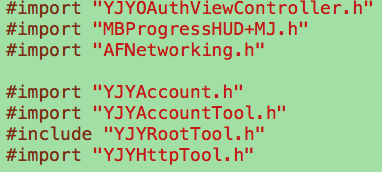
OAuth授权登录类所倒入类的头文件
介绍工具类
工具类的运用可以降低藕合度,也让代码看起来不会那么臃肿,所谓好处多多。
下面看看上面用的两个工具类:管理账号信息的YJYAccountTool 工具类和判断是否进入新特性界面的工具类。
1.YJYAccountTool:专门处理账号的业务(账号的存储和读取)
YJYAccountTool.h文件
#import <Foundation/Foundation.h>

@class YJYAccount;

@interface YJYAccountTool : NSObject

+(void)saveAccount:(YJYAccount *)account;

+(YJYAccount *)account;

+(void)accessWithCode:(NSString *)code success:(void(^)())success failure:(void(^)())failure;

@end
YJYAccountTool.m文件
//专门处理账号的业务(账号的存储和读取)

#import "YJYAccountTool.h"

#import "YJYAccount.h"

#import "AFNetworking.h"

#import "YJYHttpTool.h"

#import "YJYAccoountParam.h"

#define YJYAccountFileName [NSSearchPathForDirectoriesInDomains(NSDocumentDirectory, NSUserDomainMask, YES)[0] stringByAppendingString:@"accout.data"]

//类方法一般用静态变量代替成员属性

static YJYAccount *_account;

@implementation YJYAccountTool

+(void)saveAccount:(YJYAccount *)account{

    [NSKeyedArchiver archiveRootObject:account toFile:YJYAccountFileName];

}

+(YJYAccount *)account{

    if (!_account) {

        _account = [NSKeyedUnarchiver unarchiveObjectWithFile:YJYAccountFileName];

        if ([[NSDate date] compare:_account.expires_date] != NSOrderedAscending) {

        return nil;

        }

}

   //过期时间 = 当前时间+有效时间

    WBLog(@"%@", _account.expires_date);

    return _account;

}

+(void)accessWithCode:(NSString *)code success:(void (^)())success failure:(void (^)())failure{

    YJYAccoountParam *param = [[YJYAccoountParam alloc]init];

    param.client_id = YJYClient_id;

    param.client_secret = YJYClient_secret;

    param.code = code;

    param.grant_type = @"authorization_code";

    param.redirect_uri = YJYRedirect_uri;

    [YJYHttpTool POST:@"https://api.weibo.com/oauth2/access_token" parameters:param success:^(id responseObject) {

        YJYAccount *account = [YJYAccount accountWithDict:responseObject];

        //Save The Account Information

        [YJYAccountTool saveAccount:account];

        if (success) {

            success();

        }

    } failure:^(NSError *error) {

        if (failure) {

            NSLog(@"%@", error);

            failure(error);

        }

    }];

}

@end
2.YJYRootTool:
YJYRootTool.h文件
#import <Foundation/Foundation.h>

@interface YJYRootTool : NSObject

+(void)chooseRootViewController:(UIWindow *)window;

@end
YJYRootTool.m文件
#import "YJYRootTool.h"

#import "YJYTabBarController.h"

#import "YJYNewFeatureController.h"

#define WBVersionKey @"version"

@implementation YJYRootTool

+(void)chooseRootViewController:(UIWindow *)window{

    //获取当前版本好

    NSString *currentVersion =  [NSBundle mainBundle].infoDictionary[@"CFBundleVersion"];

    //获取上一个版本号

    NSString *lastVersion = [[NSUserDefaults standardUserDefaults] objectForKey:WBVersionKey];

    //判断当前是否有新的版本

    if ([currentVersion isEqualToString:lastVersion]) {

        UITabBarController *tabBarVc = [[YJYTabBarController alloc]init];

        window.rootViewController = tabBarVc;

    }else{

        //如果有新版,进入新特性界面

        YJYNewFeatureController *newF = [[YJYNewFeatureController alloc]init];

        window.rootViewController = newF;

    }

    //保存当前版本,用偏好设置

    [[NSUserDefaults standardUserDefaults] setObject:currentVersion forKey:WBVersionKey];

}

@end
iOS之新浪微博的OAuth授权的更多相关文章
- IOS第三天-新浪微博 - 版本新特性,OAuth授权认证
*********版本新特性 #import "HWNewfeatureViewController.h" #import "HWTabBarViewController ...
- [iOS微博项目 - 2.0] - OAuth授权3步
A.概念 OAUTH协议为用户资源的授权提供了一个安全的.开放而又简易的标准.与以往的授权方式不同之处是OAUTH的授权不会使第三方触及到用户的帐号信息(如用户名与密码),即第三方无需使用用 ...
- 新浪微博开放平台OAuth授权解决方案(含代码)
前几日一位朋友项目中需要使用新浪微博的接口,故和这位朋友一同研究了新浪微博开放平台上面所提供的资料,首先要使用这些接口是需要用户登录并且授权的,新浪微博开放平台其实是提供两种授权方式的,第一种是:OA ...
- IOS OAuth授权分析
一.黑马微博 ---> 用户的微博数据1.成为新浪的开发者(加入新浪微博的开发阵营)* 注册一个微博帐号,登录http://open.weibo.com帐号:643055866@qq.com密码 ...
- iOS:新浪微博OAuth认证
新浪微博OAuth认证 1.资源的授权 •在互联网行业,比如腾讯.新浪,那用户人群是非常巨大的 •有时候要把某些用户资源共享出去,比如第三方想访问用户的QQ数据.第三方想访问用户的新浪微博数据 • ...
- 新浪微博客户端(13)-使用UIWebView加载OAuth授权界面
使用UIWebView加载OAuth授权界面 DJOAuthViewController.m #import "DJOAuthViewController.h" @interfac ...
- OAuth授权过程
什么是OAuth授权? 一.什么是OAuth协议 OAuth(开放授权)是一个开放标准,所谓OAuth(即Open Authorization,开放授权),它是为用户资源授权提供了一种安全简单的标准, ...
- 工作笔记—新浪微博Oauth2.0授权 获取Access Token (java)
java发送新浪微博,一下博客从注册到发布第一条微博很详细 利用java语言在eclipse下实现在新浪微博开发平台发微博:http://blog.csdn.net/michellehsiao/art ...
- 【Android】OAuth验证和新浪微博的oauth实现
关于OAuth验证 OAuth是当下流行的授权方案,twitter,facebook,google等大型网站的开放平台都支持了oauth验证模式,国内的新浪微博.腾讯微博.163微博的开放平台也相继支 ...
随机推荐
- RTC时钟
1.设置时间之前取消备份区域(BKP)写保护 主要有两部分组成 1.用来和APB1总线对接,对其进行读写操作 2. 预分频模块:在RTC_CR设置相应的允许,位每个TR_CLK周期中RTC产生一个中断 ...
- 【JavaScript】[bind,call,apply] (function cal(){}());声明函数立即执行
---恢复内容开始--- 1.js 里函数调用有 4 种模式:方法调用.正常函数调用.构造器函数调用.apply/call 调用.同时,无论哪种函数调用除了你声明时定义的形参外,还会自动添加 2 个形 ...
- C#字符串操作 取文本左边 取文本右边 取文本中间 取文本中间到List集合 指定文本倒序
/// <summary> /// 取文本左边内容 /// </summary> /// <param name="str">文本</pa ...
- jq实现点击某元素之外触发事件
<script type="text/javascript"> $(document).bind("click",function(e){ var ...
- Redis集群(四):主从配置二
一.本文目的 主要介绍redis主从模式下各种情况 二.说明 主从的基本概念:Master用于写入,Slaver用于读取,不能写入或修改,一个Master可以对应多个Slaver Mas ...
- Mac下Intellij IDEA Console中文是?
Mac下Intellij IDEA Console中文是?,解决办法是在运行时的VM参数配置也加入: -Dfile.encoding=UTF-8
- Java 程序的内存泄露问题分析
什么是内存泄露? 广义的Memory Leak:应用占用了内存,但是不再使用(包括不能使用)该部分内存 狭义的Memory Leak:应用分配了内存,但是不能再获取该部分内存的引用(对于Java,也不 ...
- [Python] 学习资料汇总
Python是一种面向对象的解释性的计算机程序设计语言,也是一种功能强大且完善的通用型语言,已经有十多年的发展历史,成熟且稳定.Python 具有脚本语言中最丰富和强大的类库,足以支持绝大多数日常应用 ...
- 如何修改 Total commander 配置文件的路径
在官方主页 http://www.ghisler.com/tools.htm#other 上提供了一个名为 INIreloc.exe 的小程序,它可以变更ini文件的保存位置.
- Linux常用系统管理命令(top、free、kill、df)
top -c #任务管理器 free -m #查看内存使用情况 kill -9 2312 (说明:强制杀死进程 kill -9 pid ) df -h #查看磁盘 ...