
android ReactNative之Cannot find entry file index.android.js in any of the roots
android ReactNative之Cannot find entry file index.android.js in any of the roots
由于公司要求,想让我去了解一下ReactNative开发,说是为了以后开发的以后方便移植到IOS上。晕!!!没办法,照着React Native的中文开发文档配置环境https://reactnative.cn/docs/0.51/getting-started.html#content,配置过程还算简单,以为很简单,其实还是我太单纯。照着文档创建项目,创建好后运行项目,坑出现了,这个坑我埋了半天的时间,真是太耽误时间了。遇到的其实别的博客上都有说,Cannot find entry file index.android.js in any of the roots,就是这个错误日志,按照其他的博客的解答方式我一一尝试,不幸无一能解决我的问题,反而使用了他们的方案衍生出其他的error日志,是我本来离答案很近又被扯远了,我连续创建了三个项目才将问题解决,在此记录,为人填坑。
在react native以前的版本,index.android.js与index.ios.js是分开的两个文件,在最新版本中这两个文件合并成index.js一个文件了。但是如果你在创建项目之后直接运行,肯定会报Cannot find entry file index.android.js in any of the roots这种类似的错误,因为在根目录下已经不存在index.anroid.js和index.ios.js这两个文件,所以肯定不会检索到,你更改App.js的内容后更不可能生效。
我解决的方式是:创建项目时
react-native init AwesomeProject

cd AwesomeProject
执行完这两个命令后,不要直接去运行,先执行以下命令去创建assets目录:
通过执行

react-native bundle --platform android --dev false --entry-file index.js --bundle-output android/app/src/main/assets/index.android.bundle --assets-dest android/app/src/main/res/

命令会在assets目录下生成两个文件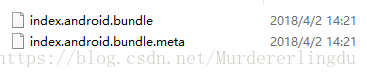
控制器会提示生成成功
 这个时候你再运行react-native run-android,就不会报错了,完美运行。你可以测试一下,通过更改App.js的样式,然后重新reload,样式就会及时生效。

纯是个人经过4、5个小时尝试的方法,真实有效,欢迎来怼。

方法二:
Changed the version of react project to a lower one from here
npm install -g rninit

rninit init [Project Name] --source react-native@0.40.0
Worked okay for both on both iOS and Android on . If you get Error Could not get BatchedBridge. run this
adb reverse tcp:8081 tcp:8081
This worked for me.
android ReactNative之Cannot find entry file index.android.js in any of the roots的更多相关文章
- Cannot find entry file index.android.js in any of the roots:[ Android ]
Changed the version of react project to a lower one from here npm install -g rninit rninit init [Pro ...
- 项目初始化以后出现:Unable to load script from assets 'index.android.bundle
Mac中真机测试React Native project时出现Unable to load script from assets 'index.android.bundle' 2018年01月21日 ...
- React-Native 之 index.android.bundle
问题: index.android.bundle 这个bug 我相信很少同学会遇到,然而就是这个问题,困扰了我跟我的同事多天, 各种方法处理: 进入 android 目录 ./gradlew c ...
- 解决React Native unable to load script from assets index.android.bundle on windows
React Native运行的时候,经常碰到React Native unable to load script from assets index.android.bundle on windows ...
- React Native: unable to load scripts from assets 'index.android.bundle' on real device
问题:重新建了一个项目后,运行react-native run-android报: unable to load scripts from assets 'index.android.bundle' ...
- Unable to load script from assets 'index.android.bundle'.make sure you bundle is packaged correctly
解决此问题 以下方法每次都需要执行命令2才能更新 1.创建assets目录 mkdir android/app/src/main/assets 2.执行命令 react-native bundle - ...
- react native中Unable to load script from assets 'index.android.bundle'解决方案
刚刚朋友问我,说是创建好一个项目,运行后报错:Unable to load script from assets 'index.android.bundle',以前好好的没出现这种现象,于是我找到一个 ...
- Unable to load script from assets 'index.android.bundle' 出错?
野路子太多,坑人真的!F**k 言归正传,当你运行 react native 程序的时候出现这个错误 ,如果您使用Windows,请按以下方式运行命令,或者如果出现错误“无法找到条目文件index.a ...
- React-Native开发之原生模块封装(Android)升级版
本文主题:如何实现原生代码的复用,即如何将原生模块封装. (尊重劳动成果,转载请注明出处:http://blog.csdn.net/qq_25827845/article/details/52862 ...
随机推荐
- Extjs学习笔记--(六,选择器)
文档对象dom是javascript与页面元素的桥梁 选择器的作用就是通过元素的标签名,属性名,css属性名对页面进行快速,准确的定位及选择 Extjs的选择器:Ext.DomQuery Ext.qu ...
- [转载]会引起全表扫描的几种SQL
查询语句的时候尽量避免全表扫描,使用全扫描,索引扫描!会引起全表扫描的几种SQL如下 1.模糊查询效率很低: 原因:like本身效率就比较低,应该尽量避免查询条件使用like:对于like ‘%... ...
- osgEarth2.8加载矢量数据描边效果
通过修改osgearth自带的agglite插件,实现矢量描边效果,可以自定义描边的颜色和宽度(单位像素) 测试文件osgearth_features.cpp #include <osg/Not ...
- DOCKER在windows上安装与配置
1.下载程序 安装包 https://github.com/boot2docker/windows-installer/releases(这个地址国内下载很慢) 用这个: https://get.da ...
- 《C++ Primer Plus》第11章 使用类 学习笔记
本章介绍了定义和使用类的许多重要方面.一般来说,访问私有类成员的唯一方法是使用类方法.C++使用友元函数来避开这种限制.要让函数称为友元,需要在类声明中声明该函数,并在声明前加上关键字friend.C ...
- @ResponseBody将集合数据转换为json格式并返回给客户端
spring-mvc.xml: <beans xmlns:mvc="http://www.springframework.org/schema/mvc" > <m ...
- C/C++对Lu系统内置动态对象进行运算符重载
欢迎访问Lu程序设计 C/C++对Lu系统内置动态对象进行运算符重载 1 说明 要演示本文的例子,你必须下载Lu32脚本系统.本文的例子需要lu32.dll.lu32.lib.C格式的头文件lu32. ...
- 开源的PaaS方案:在OpenStack上部署CloudFoundry (一)简介
目录(?)[-] OpenStack简介 OpenStack是一个美国国家航空航天局和Rackspace合作研发的以Apache许可证授权并且是一个自由软件和开放源代码项目 OpenStack是一个云 ...
- 浅析HTTPS与SSL原理
版权声明:本文由盛旷 原创文章,转载请注明出处: 文章原文链接:https://www.qcloud.com/community/article/134 来源:腾云阁 https://www.qclo ...
- java中生成流水号的一个例子(使用关系型数据库)
在实际的开发中,可能会有根据一定的规则生成流水号的需求(比如根据根据公司编码和日期生成4位流水号)我们可以把公司和日期联合起来作为一个业务编码,把这个业务编码和序列的值存储到数据库中,每次需要生成流水 ...