
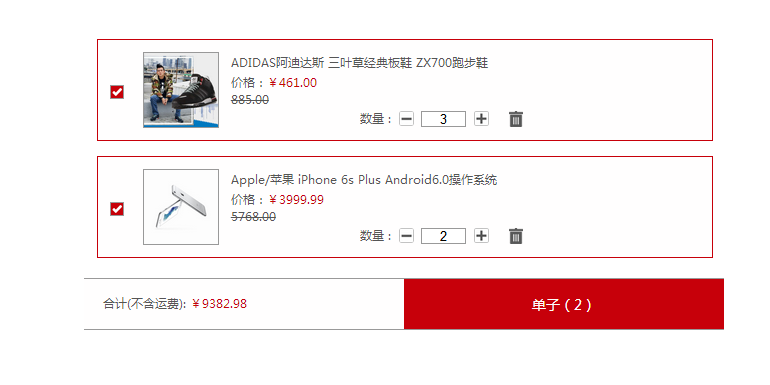
【JavaScript&jQuery】购物车自动结算
<!doctype html>

<html lang="en">

 <head>

  <meta charset="UTF-8">

  <title>购物车</title>

  <script type="text/javascript" src="js/jquery-1.11.1.min.js"></script>

  <style>

    *{margin: 0;padding: 0}

    a{text-decoration: none;}

    ul li{float: left;list-style: none;}

    #wrapper{max-width: 640px;min-width: 320px;font-size: 12px;font-family: "微软雅黑";height: 370px;margin: 50px auto;}

    #wrapper #content{width: 100%;float: left;}

    #wrapper #content .goods_lists{width: 100%;float:left; }

    #wrapper #content .goods_lists .list{width:96%;padding: 0 2%;}

    #wrapper #content .goods_lists .list li{width: 100%;height: 100px;border: 1px solid #c7000a;margin-top: 15px;float: left;background: #fffefe;}

    .goods_lists .list li .checkbox{width: 12px;height: 12px;position: relative;border:1px solid #999 ;float: left;margin-top: 45px;margin-left: 2%;z-index: 1}

    .goods_lists .list li .checkbox .c_xz{position: absolute;top: -1px;left: 0px;width: 12px;height: 12px;display: none;}

    .goods_lists .list li .door{float: left;width: 74px;height: 74px;margin: 12px 0 0 3%;border: 1px solid #999;}

    .goods_lists .list li .l_right{width: 62%;height: 74px;float: left;margin-top: 12px;padding-left: 2%}

    .goods_lists .list li .l_right .l_r_desc{max-width: 100%;overflow: hidden;color: #555; line-height:22px;height: 22px;}

    .goods_lists .list li .l_right .price{color: #555;}

    .goods_lists .list li .l_right .price span{color: #c7000a;}

    .goods_lists .list li .l_right .old_price{text-decoration: line-through;float: left;width: 100%;color: #555}

    .goods_lists .list li .l_right .l_bot{width: 66%;height:20px;float: right; color: #555;}

    .goods_lists .list li .l_right .l_bot p{float: left;padding-top: 2px;}

    .goods_lists .list li .l_right .l_bot input{float: left;width:17%;height: 14px;text-align: center;border:1px solid #999;margin-top: 3px; }

    .goods_lists .list li .l_right .l_bot a{float: left; margin: 3px 3%;}

    .goods_lists .list li .l_right .l_bot .rubbish{margin-left: 5%;}

    #wrapper #content .checkout{float: left;width: 100%;height: 50px;background: #fffefe;border-top:1px solid #999;border-bottom: 1px solid #999;margin-top: 20px; }

    #wrapper #content .checkout .c_left{float: left;width: 47%;height: 35px;font-size: 12px;color: #555;padding-left: 3%;line-height: 50px;}

    #wrapper #content .checkout .c_left span{color: #c7000a;}

    #wrapper #content .checkout .c_right{float: left;width: 50%;height: 50px;background: #c7000a;color: #fefdfd;text-align: center;font-size: 14px;line-height: 50px;}

 </style>

 </head>

 <body>

    <div id="wrapper">

        <div id="content">

            <div class="goods_lists">

                <ul id="listbox" class="list">

                    <li>

                        <div class='checkbox'>

                            <div class='c_xz'><img src='images/checkbox.png' width='12' height='12'></div>

                        </div>

                        <a class='door' href='javascript:void(0);'><img src='images/list1.jpg' width='74' height='74' alt='阿迪达斯男鞋' /></a>

                        <div class='l_right'>

                            <p class='l_r_desc'>ADIDAS阿迪达斯 三叶草经典板鞋 ZX700跑步鞋</p>

                            <p class='price'>价格:<span>¥<span class='money'  data-money='461'>461.00</span></span></p>

                            <p class='old_price'>885.00</p>

                            <div class='l_bot'>

                                <p>数量 :</p>

                                <a class='remove' href='javascript:void(0);'><img src='images/remove.png' width='15' height='15'></a>

                                <input type='text' data-max='10' class='num' value='1' />

                                <a class='add' href='javascript:void(0);'><img src='images/add.png' width='15' height='15'></a>

                                <a class='rubbish' href='javascript:void(0);'><img src='images/rubbish.png' width='14' height='16'></a>

                            </div>

                        </div>

                    </li>

                    <li>

                        <div class='checkbox'>

                            <div class='c_xz'><img src='images/checkbox.png' width='12' height='12'></div>

                        </div>

                        <a class='door' href='javascript:void(0);'><img src='images/list2.jpg' width='74' height='74' alt='iphone6s plus' /></a>

                        <div class='l_right'>

                            <p class='l_r_desc'>Apple/苹果 iPhone 6s Plus Android6.0操作系统</p>

                            <p class='price'>价格:<span>¥<span class='money'  data-money='3999.99'>3999.99</span></span></p>

                            <p class='old_price'>5768.00</p>

                            <div class='l_bot'>

                                <p>数量 :</p>

                                <a class='remove' href='javascript:void(0);'><img src='images/remove.png' width='15' height='15'></a>

                                <input type='text' data-max='10' class='num' value='1' />

                                <a class='add' href='javascript:void(0);'><img src='images/add.png' width='15' height='15'></a>

                                <a class='rubbish' href='javascript:void(0);'><img src='images/rubbish.png' width='14' height='16'></a>

                            </div>

                        </div>

                    </li>

                </ul>

            </div>

            <div class="checkout">

                <div class="c_left">

                    合计(不含运费): <span>¥<span id="sum">0.00</span></span>

                </div>

                <a href="javascript:">

                    <div class="c_right">

                        单子(<span id="count">0</span>)

                    </div>

                </a>

            </div>

        </div>

    </div>

    <script type="text/javascript">

        $(function(){

            //删除商品

            $("#listbox").on("click",".rubbish",function(){

                $(this).parents("li").remove();

                tm_total();

            });

            //商品复选框的选中和不选中

            $("#listbox").on("click",".checkbox",function(){

                $(this).find(".c_xz").toggle();

                tm_total();

            });

            //商品数量的添加和减少

            $("#listbox").on("click",".add",function(){

                var $input = $(this).prev();

                var value = $input.val();

                var max = $input.data("max");

                value++;

                if(value > max)value = max;

                $input.val(value);

                tm_total();

            }).on("click",".remove",function(){

                var $input = $(this).next();

                var value = $input.val();

                value--;

                if(value<=0)value=1;

                $input.val(value);

                tm_total();

            });

        });

        //求总和

        function tm_total(){

            var total = 0;

            $("#listbox").find("li").each(function(){

                var flag = $(this).find(".c_xz").is(":visible");

                if(flag){

                    var money = $(this).find(".money").data("money");

                    var number = $(this).find(".num").val();

                    total += money * number;

                }

            });

            //求用户购买了多少个商品

            var length =$("#listbox").find(".c_xz:visible").length;

            $("#count").text(length);

            $("#sum").text(total);

        };

    </script>

 </body>

</html>
【JavaScript&jQuery】购物车自动结算的更多相关文章
- JavaScript jQuery 中定义数组与操作及jquery数组操作
首先给大家介绍javascript jquery中定义数组与操作的相关知识,具体内容如下所示: 1.认识数组 数组就是某类数据的集合,数据类型可以是整型.字符串.甚至是对象Javascript不支持多 ...
- jQuery AutoComplete 自动补全
jQuery.AutoComplete是一个基于jQuery的自动补全插件.借助于jQuery优秀的跨浏览器特性,可以兼容Chrome/IE/Firefox/Opera/Safari等多种浏览器. 特 ...
- jquery背景自动切换特效
查看效果网址:http://keleyi.com/a/bjad/4kwkql05.htm 本特效的jquery版本只支持1.9.0以下. 代码如下: <!DOCTYPE html PUBLIC ...
- 30+最佳Ajax jQuery的自动完成插件的例子
在这篇文章中,我们将介绍35个jQuery AJAX的自动完成提示例子. jQuery 的自动完成功能,使用户快速找到并选择一定的价值.每个人都想要快速和即时搜索输入栏位,因为这个原因,许 流行的搜索 ...
- GBin1插件推荐之马可波罗(Marco Polo),jQuery的自动补齐插件 - Autocomplete Plugin
让我们Google一下"jQuery autocomplete plugin"(jquery自动补齐插件).在过去的4年中,我已经Google了很多次这个组合了.然而结果并没有变化 ...
- Javascript Jquery 中的数组定义与操作_子木玲_新浪博客
body{ font-family: "Microsoft YaHei UI","Microsoft YaHei",SimSun,"Segoe UI& ...
- 在eclipse-jee-juno中配置Aptana对jQuery代码自动提示
主要问题 在Aptana的Web Project中打开js文件有JavaScript的自动提示,但是在JavaEE项目中却没有. 版本 eclipse-jee-juno,即Eclipse 4.2的Ja ...
- jquery 图片自动无缝滚动
<!DOCTYPE html><html><head> <meta charset="utf-8"> <meta http-e ...
- jQuery图片自动添加水印插件
JS脚本(jQuery)为图片加水印效果预览:http://hovertree.com/texiao/jquery/94/ 本功能使用HTML5实现,可为图片加上文字水印,可设置文字,设置颜色,位置等 ...
随机推荐
- Spring之HandlerInterceptor拦截器
思维导图下载:https://pan.baidu.com/s/19z73Bs8MsHFAupga3Cr3Gg
- centos7.4 防火墙设置
1.关闭默认的firewall防火墙 systemctl stop firewalld.service #停止firewall systemctl disable firewalld.service ...
- [SDOI2011]染色 树链剖分
LG传送门 我写这道题的题解主要是因为洛谷上的题解要么讲的不清要么代码丑滑稽,导致初学时的我调了很久,所以想发个题解方便后来人. 由于要维护的信息还是具有区间可加性,只需要记录一下每个区间的左右端点颜 ...
- AngularJS中Directive指令系列 - 基本用法
参考: https://docs.angularjs.org/api/ng/service/$compile http://www.zouyesheng.com/angular.html Direct ...
- Git生成多个ssh key
在实际的工作中, 有可能需要连接多个远程仓库, 例如我想连接私有仓库.GitLab官网.GitHub官网, 那么同一台电脑就要生成多个ssh key: ssh-keygen -t rsa -C &qu ...
- Linux工作管理
工作管理? 其实也就是把程序放到后台来管理,在windows中也就是最小化,在Linux中是通过命令把程序放到后台中.jobs命令查看后台程序. 对于第一点注意事项,mysql启动是例外的,要是叉掉了 ...
- Google TensorFlow for GPU安装、配置大坑
Google TensorFlow for GPU安装.配置大坑 从本周一开始(12.05),共4天半的时间,终于折腾好Google TensorFlow for GPU版本,其间跳坑无数,摔得遍体鳞 ...
- 2018百度之星开发者大赛-paddlepaddle学习(二)将数据保存为recordio文件并读取
paddlepaddle将数据保存为recordio文件并读取 因为有时候一次性将数据加载到内存中有可能太大,所以我们可以选择将数据转换成标准格式recordio文件并读取供我们的网络利用,接下来记录 ...
- 【第七章】MySQL数据库备份-物理备份
一.数据库备份 备份的目的: 备份: 能够防止由于机械故障以及人为误操作带来的数据丢失,例如将数据库文件保存在了其它地方. 冗余: 数据有多份冗余,但不等备份,只能防止机械故障还来的数据丢失,例如主备 ...
- ES6的新特性(3)——变量的解构赋值
变量的解构赋值 数组的解构赋值 基本用法 ES6 允许按照一定模式,从数组和对象中提取值,对变量进行赋值,这被称为解构(Destructuring). let a = 1; let b = 2; le ...