
robot framework Selenium2关键字介绍
*** Settings ***

Library           Selenium2Library

*** Keywords ***

Checkbox应该不被选择

    [Arguments]    ${locator}

    Checkbox Should Not Be Selected    ${locator}

Frame应该包含文本

    [Arguments]    ${locator}    ${text}    ${loglevel}=INFO

    Frame Should Contain    ${locator}    ${text}    ${loglevel}

List应该无选项

    [Arguments]    ${locator}

    List Should Have No Selections    ${locator}

List选项应该是

    [Arguments]    ${locator}    @{items}

    List Selection Should Be    ${locator}    @{items}

Radio按钮不应该被选择

    [Arguments]    ${group_name}

    Radio Button Should Not Be Selected    ${group_name}

Radio按钮应该被设置成

    [Arguments]    ${group_name}    ${value}

    Radio Button Should Be Set To    ${group_name}    ${value}

Url应该包含

    [Arguments]    ${expected}

    Location Should Contain    ${expected}

Xpath应该匹配X次

    [Arguments]    ${xpath}    ${expected_xpath_count}    ${msg}=    ${loglevel}=INFO

    Xpath Should Match X Times    ${xpath}    ${expected_xpath_count}    ${msg}    ${loglevel}

checkbox应该被选择

    [Arguments]    ${locator}

    checkbox should be selected    ${locator}

url应该是

    [Arguments]    ${url}

    Location Should Be    ${url}

下次确认选择取消

    Choose Cancel On Next Confirmation

下次确认选择确定

    Choose Ok On Next Confirmation

从List中取消选项

    [Arguments]    ${locator}    @{items}

    Unselect From List    ${locator}    @{items}

从List选择选项

    [Arguments]    ${locator}    @{items}

    Select From List    ${locator}    @{items}

偏移拖拽

    [Arguments]    ${source}    ${xoffset}    ${yoffset}

    Drag And Drop By Offset    ${source}    ${xoffset}    ${yoffset}

元素应该不包含文本

    [Arguments]    ${locator}    ${expected}    ${msg}=

    Element Should Not Contain    ${locator}    ${expected}    ${msg}

元素应该不可用

    [Arguments]    ${locator}

    Element Should Be Disabled    ${locator}

元素应该不可见

    [Arguments]    ${locator}    ${msg}=

    Element Should Not Be Visible    ${locator}    ${msg}

元素应该包含文本

    [Arguments]    ${locator}    ${text}

    Element Should Contain    ${locator}    ${text}

元素应该匹配x次

    [Arguments]    ${locator}    ${count}    ${msg}=    ${loglevel}=INFO

    Locator Should Match X Times    ${locator}    ${count}    ${msg}    ${loglevel}

元素应该可用

    [Arguments]    ${locator}

    Element Should Be Enabled    ${locator}

元素应该可见

    [Arguments]    ${locator}

    Element Should Be Visible    ${locator}

元素文本应该是

    [Arguments]    ${locator}    ${expected}    ${msg}=

    Element Text Should Be    ${locator}    ${expected}    ${msg}

全选List元素

    [Arguments]    ${locator}

    Select All From List    ${locator}
关闭所有浏览器

    Close All Browsers

关闭浏览器

    Close Browser

close browser 关闭当前的浏览器。close all browser 关键所有打开的浏览器和缓存重置。
Maximize Browser Window 关键字使当前打开的浏览器全屏。

get windows size 关键字用于打设置打开浏览器的宽度和高度。以像素为单位,第一个参数 800 表示宽
度,第二个参数 600 表示高度。


关闭窗口

    Close Window

切换浏览器

    [Arguments]    ${index}

    Switch Browser    ${index}

创建Webdriver

    [Arguments]    ${driver_name}    ${alias}=    ${kwargs}={}

    Create Webdriver    ${driver_name}    ${alias}    ${kwargs}

删除Cookie

    [Arguments]    ${name}

    Delete Cookie    ${name}

删除所有Cookie

    Delete All Cookies

删除本地策略

    [Arguments]    ${strategy_name}

    Remove Location Strategy    ${strategy_name}

刷新页面

    Reload Page

双击元素

    [Arguments]    ${locator}

    Double Click Element    ${locator}

取消选择Checkbox

    [Arguments]    ${locator}

    Unselect Checkbox    ${locator}

取消选择Frame

    Unselect Frame

回退

    Go Back

在图片上按下鼠标左键

    [Arguments]    ${locator}

    Mouse Down On Image    ${locator}
重复多次操作
    repeat keyword ${num} ${operation}
Open Browser 打开浏览器,参数包括url | browser=xx | alias=xx 等
Click Link 点击一个超链接,参数是一个locator
Click Element 点击一个元素,如单选框、复选框、按钮等
Click Button 点击一个button,必须是button元素,应用场景少
Input Text 输入文本,参数包括 Locator | Text
Select Frame / Unselect Frame 选择进入 / 退出某个iframe,当页面中包含iframe是注意使用这个关键字,不然会定位不到元素
Wait Until Page Contains 等待页面中出现某个文本后才进行下一步操作
should be equal 是指两个对象相等,should match 是匹配模式,可用通配符
Get Table Cell 可以更直接的获取表格的内容
Get Element Attribute 获取某个元素的属性
Evaluate是执行python表达式,并返回执行结果


creat list 创建列表

get time 获取当前时间

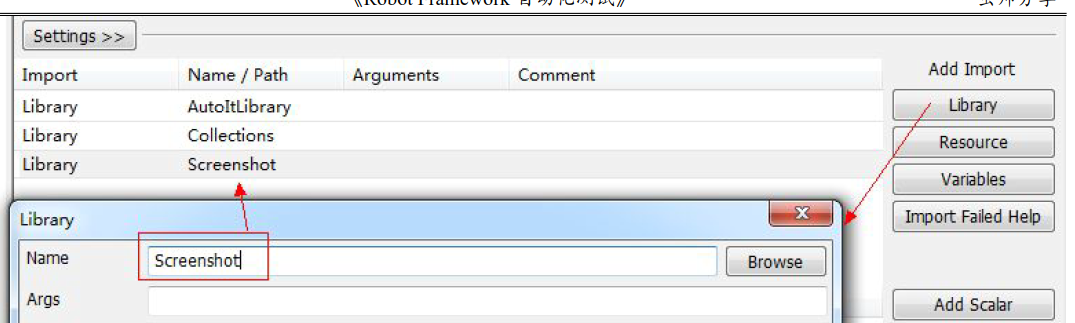
screenshot 库



robot framework Selenium2关键字介绍的更多相关文章
- Robot Framework常用关键字介绍
常用关键字介绍 在学习一门编程语言的时候,大多教材都是从打印“hello world”开始.我们可以像编程语言一样来学习 Robot Framework.虽然通过 RIDE 提供“填表”一样的写测试用 ...
- robot framework 常用关键字介绍
1.log 打印所有内容 log hello word 2.定义变量 ${a} Set variable 92 log ${a} 3.连接对象 ${a} Catenate hello word l ...
- Robot Framework - 基础关键字 BuiltIn 库(二)
本篇教程,我们继续接着上篇内容进行讲解,我们本节教程讲解的是Robot Framework 机器人框架中的变量中使用判断.字符串的拼接.Evaluate的用法.调用Python文件.条件分支语句.以及 ...
- Robot Framework - 基础关键字 BuiltIn 库(一)
今天给大家分享的是Robot Framework 机器人框架中 BuiltIn 基础库的使用...BuiltIn 库里面提供了很多基础方法助力于我们在自动化测试领域中做的更好!——本系列教程是教会大家 ...
- Robot Framework 接口自动化介绍
接口测试的重要性大家应该都清楚,就不多说了,本文中主要介绍接口测试如何在robot framework自动化测试框架中进行. 一.环境依赖 1.安装robot framework环境,本文中不做讲解 ...
- Robot Framework常用关键字
虽然通过RIDE提供"填表"一样的写测试用例的方式.但它却支持强大的关键字功能,以及可以开发关键字的扩展能力. Comment 注释功能,也可以使用python中的"#& ...
- Robot Framework 自定义关键字 Ignore error
以上是关键字的完整写法. 一下是调用该关键字的实例.
- Robot Framework 常用关键字使用方法
1. Select From Listid=sourceConnoracle_source 从下拉框选取值. 2. Select Radio button name value 选择单选框.也可以点 ...
- robot framework 的关键字Continue For Loop 用法
Continue For Loop关键字就是python的continue的意思,跳出本层循环,继续执行下一个循环. 我先举个栗子: :FOR ${index} IN RANGE 5 ...
随机推荐
- WPF中。。DataGrid 实现时间控件和下拉框控件
DatePicker 和新的 DataGrid 行 用户与 DataGrid 中日期列的交互给我造成了很大的麻烦. 我通过将一个 Data Source 对象拖动到 WPF 窗口上,创建了一个 Dat ...
- cogs696 longest prefix
cogs696 longest prefix 原题链接 IOI1996原题? 其实这题我不会. map+string+手动氧气大法好 //就是这么皮(滑稽 Code // It is made by ...
- 创建Springmvc项目时,特殊拦截器失效情况的原因及解决办法
最近开发一个新项目时,搭建springmvc框架时,遇到一个拦截器失效的情况困扰了两天.现在解决,特此记录一下. 拦截器不生效的情况描述: 设置登录拦截的时候,首先登录接口肯定是不用拦截的.所以需要在 ...
- 安装完.net core sdk 后部署 ASP.NET Core 出现错误502.5
将项目升级到和sdk一样的版本 然后 命令行执行 iisreset
- asp.net 问题:Web 服务器上的请求筛选模块被配置为 拒绝包含的查询字符串过长的请求
发现问题: post请求,在发送一个图片base64编码的字符串时,服务端报这个错误. 报错信息中给出了解决办法: 最可能的原因: Web 服务器上的请求筛选被配置为拒绝该请求,因为查询字符串过长. ...
- [转]git命令之git remote的用法
git remote git remote -v git init git add xxx git commit -m 'xxx' git remote add origin ssh://softw ...
- K-means算法实现
目录 K-means K-means x = xlsread("D:\MatlabData\西瓜数据集.xlsx"); m = length(x); [Idx,C]=kmeans( ...
- scikit-learn 0.18中的cross_validation模块被移除
环境:scikit-learn 0.18 , python3 from sklearn.cross_validation import train_test_split from sklearn.gr ...
- python怎么安装requests、beautifulsoup4等第三方库
零基础学习python最大的难题之一就是安装所有需要的软件,下面来简单介绍一下如何安装用pip安装requests.beautifulsoup4等第三方库: 方法/步骤 点击开始,在运行里 ...
- jpa的@Query中"?"占位符的使用小坑
今天使用@Query自定义查询语句,出现了一个错误: java.lang.IllegalArgumentException: Parameter with that position [1] did ...