
关于Cocos2d-x中定时器的使用总结
1.定义
定时器在大部分游戏中是不可或缺的,即每隔一段时间,就要执行相应的刷新体函数,以更新游戏的画面、时间、进度、敌人的指令等等。
cocos2dx为我们提供了定时器schedule相关的操作。其操作函数的定义在CCNode中,所以基本上大多数的引擎类都可以设置定时器,如CCLayer、CCSprite、CCMenu等。
2.种类
定时器更新的方式分为三类:
(1)默认定时器 :scheduleUpdate();
(2)自定义定时器:schedule();
(3)一次性定时器:scheduleOnce();
3.Demo下载
https://github.com/shahdza/Cocos_LearningTest/tree/master/demo_%E5%AE%9A%E6%97%B6%E5%99%A8schedule%E3%80%81update
4.scheduleUpdate
默认定时器:scheduleUpdate()。
该定时器默认刷新次数与屏幕刷新频率有关。如频率为60帧每秒,那么scheduleUpdate每秒执行60次刷新。
与scheduleUpdate其对应的刷新函数体为update(),即每一帧会执行一次update()函数。
相关操作如下:
 //

     //开启默认定时器。刷新间隔为一帧。

     void scheduleUpdate();

     void scheduleUpdateWithPriority(int priority); //给予优先级priority。priority越小,优先级越高

     virtual void update(float delta); //update为scheduleUpdate定时器的刷新函数体.

 //
5.schedule
自定义定时器:schedule()。
该定时器可以自定义指定的刷新函数体、刷新函数体的次数、刷新频率、以及开始刷新的时间。
函数体不一定为update(),可以自己定义。
相关操作如下:
  //

      //设置自定义定时器。默认刷新间隔为一帧。

      //      interval  :   每隔interval秒,执行一次。

      //      repeat    :   重复次数。

      //      delay     :   延迟时间,即创建定时器delay秒后开始执行刷新。

      //schedule( schedule_selector(HelloWorld::myUpdate), 1.0/60.0 );

      void schedule(SEL_SCHEDULE selector); //默认刷新间隔为一帧

      void schedule(SEL_SCHEDULE selector, float interval); //自定义刷新间隔,单位:秒

      void schedule(SEL_SCHEDULE selector, float interval, unsigned int repeat, float delay);

 //
6.scheduleOnce
一次性定时器:scheduleOnce()。
该定时器在等待delay秒延迟时间后,只执行一次刷新函数体,之后就不再刷新。
相关操作如下:
  //

      //只执行一次,delay秒后执行

      //scheduleOnce( schedule_selector(HelloWorld::myUpdate), 5.0 );

      void scheduleOnce(SEL_SCHEDULE selector, float delay);

  //
7.其他操作
定时器的取消、暂停、恢复。
相关操作如下:
 //

     //this->unscheduleUpdate();

     //sprite->unscheduleAllSelectors();

     void unscheduleUpdate(void);            //取消默认定时器

     void unschedule(SEL_SCHEDULE selector); //取消自定义函数的定时器

     void unscheduleAllSelectors(void);      //取消所有定时器

     void pauseSchedulerAndActions(void);    //暂停所有定时器和动作

     void resumeSchedulerAndActions(void);   //恢复所有定时器和动作

 //
代码实战(这是2.x的版本格式,可以自己改为3.x的版本格式)
1、在HelloWorld::init()中创建五个精灵
精灵和五种定义定时器的方法,一一对应。
  //

      //创建五个精灵

          CCSprite* sp = CCSprite::create("Icon.png");

          sp->setPosition( ccp(, mysize.height - ) );

          this->addChild(sp, , ); //tag标记100

          CCSprite* sp1 = CCSprite::create("Icon.png");

          sp1->setPosition( ccp(, mysize.height - ) );

          this->addChild(sp1, , ); //tag标记101

         CCSprite* sp2 = CCSprite::create("Icon.png");

         sp2->setPosition( ccp(, mysize.height - ) );

         this->addChild(sp2, , ); //tag标记102

         CCSprite* sp3 = CCSprite::create("Icon.png");

         sp3->setPosition( ccp(, mysize.height - ) );

         this->addChild(sp3, , ); //tag标记103

         CCSprite* sp4 = CCSprite::create("Icon.png");

         sp4->setPosition( ccp(, mysize.height - ) );

         this->addChild(sp4, , ); //tag标记104

     //定义五个定时器,更新精灵

         this->scheduleUpdate();

         this->schedule( schedule_selector(HelloWorld::myupdate) );

         this->schedule( schedule_selector(HelloWorld::myupdate2), 1.0f );

         this->schedule( schedule_selector(HelloWorld::myupdate3), 1.0f, , 3.0f);

         this->scheduleOnce( schedule_selector(HelloWorld::myupdate4), 5.0f );

 //
2.编写定时器对应的刷新函数体
 //

      //scheduleUpdate

      void HelloWorld::update(float dt)

      {

          CCSprite* sp = (CCSprite*)this->getChildByTag(); //获取 tag=100 的精灵

          sp->setPosition( sp->getPosition() + ccp(,) );    //每帧移动1

      }

      //schedule(schedule_selector)

     void HelloWorld::myupdate(float dt)

     {

         CCSprite* sp1 = (CCSprite*)this->getChildByTag(); //获取 tag=101 的精灵

         sp1->setPosition( sp1->getPosition() + ccp(,) );   //每帧移动1

     }

     //schedule(schedule_selector, interval)

     void HelloWorld::myupdate2(float dt)

     {

         CCSprite* sp2 = (CCSprite*)this->getChildByTag(); //获取 tag=102 的精灵

         sp2->setPosition( sp2->getPosition() + ccp(,) );  //每秒移动60

     }

     //schedule(schedule_selector, interval, repeat, delay)

     void HelloWorld::myupdate3(float dt)

     {

         CCSprite* sp3 = (CCSprite*)this->getChildByTag(); //获取 tag=103 的精灵

         sp3->setPosition( sp3->getPosition() + ccp(,) );  //每秒移动60

     }

     //scheduleOnce

     void HelloWorld::myupdate4(float dt)

     {

         CCSprite* sp4 = (CCSprite*)this->getChildByTag(); //获取 tag=104 的精灵

         sp4->setPosition( sp4->getPosition() + ccp(,) ); //移动100

     }

 //
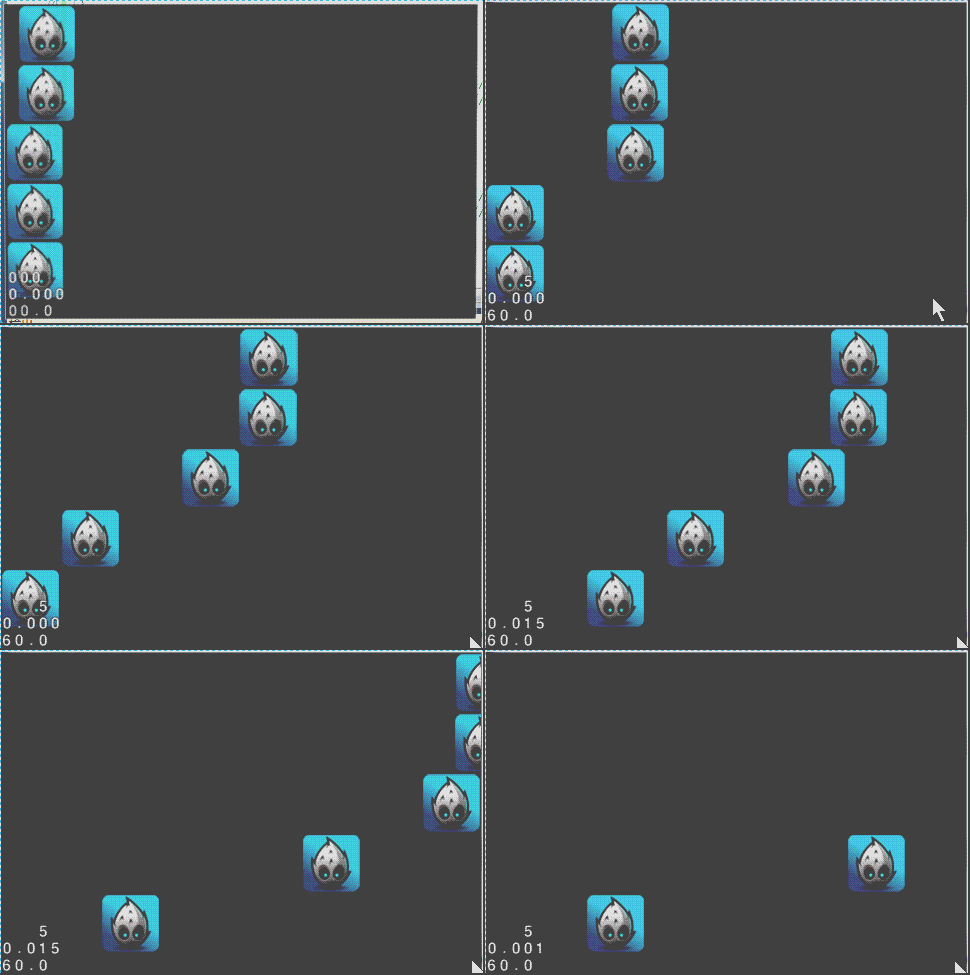
3.运行结果
4.分析和总结
(1)scheduleUpdate()和schedule(schedule_selector)的效果一样,只是schedule可以自定义刷新函数体,不一定是update()。而scheduleUpdate()的刷新函数体只能为update()。
(2)schedule(schedule_selector, interval):设置了interval=1.0,所以每隔1.0秒执行了一次myupdate2()。
(3)schedule(schedule_selector, interval, repeat, delay):在开始3.0f秒后才开始执行myupdate3(),并且之后又重复执行了5次,就停止更新了。
(4)scheduleOnce(schedule_selector):在开始5秒后,只执行了一次myupdate4(),就停止更新了。
本文出自 “夏天的风” 博客 http://shahdza.blog.51cto.com/2410787/1542014
关于Cocos2d-x中定时器的使用总结的更多相关文章
- Unity3D中定时器的使用
源地址:http://unity3d.9tech.cn/news/2014/0402/40149.html 在游戏设计过程中定时器是必不可少的工具,我们知道update方法是MonoBehavior中 ...
- 如何在cocos2d项目中enable ARC
如何在cocos2d项目中enable ARC 基本思想就是不支持ARC的代码用和支持ARC的分开,通过xcode中设置编译选项,让支持和不支持ARC的代码共存. cocos2d是ios app开发中 ...
- 如何在Cocos2D游戏中实现A*寻路算法(六)
大熊猫猪·侯佩原创或翻译作品.欢迎转载,转载请注明出处. 如果觉得写的不好请告诉我,如果觉得不错请多多支持点赞.谢谢! hopy ;) 免责申明:本博客提供的所有翻译文章原稿均来自互联网,仅供学习交流 ...
- 如何在Cocos2D游戏中实现A*寻路算法(一)
大熊猫猪·侯佩原创或翻译作品.欢迎转载,转载请注明出处. 如果觉得写的不好请告诉我,如果觉得不错请多多支持点赞.谢谢! hopy ;) 免责申明:本博客提供的所有翻译文章原稿均来自互联网,仅供学习交流 ...
- WPF中定时器与进度条的配合使用
WPF中定时器使用的注意事项: WPF需要使用System.Windows.Threading.DispatcherTimer定时器,而不能使用System.Timers.Timer定时器.因为Sys ...
- [转]Qt中定时器使用的两种方法
Qt中定时器的使用有两种方法,一种是使用QObject类提供的定时器,还有一种就是使用QTimer类. 其精确度一般依赖于操作系统和硬件,但一般支持20ms.下面将分别介绍两种方法来使用定时器. 方法 ...
- JS中定时器的返回数值ID值
定时器会返回一个数字值id,可以由clearInterval(id)或clearTimeout(id)来实现对对应定时器的清除. setInterval()/setTimeout()BOM中的Wind ...
- Java中定时器Timer致命缺点(附学习方法)
简介 这篇文章我一直在纠结到底要不要写,不想写一来因为定时器用法比较简单,二来是面试中也不常问.后来还是决定写了主要是想把自己分析问题思路分享给大家,让大家在学习过程中能够参考,学习态度我相信大部分人 ...
- Javascript中定时器的使用方法
Javascript中定时器的使用方法 1.间隔定时器(每隔一段时间执行一次代码) 格式:setInterval(函数,时间) //时间单位是毫秒,每隔设置的时间执行函数里的内容一遍(一直执行) // ...
- SpringMVC中定时器继承Task后无法对service注入问题
最近在做一个Spring+MyBatis的一个项目,其中用到了Redis的存储,然后遇到问题是这样的: RedisTask是通过定时器来每分钟像数据库里推送的,于是就有了 public class R ...
随机推荐
- OAF_OAF控件系列8 - SubTab的实现(案例)
2014-06-02 Created By BaoXinjian
- hdu 1999 不可摸数 筛选素数 两次打表
不可摸数 Time Limit: 2000/1000 MS (Java/Others) Memory Limit: 65536/32768 K (Java/Others) Total Submi ...
- libiconv字符集转换库在C#中的使用
<libiconv字符集转换库用法>一文中说到了libiconv能够实现不同字符集的转换. 比方GBK转BIG5等.在项目中由于须要,找到这个库.但是这个库在C#中没有非常好的支持.只是, ...
- sql server中bit字段实现取反操作
update Fct_StockMove set Disabled=Disabled^1 WHERE MoveId='DCE268E0-2CB3-4D17-AC4E-0046FB459CAD'; 1. ...
- unity3d 通过添加rigidBody来指明物体是动态的,以避免cache开销
unity3d 通过添加rigidBody来指明物体是动态的,以避免cache开销. 如果不添加rigidBody,则unity会认为它是静态的,会对物理计算进行cache,但如果此物体实际上tran ...
- 记一次Animator状态快速切换问题的解决
事情是这样的,我尝试在一帧内多次切换一些状态(当前状态为Idle的情况下): public Animator animator; void OnEnable() { animator.CrossFad ...
- [100]linux输入输出重定向
一目了然版本: &号含义: 参考 参考:非常经典,值得一看,我是在linux爱好者公众号里发现的. 下面是我自己的一些总结. linux的命令数据流 在Linux下,当一个用户进程被创建的时候 ...
- SQL Server 备份数据库到指定路径,任务实现
--Description:备份指定数据到指定路径,第一次完整备份.每月1号完整备份.每周一完整,每天增量备份--====================================ALTER p ...
- Android App 内存泄露之调试工具(1)
Android App 内存泄露之工具(1) 使用内存监測工具 DDMS –> Heap 操作步骤 启动eclipse后,切换到DDMS透视图,并确认Devices视图.Heap视图都是打开的, ...
- .NET Garbage-Collectors
http://mattwarren.org/tags/#Garbage-Collectors https://github.com/dotnet/coreclr/issues https://lldb ...