
Transform动画初解 in Swift
创建一个界面,就像这样的:
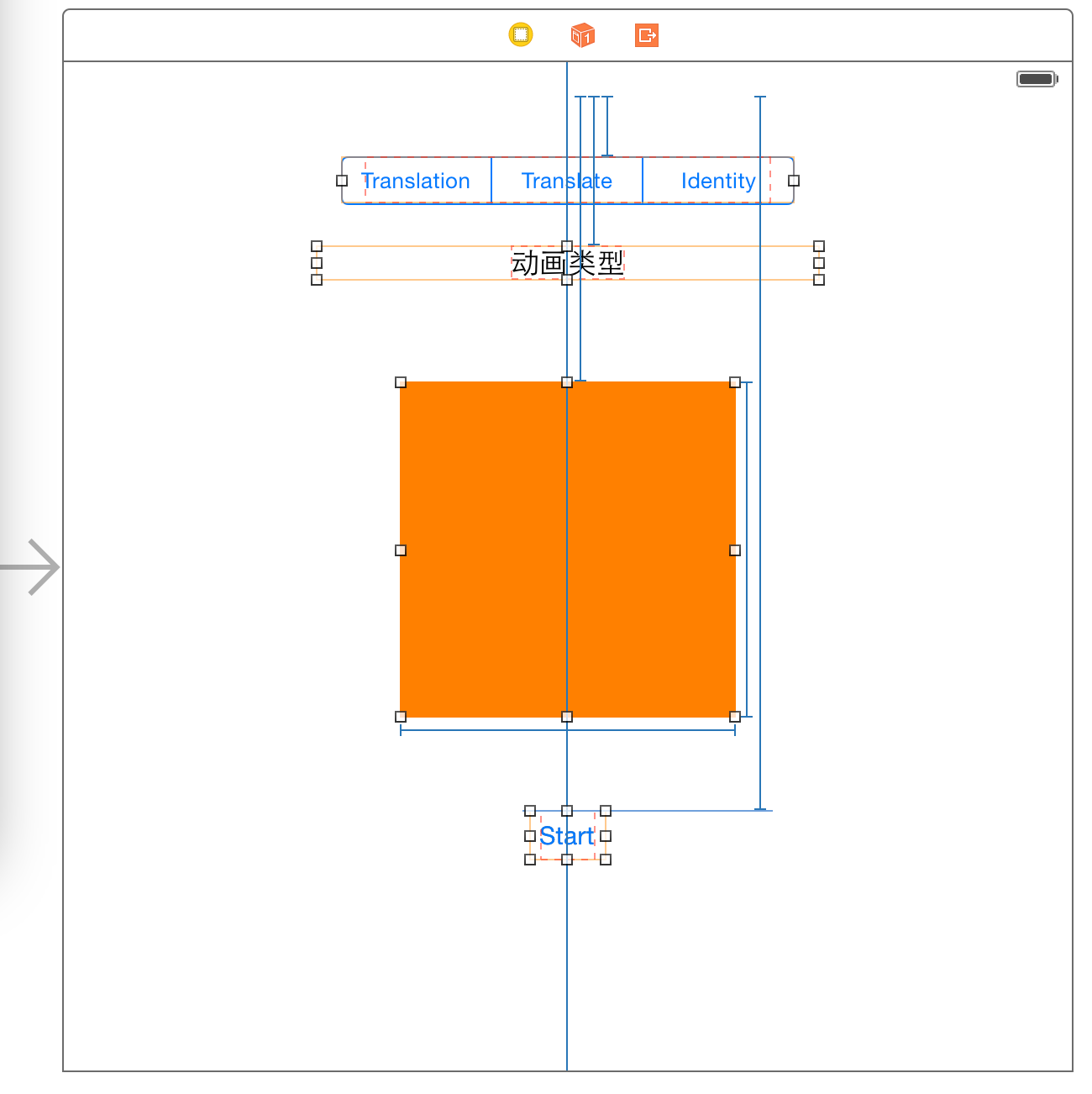
顶部是一个UISegmentControl,用来制定transform的类型。分别是:CGAffineTransformMakeTranslation、CGAffineTransformTranslate、CGAffineTransformIdentity.
然后是一个UILabel,这个Label实时的显示当前的动画类型是什么。
桔色的是动画的View。
最下面是一个按钮,按这个按钮桔色的View开始执行动画。
其他的,蓝色的线就是这几个View的Constraints。指定这几个view的定位是如何的,比如,相对于顶部的距离,相对于左边的距离,右边的距离等。
配置好页面上的View之后,给这些View在Controller中指定对应的对象。并在nib文件中指定各个View的事件。
View在controller中对应的对象:
    @IBOutlet weak var animationView: UIView!

    @IBOutlet weak var animationLabel: UILabel!
UISegmentControl的事件:
    @IBAction func segmentAction(sender: AnyObject) {

        var segmentControl = sender as UISegmentedControl

        animationType = segmentControl.selectedSegmentIndex

    }
运行动画的按钮的事件:
@IBAction func runAction(sender: AnyObject) {

        var distance: CGFloat =

        switch animationType {

        case :

            self.animationLabel.text = "CGAffineTransformMakeTranslation"

            UIView.animateWithDuration(1.0, animations: {

                self.animationView.transform = CGAffineTransformMakeTranslation(distance, )

            })

        case :

            self.animationLabel.text = "CGAffineTransformTranslate"

            UIView.animateWithDuration(1.0, animations: {

                self.animationView.transform = CGAffineTransformTranslate(self.animationView.transform, distance, )

            })

        case :

            self.animationLabel.text = "CGAffineTransformIdentity"

            UIView.animateWithDuration(1.0, animations: {

                self.animationView.transform = CGAffineTransformTranslate(CGAffineTransformIdentity, distance, )

            })

        default:

            println("")

        }

    }
在ViewDidLoad设置选择的动画的类型,这里我们不直接取UISegmentControl的selectedIndex的值。所以,在ViewDidLoad方法内设定默认值是1(即选定到是第一个)。
全部代码:
//

//  ViewController.swift

//  TransformDemo

//

//  Created by Bruce Lee on 30/11/14.

//  Copyright (c) 2014 Dynamic Cell. All rights reserved.

//

//  QQ:1828099940, 群:58099570 欢迎加入讨论

//

import UIKit

class ViewController: UIViewController {

    @IBOutlet weak var animationView: UIView!

    @IBOutlet weak var animationLabel: UILabel!

    var animationType: Int!

    override func viewDidLoad() {

        super.viewDidLoad()

        animationType =

    }

    override func didReceiveMemoryWarning() {

        super.didReceiveMemoryWarning()

        // Dispose of any resources that can be recreated.

    }

    @IBAction func segmentAction(sender: AnyObject) {

        var segmentControl = sender as UISegmentedControl

        animationType = segmentControl.selectedSegmentIndex

    }

    @IBAction func runAction(sender: AnyObject) {

        var distance: CGFloat =

        switch animationType {

        case :

            self.animationLabel.text = "CGAffineTransformMakeTranslation"

            UIView.animateWithDuration(1.0, animations: {

                self.animationView.transform = CGAffineTransformMakeTranslation(distance, )

            })

        case :

            self.animationLabel.text = "CGAffineTransformTranslate"

            UIView.animateWithDuration(1.0, animations: {

                self.animationView.transform = CGAffineTransformTranslate(self.animationView.transform, distance, )

            })

        case :

            self.animationLabel.text = "CGAffineTransformIdentity"

            UIView.animateWithDuration(1.0, animations: {

                self.animationView.transform = CGAffineTransformTranslate(CGAffineTransformIdentity, distance, )

            })

        default:

            println("")

        }

    }

}
Transform动画初解 in Swift的更多相关文章
- transform动画效果
transform动画效果 transform :移动,旋转.倾斜.缩放. transform:translate(0,300px); x代表的是水平的偏移距离,y代表垂直的. t ...
- 教你实现类似于格瓦拉启动页中的放大转场动画(OC&Swift)
教你实现类似于格瓦拉启动页中的放大转场动画(OC&Swift) 一.前言 用过格瓦拉电影,或者其他app可能都知道,一种点击按钮用放大效果实现转场的动画现在很流行,效果大致如下 在iOS中,在 ...
- css3 transform动画效果与公司框架简易动画的差异
先看一下该网站的效果 http://2014guangzhouchezhan.dongfeng-citroen.com.cn/mobile/ 该站里面的动画效果由简易动画与css3动画2种方式混合达到 ...
- transform动画的一个3D的正方体盒子
<!DOCTYPE html> <html lang="en"> <head> <meta charset="UTF-8&quo ...
- vue slot的使用(transform动画)
slot的说明就看vue的官方文档 但是有点模糊 理解: 是对组件的扩展,通过slot插槽向组件内部指定位置传递内容,通过slot可以父子传参: 解决什么问题:正常情况下,<Child&g ...
- iOS 原生库(AVFoundation)实现二维码扫描,封装的工具类,不依赖第三方库,可高度自定义扫描动画及界面(Swift 4.0)
Create QRScanner.swift file // // QRScanner.swift // NativeQR // // Created by Harvey on 2017/10/24. ...
- transform动画
1. html 结构 <!DOCTYPE html> <html lang="en"> <head> <meta charset=&quo ...
- transform 动画效果
http://www.css88.com/tool/css3Preview/Transform.html transform的含义是:改变,使…变形:转换 transform的属性包括:rotate( ...
- 移动端动画使用transform提升性能
在移动端做动画,对性能要求较高而通常的改变margin属性是性能极低的,即使使用绝对定位改变top,left这些属性性能也很差因此应该使用transform来进行动画效果,如transform:tra ...
随机推荐
- pyspark连接mysql
from pyspark import SparkContext from pyspark.sql import SQLContext if __name__=="__main__" ...
- IDEA试用期结束以后继续试用(全部失效就更新),IDEA 2018 LICENSE SERVER
IDEA是一款收费的IDE,但是新用户可以免费试用一段时间,试用期结束可以购买,也可以通过填写License server address来继续使用. 打开IDEA以后,通过Help ----- Re ...
- c#中var类型用法同dynamic,object区别
1.object万能对象:object只是个对象,是个强类型,在编译的时候确定类型了,只能用对象本身的方法属性等等,object想使用动态属性方法只能用反射. 2.var万能强类型. 3.dynami ...
- Spring batch学习 持久化表结构详解(2)
#接上一篇 这一篇讲一下持久化需要表 batch_job_execution, batch_job_execution_context, batch_job_execution_params, bat ...
- vconsole使用
<html> <head> <meta http-equiv="Content-Type" content="text/html; char ...
- 安装配置Android开发环境SDK
引言: 好搞事情,搞点移动端测试高大尚的东西,首先先得把环境搭建起来: 1.下载 握了个草,很多网站都直接推荐到android官网去下载,叔不知google官网早就被我大天朝给墙了,对于不喜欢FQ的天 ...
- Nginx代理配置文件
#user nginx; worker_processes 5; #error_log /var/log/nginx/error.log warn; #pid /var/run/nginx.pid; ...
- iframe 元素会创建包含另外一个文档的内联框架(即行内框架)
HTML 与 XHTML 之间的差异 在 HTML 4.1 Strict DTD 和 XHTML 1.0 Strict DTD 中,不支持 iframe 元素. 提示和注释: 提示:您可以把需要的文本 ...
- JobTracker和TaskTracker
[JobTracker和TaskTracker] 1.JobTracker 对应于 NameNode,TaskTracker 对应于 DataNode. 2.JobTracker是一个master服 ...
- JS如何判断浏览器类型,如何模拟浏览器类型(模拟微信浏览器)
一.前言 在编写前端代码时,为了页面兼容性,我们往往需要考虑不同的浏览器类型 而这就需要在前端代码中进行识别和区分 接下来就来谈谈对浏览器类型的识别 二.正文 (一).查看浏览器类型的核心代码 var ...