
纯C++binder服务和客户端实例
继承关系:
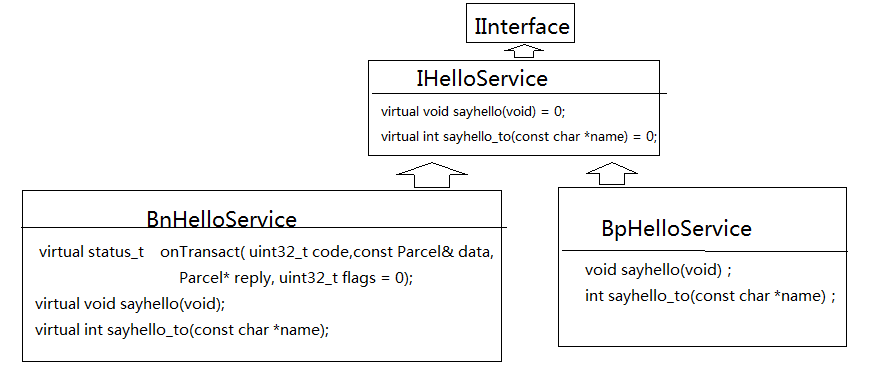
文件关系
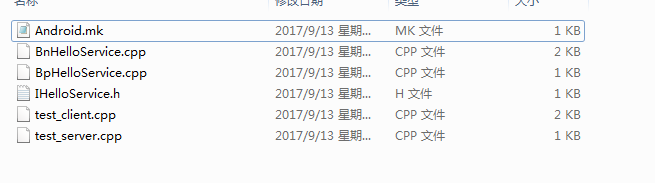
IHelloService.h
 /* 参考: frameworks\av\include\media\IMediaPlayerService.h */

 #ifndef ANDROID_IHELLOERVICE_H

 #define ANDROID_IHELLOERVICE_H

 #include <utils/Errors.h>  // for status_t

 #include <utils/KeyedVector.h>

 #include <utils/RefBase.h>

 #include <utils/String8.h>

 #include <binder/IInterface.h>

 #include <binder/Parcel.h>

 #define HELLO_SVR_CMD_SAYHELLO     0

 #define HELLO_SVR_CMD_SAYHELLO_TO  1

 namespace android {

 class IHelloService: public IInterface

 {

 public:

     DECLARE_META_INTERFACE(HelloService);

     virtual void sayhello(void) = ;

     virtual int sayhello_to(const char *name) = ;

 };

 class BnHelloService: public BnInterface<IHelloService>

 {

 public:

     virtual status_t    onTransact( uint32_t code,

                                     const Parcel& data,

                                     Parcel* reply,

                                     uint32_t flags = );

     virtual void sayhello(void);

     virtual int sayhello_to(const char *name);

 };

 }

 #endif
BnHelloService.cpp
 /* 参考: frameworks\av\media\libmedia\IMediaPlayerService.cpp */

 #define LOG_TAG "HelloService"

 #include "IHelloService.h"

 namespace android {

 status_t BnHelloService::onTransact( uint32_t code, const Parcel& data,

                                 Parcel* reply, uint32_t flags)

 {

     /* 解析数据,调用sayhello/sayhello_to */

     switch (code) {

         case HELLO_SVR_CMD_SAYHELLO: {

             sayhello();

             return NO_ERROR;

         } break;

         case HELLO_SVR_CMD_SAYHELLO_TO: {

             /* 从data中取出参数 */

             int32_t policy =  data.readInt32(); //多余的0,客户端有多发送一个0

             String16 name16 = data.readString16(); //获取客户端发来的name

             String8 name8(name16); //讲16位字符传化位8位的字符

             int cnt = sayhello_to(name8.string()); //const char*

             /* 把返回值写入reply传回去 */

             reply->writeInt32(cnt);

             return NO_ERROR;

         } break;

         default:

             return BBinder::onTransact(code, data, reply, flags);

     }

 }

 void BnHelloService::sayhello(void)

 {

     static int cnt = ;

     printf("say hello : %d\n", cnt++);

 }

 int BnHelloService::sayhello_to(const char *name)

 {

     static int cnt = ;

     printf("say hello to %s : %d\n", name, cnt++);

     return cnt;

 }

 }
BpHelloService.cpp
 /* 参考: frameworks\av\media\libmedia\IMediaPlayerService.cpp */

 #include "IHelloService.h"

 namespace android {

 class BpHelloService: public BpInterface<IHelloService>

 {

 public:

     BpHelloService(const sp<IBinder>& impl)

         : BpInterface<IHelloService>(impl)

     {

     }

     void sayhello(void)

     {

         /* 构造/发送数据 */

         Parcel data, reply;

         data.writeInt32();

         remote()->transact(HELLO_SVR_CMD_SAYHELLO, data, &reply);

     }

     int sayhello_to(const char *name)

     {

         /* 构造/发送数据 */

         Parcel data, reply;

         data.writeInt32(); //多发一个0

         data.writeString16(String16(name));

         remote()->transact(HELLO_SVR_CMD_SAYHELLO_TO, data, &reply);

         return reply.readInt32();

     }

 };

 IMPLEMENT_META_INTERFACE(HelloService, "android.media.IHelloService");

 }
test_service.cpp
 /* 参考: frameworks\av\media\mediaserver\Main_mediaserver.cpp */

 #define LOG_TAG "HelloService"

 //#define LOG_NDEBUG 0

 #include <fcntl.h>

 #include <sys/prctl.h>

 #include <sys/wait.h>

 #include <binder/IPCThreadState.h>

 #include <binder/ProcessState.h>

 #include <binder/IServiceManager.h>

 #include <cutils/properties.h>

 #include <utils/Log.h>

 #include "IHelloService.h"

 using namespace android;

 int main(void)

 {

     /* addService */

     /* while(1){ read data, 解析数据, 调用服务函数 } */

     /* 打开驱动, mmap */

     sp<ProcessState> proc(ProcessState::self());

     /* 获得BpServiceManager */

     sp<IServiceManager> sm = defaultServiceManager();

     sm->addService(String16("hello"), new BnHelloService());

     /* 循环体 */

     ProcessState::self()->startThreadPool();

     IPCThreadState::self()->joinThreadPool();

     return ;

 }
test_client.cpp
 #define LOG_TAG "HelloService"

 #include <fcntl.h>

 #include <sys/prctl.h>

 #include <sys/wait.h>

 #include <binder/IPCThreadState.h>

 #include <binder/ProcessState.h>

 #include <binder/IServiceManager.h>

 #include <cutils/properties.h>

 #include <utils/Log.h>

 #include "IHelloService.h"

 using namespace android;

 /* ./test_client hello

  * ./test_client hello <name>

  */

 int main(int argc, char **argv)

 {

     int cnt;

     if (argc < ){

         printf("Usage:\n");

         printf("%s hello\n", argv[]);

         printf("%s hello <name>\n", argv[]);

         return -;

     }

     /* getService */

     /* 打开驱动, mmap */

     sp<ProcessState> proc(ProcessState::self());

     /* 获得BpServiceManager */

     sp<IServiceManager> sm = defaultServiceManager();

     //获取hello服务

     sp<IBinder> binder = sm->getService(String16("hello"));

     if (binder == )

     {

         printf("can't get hello service\n");

         return -;

     }

     /* service肯定是BpHelloServie指针 */

     sp<IHelloService> service = interface_cast<IHelloService>(binder);

     /* 调用Service的函数 */

     if (argc < ) {

         service->sayhello();

         printf("client call sayhello");

     }

     else {

         cnt = service->sayhello_to(argv[]);

         printf("client call sayhello_to, cnt = %d", cnt);

     }

     return ;

 }
Andriod.mk
 LOCAL_PATH:= $(call my-dir)

 include $(CLEAR_VARS)

 LOCAL_SRC_FILES:= \

     BnHelloService.cpp \

     BpHelloService.cpp \

     test_server.cpp

 LOCAL_SHARED_LIBRARIES := \

     libcutils \

     libutils \

     liblog \

     libbinder

 LOCAL_MODULE:= test_server

 LOCAL_32_BIT_ONLY := true

 include $(BUILD_EXECUTABLE)

 include $(CLEAR_VARS)

 LOCAL_SRC_FILES:= \

     BpHelloService.cpp \

     test_client.cpp

 LOCAL_SHARED_LIBRARIES := \

     libcutils \

     libutils \

     liblog \

     libbinder

 LOCAL_MODULE:= test_client

 LOCAL_32_BIT_ONLY := true

 include $(BUILD_EXECUTABLE)
纯C++binder服务和客户端实例的更多相关文章
- WebService 服务端客户端 实例 HTTPRIO (一) SOAP WSDL
Delphi中WebService包含的组件解释(有7个) (1) THTTPRIO-------:使用Http消息来调用远程使用SOAP的接口对象 (2) THTTPReqResp- ...
- [精华][推荐]CAS SSO单点登录服务端客户端实例
1.修改server.xml文件,如下: 注意: 这里使用的是https的认证方式,需要将这个配置放开,并做如下修改: <Connector port="8443" prot ...
- 用C++开发Binder服务
用C++来实现Binder服务比较麻烦,原因是没有AIDL的辅助,必须手工来写中间的代码. 首先写一个服务类ExampleServer的代码: class ExampleServer : public ...
- CXF发布webService服务以及客户端调用
这篇随笔内容是CXF发布webService服务以及客户端调用的方法 CXF是什么? 开发工作之前需要下载CXF和安装 下载地址:http://cxf.apache.org 安装过程: <1&g ...
- DelphiXE7中创建WebService(服务端+客户端)
相关资料: http://www.2ccc.com/news/Html/?1507.html http://www.dfwlt.com/forum.php?mod=viewthread&tid ...
- react服务端/客户端,同构代码心得
FKP-REST是一套全栈javascript框架 react服务端/客户端,同构代码心得 作者:webkixi react服务端/客户端,同构代码心得 服务端,客户端同构一套代码,大前端的梦想, ...
- android binder机制之——(创建binder服务)
Binder机制编程 前面的几篇文章具体介绍了android中binder机制的方方面面,相信你对binder机制已经有了较深刻的理解.俗话说得好"学以致用",以下我们就通过在 ...
- DelphiXE7中创建WebService(服务端+客户端) good
相关资料:http://www.2ccc.com/news/Html/?1507.html DelphiXE7新建WebService具体操作:1.打开“DelphiXE7”->“File”-& ...
- ipv6禁用导致rpcbind服务启动失败实例
ipv6禁用导致rpcbind服务启动失败实例 昨天在做服务器磁盘分区扩容的时候出现过一个服务启动的问题,在此记录.情景再现:前天晚上申请做磁盘扩容,得到批准后,昨天早上5点开始做停机调整维护 ...
随机推荐
- delphi向SQL Server2005中存取图片
SQL Server2005中,我用image类型来存取图片,首先把数据库表设置好 例如我的pic表有如下两列:时间,图片. delphi中,我用ADOQuery来连接数据库,但是数据库中有好几张表, ...
- 免费180天的Ashampoo Anti-Virus 2014
官方网站:https://www.ashampoo.com/cn/rmb/pde/0449/Security_Software/Ashampoo-Anti-Virus 活动页面:http://www. ...
- tornado框架的get方法传递参数
tornado框架的get方法传递参数,代码: # encoding: utf-8 """ @version: ?? @author: andu99 @contact: ...
- Socket编程中检测端口是否被占用
一般检测一个端口是否被占用的方法是看bind是否成功,其实在Windows中有两个API可以获取到当前系统端口的占用情况(GetTcpTable/GetUdpTable),利用这两个函 ...
- 使用eclipse启动系统时报错“ java.lang.OutOfMemoryError: PermGen space”问题的解决
转载请注明出处:http://blog.csdn.net/dongdong9223/article/details/76571611 本文出自[我是干勾鱼的博客] 有的时候,使用eclipse启动系统 ...
- SharpNodeSettings项目,可配置的数据采集,统一的工业数据网关,OPC UA服务器开发,PLC数据发布到自身内存,redis,opc ua,以及数据可视化开发
本项目隶属于 HslCommunication 项目的SDK套件,如果不清楚HslCommunication组件的话,可以先了解那个项目,源代码地址:https://github.com/dathli ...
- # 20155327 2016-2017-4 《Java程序设计》第8周学习总结
20155327 2016-2017-4 <Java程序设计>第7周学习总结 教材学习内容总结 了解NIO NIO使用频道(Channel)来衔接数据节点,在处理数据时,NIO可以让你设定 ...
- bzoj 4176 Lucas的数论
bzoj 4176 Lucas的数论 和约数个数和那题差不多.只不过那个题是多组询问,这题只询问一次,并且 \(n\) 开到了 \(10^9\). \[ \begin{align*} \sum_{i= ...
- hibernate映射xml文件配置之一对多,多对多
一对多配置 [1]班级和学生模型 --->班级可容纳多个学生 --->学生只能属于一个班级 [2]一对多配置中的关系维护(inverse) --->一端放弃关系的维护 ---> ...
- Web开发需要常见的问题
1.sendRedirec()方法执行后,是会直接跳转到目标页面还是执行完其后的语句再跳转到目标页面??? 该方法在执行完其后面的语句才会跳转到目标页面,比如: public void doGet(H ...