
spring mvc中添加对Thymeleaf的支持
一、下载Thymeleaf
官方下载地址:https://dl.bintray.com/thymeleaf/downloads/thymeleaf/
我下载的是最新的3.0.11版本
把包里的jar包丢到项目中去:
dist/thymeleaf-3.0.11.RELEASE.jar

dist/thymeleaf-spring5-3.0.11.RELEASE.jar

lib/attoparser-2.0.5.RELEASE.jar

lib/slf4j-api-1.7.25.jar

lib/unbescape-1.1.6.RELEASE.jar
如果是基于maven的项目,在pom.xml中添加如下内容:
基于spring5的配置:
<dependency>

    <groupId>org.thymeleaf</groupId>

    <artifactId>thymeleaf-spring5</artifactId>

    <version>3.0.11.RELEASE</version>

</dependency>
基于spring4的配置:
<dependency>

    <groupId>org.thymeleaf</groupId>

    <artifactId>thymeleaf-spring4</artifactId>

    <version>3.0.11.RELEASE</version>

</dependency>
二、项目中添加对Thymeleaf的支持
修改springmvc的配置文件springMVC-servlet.xml,添加如下内容:
<bean id="templateResolver"

      class="org.thymeleaf.spring5.templateresolver.SpringResourceTemplateResolver">

    <property name="prefix" value="/WEB-INF/templates/"/>

    <property name="suffix" value=".html"/>

    <property name="characterEncoding" value="UTF-8"/>

    <property name="order" value="1"/>

    <property name="templateMode" value="HTML5"/>

    <property name="cacheable" value="false"/>

</bean>

<bean id="templateEngine"

      class="org.thymeleaf.spring5.SpringTemplateEngine">

    <property name="templateResolver" ref="templateResolver"/>

</bean>

<bean id="viewResolver" class="org.thymeleaf.spring5.view.ThymeleafViewResolver">

    <property name="templateEngine" ref="templateEngine"/>

    <property name="characterEncoding" value="UTF-8"/>

</bean>
在项目的/WEB-INF/templates/添加对应的模板文件,这个跟上面配置文件的内容是对应的,要在模板文件html标签添加xmlns:th属性:
<html lang="cn" xmlns:th="http://www.thymeleaf.org">
三、Eclipse中安装Thymeleaf的插件
在Eclipse Marketplace中找到Thymeleaf插件,然后直接安装即可
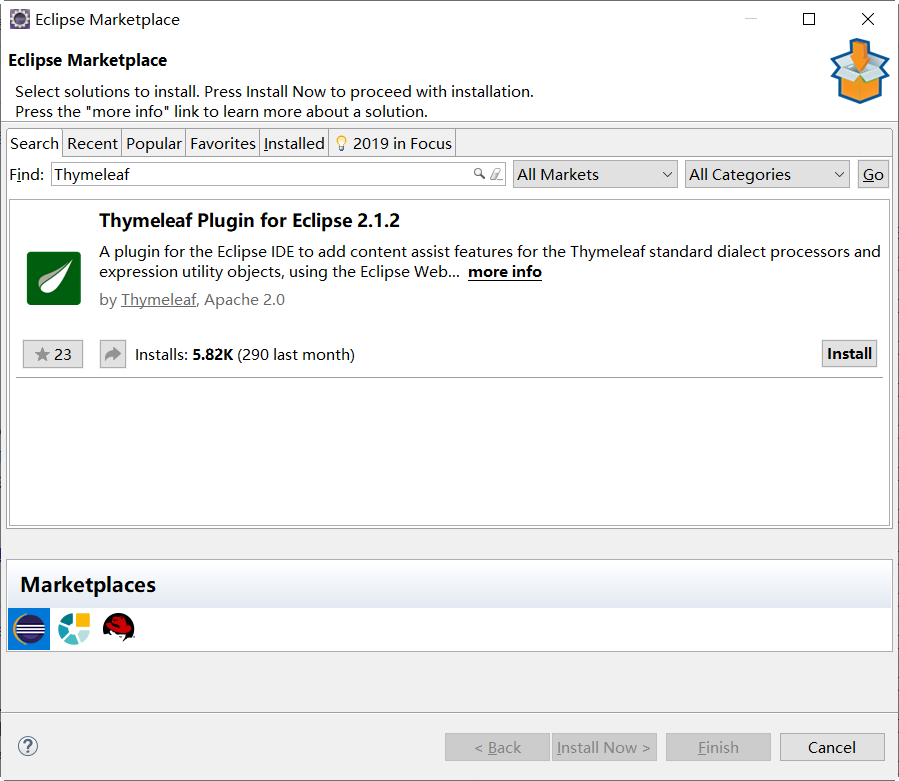
安装完以后,代码提示中就有Thymeleaf标签的提示了。
四、基础语法
1、在模板中引用变量:
${x}用于返回request作用域里的x值,或者Thymeleaf作用域里的x值${param.x}用于返回页面请求参数的x值(有可能会有多值)${session.x}用于返回session作用域里的x值${application.x}用于返回application作用域里的x值
2、字符串操作:
字符串拼接: +
文字替换: |The name is ${name}|
示例:
<a th:href="@{'edit?topicid=' + ${topic.topicid }}">编辑<a>
或:
<a th:href="@{|edit?topicid=${topic.topicid }|}">编辑<a>
3、链接表达式
@{...} 用来配合link src href使用的语法,对应的标签为 th:link、th:href和th:src
示例:
<a th:href="@{'edit?topicid=' + ${topic.topicid }}">编辑<a> <!-- 输出结果为:edit?topicid=1 -->
或:
<a th:href="@{edit(topicid=${topic.topicid })}">编辑<a> <!-- 输出结果为:edit?topicid=1 -->
多个参数:
<a th:href="@{edit(topicid=${topic.topicid },index=${index})}">编辑<a> <!-- 输出结果为:edit?topicid=1&index=1 -->
4、if判断
使用th:if表示满足条件,使用th:unless表示不满足条件
示例:
<divth:if="${session.user==null}">

<a href="login">登录</a> <a href="register">注册</a>

</div>

<divth:unless="${session.user==null}">

<span th:text="|欢迎您,${session.user.useralias }|"></span>

</div>
5、循环遍历
使用th:each
示例:
<!DOCTYPE HTML>

<html xmlns:th="http://www.thymeleaf.org">

<head>

    <title>hello</title>

    <meta http-equiv="Content-Type" content="text/html; charset=UTF-8"/>

</head>

<body>

    <!-- 不存在则忽略,显示hello null!(可以通过默认值进行设置)-->

    <p th:text="'Hello ' + (${name}?:'admin')">3333</p>

    <table>

        <tr>

            <th>ID</th>

            <th>NAME</th>

            <th>AGE</th>

        </tr>

        <tr th:each="emp : ${empList}">

            <td th:text="${emp.id}">1</td>

            <td th:text="${emp.name}">海</td>

            <td th:text="${emp.age}">18</td>

        </tr>

    </table>

</body>

</html>
使用序列的写法:
<!DOCTYPE HTML>

<html xmlns:th="http://www.thymeleaf.org">

<head>

    <title>hello</title>

    <meta http-equiv="Content-Type" content="text/html; charset=UTF-8"/>

</head>

<body>

    <!-- 不存在则忽略,显示hello null!(可以通过默认值进行设置)-->

    <p th:text="'Hello ' + (${name}?:'admin')">3333</p>

    <table>

        <tr>

            <th>INDEX</th>

            <th>NAME</th>

            <th>AGE</th>

        </tr>

        <tr th:each="emp,stat : ${empList}">

            <td th:text="${stat.index+1}">1</td>

            <td th:text="${emp.name}">海</td>

            <td th:text="${emp.age}">18</td>

        </tr>

    </table>

</body>

</html>
遍历指定次数:
<div class="pager" th:each="item:${#numbers.sequence(1,10)}">

    <div th:text="${item}"></div>

</div>
6、在javascript中访问Model中的变量
使用th:inline标签,然后把变量包在[[...]]或[()]中,我试了一下,[(...)]比较好用
示例:
<script th:inline="javascript">

function func() {

    var topicid = [(${param.topicid})];

}

</script>
7、声明局部变量
使用th:with标签
示例:
        <div class="desc" th:with="no=${stat.index + 1}">

            <div class="info" th:text="|${no}楼|">

            </div>

        </div>
8、格式化输出日期
使用#dates.format
示例:
<div th:text="${#dates.format(topic.createdate,'yyyy-MM-dd HH:mm')}"></div>
或者:
<div>[[${#dates.format(topic.createdate,'yyyy-MM-dd HH:mm')}]]</div>
9、模板的使用
使用th:fragment声明模板,使用th:insert、th:replace或th:include引用模板
模板文件footer.html
<footer th:fragment="copy">

   the content of footer

</footer>
fragment的引用
- th:insert:保留自己的主标签,保留th:fragment的主标签。
- th:replace:不要自己的主标签,保留th:fragment的主标签。
- th:include:保留自己的主标签,不要th:fragment的主标签。(官方3.0后不推荐)
模板文件名 :: fragment名称
导入片段:

<div th:insert="footer :: copy"></div>

<div th:replace="footer :: copy"></div>

<div th:include="footer :: copy"></div>

结果为:

<div>

    <footer>

       the content of footer

    </footer>

</div>

<footer>

    the content of footer

</footer>

<div>

    the content of footer

</div>
spring mvc中添加对Thymeleaf的支持的更多相关文章
- Spring MVC 中的基于注解的 Controller【转】
原文地址:http://my.oschina.net/abian/blog/128028 终于来到了基于注解的 Spring MVC 了.之前我们所讲到的 handler,需要根据 url 并通过 H ...
- spring mvc中的文件上传
使用commons-fileupload上传文件所需要的架包有:commons-fileupload 和common-io两个架包支持,可以到Apache官网下砸. 在配置文件spring-mvc.x ...
- Spring MVC中基于注解的 Controller
终于来到了基于注解的 Spring MVC 了.之前我们所讲到的 handler,需要根据 url 并通过 HandlerMapping 来映射出相应的 handler 并调用相应的方法以响 ...
- Spring MVC中各个filter的用法
转载:http://blog.csdn.net/qyp1314/article/details/42023725 Spring MVC中各个filter的用法 2014-12-19 09:08 105 ...
- Spring MVC中@RequestMapping注解使用技巧(转)
@RequestMapping是Spring Web应用程序中最常被用到的注解之一.这个注解会将HTTP请求映射到MVC和REST控制器的处理方法上. 在这篇文章中,你将会看到@RequestMapp ...
- Spring MVC 中的基于注解的 Controller(转载)
终于来到了基于注解的 Spring MVC 了.之前我们所讲到的 handler,需要根据 url 并通过 HandlerMapping 来映射出相应的 handler 并调用相应的方法 ...
- Spring MVC 中使用AOP 进行统一日志管理--注解实现
1.AOP简介 AOP称为面向切面编程 AOP的基本概念 (1)Aspect(切面):通常是一个类,里面可以定义切入点和通知 (2)JointPoint(连接点):程序执行过程中明确的点,一般是方法的 ...
- Spring mvc中@RequestMapping 6个基本用法
Spring mvc中@RequestMapping 6个基本用法 spring mvc中的@RequestMapping的用法. 1)最基本的,方法级别上应用,例如: Java代码 @Reques ...
- Http请求中Content-Type讲解以及在Spring MVC中的应用
引言: 在Http请求中,我们每天都在使用Content-type来指定不同格式的请求信息,但是却很少有人去全面了解content-type中允许的值有多少,这里将讲解Content-Type的可用值 ...
随机推荐
- IVS_原理
智能视频分析技术指计算机图像视觉分析技术,是人工智能研究的一个分支,它在图像及图像描述之间建立映射关系,从而使计算机能够通过数字图像处理和分析来理解视频画面中的内容.智能视频分析技术涉及到模式识别.机 ...
- SpringBoot2.x应用启动、关闭shell脚本
本篇主要说明以下内容: 1.SpringBoot2.x应用启动.关闭的shell脚本 1 启动脚本 直接放到同jar包同一个目录下,如下: #!/usr/bin/env bash APPLICATIO ...
- centos 7 新机器安装部署配置
首先卸载openjdk,安装jdk 1.查看java版本 [lambert@localhost ~]$ java -version openjdk version "1.8.0_102&qu ...
- kubernetes集群证书过期之后--转发
步骤 如果有多master,需要在每个master上进行以下操作. 需要进行以下步骤 重新生成证书 重新生成对应的配置文件 重启docker 和 kubelet 拷贝kubectl 客户端文件 [ro ...
- zabbix--基础概念及原理
zabbix 基础概念及工作原理整理 什么是 zabbix? Zabbix 能监控各种网络参数,保证服务器系统的安全运营:并提供灵活的通知机制以让系统管理员快速定位.解决存在的各种问题.是一个基于 W ...
- 浅谈Flask 中的 线程局部变量 request 原理
2017-11-27 17:25:11 晚橙 阅读数 600更多 分类专栏: Flask python 多线程 版权声明:本文为博主原创文章,遵循CC 4.0 BY-SA版权协议,转载请附上原文出 ...
- Beta冲刺第5次
二.Scrum部分 1. 各成员情况 翟仕佶 学号201731103226 今日进展 新增将图片转为粉笔画功能代码 存在问题 难者不会,会者不难,主要是参数设置问题 明日安排 视情况而定,可能还是写扩 ...
- 2019年杭电多校第三场 1008题Game(HDU6610+带修改莫队+Nim博弈)
题目链接 传送门 题意 给你\(n\)堆石子,每堆有\(a_i\)堆石子,\(q\)次操作: 在\([L,R]\)内有多少个子区间使得\(Alice\)(先手)在\(Nim\)博弈中获胜: 交换\(a ...
- 开发基础之牛逼哄哄的 Lambda 表达式,简洁优雅就是生产力
什么是Lambda? 我们知道,对于一个Java变量,我们可以赋给其一个“值”. 如果你想把“一块代码”赋给一个Java变量,应该怎么做呢? 比如,我想把右边那块代码,赋给一个叫做aBlockOfCo ...
- python基础笔记-字符串
字符串是 Python 中最常用的数据类型.我们可以使用引号(‘或”)来创建字符串. def main(): str1 = 'hello,world' print(len(str1))#计算字符串的长 ...