
python解决使用镜像源来安装包
一、问题
在进行python包安装的时候出现一个问题就是无法进行安装,且出现了如下的错误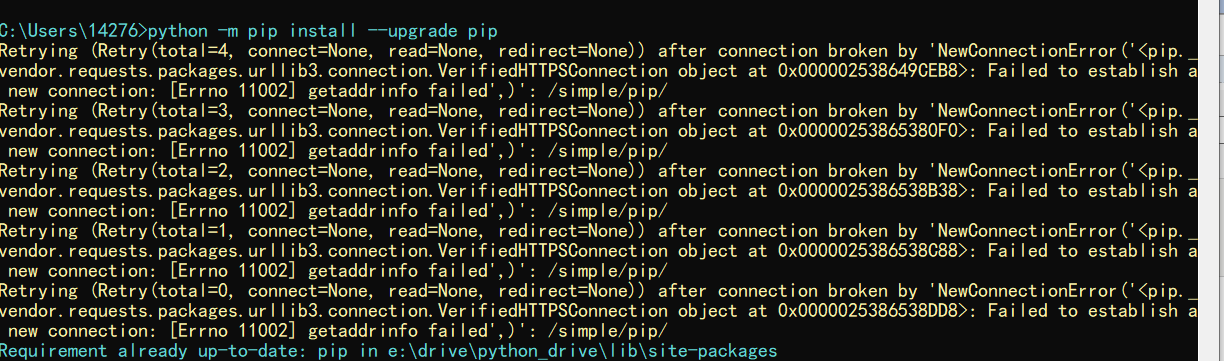
报错代码
Retrying (Retry(total=4, connect=None, read=None, redirect=None)) after connection broken by 'NewConnectionError('<pip._vendor.requests.packages.urllib3.connection.VerifiedHTTPSConnection object at 0x0000018D8B602160>: Failed to establish a new connection: [Errno 11002] getaddrinfo failed',)': /simple/pip/

Retrying (Retry(total=3, connect=None, read=None, redirect=None)) after connection broken by 'NewConnectionError('<pip._vendor.requests.packages.urllib3.connection.VerifiedHTTPSConnection object at 0x0000018D8C9B5940>: Failed to establish a new connection: [Errno 11002] getaddrinfo failed',)': /simple/pip/

Retrying (Retry(total=2, connect=None, read=None, redirect=None)) after connection broken by 'NewConnectionError('<pip._vendor.requests.packages.urllib3.connection.VerifiedHTTPSConnection object at 0x0000018D8C9B5B70>: Failed to establish a new connection: [Errno 11002] getaddrinfo failed',)': /simple/pip/

Retrying (Retry(total=1, connect=None, read=None, redirect=None)) after connection broken by 'NewConnectionError('<pip._vendor.requests.packages.urllib3.connection.VerifiedHTTPSConnection object at 0x0000018D8C9B5DD8>: Failed to establish a new connection: [Errno 11002] getaddrinfo failed',)': /simple/pip/

Retrying (Retry(total=0, connect=None, read=None, redirect=None)) after connection broken by 'NewConnectionError('<pip._vendor.requests.packages.urllib3.connection.VerifiedHTTPSConnection object at 0x0000018D8C9B5BE0>: Failed to establish a new connection: [Errno 11002] getaddrinfo failed',)': /simple/pip/
二、解决
上面的原因是因为寝室网的问题,出现了链接超时或者是无法访问外网的原因,比如无法进入python的官网,这个就是问题的原因 。解决办法:
1.换一个网络
2.使用镜像地址,比如清华园,或者是豆瓣等镜像文件这样就可以进行下载以及正确的安装了。
指令:【pip install [包名] -i http://pypi.douban.com/simple --trusted-host pypi.douban.com】
三、结果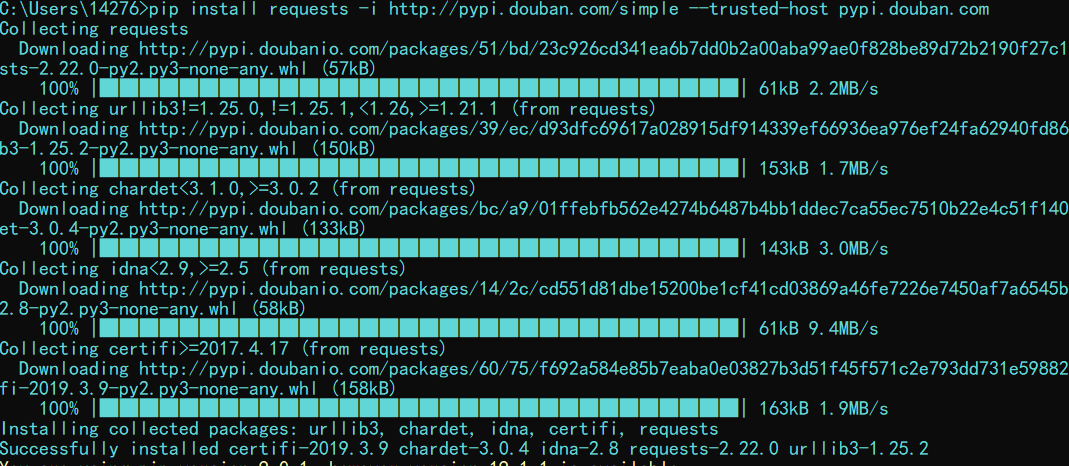
四、拓展
1.配置镜像文件这样就可以直接使用pip的指令来完成包的安装和数据的升级
2.首先在cmd中输入set,查看userprofile的位置,一般就在系统盘(C盘)下面的USER
3.在该目录下面建立一个pip的文件夹
4.在该文件下面建立一个pip.ini的文件
5.在该文件中写入如下内容,然后在保存。
[global]

index-url = https://pypi.tuna.tsinghua.edu.cn/simple

[install]

trusted-host=tsinghua.edu.cn
结果图: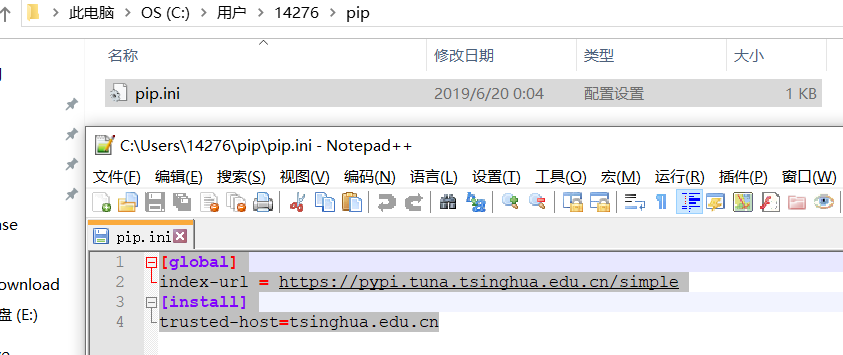
6.检验安装一个selenium和pip升级的,据此解决了前面遇到的问题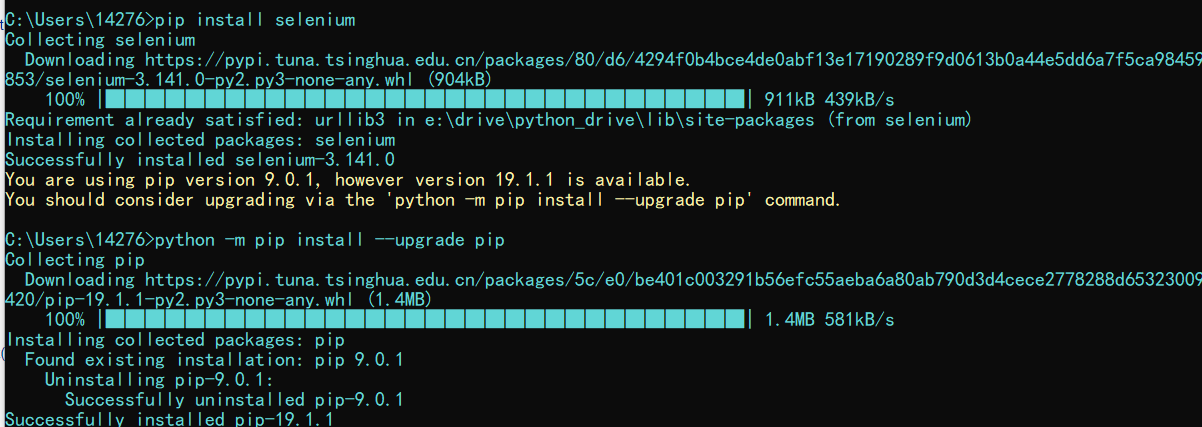
五、总结
可以看见使用命令就是【pip install [包名] -i [镜像源]】,或者使用一劳永逸法,注:如果http报错,就使用https协议
下面列举一些镜像源
阿里云 http://mirrors.aliyun.com/pypi/simple/
中国科技大学 https://pypi.mirrors.ustc.edu.cn/simple/
豆瓣(douban) http://pypi.douban.com/simple/
清华大学 https://pypi.tuna.tsinghua.edu.cn/simple/
中国科学技术大学 http://pypi.mirrors.ustc.edu.cn/simple/
python解决使用镜像源来安装包的更多相关文章
- Python:更改pip镜像源的方法
windows系统一步更换 在命令提示符中运行 pip config set global.index-url https://mirrors.aliyun.com/pypi/simple/ 具体其它 ...
- 更换Python默认软件镜像源
限于一些众所周知的原因,在我们pip安装软件的时候出现类似报错: data = self.read(amt=amt, decode_content=decode_content) File " ...
- Python: 解决pip安装源被墙的问题
pip install <package> -i http://mirrors.aliyun.com/pypi/simple --trusted-host mirrors.aliyun.c ...
- python 配置pip镜像源
在本地用户下新建pip文件夹,新建pip.ini [global] index-url = http://mirrors.aliyun.com/pypi/simple/ [install] trust ...
- Python镜像源集合——镜像源更改方法
python在线安装库时会较慢,那是因为python的默认镜像源在国外,因此会慢:而国内有很多可以用的python镜像源,将python镜像源更改为国内的,则可以大大加快python库的安装速度. 1 ...
- Python国内镜像源及报错解决方法
国内镜像源: 阿里云:https://mirrors.aliyun.com/pypi/simple/ 清华:https://pypi.tuna.tsinghua.edu.cn/simple/ 中国科技 ...
- 6.python设置代理和添加镜像源介绍
为什么要修改镜像源? 一般使用python安装库,会用到pip install xxx 指令或者conda install xxx指令,因为pip和conda默认国外镜像源,这时会在Python的官方 ...
- mark LINUX_6.8 python_2.6.6 setup版本升级 python 2.7.9 安装 pip 临时使用国内镜像源库 指定模块版本 删除指定模块
简单但却又经常需要使用 网上 贴子也很多 也经常用 所以 做个mark 吧: 1首先下载python2.7.9 源tar包 源码安装 可利用linux自带下载工具wget下载,如下所示: ...
- python pip 安装使用国内镜像源
国内镜像源 清华:https://pypi.tuna.tsinghua.edu.cn/simple 阿里云:http://mirrors.aliyun.com/pypi/simple/ 中国科技大学 ...
随机推荐
- ajax+vue简单使用
<script type="text/javascript" src="http://cdn.bootcss.com/vue/2.2.2/vue.min.js&qu ...
- Visual Studio调试到OpenCV源码中
TL;DR VS2015下,build-farm/vs2015-x64/bin/Debug/目录,*.pdb文件,都拷贝到install/x64/vc14/bin目录,就可以调试进去opencv源码了 ...
- javascript之BOM对象(三其他对象)
一.navigator对象 navigator使用来识别浏览器的,是所有支持javascript的浏览器所共有的.与BOM的其他对象不同,每个浏览器的navigator对象都有一套自己的属性. 常见的 ...
- 关于METRIC SPACE中的一些概念对比(sequence and net)
由于LaTeX 和其他的编辑软件都不太好用,所以采用手写笔记的方式. ——一个想学代几的大二小萌新
- 绘制指引线的JS库leader-line
前言 之前看到一篇推荐Magi这个搜索引擎的新闻,对于这个搜索引擎是否好用咱们不予置评,但是我在这个搜索引擎上面发现了一个好玩的前端功能. 如上图,将鼠标浮动到学习来源上时,会展示一堆指引线. 本博客 ...
- android 代码里设置控件属性
设置字体大小: setTextSize(TypedValue.COMPLEX_UNIT_PX,22); //22像素 setTextSize(TypedValue.COMPLEX_UNIT_SP,22 ...
- Angle Beats Gym - 102361A(计算几何)
Angle Beats \[ Time Limit: 4000 ms \quad Memory Limit: 1048576 kB \] 题意 给出 \(n\) 个初始点以及 \(q\) 次询问,每次 ...
- CF Round #600 (Div 2) 解题报告(A~E)
CF Round #600 (Div 2) 解题报告(A~E) A:Single Push 采用差分的思想,让\(b-a=c\),然后观察\(c\)序列是不是一个满足要求的序列 #include< ...
- CPU 的由来
由 c# 的CEF 框架提供的 js 扩展,WebBrowser. JavascriptObjectRepository. 问:为什么要提供这一种方式. 提供了一种 能让js 与后端代码通讯的 方式. ...
- VueCli3新特性
升级VueCli3的理由: 1.构建速度大大加快,之前看到一个升级的例子是2的3倍速度,具体可以在自己迁移一个项 目测试下,这里的优化有默认开启了多核构建.缓存 并行和缓存 2.webpack被内置到 ...