
python解决使用镜像源来安装包
一、问题
在进行python包安装的时候出现一个问题就是无法进行安装,且出现了如下的错误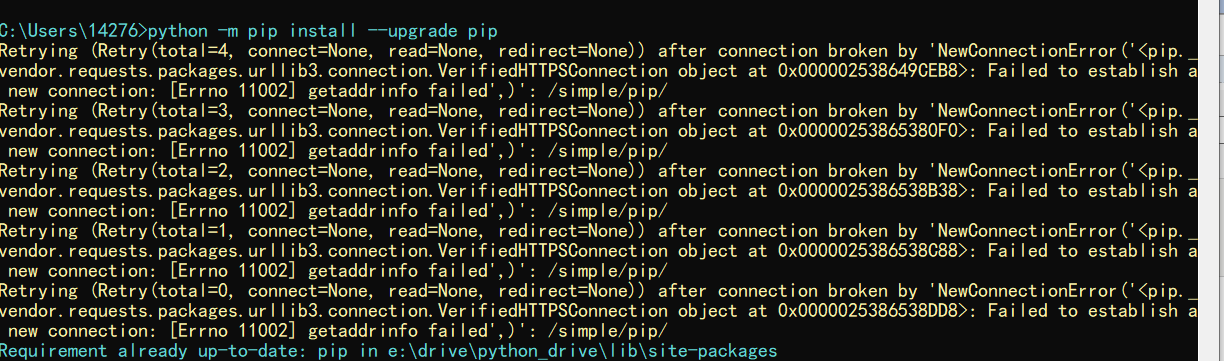
报错代码
Retrying (Retry(total=4, connect=None, read=None, redirect=None)) after connection broken by 'NewConnectionError('<pip._vendor.requests.packages.urllib3.connection.VerifiedHTTPSConnection object at 0x0000018D8B602160>: Failed to establish a new connection: [Errno 11002] getaddrinfo failed',)': /simple/pip/

Retrying (Retry(total=3, connect=None, read=None, redirect=None)) after connection broken by 'NewConnectionError('<pip._vendor.requests.packages.urllib3.connection.VerifiedHTTPSConnection object at 0x0000018D8C9B5940>: Failed to establish a new connection: [Errno 11002] getaddrinfo failed',)': /simple/pip/

Retrying (Retry(total=2, connect=None, read=None, redirect=None)) after connection broken by 'NewConnectionError('<pip._vendor.requests.packages.urllib3.connection.VerifiedHTTPSConnection object at 0x0000018D8C9B5B70>: Failed to establish a new connection: [Errno 11002] getaddrinfo failed',)': /simple/pip/

Retrying (Retry(total=1, connect=None, read=None, redirect=None)) after connection broken by 'NewConnectionError('<pip._vendor.requests.packages.urllib3.connection.VerifiedHTTPSConnection object at 0x0000018D8C9B5DD8>: Failed to establish a new connection: [Errno 11002] getaddrinfo failed',)': /simple/pip/

Retrying (Retry(total=0, connect=None, read=None, redirect=None)) after connection broken by 'NewConnectionError('<pip._vendor.requests.packages.urllib3.connection.VerifiedHTTPSConnection object at 0x0000018D8C9B5BE0>: Failed to establish a new connection: [Errno 11002] getaddrinfo failed',)': /simple/pip/
二、解决
上面的原因是因为寝室网的问题,出现了链接超时或者是无法访问外网的原因,比如无法进入python的官网,这个就是问题的原因 。解决办法:
1.换一个网络
2.使用镜像地址,比如清华园,或者是豆瓣等镜像文件这样就可以进行下载以及正确的安装了。
指令:【pip install [包名] -i http://pypi.douban.com/simple --trusted-host pypi.douban.com】
三、结果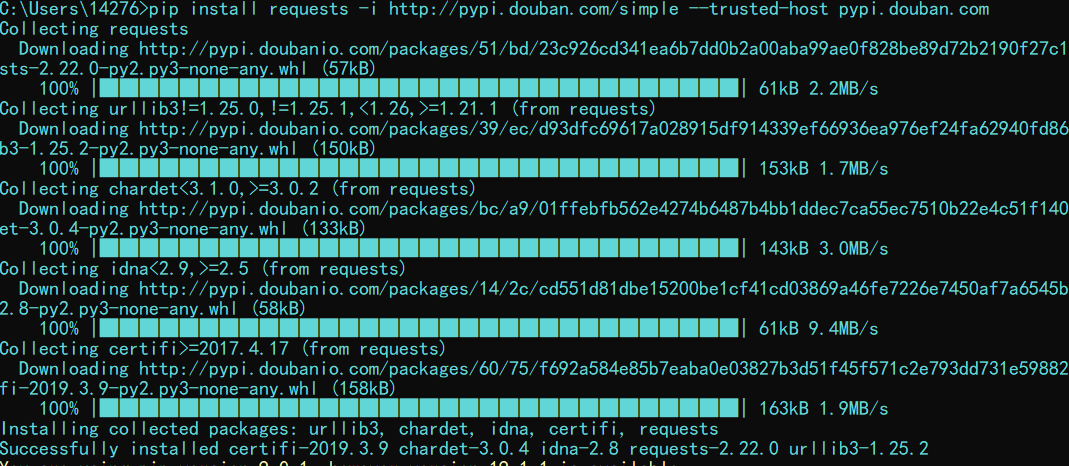
四、拓展
1.配置镜像文件这样就可以直接使用pip的指令来完成包的安装和数据的升级
2.首先在cmd中输入set,查看userprofile的位置,一般就在系统盘(C盘)下面的USER
3.在该目录下面建立一个pip的文件夹
4.在该文件下面建立一个pip.ini的文件
5.在该文件中写入如下内容,然后在保存。
[global]

index-url = https://pypi.tuna.tsinghua.edu.cn/simple

[install]

trusted-host=tsinghua.edu.cn
结果图: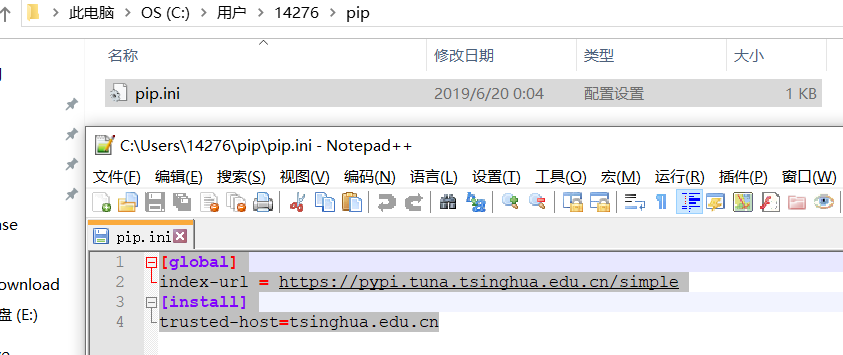
6.检验安装一个selenium和pip升级的,据此解决了前面遇到的问题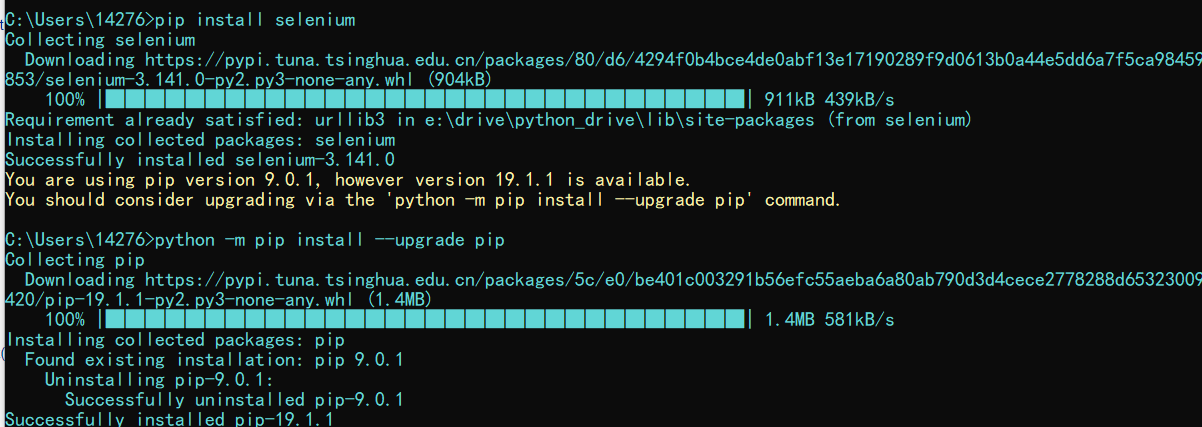
五、总结
可以看见使用命令就是【pip install [包名] -i [镜像源]】,或者使用一劳永逸法,注:如果http报错,就使用https协议
下面列举一些镜像源
阿里云 http://mirrors.aliyun.com/pypi/simple/
中国科技大学 https://pypi.mirrors.ustc.edu.cn/simple/
豆瓣(douban) http://pypi.douban.com/simple/
清华大学 https://pypi.tuna.tsinghua.edu.cn/simple/
中国科学技术大学 http://pypi.mirrors.ustc.edu.cn/simple/
python解决使用镜像源来安装包的更多相关文章
- Python:更改pip镜像源的方法
windows系统一步更换 在命令提示符中运行 pip config set global.index-url https://mirrors.aliyun.com/pypi/simple/ 具体其它 ...
- 更换Python默认软件镜像源
限于一些众所周知的原因,在我们pip安装软件的时候出现类似报错: data = self.read(amt=amt, decode_content=decode_content) File " ...
- Python: 解决pip安装源被墙的问题
pip install <package> -i http://mirrors.aliyun.com/pypi/simple --trusted-host mirrors.aliyun.c ...
- python 配置pip镜像源
在本地用户下新建pip文件夹,新建pip.ini [global] index-url = http://mirrors.aliyun.com/pypi/simple/ [install] trust ...
- Python镜像源集合——镜像源更改方法
python在线安装库时会较慢,那是因为python的默认镜像源在国外,因此会慢:而国内有很多可以用的python镜像源,将python镜像源更改为国内的,则可以大大加快python库的安装速度. 1 ...
- Python国内镜像源及报错解决方法
国内镜像源: 阿里云:https://mirrors.aliyun.com/pypi/simple/ 清华:https://pypi.tuna.tsinghua.edu.cn/simple/ 中国科技 ...
- 6.python设置代理和添加镜像源介绍
为什么要修改镜像源? 一般使用python安装库,会用到pip install xxx 指令或者conda install xxx指令,因为pip和conda默认国外镜像源,这时会在Python的官方 ...
- mark LINUX_6.8 python_2.6.6 setup版本升级 python 2.7.9 安装 pip 临时使用国内镜像源库 指定模块版本 删除指定模块
简单但却又经常需要使用 网上 贴子也很多 也经常用 所以 做个mark 吧: 1首先下载python2.7.9 源tar包 源码安装 可利用linux自带下载工具wget下载,如下所示: ...
- python pip 安装使用国内镜像源
国内镜像源 清华:https://pypi.tuna.tsinghua.edu.cn/simple 阿里云:http://mirrors.aliyun.com/pypi/simple/ 中国科技大学 ...
随机推荐
- MySQL报错合集解决办法: server has gone away, @@GLOBAL.GTID_PURGED can only be set when @@GLOBAL.GTID_MODE = ON
server has gone away: 如下图 执行以下命令 show global variables like '%timeout%'; set global interactive_time ...
- CAS 集群部署
业务场景 单点登录服务器如果压力过大的情况,那么可以使用集群分担压力,但是cas 默认不支持session同步. 所以可以需要做session同步,可以使用j2cache 实现session同步.另外 ...
- computer networking ---------DNS
[DNS]domain named system 域名解析系统,即相当于对www.baidu.com的类似的域名进行解析,对于人而言,记忆一些域名相比于记忆一些Ip地址来说简单的多,而对于计算机而言, ...
- 用 Splashtop Wired XDisplay HD 让 ipad做电脑扩展屏幕__亲测有效
参考: [1]https://blog.csdn.net/Tang_Chuanlin/article/details/86433152
- Fluter基础巩固之Dart语言详解<三>
继续Dart语言的学习,这次过后下次就进入全新的Flutter的学习了,小小的激动.. 操作符重载: C++中也有,咱们来看一下在Dart中是如何来实现的: 比较简单. 异步[重要!]: async和 ...
- 禁用wordpress模板默认样式
我们知道wordpress主题比如twentytwenty都会有样式,如果不想使用它们的默认样式怎么处理呢?其实很简单,随ytkah一起来看看吧.进入2020主题的function.php文件,里面有 ...
- l获取list 的长度,EL表达式获取list的长度,EL表达式获取list大小
在jsp页面中不能通过${list.size}取列表长度,而是 <%@ taglib uri="http://java.sun.com/jsp/jstl/core" pref ...
- [RN] 阿里 ant-design 菜单比较丰富 https://github.com/ant-design/ant-design-mobile
阿里 ant-design 菜单比较丰富 https://github.com/ant-design/ant-design-mobile 天和风雨顺 地和五谷丰 人和事业旺 家和万事兴
- ZROI 暑期高端峰会 A班 Day2 线性代数
高斯消元 很普及组,不讲了 当主元没有逆的时候可以辗转相除. 如果也没有带余数除法--没救了 逆矩阵 我们定义矩阵 \(A\) 的逆矩阵为 \(A^{-1}\),满足 \(AA^{-1}=A^{-1} ...
- 解决github clone慢的问题
github clone非常慢,解决方法,首先要有vpn 参考 https://www.zhihu.com/question/27159393 第一种方法 这种是没有vpn的方法,测试从10k到 几十 ...