
Hyperledger Fabric 入门 first-network 搭建
1.准备环境:
安装git、docker、curl、go
[root@test_vonedao_83 fabric]# git --version

git version 1.8.3.1

[root@test_vonedao_83 fabric]# curl --version

curl 7.29. (x86_64-redhat-linux-gnu) libcurl/7.29. NSS/3.36 zlib/1.2. libidn/1.28 libssh2/1.4.

Protocols: dict file ftp ftps gopher http https imap imaps ldap ldaps pop3 pop3s rtsp scp sftp smtp smtps telnet tftp

Features: AsynchDNS GSS-Negotiate IDN IPv6 Largefile NTLM NTLM_WB SSL libz unix-sockets

[root@test_vonedao_83 fabric]# go version

go version go1.12.1 linux/amd64

[root@test_vonedao_83 fabric]# docker -v

Docker version 1.13., build 7f2769b/1.13.1
[root@test_vonedao_83 fabric]# pwd
/opt/fabric
[root@test_vonedao_83 fabric]# cd /opt/fabric/
[root@test_vonedao_83 fabric]# pwd
/opt/fabric
2. 一般入门,先git拉源码(可以不拉源码,直接下载bootstrap.sh)
# git clone "https://gerrit.hyperledger.org/r/fabric"

克隆下了后,目录大概就是这些内容,暂时各个文件内容,还不太清楚。我们先去scripts里面看看:

引导脚本bootstrap.sh:会自动进行fabric相关镜像的下载 ,并且还会把fabric samples库下载下来(时间可能有点久,如果出现长时间停顿,可以尝试重新执行脚本)
执行脚本:

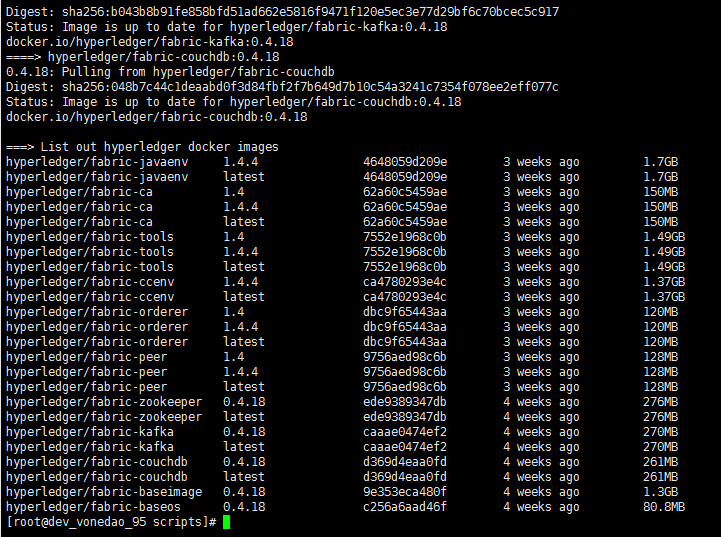
下载的fabric-samples,我们看下有什么:

在目录fabric-samples/bin下面的这些命令,可以用
export FABRIC_HOME=/你定义的路径/fabric/scripts/fabric-samples/
export PATH=$FABRIC_HOME/bin:$PATH
加入到系统环境变量中。方便可以直接使用:
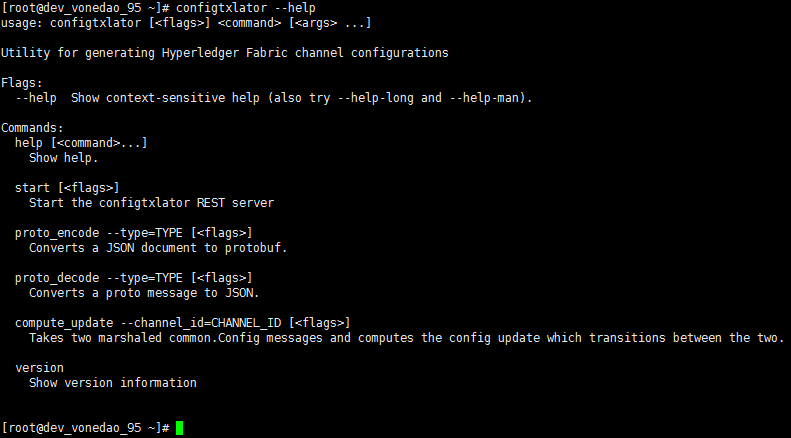
模块的命令介绍:
configtxgen 区块和交易生成模块
[root@dev_vonedao_95 first-network]# configtxgen --help
Usage of configtxgen:
-asOrg 所属组织
-channelCreateTxBaseProfile string
Specifies a profile to consider as the orderer system channel current state to allow modification of non-application parameters during channel create tx generation. Only valid in conjuction with 'outputCreateChannelTx'.
-channelID channel名称,若没有则系统提供一个默认值
-configPath 配置路径?
-inspectBlock 打印特定区块文件中的配置内容
-inspectChannelCreateTx 打印创建通道的交易配置文件
-outputAnchorPeersUpdate 更新channel配置信息
-outputBlock 输出区块文件的路径
-outputCreateChannelTx 标示输出创始块文件
-printOrg 以JSON格式打印组织的定义。(用于手动将组织添加到channel)
-profile 配置文件的节点
-version 版本信息
configtxlator 区块和交易解析模块。把区块链的二进制文件转化成JSON格式的文件,便于我们阅读和理解。
[root@dev_vonedao_95 first-network]# configtxlator --help
usage: configtxlator [<flags>] <command> [<args> ...]
Utility for generating Hyperledger Fabric channel configurations
Flags:
--help Show context-sensitive help (also try --help-long and --help-man).
Commands:
help [<command>...]
Show help.
start [<flags>] 启动configtxlator REST服务器
proto_encode --type=TYPE [<flags>]
Converts a JSON document to protobuf.
proto_decode --type=TYPE [<flags>]
Converts a proto message to JSON.
compute_update --channel_id=CHANNEL_ID [<flags>]
Takes two marshaled common.Config messages and computes the config update which transitions between the two.
version
Show version information
cryptogen 组织和证书生成模块
[root@dev_vonedao_95 first-network]# cryptogen --help
usage: cryptogen [<flags>] <command> [<args> ...]
Utility for generating Hyperledger Fabric key material
Flags:
--help Show context-sensitive help (also try --help-long and --help-man).
Commands:
help [<command>...]
Show help.
generate [<flags>]
Generate key material
showtemplate
Show the default configuration template
version
Show version information
extend [<flags>]
Extend existing network
orderer 交易打包、排序模块
[root@dev_vonedao_95 first-network]# orderer --help
usage: orderer [<flags>] <command> [<args> ...]
Hyperledger Fabric orderer node
Flags:
--help Show context-sensitive help (also try --help-long and --help-man).
Commands:
help [<command>...]
Show help.
start*
Start the orderer node
version
Show version information
benchmark
Run orderer in benchmark mode
peer 主节点模块,负责存储区块链数据,运行维护链码
[root@dev_vonedao_95 first-network]# orderer --help
usage: orderer [<flags>] <command> [<args> ...]
Hyperledger Fabric orderer node
Flags:
--help Show context-sensitive help (also try --help-long and --help-man).
Commands:
help [<command>...]
Show help.
start*
Start the orderer node
version
Show version information
benchmark
Run orderer in benchmark mode
discover 发现服务的客户端
[root@dev_vonedao_95 first-network]# discover --help

usage: discover [<flags>] <command> [<args> ...]

Command line client for fabric discovery service

Flags:

  --help                   Show context-sensitive help (also try --help-long and --help-man).

  --configFile=CONFIGFILE  Specifies the config file to load the configuration from

  --peerTLSCA=PEERTLSCA    Sets the TLS CA certificate file path that verifies the TLS peer's certificate

  --tlsCert=TLSCERT        (Optional) Sets the client TLS certificate file path that is used when the peer enforces client authentication

  --tlsKey=TLSKEY          (Optional) Sets the client TLS key file path that is used when the peer enforces client authentication

  --userKey=USERKEY        Sets the user's key file path that is used to sign messages sent to the peer

  --userCert=USERCERT      Sets the user's certificate file path that is used to authenticate the messages sent to the peer

  --MSP=MSP                Sets the MSP ID of the user, which represents the CA(s) that issued its user certificate

Commands:

  help [<command>...]

    Show help.

  peers [<flags>]

    Discover peers

  config [<flags>]

    Discover channel config

  endorsers [<flags>]

    Discover chaincode endorsers

  saveConfig

    Save the config passed by flags into the file specified by --configFile
fabric-ca-client 证书颁发客户端
[root@dev_vonedao_95 first-network]# fabric-ca-client --help

Hyperledger Fabric Certificate Authority Client

Usage:

  fabric-ca-client [command]

Available Commands:

  affiliation Manage affiliations

  certificate Manage certificates

  enroll      Enroll an identity

  gencrl      Generate a CRL

  gencsr      Generate a CSR

  getcainfo   Get CA certificate chain and Idemix public key

  identity    Manage identities

  reenroll    Reenroll an identity

  register    Register an identity

  revoke      Revoke an identity

  version     Prints Fabric CA Client version

Flags:

      --caname string                  Name of CA

      --csr.cn string                  The common name field of the certificate signing request

      --csr.hosts stringSlice          A list of comma-separated host names in a certificate signing request

      --csr.keyrequest.algo string     Specify key algorithm

      --csr.keyrequest.size int        Specify key size

      --csr.names stringSlice          A list of comma-separated CSR names of the form <name>=<value> (e.g. C=CA,O=Org1)

      --csr.serialnumber string        The serial number in a certificate signing request

      --enrollment.attrs stringSlice   A list of comma-separated attribute requests of the form <name>[:opt] (e.g. foo,bar:opt)

      --enrollment.label string        Label to use in HSM operations

      --enrollment.profile string      Name of the signing profile to use in issuing the certificate

      --enrollment.type string         The type of enrollment request: 'x509' or 'idemix' (default "x509")

  -H, --home string                    Client's home directory (default "/root/.fabric-ca-client")

      --id.affiliation string          The identity's affiliation

      --id.attrs stringSlice           A list of comma-separated attributes of the form <name>=<value> (e.g. foo=foo1,bar=bar1)

      --id.maxenrollments int          The maximum number of times the secret can be reused to enroll (default CA's Max Enrollment)

      --id.name string                 Unique name of the identity

      --id.secret string               The enrollment secret for the identity being registered

      --id.type string                 Type of identity being registered (e.g. 'peer, app, user') (default "client")

      --loglevel string                Set logging level (info, warning, debug, error, fatal, critical)

  -M, --mspdir string                  Membership Service Provider directory (default "msp")

  -m, --myhost string                  Hostname to include in the certificate signing request during enrollment (default "dev_vonedao_95")

  -a, --revoke.aki string              AKI (Authority Key Identifier) of the certificate to be revoked

  -e, --revoke.name string             Identity whose certificates should be revoked

  -r, --revoke.reason string           Reason for revocation

  -s, --revoke.serial string           Serial number of the certificate to be revoked

      --tls.certfiles stringSlice      A list of comma-separated PEM-encoded trusted certificate files (e.g. root1.pem,root2.pem)

      --tls.client.certfile string     PEM-encoded certificate file when mutual authenticate is enabled

      --tls.client.keyfile string      PEM-encoded key file when mutual authentication is enabled

  -u, --url string                     URL of fabric-ca-server (default "http://localhost:7054")

Use "fabric-ca-client [command] --help" for more information about a command.
idemixgen 用来根据 MSP 为身份混合器创建配置文件
[root@dev_vonedao_95 first-network]# idemixgen --help

usage: idemixgen [<flags>] <command> [<args> ...]

Utility for generating key material to be used with the Identity Mixer MSP in Hyperledger Fabric

Flags:

  -h, --help                    Show context-sensitive help (also try --help-long and --help-man).

      --output="idemix-config"  The output directory in which to place artifacts

Commands:

  help [<command>...]

    Show help.

  ca-keygen

    Generate CA key material

  signerconfig [<flags>]

    Generate a default signer for this Idemix MSP

  version

    Show version information
学习下byfn.sh脚本的相关命令和参数:
[root@dev_vonedao_95 first-network]# sh byfn.sh

Usage:

  byfn.sh <mode> [-c <channel name>] [-t <timeout>] [-d <delay>] [-f <docker-compose-file>] [-s <dbtype>] [-l <language>] [-o <consensus-type>] [-i <imagetag>] [-a] [-n] [-v]

    <mode> - one of 'up', 'down', 'restart', 'generate' or 'upgrade'

      - 'up' - bring up the network with docker-compose up    启动网络

      - 'down' - clear the network with docker-compose down   关闭网络

      - 'restart' - restart the network   重启网络

      - 'generate' - generate required certificates and genesis block    生成证书和创世区块

      - 'upgrade'  - upgrade the network from version 1.3.x to 1.4.0     将网络从1.3升级到1.4

    -c <channel name> - channel name to use (defaults to "mychannel")    设置channel名称,默认mychannel

    -t <timeout> - CLI timeout duration in seconds (defaults to )      CLI超时时间,默认10秒

    -d <delay> - delay duration in seconds (defaults to )               延时时间,默认3秒

    -f <docker-compose-file> - specify which docker-compose file use (defaults to docker-compose-cli.yaml)   指定docker-compose文件,默认docker-compose-cli.yaml
-s <dbtype> - the database backend to use: goleveldb (default) or couchdb 指定使用的数据库,默认是goleveldb或者couchdb
-l <language> - the chaincode language: golang (default) or node 指定链码使用的语言,默认是golang或者node

-o <consensus-type> - the consensus-type of the ordering service: solo (default), kafka, or etcdraft  指定排序服务使用的共识机制。默认是solo,kafka或者etcdraft

-i <imagetag> - the tag to be used to launch the network (defaults to "latest") 用于启动网络的镜像版本。默认是latest

-a - launch certificate authorities (no certificate authorities are launched by default) 启动证书颁发机构,默认没有证书颁发机构

-n - do not deploy chaincode (abstore chaincode is deployed by default) 不部署链码(默认情况下部署Absore链码)

-v - verbose mode 版本信息
byfn.sh -h (print this message)
Typically, one would first generate the required certificates and
genesis block, then bring up the network. e.g.:
byfn.sh generate -c mychannel
byfn.sh up -c mychannel -s couchdb
byfn.sh up -c mychannel -s couchdb -i 1.4.0
byfn.sh up -l node
byfn.sh down -c mychannel
byfn.sh upgrade -c mychannel
Taking all defaults:
byfn.sh generate
byfn.sh up
byfn.sh down
Hyperledger Fabric 入门 first-network 搭建的更多相关文章
- Hyperledger fabric 1.4 环境搭建(一)
Hyperledger fabric 1.4 环境搭建(一) 1.更换下载源 更换apt的下载源,因为官方下载源很慢,需要更换到国内的镜像站 1.1.进入/etc/apt/目录 cd etc/apt ...
- 基于docker的 Hyperledger Fabric 多机环境搭建(上)
环境:ubuntu 16.04 Docker 17.04.0-ce go 1.7.4 consoul v0.8.0.4 ======================================= ...
- 基于docker的 Hyperledger Fabric 多机环境搭建(下)
Docker环境部署见上一篇博客:http://www.cnblogs.com/cnblogs-wangzhipeng/p/6994541.html. 我们部署分布式容器服务后就要在上面部署Fabri ...
- Hyperledger Fabric 1.0 学习搭建 (五)--- 启动Fabric多节点集群
5.1.启动orderer节点服务 上述操作完成后,此时各节点的compose配置文件及证书验证目录都已经准备完成,可以开始尝试启动多机Fabric集群. 首先启动orderer节点,切换至order ...
- Hyperledger Fabric 1.0 学习搭建 (四)--- 创建Fabric多节点集群
4.1.配置说明 首先可以根据官方Fabric自带的e2e_cli列子中的集群方案来生成我们自己的集群,与案例不同的是我们需要把容器都分配到不同的服务器上,彼此之间通过网络来进行通信,网络构建完成后则 ...
- Hyperledger Fabric 1.0 学习搭建 (三)--- 运行测试e2e-Fabric
3.1.运行fabric-samples的问题说明 该问题说明能够解决6.1.平台特定使用的二进制文件配置第一步的问题.可以选择继续阅读该说明,或者等参考到6.1小节时再反向阅读本说明,具体在6.1中 ...
- Hyperledger Fabric 1.0 学习搭建 (二)--- 源码及镜像文件处理
2.1下载Fabric源码下载Fabric源码是因为要用到源码中提到的列子和工具, 工具编译需要用到go语言环境, 因此需要把源码目录放到$GOPATH下. 通过1.3中go的安装配置, $GOPAT ...
- Hyperledger Fabric 1.0 学习搭建 (一)--- 基础环境搭建
1: 环境构建在本文中用到的宿主机环境是Centos ,版本为Centos.x86_64 7.2, 一定要用7版本以上, 要不然会安装出错. 通过Docker 容器来运行Fabric的节点,版本为v1 ...
- HyperLedger Fabric 学习思路分享
HyperLedger Fabric 学习思路分享 HyperLedger Fabric最初是由Digital Asset和IBM公司贡献的.由Linux基金会主办的一个超级账本项目,它是一个目前非常 ...
随机推荐
- Manjaro Linux使用1月滚粗记
每个OIer都有对Linux的向往(雾) 这不,一个月前我便看上了Manjaro,主要原因是因为Manjaro软件包全,安装简便,下面就来说说我退回windows的原因: 1.桌面卡顿,我用的gnom ...
- hadoop spark合并小文件
一.输入文件类型设置为 CombineTextInputFormat hadoop job.setInputFormatClass(CombineTextInputFormat.class) sp ...
- STL next_permutation 全排列
调用方法: ]={,,,}; )){ ;i<;i++) printf("%d ",arr[i]); puts(""); } 测试效果: 注:可以看到1 2 ...
- codeblock代码片段
for循环 ; $(index name)<| ; $(index name)++ ){ } 2. 反向for循环 ; $(index name)>= ; $(index name)-- ...
- 牛客网 牛客练习赛4 A.Laptop-二维偏序+离散化+树状数组
A.Laptop 链接:https://ac.nowcoder.com/acm/contest/16/A来源:牛客网 时间限制:C/C++ 1秒,其他语言2秒 空间限制:C/C++ 131072K,其 ...
- bootstrap-全局CSS&js插件
一.全局CSS 1.概述 1. 全局CSS样式: * 按钮:class="btn btn-default" * 图片: * class="img-responsive&q ...
- ES6基础-变量的解构赋值
作者 | Jeskson 来源 | 达达前端小酒馆 解构赋值: 数组的解构赋值,对象的解构赋值,字符串的解构赋值,数值与布尔值的解构赋值,函数参数的解构赋值. 开发环境准备: 编辑器,VS Code, ...
- nginx 配置虚拟主机( 基于域名 )
一.创建网站目录及文件: [root@localhost data]# tree /data /data └── wwwroot ├── www..com │ └── index.html └── ...
- CSS样式的引入方式
test.css div{ color:yellow; } 在html中引入 <link href="test.css" type="text/css" ...
- SpringMVC实现文件下载的两种方式及多文件下载
1.传统方法 @RequestMapping("/download") public String download( String fileName ,String filePa ...