
iTextSharp生成pdf含模板(二)---C#代码部分
参考地址:https://www.cnblogs.com/ibeisha/p/itextsharp-pdf.html
一、先在程序中使用Nuget安装iTextSharp(我是创建的控制台程序)
二、建立静态常量类
     public class ConstantInfo

     {

         /// <summary>

         /// 证书下载目录

         /// </summary>

         public static string _Certificate { get { return "/DownloadResource/Certificate/"; } }

         /// <summary>

         /// 证书模板目录

         /// </summary>

         public static string _CertificateTemplate { get { return "/Resources/"; } }

     }
三、生成pdf主体代码
     class Program

     {

         static void Main(string[] args)

         {

             //生成的pdf文件名称

             string fileName = "Certificate_test.pdf";

             //生成的pdf文件目录

             string downloadFilePath = AppDomain.CurrentDomain.BaseDirectory + ConstantInfo._Certificate;

             //生成的pdf文件完整路径

             string downloadFileName = downloadFilePath + fileName;

             //如没有,则创建

             if (!Directory.Exists(downloadFilePath))

             {

                 Directory.CreateDirectory(downloadFilePath);

             }

             //证书模板目录

             string templateFilePath = AppDomain.CurrentDomain.BaseDirectory + ConstantInfo._CertificateTemplate + "TemplateCer.pdf";

             //可直接写成固定目录

             //string tempFilePath = "D:\\tmp.pdf";

             //字体资源

             string fontFilePath = AppDomain.CurrentDomain.BaseDirectory + ConstantInfo._CertificateTemplate + "msyhbd.ttf";

             iTextSharp.text.pdf.PdfReader pdfReader = new iTextSharp.text.pdf.PdfReader(templateFilePath);

             PdfStamper pdfStamper = new PdfStamper(pdfReader, new FileStream(downloadFileName, FileMode.OpenOrCreate));

             AcroFields pdfFormFields = pdfStamper.AcroFields;

             pdfStamper.FormFlattening = true;

             //BaseFont bf = BaseFont.CreateFont(BaseFont.HELVETICA, BaseFont.CP1252, BaseFont.NOT_EMBEDDED);

             BaseFont simheiBase = BaseFont.CreateFont(fontFilePath, BaseFont.IDENTITY_H, BaseFont.EMBEDDED);

             //添加图片

             //Image image = Image.GetInstance("");

             //pdfStamper.Writer.Add(image);

             pdfFormFields.AddSubstitutionFont(simheiBase);

             //根据pdf中对应的表单域(一定要一致)赋对应的值

             pdfStamper.AcroFields.SetField("Name", "小红");

             pdfStamper.AcroFields.SetField("Score", "");

             pdfStamper.AcroFields.SetField("CompanyName", "测试测试");

             pdfStamper.AcroFields.SetField("Date", "2019-7-17");

             //pdfStamper.AcroFields.SetField("chk", "yes", true);

             pdfStamper.Close();

             pdfReader.Close();

             Console.Read();

             //解析文本

             //PdfReaderContentParser parser = new PdfReaderContentParser(pdfReader);

             //PdfWriter pdfWriter;

             //ITextExtractionStrategy strategy;

             //strategy = parser.ProcessContent<SimpleTextExtractionStrategy>(1, new SimpleTextExtractionStrategy());

             //string ss = strategy.GetResultantText();

             //byte[] buffer = pdfReader.GetPageContent(1);

             //string strBody = System.Text.Encoding.Default.GetString(buffer);

         }

     }
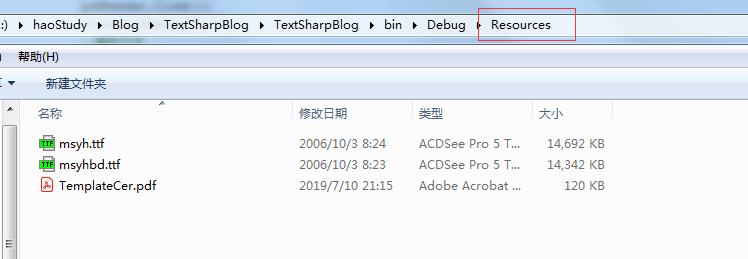
四、文件路径如图:

其中ttf是用到的字体,看自己需要用到什么字体,可直接从网上下载对应的字体
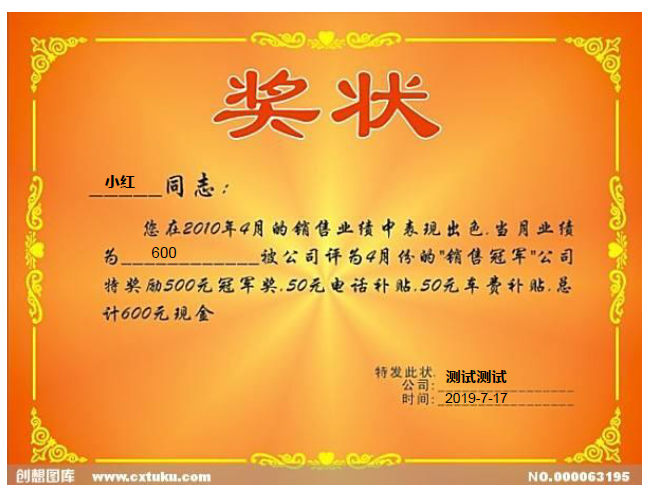
生成的效果图
后记:最近遇到一个问题,在软件中已经用预览功能调整好字体的大小,但是在程序中,如果不用下载字体的话,值赋不上,如果用下载的字体(ttf)的话,和在软件中设置的还是有差别的。最后还是得再调整。有时间一定要看看这个问题。
iTextSharp生成pdf含模板(二)---C#代码部分的更多相关文章
- iTextSharp生成pdf含模板(一)---制作pdf模板
参考地址:https://www.cnblogs.com/ibeisha/p/itextsharp-pdf.html 一.使用场景:在线填写一些信息,根据对应的信息生成奖状. 二.解决方案 1.新建w ...
- itextsharp生成pdf后的直接打印问题
原文 itextsharp生成pdf后的直接打印问题 小弟这两天用itextsharp生成pdf文档,生成的pdf可以直接保存在指定路径的文件夹下,可是user不想保存,想要点一下button,就可以 ...
- iTextSharp生成PDF文件
这是一篇简单的教程,所以只涉及一些iTextSharp生成pdf的简单应用,详细教程请搜索iTextSharp进入官网看官方文档(英文版). iTextSharp官方文档:https://itextp ...
- C#使用itextsharp生成PDF文件
项目需求需要生成一个PDF文档,使用的是VS2010,ASP.NET. 网络上多次搜索没有自己想要的,于是硬着头皮到itextpdf官网看英文文档,按时完成任务,以实用为主,共享一下: 使用HTML文 ...
- iTextSharp生成pdf的一个简单例子
效果图: 参考:http://www.cnblogs.com/CareySon/archive/2011/11/09/2243496.html http://www.cnblogs.com/julyl ...
- iTextSharp生成pdf文档案例
1.using iTextSharp.text;using iTextSharp.text.pdf; 2.设置页面大小 iTextSharp.text.Rectangle pageSize = new ...
- itextsharp生成pdf
itextsharp在ios中可用,亲测 (一)生成文档 Document document = , , , ), , , , ); //Document document = new Documen ...
- 利用ItextSharp 生成PDF文档改进版
导入的ItextSharp.dll一定要是较高的版本 数据库表结构 生成的PDF样式 代码: namespace WebPDF { public partial class _Default : Sy ...
- .Net iTextSharp 生成pdf
拿别人例子 public ActionResult index() { var ms = new MemoryStream(); #region CreatePDF Document document ...
随机推荐
- JS高阶---作用域与执行上下文
一句话介绍 .
- django学习-安装、创建应用、编写视图
快速安装指南 py -3 -m pip install django >>> import django >>> django.get_version() '2.2 ...
- windows 上jenkins slave 执行脚本提示成功,但是没有运行
控制台结果,但是脚本没有运行Started by user admin Building remotely on test_1110 in workspace D:\jenkins\workspace ...
- hbase链接失败
https://blog.csdn.net/u010886217/article/details/84444046
- 处理海量数据的grep、cut、awk、sed 命令
grep.cut.awk.sed 常常应用在查找日志.数据.输出结果等等,并对我们想要的数据进行提取. 通常grep,sed命令是对行进行提取,cut跟awk是对列进行提取 处理海量数据之grep命令 ...
- 使用async-profiler简单分析zeebe 工作流引擎的性能
刚开始的时候直接使用的系统暴露的prometheus metrics,发现越高的版本反而性能越差,期间使用过了 perf 打算使用perf 生成火焰图的,但是因为符号缺失,只找到了占用较高的任务,详细 ...
- CentOS7 部署nfs服务
参考博客 参考博客 https://blog.51cto.com/addam/1576144 错误1: 客户端挂载nfs报错mount: wrong fs type, bad option, bad ...
- 洛谷 P4290 [HAOI2008]玩具取名
传送门 思路 博客半年没更新了,来更新个博文吧 在\(dsr\)聚聚博客的帮助下,我用半个上午和一个中午的时间苟延残喘地完成了这道题 先是读题目读大半天,最后连个样例都看不懂 之后又是想思路,实在想不 ...
- [LeetCode] 322. Coin Change 硬币找零
You are given coins of different denominations and a total amount of money amount. Write a function ...
- [LeetCode] 187. Repeated DNA Sequences 求重复的DNA序列
All DNA is composed of a series of nucleotides abbreviated as A, C, G, and T, for example: "ACG ...