
Vue插槽详解 | 什么是插槽?

作者 | Jeskson
来源 | 达达前端小酒馆
什么是插槽?插槽的指令为v-slot,它目前取代了slot和slot-scope,插槽内容,vue实例一套内容分发的api,将slot元素作为承载分发内容的出口。
组件的书写:
<my-link url="/profile">

dada

</my-link>
运用组件模板,可以在里面书写:
<a v-bind:href="url" class="css-link">

<slot></slot>

</a>

<slot></slot>会替换dada
插槽内可以写任何模板代码:
<my-link url="/profile">

<span class=“weixin"> </span>

dada

</my-link>
<my-link url="/profile">

<my-icon name="user"></my-icon>

dada

<my-link>

// 添加图标组件
如果my-link没有包含一个slot元素,之间的任何内容都会消失。
什么是插槽,它是vue提出的一个概念,插槽用于决定将所携带的内容,插入到指定的某个位置,使得模块分块,具有模块化特质。
插槽怎么用?
// 父组件

<template>

<div>

我是父组件

<slotda>

<p style="color:red">我是父组件得插槽内容</p>

</slotda>

<div>

</template>
在父组件中引用子组件中写入想要得显示内容
子组件slotda
<template>

<div class="slotda">

 <div>我是slotda组件</div>

 <slot></slot>

 </idv>

</template>
在子组件中写入slot,所在位置就是父组件要显示得内容
// 父组件

<template>

<div>

我是父组件

<slotda>

<p style="color:red">我是父组件插槽内容</p>

<slotdd></slotdd>

</div>

</template>
子组件
<template>

<div class="slotdd">

我是slotdd组件

</div>

</template>
具名插槽
<template>

<div class="slotdadada">

 <div>slotdadada</div>

 <slot name="header"></slot>

 <slot></slot>

 <slot name="footer"></slot>

</div>

</template>

子组件
父组件
<template>

<div>

我是父组件

<slotdadada>

 <p>dada</p>

 <template slot="header">

 <p>da</p>

 </template>

 <p slot="footer">我是footer</p>

</slotdadada>

</div>

</template>
插槽默认内容
// 父组件

<template>

<div>

我是父组件

<slotdd></slotdd>

</div>

</template>
子组件
<template>

<div class="slotdd">

 <slot>ddd</slot>

 </div>

</template>
作用域
<template>

<div>

我是父组件

<slot-d>

<p>{{name}}</p>

</slot-d>

</div>

</template>

<script>

export default {

 data() {

  return {

   name: 'dada'

  }

}}

</script>
子组件
<template>

<div class="slot-d">

<slot></slot>

</div>

</template>
插槽可以是任意内容:
插槽就是Vue实现的一套内容分发的API,将元素作为承载分发内容的出口。
没有插槽的情况下,在组件标签内些一些内容是不起任何作用的,当我在组件中声明了slot元素后,在组件元素内写的内容就会跑到它这里了!
<div id="app">

<child-component></child-component>

</div>

</script>

Vue.component('child-component', {

 template: `

 <div>Hello,World!</div>

 `

 })

 let vm = new Vue({

 el: '#app',

 data:{

 }

})

</script>
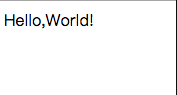
<child-component>你好</child-component>
组件之间得内容没有显示,使用插槽就有显示了,看看如何用:
Vue.component('child-component',{

        template:`

            <div>

            Hello,World!

            <slot></slot>

            </div>

        `

    })
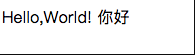
具名插槽,就是给这个插槽起个名字,slot属性对应的内容都会和组件中name一一对应。
child-component,没有名字得就是默认得。
<div id="app">

    <child-component>

        <template slot="girl">

            购物、逛街

        </template>

        <template slot="boy">

            帅气

        </template>

        <div>

            我是人

            我是默认的插槽

        </div>

    </child-component>

</div>
<script>

    Vue.component('child-component',{

        template:`

            <div>

            <h4>这个世界有男人和女人</h4>

            <slot name="girl"></slot>

            <div style="height:1px;background-color:red;"></div>

            <slot name="boy"></slot>

            <div style="height:1px;background-color:red;"></div>

            <slot></slot>

            </div>

        `

    })

    let vm = new Vue({

        el:'#app',

        data:{

        }

    })

</script>
作用域插槽,在组件上的属性,可以在组件元素内使用!
在template元素上添加属性slot-scope
<div id="app">

    <child>

        <template slot-scope="a">

      <!-- {"say":"你好"} -->

            {{a}}

        </template>

    </child>

</div>
Vue.component('child',{

        template:`

            <div>

                <slot say="你好"></slot>

            </div>

        `

    })
<div id="app">

    <child :lists="nameList">

        <template slot-scope="a">

            {{a}}

        </template>

    </child>

</div>
Vue.component('child',{

        props:['lists'],

        template:`

            <div>

                <ul>

                    <li v-for="list in lists">

                        <slot :bbbbb="list"></slot>

                    </li>

                </ul>

            </div>

        `

    })
在一个组件中使用 标签,就是定义一个插槽。
如果组件中没包含任何被传入的东西都会被抛弃。
<div class="container">

  <header>

    <slot name="header"></slot>

  </header>

  <main>

    <slot></slot>

  </main>

  <footer>

    <slot name="footer"></slot>

  </footer>

</div>
<base-layout>

  <template slot="header">

    <h1>d</h1>

  </template>

  <p>dd.</p>

  <p>dd.</p>

  <template slot="footer">

    <p> ddd </p>

  </template>

</base-layout>
<base-layout>

  <h1 slot="header">H</h1>

  <p>A.</p>

  <p>A.</p>

  <p slot="footer">H</p>

</base-layout>
在没有指定slot属性的时候 都会放在slot没有name属性的插槽当中。
编译作用域
插槽中的内容不能访问父级作用域
<navigation-link url="/profile">

  Logged in as {{ user.name }}

</navigation-link>

// 部分不能访问 url
父组件模板的所有东西都会在父级作用域内编译;子组件模板的所有东西都会在子级作用域内编译。
<ul>

  <li

    v-for="todo in todos"

    v-bind:key="todo.id"

  >

    {{ todo.text }}

  </li>

</ul>
合成组件:
<div id="app1">

  <navigation-link url="/profile">

    Your Profile

  </navigation-link>

</div>
然后你在 <navigation-link> 的模板中可能会写为:
Vue.component('navigation-link', {

    template: `

      <a

        v-bind:href="url" rel="external nofollow"

        class="nav-link"

      >

      <slot></slot>

      </a>

    `

  });
当组件渲染的时候,这个 元素将会被替换为“Your Profile”。
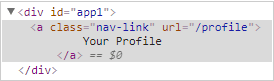
插槽内可以包含任何模板代码
<navigation-link url="/profile">

 <!-- 添加一个 Font Awesome 图标 -->

 <span class="fa fa-user"></span>

 Your Profile

</navigation-link>
也可以是组件:
<navigation-link url="/profile">

 <!-- 添加一个图标的组件 -->

 <font-awesome-icon name="user"></font-awesome-icon>

 Your Profile

</navigation-link>
但是如果在navigation-link中没有包含一个slot元素,都会让之间得内容都消失得。
具名插槽
需要多个插槽
<div class="container">

 <header>

  <!-- 我们希望把页头放这里 -->

 </header>

 <main>

  <!-- 我们希望把主要内容放这里 -->

 </main>

 <footer>

  <!-- 我们希望把页脚放这里 -->

 </footer>

</div>

<div class="container">

 <header>

  <slot name="header"></slot>

 </header>

 <main>

  <slot></slot>

 </main>

 <footer>

  <slot name="footer"></slot>

 </footer>

</div>

<base-layout>

 <template slot="header">

  <h1></h1>

 </template>

 <p></p>

 <p></p>

 <template slot="footer">

  <p></p>

 </template>

</base-layout>
作用域插槽
Vue.component('todo-list',{

    template:`

    <ul>

      <li

        v-for="todo in todos"

        v-bind:key="todo.id">

        {{ todo.text }}

      </li>

    </ul>

    `

  });

  <ul>

 <li

  v-for="todo in todos"

  v-bind:key="todo.id"

 >

  <!-- 我们为每个 todo 准备了一个插槽,-->

  <!-- 将 `todo` 对象作为一个插槽的 prop 传入。-->

  <slot v-bind:todo="todo">

   <!-- 回退的内容 -->

   {{ todo.text }}

  </slot>

 </li>

</ul>
看代码后,插槽内容基本了解。对于编译作用域:
<navigation-link url="/profile">

  Logged in as {{ user.name }}

</navigation-link>
该插槽和模板得其他地方一样都可以访问相同的实例属性,就是相同的”作用域“,但不能访问navigation-link标签的作用域。
<navigation-link url="/profile">

  Clicking here will send you to: {{ url }}

  <!--

  这里的 `url` 会是 undefined,因为 "/profile" 是

  _传递给_ <navigation-link> 的而不是

  在 <navigation-link> 组件*内部*定义的。

  -->

</navigation-link>
我了解了呢。
后备内容
<button type="submit">

  <slot></slot>

</button>
<button type="submit">

  <slot>Submit</slot>

</button>
<submit-button></submit-button>

<button type="submit">

  Submit

</button>
作用域插槽
<span>

  <slot>{{ user.lastName }}</slot>

</span>

<current-user>

  {{ user.firstName }}

</current-user>

然而上述代码不会正常工作,因为只有 <current-user>

组件可以访问到 user 而我们提供的内容是在父级渲染的。

<span>

  <slot v-bind:user="user">

    {{ user.lastName }}

  </slot>

</span>
绑定在 元素上的特性被称为插槽 prop
<current-user>

  <template v-slot:default="slotProps">

    {{ slotProps.user.firstName }}

  </template>

</current-user>
<current-user v-slot:default="slotProps">

  {{ slotProps.user.firstName }}

</current-user>

<current-user v-slot="slotProps">

  {{ slotProps.user.firstName }}

</current-user>
默认插槽的缩写语法不能和具名插槽混用
<!-- 无效,会导致警告 -->

<current-user v-slot="slotProps">

  {{ slotProps.user.firstName }}

  <template v-slot:other="otherSlotProps">

    slotProps is NOT available here

  </template>

</current-user>
多个插槽的写法:
<current-user>

  <template v-slot:default="slotProps">

    {{ slotProps.user.firstName }}

  </template>

  <template v-slot:other="otherSlotProps">

    ...

  </template>

</current-user>
解构插槽 Prop
function (slotProps) {

  // 插槽内容

}

<current-user v-slot="{ user }">

  {{ user.firstName }}

</current-user>

<current-user v-slot="{ user: person }">

  {{ person.firstName }}

</current-user>
动态插槽名
<base-layout>

  <template v-slot:[dynamicSlotName]>

    ...

  </template>

</base-layout>
❤️ 不要忘记留下你学习的脚印 [点赞 + 收藏 + 评论]
作者Info:
【作者】:Jeskson
【原创公众号】:达达前端小酒馆。
【福利】:公众号回复 “资料” 送自学资料大礼包(进群分享,想要啥就说哈,看我有没有)!
【转载说明】:转载请说明出处,谢谢合作!~
大前端开发,定位前端开发技术栈博客,PHP后台知识点,web全栈技术领域,数据结构与算法、网络原理等通俗易懂的呈现给小伙伴。谢谢支持,承蒙厚爱!!!
若本号内容有做得不到位的地方(比如:涉及版权或其他问题),请及时联系我们进行整改即可,会在第一时间进行处理。
请点赞!因为你们的赞同/鼓励是我写作的最大动力!
欢迎关注达达的CSDN!
这是一个有质量,有态度的博客

Vue插槽详解 | 什么是插槽?的更多相关文章
- Vue 路由详解
Vue 路由详解 对于前端来说,其实浏览器配合超级连接就很好的实现了路由功能.但是对于单页面应用来说,浏览器和超级连接的跳转方式已经不能适用,所以各大框架纷纷给出了单页面应用的解决路由跳转的方案. V ...
- Vue 实例详解与生命周期
Vue 实例详解与生命周期 Vue 的实例是 Vue 框架的入口,其实也就是前端的 ViewModel,它包含了页面中的业务逻辑处理.数据模型等,当然它也有自己的一系列的生命周期的事件钩子,辅助我们进 ...
- Vue.prototype详解
参考地址:Vue.prototype详解 如果需要设置 全局变量,在main.js中,Vue实例化的代码里添加. 不想污染全局作用域.这种情况下,你可以通过在 原型 上定义它们使其在每个Vue实例中可 ...
- 六. Vue CLI详解
1. Vue CLI理解 1.1 什么是Vue CLI 如果你只是简单写几个Vue的Demo程序, 那么你不需要Vue CLI,如果你在开发大型项目那么你需要它, 并且必然需要使用Vue CLI. 使 ...
- Vue插槽详解
简介 插槽:简单理解就是组件内部留一个或多个的插槽位置,可供组件传对应的模板代码进去.插槽的出现,让组件变的更加灵活. 一.匿名插槽 // 组件(父) <my-component> < ...
- Vue 插槽详解
Vue插槽,是学习vue中必不可少的一节,当初刚接触vue的时候,对这些掌握的一知半解,特别是作用域插槽一直没明白. 后面越来越发现插槽的好用. 分享一下插槽的一些知识吧. 分一下几点: 1.插槽内可 ...
- Vue.js 源码分析(二十五) 高级应用 插槽 详解
我们定义一个组件的时候,可以在组件的某个节点内预留一个位置,当父组件调用该组件的时候可以指定该位置具体的内容,这就是插槽的用法,子组件模板可以通过slot标签(插槽)规定对应的内容放置在哪里,比如: ...
- 05-Vue入门系列之Vue实例详解与生命周期
Vue的实例是Vue框架的入口,其实也就是前端的ViewModel,它包含了页面中的业务逻辑处理.数据模型等,当然它也有自己的一系列的生命周期的事件钩子,辅助我们进行对整个Vue实例生成.编译.挂着. ...
- vue实例详解
Vue实例的构造函数 每个 Vue.js 应用都是通过构造函数 Vue 创建一个 Vue 的根实例 启动的 虽然没有完全遵循 MVVM 模式, Vue 的设计无疑受到了它的启发.因此在文档中经常会使用 ...
随机推荐
- Loj #2553. 「CTSC2018」暴力写挂
Loj #2553. 「CTSC2018」暴力写挂 题目描述 temporaryDO 是一个很菜的 OIer .在 4 月,他在省队选拔赛的考场上见到了<林克卡特树>一题,其中 \(k = ...
- torch_11_BEGAN
BEGAN: 创新: 1.不是考虑生成图片与真实图片之间的真实的分布,而是估计分布的误差的分布之间的差距. 2.G,D的能力平衡提出了一种均衡的概念 3.提供了一种超参数,这超参数可以在图片的多样性和 ...
- 《Spring + MyBatis 企业应用实战》书评
最近公司的前端用 MpVUE.JS 开发微信小程序遇到一个问题,对后端传来的富文本编辑器的标签无法进行解析.因为公司小,这个问题前端人员直接反映给老板,跟老板说,“ MpVUE.JS 无法解析富文本编 ...
- [线段树]区间修改&区间查询问题
区间修改&区间查询问题 [引言]信息学奥赛中常见有区间操作问题,这种类型的题目一般数据规模极大,无法用简单的模拟通过,因此本篇论文将讨论关于可以实现区间修改和区间查询的一部分算法的优越与否. ...
- virsh console配置
If you're trying to get to the console, you can either use virt-viewer for the graphical console or ...
- [Flutter] Windows桌面程序开发
在今年5月的谷歌I/O 2019大会时, 谷歌就宣布了flutter已经支持全平台开发, 包括 android, ios, mac, linux, windows, web 等 . Flutter桌面 ...
- c# "As" 与 "Is"效率 (原发布csdn 2017-10-07 11:49:18)
十一长假就要过去了,今年假期没有回家,一个人闲着无聊就在看C#语言规范5.0中文版.昨天看了 is运算符和 as运算符,平时项目中也有用到这两种符号,对于其效率也没有进行比较过,趁着假期有空,先看下效 ...
- //某父元素(.class)底下相同class的第二的取值
//某父元素(.class)底下相同class的第二的取值 var v = $('.cell-right').find(".startime").eq(1).val();
- SQLAlchemy--基本增删改查
目录 简介 安装 组成部分 简单使用 执行原生sql(不常用) orm使用(重点) 常用数据类型 Column常用参数 常用操作(CURD) 创建映射类的实例 创建会话Session 增加add()/ ...
- 学习shiro第三天
今天比较晚,所以只看了shiro的认证策略Authentication Strategy,下面讲讲shiro的三种认证策略. 1.AtLeastOneSuccessfulStrategy:这个是shi ...