
Android ListView显示不同样式的item
先look图
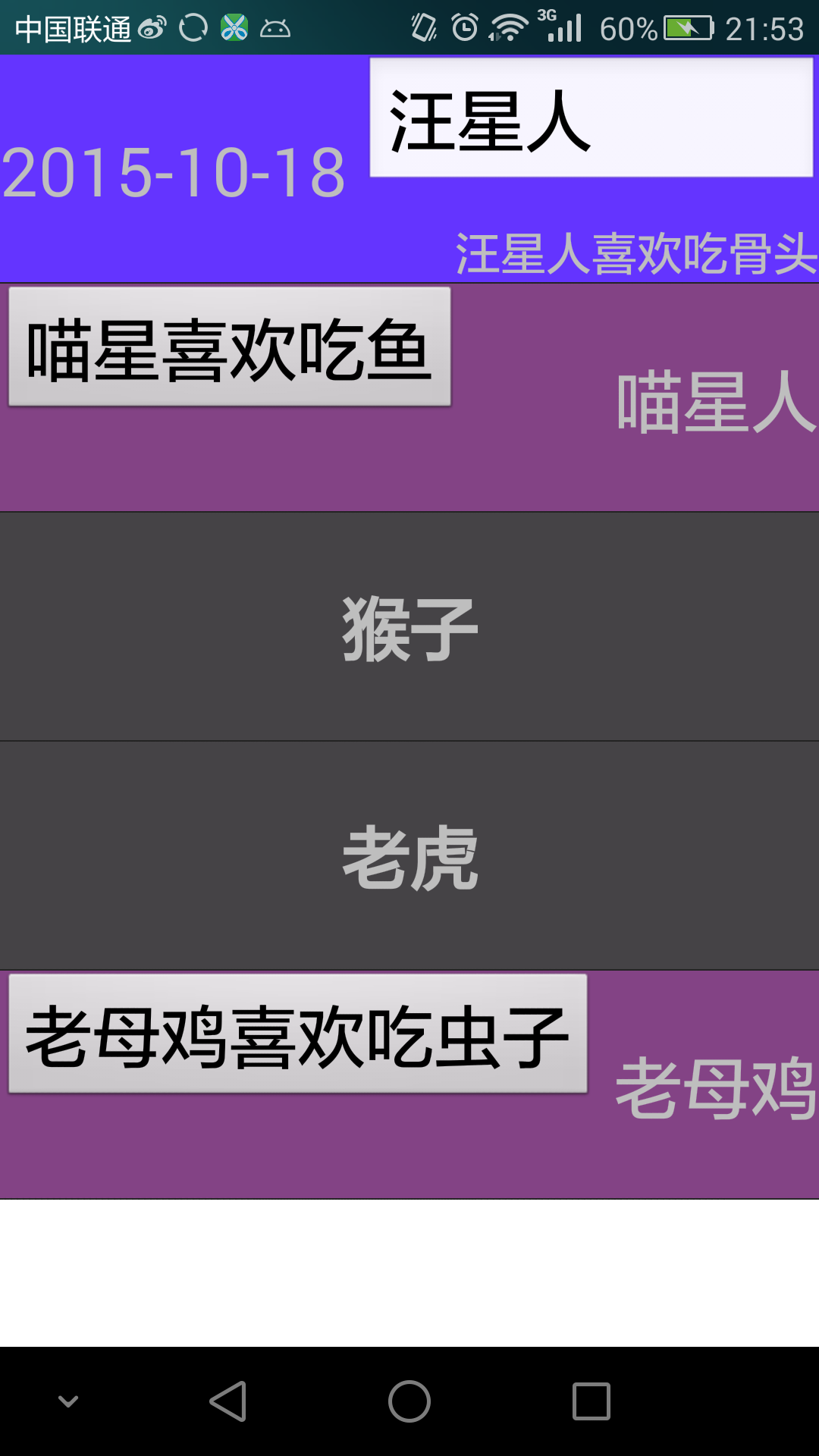
我们再使用listview时,listview的item大多时候都是一种样式,在很多app中也很常见,但有时候根据需求,可能数据的数量不一样,同个类型的数据显示的位置不同,亦或者有的item需要图片,有的不需要,但是这些又必须在同一个listview中显示,这时我们就需要在listview中显示多种样式的item,首先我们需要考虑的是如何将不同数量的数据装载到ArrayList<~>中呢,先看看下面的listViewItem,。
 package com.example.keranbin.myapplication;

 import java.util.HashMap;

 import java.util.Map;

 public class lIstViewItem

 {

     //用于区分listview显示的不同item,告诉适配器我这是什么类型,listview适配器根据type决定怎么显示

     public int type;

     //将要显示的数据用HashMap包装好

     public HashMap<String,Object> map ;

     public lIstViewItem(int type, HashMap<String, Object> map)

     {

         this.type = type;

         this.map = map;

     }

 }
我们通过自定义一个listItem,即可将所有不同类型,不同数量的数据先组装成统一类型listItem即可,然后用arrayList.add(listitem)即可。
  /**

      * 这里我们用三种不同的样式进行测试

      **/

     private ArrayList<lIstViewItem> getDatas() {

         viewItemsArraylists = new ArrayList<lIstViewItem>();

         viewItemsArraylists.add(new lIstViewItem(2, getHashMapThreeType("汪星人", "汪星人喜欢吃骨头", "2015-10-18")));

         viewItemsArraylists.add(new lIstViewItem(1, getHashMapSecondType("喵星人", "喵星喜欢吃鱼")));

         viewItemsArraylists.add(new lIstViewItem(0, getHashMapFirstType("猴子")));

         viewItemsArraylists.add(new lIstViewItem(0, getHashMapFirstType("老虎")));

         viewItemsArraylists.add(new lIstViewItem(1, getHashMapSecondType("老母鸡", "老母鸡喜欢吃虫子")));

         return viewItemsArraylists;

     }

     //第一种样式,只传输一个数据

     private HashMap<String, Object> getHashMapFirstType(String firstTheme) {

         HashMap<String, Object> hashMap = new HashMap<String, Object>();

         hashMap.put("Theme", firstTheme);

         return hashMap;

     }

     //第二种样式,传输两个数据

     private HashMap<String, Object> getHashMapSecondType(String secondTheme, String secondContent) {

         HashMap<String, Object> hashMap = new HashMap<String, Object>();

         hashMap.put("Theme", secondTheme);

         hashMap.put("Content", secondContent);

         return hashMap;

     }

     //第三种样式,传输三个数据

     private HashMap<String, Object> getHashMapThreeType(String threeTheme, String threeContent, String date) {

         HashMap<String, Object> hashMap = new HashMap<String, Object>();

         hashMap.put("Theme", threeTheme);

         hashMap.put("Content", threeContent);

         hashMap.put("Date", date);

         return hashMap;

     }
剩下的就是listViewAdapter的事情啦,和显示一种样式的listViewAdapter不同的一点是我们重写实现父类baseAdapter的两个方法。
   //返回当前布局的样式type

     @Override

     public int getItemViewType(int position) {

         return listDatas.get(position).type;

     }

     //返回你有多少个不同的布局

     @Override

     public int getViewTypeCount() {

         return 3;

     }
然后在getView中根据需要进行判断决定显示那种样式即可
 package com.example.keranbin.myapplication;

 import android.content.Context;

 import android.view.LayoutInflater;

 import android.view.View;

 import android.view.ViewGroup;

 import android.widget.BaseAdapter;

 import android.widget.Button;

 import android.widget.EditText;

 import android.widget.ImageView;

 import android.widget.TextView;

 import java.util.ArrayList;

 /**

  * Created by keranbin on 2015/10/13.

  */

 public class ListViewAdapter extends BaseAdapter {

     private LayoutInflater mLayoutInflater;

     private Context context;

     private ArrayList<lIstViewItem> listDatas;

     public ListViewAdapter(Context context, ArrayList<lIstViewItem> listDatas) {

         this.listDatas = listDatas;

         mLayoutInflater = (LayoutInflater) context.getSystemService(Context.LAYOUT_INFLATER_SERVICE);

     }

     //返回当前布局的样式type

     @Override

     public int getItemViewType(int position) {

         return listDatas.get(position).type;

     }

     //返回你有多少个不同的布局

     @Override

     public int getViewTypeCount() {

         return 3;

     }

     @Override

     public int getCount() {

         return listDatas.size();

     }

     @Override

     public Object getItem(int position) {

         return listDatas.get(position);

     }

     @Override

     public long getItemId(int position) {

         return position;

     }

     @Override

     public View getView(int position, View convertView, ViewGroup parent) {

         lIstViewItem listItem = listDatas.get(position);

         int Type = getItemViewType(position);

         ViewHolderfirstType viewHolderfirstType = null;

         ViewHoldersecondType viewHoldersecondType = null;

         ViewHolderThreeType viewHolderThreeType = null;

         if (convertView == null) {

             switch (Type) {

                 case 0:

                     viewHolderfirstType = new ViewHolderfirstType();

                     convertView = mLayoutInflater.inflate(R.layout.activity_first_type_item, null);

                     viewHolderfirstType.tv_first_theme = (TextView) convertView.findViewById(R.id.tv_first_theme);

                     viewHolderfirstType.tv_first_theme.setText(listItem.map.get("Theme").toString());

 //                  convertView.setTag(viewHolderfirstType);  //如果要复用,不同于一种样式的listView ,这样的写法是错误的,具体原因看下面第一个小哥评论的说法

                     convertView.setTag(R.id.viewHolderfirstType, viewHolderfirstType);

                     break;

                 case 1:

                     viewHoldersecondType = new ViewHoldersecondType();

                     convertView = mLayoutInflater.inflate(R.layout.activity_second_type_item, null);

                     viewHoldersecondType.tv_second_content = (TextView) convertView.findViewById(R.id.tv_second_content);

                     viewHoldersecondType.btn_second_theme = (Button) convertView.findViewById(R.id.btn_second_theme);

                     viewHoldersecondType.tv_second_content.setText(listItem.map.get("Theme").toString());

                     viewHoldersecondType.btn_second_theme.setText(listItem.map.get("Content").toString());

 //                    convertView.setTag(viewHoldersecondType);  //如果要复用,不同于一种样式的listView ,这样的写法是错误的,具体原因看下面第一个小哥评论的说法

                     convertView.setTag(R.id.viewHoldersecondType, viewHoldersecondType);

                     break;

                 case 2:

                     viewHolderThreeType = new ViewHolderThreeType();

                     convertView = mLayoutInflater.inflate(R.layout.activity_three_type_item, null);

                     viewHolderThreeType.tv_three_content = (TextView) convertView.findViewById(R.id.tv_three_content);

                     viewHolderThreeType.et_three_theme = (EditText) convertView.findViewById(R.id.et_three_theme);

                     viewHolderThreeType.tv_three_time = (TextView) convertView.findViewById(R.id.tv_three_time);

                     viewHolderThreeType.et_three_theme.setText(listItem.map.get("Theme").toString());

                     viewHolderThreeType.tv_three_content.setText(listItem.map.get("Content").toString());

                     viewHolderThreeType.tv_three_time.setText(listItem.map.get("Date").toString());

 //                    convertView.setTag(viewHolderThreeType);//如果要复用,不同于一种样式的listView ,这样的写法是错误的,具体原因看下面第一个小哥评论的说法

                     convertView.setTag(R.id.viewHolderthreeType, viewHolderThreeType);

                     break;

             }

         } else {

             switch (Type) {

                 case 0:

                     viewHolderfirstType = (ViewHolderfirstType) convertView.getTag(R.id.viewHolderfirstType);

                     viewHolderfirstType.tv_first_theme.setText(listItem.map.get("Theme").toString());

                     break;

                 case 1:

                     viewHoldersecondType = (ViewHoldersecondType) convertView.getTag(R.id.viewHoldersecondType);

                     viewHoldersecondType.tv_second_content = (TextView) convertView.findViewById(R.id.tv_second_content);

                     viewHoldersecondType.btn_second_theme = (Button) convertView.findViewById(R.id.btn_second_theme);

                     viewHoldersecondType.tv_second_content.setText(listItem.map.get("Theme").toString());

                     viewHoldersecondType.btn_second_theme.setText(listItem.map.get("Content").toString());

                     break;

                 case 2:

                     viewHolderThreeType = (ViewHolderThreeType) convertView.getTag(R.id.viewHolderthreeType);

                     viewHolderThreeType.tv_three_content = (TextView) convertView.findViewById(R.id.tv_three_content);

                     viewHolderThreeType.et_three_theme = (EditText) convertView.findViewById(R.id.et_three_theme);

                     viewHolderThreeType.tv_three_time = (TextView) convertView.findViewById(R.id.tv_three_time);

                     viewHolderThreeType.et_three_theme.setText(listItem.map.get("Theme").toString());

                     viewHolderThreeType.tv_three_content.setText(listItem.map.get("Content").toString());

                     viewHolderThreeType.tv_three_time.setText(listItem.map.get("Date").toString());

                     break;

             }

         }

         return convertView;

     }

     class ViewHolderfirstType {

         TextView tv_first_theme;

     }

     class ViewHoldersecondType {

         TextView tv_second_content;

         Button btn_second_theme;

     }

     class ViewHolderThreeType {

         EditText et_three_theme;

         TextView tv_three_content;

         TextView tv_three_time;

     }

 }
第一种样式页面组件主要是一个TextView.
 <?xml version="1.0" encoding="utf-8"?>

 <RelativeLayout xmlns:android="http://schemas.android.com/apk/res/android"

     android:layout_width="match_parent"

     android:layout_height="match_parent"

     >

     <RelativeLayout

         android:layout_width="fill_parent"

         android:layout_height="100dp"

         android:background="#454346">

         <TextView

             android:id="@+id/tv_first_theme"

             android:layout_width="wrap_content"

             android:layout_height="wrap_content"

             android:layout_centerHorizontal="true"

             android:layout_centerVertical="true"

             android:textSize="30dp"

             android:textStyle="bold" />

     </RelativeLayout>

 </RelativeLayout>
第二种样式页面组件主要是一个TextView和一个button.
 <?xml version="1.0" encoding="utf-8"?>

 <RelativeLayout xmlns:android="http://schemas.android.com/apk/res/android"

     android:layout_width="match_parent"

     android:layout_height="match_parent">

     <RelativeLayout

         android:layout_width="fill_parent"

         android:layout_height="100dp"

         android:background="#834385">

         <Button

             android:id="@+id/btn_second_theme"

             android:layout_width="wrap_content"

             android:layout_height="wrap_content"

             android:textSize="30dp" />

         <TextView

             android:id="@+id/tv_second_content"

             android:layout_width="wrap_content"

             android:layout_height="wrap_content"

             android:layout_alignParentEnd="true"

             android:layout_alignParentRight="true"

             android:layout_centerVertical="true"

             android:textSize="30dp" />

     </RelativeLayout>

 </RelativeLayout>
第三种样式页面组件主要是两个TextView和一个EditText.
 <?xml version="1.0" encoding="utf-8"?>

 <RelativeLayout xmlns:android="http://schemas.android.com/apk/res/android"

     android:layout_width="match_parent"

     android:layout_height="match_parent">

     <RelativeLayout

         android:layout_width="fill_parent"

         android:layout_height="100dp"

         android:background="#6434ff">

         <EditText

             android:id="@+id/et_three_theme"

             android:layout_width="200dp"

             android:layout_height="wrap_content"

             android:layout_alignParentEnd="true"

             android:layout_alignParentRight="true"

             android:textSize="30dp" />

         <TextView

             android:id="@+id/tv_three_time"

             android:layout_width="wrap_content"

             android:layout_height="wrap_content"

             android:layout_alignParentLeft="true"

             android:layout_alignParentStart="true"

             android:layout_centerVertical="true"

             android:textSize="30dp" />

         <TextView

             android:id="@+id/tv_three_content"

             android:layout_width="wrap_content"

             android:layout_height="wrap_content"

             android:layout_alignEnd="@+id/et_three_theme"

             android:layout_alignParentBottom="true"

             android:layout_alignRight="@+id/et_three_theme"

             android:textSize="20dp" />

     </RelativeLayout>

 </RelativeLayout>
activity_main.xml文件非常简单,就一个listView。
 <?xml version="1.0" encoding="utf-8"?>

 <RelativeLayout xmlns:android="http://schemas.android.com/apk/res/android"

     android:layout_width="match_parent"

     android:layout_height="match_parent"

     android:background="#ffffff">

     <ListView

         android:id="@+id/listView"

         android:layout_width="fill_parent"

         android:layout_height="fill_parent"></ListView>

 </RelativeLayout>
下面是MainActivity的代码
 package com.example.keranbin.myapplication;

 import android.app.Activity;

 import android.os.Bundle;

 import android.widget.ListView;

 import java.util.ArrayList;

 import java.util.HashMap;

 public class MainActivity extends Activity {

     private ListView listView;                               //页面listview

     private ListViewAdapter listViewAdapter;                 //listview适配器

     private ArrayList<lIstViewItem> viewItemsArraylists;     //Arraylist主要装载的是传给适配器的数据集合

     @Override

     protected void onCreate(Bundle savedInstanceState) {

         super.onCreate(savedInstanceState);

         setContentView(R.layout.activity_main);

         //初始化页面组件及一些数据

         initView();

         //为listview设置适配器

         ListViewAdapter listViewAdapter = new ListViewAdapter(MainActivity.this, getDatas());

         listView.setAdapter(listViewAdapter);

     }

     //初始化页面组件及一些数据

     private void initView() {

         listView = (ListView) this.findViewById(R.id.listView);

         listViewAdapter = new ListViewAdapter(MainActivity.this, getDatas());

     }

     /**

      * 这里我们用三种不同的样式进行测试

      **/

     private ArrayList<lIstViewItem> getDatas() {

         viewItemsArraylists = new ArrayList<lIstViewItem>();

         viewItemsArraylists.add(new lIstViewItem(2, getHashMapThreeType("汪星人", "汪星人喜欢吃骨头", "2015-10-18")));

         viewItemsArraylists.add(new lIstViewItem(1, getHashMapSecondType("喵星人", "喵星喜欢吃鱼")));

         viewItemsArraylists.add(new lIstViewItem(0, getHashMapFirstType("猴子")));

         viewItemsArraylists.add(new lIstViewItem(0, getHashMapFirstType("老虎")));

         viewItemsArraylists.add(new lIstViewItem(1, getHashMapSecondType("老母鸡", "老母鸡喜欢吃虫子")));

         return viewItemsArraylists;

     }

     //第一种样式,只传输一个数据

     private HashMap<String, Object> getHashMapFirstType(String firstTheme) {

         HashMap<String, Object> hashMap = new HashMap<String, Object>();

         hashMap.put("Theme", firstTheme);

         return hashMap;

     }

     //第二种样式,传输两个数据

     private HashMap<String, Object> getHashMapSecondType(String secondTheme, String secondContent) {

         HashMap<String, Object> hashMap = new HashMap<String, Object>();

         hashMap.put("Theme", secondTheme);

         hashMap.put("Content", secondContent);

         return hashMap;

     }

     //第三种样式,传输三个数据

     private HashMap<String, Object> getHashMapThreeType(String threeTheme, String threeContent, String date) {

         HashMap<String, Object> hashMap = new HashMap<String, Object>();

         hashMap.put("Theme", threeTheme);

         hashMap.put("Content", threeContent);

         hashMap.put("Date", date);

         return hashMap;

     }

 }
Android ListView显示不同样式的item的更多相关文章
- Android ListView 之 SimpleAdapter 二 (包含 item 中按钮监听)
1 MainActivity.java package com.myadapter; import java.util.ArrayList; import java.util.HashMap; ...
- Android ListView显示底部的分割线
有些时候,我们会提出这样的需求,希望ListView显示底部(顶部)的分割线,这样做,会使得UI效果更加精致,如下图所示: 如果搜索资料,大家会搜到一堆相关的方法,最多的莫过于设置listview的f ...
- android listview实现点击某个item后使其显示在屏幕顶端
在该listview的点击事件中加入一下代码即可 listView.setSelectionFromTop(position, 0);
- ListView显示多种类型的item
ListView可以显示多种类型的条目布局,这里写显示两种布局的情况,其他类似 这是MainActivity:,MainActivity的布局就是一个ListView public class Mai ...
- 【转】Android ListView加载不同的item布局
原创教程,转载请保留出处:http://www.eoeandroid.com/thread-72369-1-1.html 最近有需求需要在listView中载入不同的listItem布局,开始 ...
- Android listview 制作表格样式+由下往上动画弹出效果实现
效果是这样的:点击按下弹出表格的按钮,会由下往上弹出右边的列表,按下返回按钮就由上往下退出界面. 布局文件: activity_main.xml <RelativeLayout xmlns:an ...
- Android ListView显示访问WebServices返回的JSON结果
1.WebServices的返回结果 2.ListView内容布局代码 <?xml version="1.0" encoding="utf-8"?> ...
- Android ListView 显示多种数据类型
ListView往往可能会有不同的数据类型,单类型的数据可能运用会比较少些,这也是最近项目中的一个需求{在发送消息的时候,需要选择联系人,而联系人列表由英文字母索引+联系人组成},上一篇文章只是一个基 ...
- Android ListView之选中(撤销选中)Item
在ContactListActivity中,点击未选中的item将其选中,再点击已选中的item撤销其选中 public void onItemClick(AdapterView<?> p ...
随机推荐
- 201871010128-杨丽霞《面向对象程序设计(Java)》第十一周学习总结
201871010128-杨丽霞<面向对象程序设计(Java)>第十一周学习总结 项目 内容 这个作业属于哪个课程 https://www.cnblogs.com/nwnu-daizh/ ...
- mysql版本引起的驱动问题
mysql版本引起的驱动问题 com.mysql.jdbc.Driver 是 mysql-connector-java 5中的, com.mysql.cj.jdbc.Driver 是 mysql-co ...
- iptables学习2
Firewall:工作在主机或网络边缘,对进出的报文按事先定义的规则进行检查, 并且由匹配到的规则进行处理的一组硬件或软件,甚至可能是两者的组合 隔离用户访问,只允许访问指定的服务 通过ADSL ...
- NLP之预训练
内容是结合:https://zhuanlan.zhihu.com/p/49271699 可以直接看原文 预训练一般要从图像处理领域说起:可以先用某个训练集合比如训练集合A或者训练集合B对这个网络进行预 ...
- 公共组件及脚手架webpack模板
一.公共组件的创建和使用 前面已经学习vue组件时,了解了公共组件,但在脚手架项目中只使用过局部组件.这里是讲解全局组件如何在脚手架项目中去使用. 1.创建全局组件 在src/components/C ...
- Linux性能优化实战学习笔记:第十一讲
一.性能指标 1.性能指标思维导图 2.CPU使用率 3.CPU平均负载 4.CPU缓存的命中率 CPU 在访问内存的时候,免不了要等待内存的响应.为了协调这两者巨大的性能差距,CPU 缓存(通常是多 ...
- [LeetCode] 914. X of a Kind in a Deck of Cards 一副牌中的X
In a deck of cards, each card has an integer written on it. Return true if and only if you can choos ...
- [LeetCode] 47. Permutations II 全排列之二
Given a collection of numbers that might contain duplicates, return all possible unique permutations ...
- Spring 常犯的十大错误,这坑你踩过吗?
阅读本文大概需要 9 分钟. 1.错误一:太过关注底层 我们正在解决这个常见错误,是因为 “非我所创” 综合症在软件开发领域很是常见.症状包括经常重写一些常见的代码,很多开发人员都有这种症状. 虽然理 ...
- js获取长度,根据编码获取长度
dataLen:function(str){ var realLength = 0, len = str.length, charCode = -1; for(var i = 0; i < le ...