
Android开发之AIDL的使用一--跨应用启动Service
启动其他App的服务,跨进程启动服务。
与启动本应用的Service一样,使用startService(intent)方法
不同的是intent需要携带的内容不同,需要使用intent的setComponent()方法。
setComponent()方法需要传入两个参数,第一个参数是包名,第二个参数是组件名。即,第一个参数传入要启动的其他app的包名,第二个参数传入的时候要启动的其他app的service名。
看下面的例子:(aidlserviceapp应用通过button启动aidlservice应用的MyService)
aidlserviceapp应用:
 package com.example.aidlserviceapp;

 import android.app.Activity;

 import android.content.ComponentName;

 import android.content.Intent;

 import android.os.Bundle;

 import android.view.View;

 import android.view.View.OnClickListener;

 import android.widget.Button;

 public class MainActivity extends Activity implements OnClickListener {

     private Button btn_StartService, btn_StopService;

     Intent serviceIntent = null;

     @Override

     protected void onCreate(Bundle savedInstanceState) {

         super.onCreate(savedInstanceState);

         setContentView(R.layout.activity_main);

         serviceIntent = new Intent();

         ComponentName componentName = new ComponentName(

                 "com.example.aidlservice", "com.example.aidlservice.MyService");

         serviceIntent.setComponent(componentName); // 使用intent的setComponent()方法,启动其他应用的组件。

         btn_StartService = (Button) findViewById(R.id.btn_StartService);

         btn_StopService = (Button) findViewById(R.id.btn_StopService);

         btn_StartService.setOnClickListener(this);

         btn_StopService.setOnClickListener(this);

     }

     @Override

     public void onClick(View v) {

         switch (v.getId()) {

         case R.id.btn_StartService:

             startService(serviceIntent);

             break;

         case R.id.btn_StopService:

             stopService(serviceIntent);

             break;

         default:

             break;

         }

     }

 }
aidlservice应用
 package com.example.aidlservice;

 import android.app.Service;

 import android.content.Intent;

 import android.os.IBinder;

 import android.util.Log;

 public class MyService extends Service {

     public static final String TAG = "aidlservice";

     @Override

     public IBinder onBind(Intent intent) {

         return null;

     }

     @Override

     public void onCreate() {

         super.onCreate();

         Log.e(TAG, "其他应用服务启动");

     }

     @Override

     public void onDestroy() {

         super.onDestroy();

         Log.e(TAG, "其他应用服务停止");

     }

 }
同时添加MyService在该应用的manifest。
1.启动aidlservice应用
2.启动aidlserviceapp应用
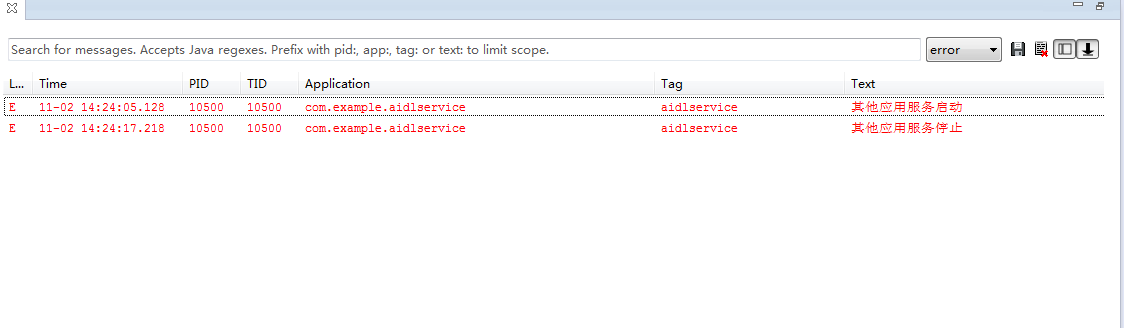
3.点击button,查看打印的log,是否启动了aidlservice应用的MyService服务。
结果如下图,启动成功。
Android开发之AIDL的使用一--跨应用启动Service的更多相关文章
- Android开发之Java集合类性能分析
对于Android开发者来说深入了解Java的集合类很有必要主要是从Collection和Map接口衍生出来的,目前主要提供了List.Set和 Map这三大类的集合,今天Android吧(ard8. ...
- Android开发之InstanceState详解
Android开发之InstanceState详解 本文介绍Android中关于Activity的两个神秘方法:onSaveInstanceState() 和 onRestoreInstanceS ...
- Android开发之Git配置
Android开发之Git配置 1.首先git配置: 输入命令: git config --global user.name "xxx.xx" git config --globa ...
- 【Android UI】Android开发之View的几种布局方式及实践
引言 通过前面两篇: Android 开发之旅:又见Hello World! Android 开发之旅:深入分析布局文件&又是“Hello World!” 我们对Android应用程序运行原理 ...
- Android开发之旅: Intents和Intent Filters(理论部分)
引言 大部分移动设备平台上的应用程序都运行在他们自己的沙盒中.他们彼此之间互相隔离,并且严格限制应用程序与硬件和原始组件之间的交互. 我们知道交流是多么的重要,作为一个孤岛没有交流的东西,一定毫无意义 ...
- Android开发之ViewPager+ActionBar+Fragment实现响应式可滑动Tab
今天我们要实现的这个效果呢,在Android的应用中十分地常见,我们可以看到下面两张图,无论是系统内置的联系人应用,还是AnyView的阅读器应用,我们总能找到这样的影子,当我们滑动屏幕时,Tab可 ...
- Android开发之Java必备基础
Android开发之Java必备基础 Java类型系统 Java语言基础数据类型有两种:对象和基本类型(Primitives).Java通过强制使用静态类型来确保类型安全,要求每个变量在使用之前必须先 ...
- Android开发之PopupWindow
/* * Android开发之PopupWindow * * Created on: 2011-8-8 * Author: blueeagle * Email: liujiaxiang@g ...
- [置顶] Android开发之MediaPlayerService服务详解(一)
前面一节我们分析了Binder通信相关的两个重要类:ProcessState 和 IPCThreadState.ProcessState负责打开Binder 驱动,每个进程只有一个.而 IPCThre ...
随机推荐
- JSON Helper
using System; using System.Collections.Generic; using System.Linq; using System.Web; using System.Se ...
- CorelDRAW 插件的安装和使用
CorelDRAW 是一款在中国非常受欢迎的图形软件,开放的界面和编程技术,能够对它进行二次开发制作插件,插件大抵有三种gms.cpg.exe格式,下面介绍一下这三种插件的安装和使用方法. 一.gms ...
- 百度地图api的实现
获取客户端IP地址经纬度所在城市 <?php $getIp=$_SERVER["REMOTE_ADDR"]; echo 'IP:',$getIp; echo ''; $con ...
- docker下PHP+Nginx+HHVM运行环境
Dockerfile 准备开始,我们创建一个 Dockerfile —— Dockerfile 包含如何创建所需镜像的指令. FROM centos:centos6MAINTAINER Mike ...
- java实现附件预览(openoffice+swfTools+FlexPaper) (转载)
下边例子是在网上找了一个网友做的例子,在次记录 1.概述 主要原理 1.通过第三方工具openoffice,将word.excel.ppt.txt等文件转换为pdf文件 2.通过swfTools将pd ...
- 在cmd命令行下登录本地oracle数据库与服务器上的oracle
一.本地登录 cmd->sqlplus 用户名/密码@数据库名 (as sysdba)->enter注:如果此用户名不是系统用户sys,scott,system就不需要加as sysdba ...
- iOS定位坐标转换工具-b
坐标系介绍 首先介绍一下目前的定位坐标系统1.地球坐标 :( 代号:GPS.WGS84 )--- 有W就是世界通用的也就是原始坐标体系,这是国际公认的世界标准坐标体系: 使用 WGS84 坐标系统的产 ...
- 高仿猫眼电影选座(选票)模块-b
上图看效果先: 1)画座位图其实不是很难一般数据都会给坐标,将坐标对应座位画出来就可以了,主要是开场动画要设置默认大小,还有座位图的数量也不是固定的,所以在初始化座位图的时侯就默认算出了整个座位图的大 ...
- ios 8和iOS 9 适用的uidatepicker
UIAlertController *alertController = [UIAlertController alertControllerWithTitle:@"\n\n\n\n\n\n ...
- JS日期格式化(网上转载)
JS日期格式化(网上转载) <!DOCTYPE HTML PUBLIC "-//W3C//DTD HTML 4.01 Transitional//EN"> <ht ...