
CSS伪对象选择符整理
1. E::selection
设置对象被选择时的样式。
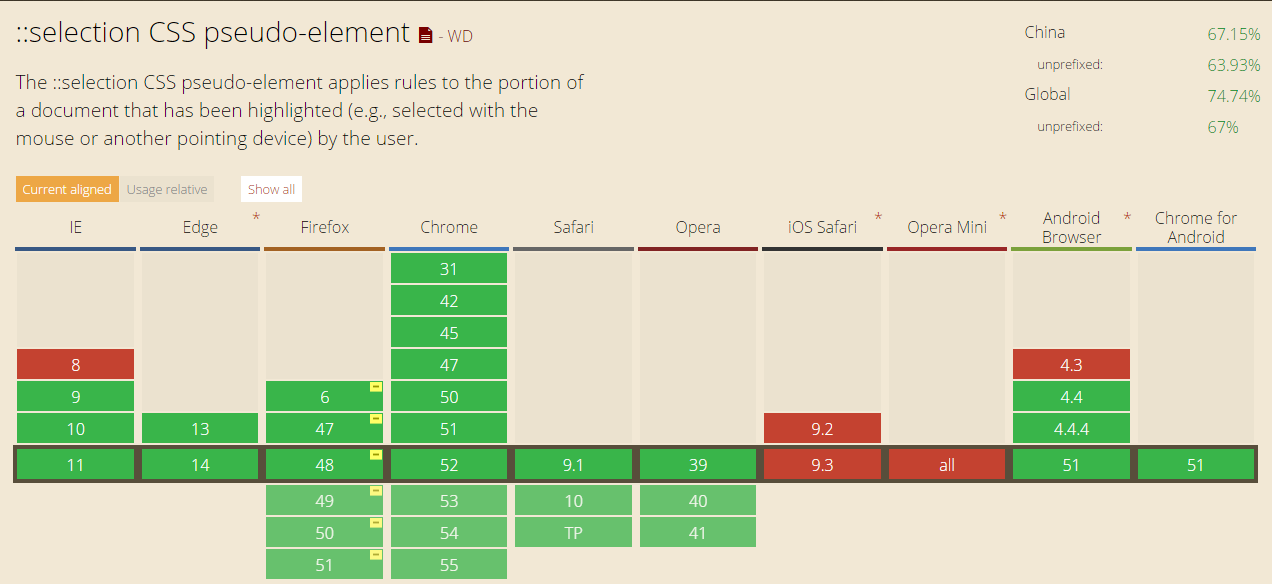
需要注意的是,::selection只能定义被选择时的background-color,color及text-shadow(IE11尚不支持定义该属性)。
兼容性:
<div class="_selection">

        <p>1. Selecting master branch will publish your site from the master branch. This is useful for repositories dedicated to website content.</p>

        <p>2. Selecting master branch /docs folder will publish from the /docs folder of your master branch. </p>

        <p>3. This lets you maintain documentation and code together on one branch, and open source maintainers can accept contributions for both in a single pull request.</p>

    </div>
._selection p::selection{

    background: #eb4960;

    color: #ffffff;

}
预览:

2. E::placeholder
设置对象文字占位符的样式
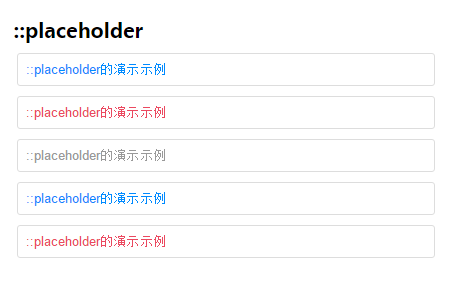
::placeholder 伪元素用于控制表单输入框占位符的外观,它允许开发者/设计师改变文字占位符的样式,默认的文字占位符为浅灰色。
当表单背景色为类似的颜色时它可能效果并不是很明显,那么就可以使用这个伪元素来改变文字占位符的颜色。
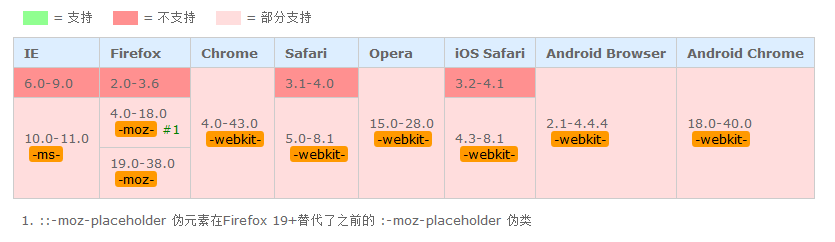
需要注意的是,除了Firefox是 ::[prefix]placeholder,其他浏览器都是使用 ::[prefix]input-placeholder
Firefox支持该伪元素使用text-overflow属性来处理溢出问题。
兼容性:
代码示例
<div class="_placeholder">

        <h1>::placeholder</h1>

        <input type="text" placeholder="::placeholder的演示示例"/>

        <input type="text" placeholder="::placeholder的演示示例"/>

        <input type="text" placeholder="::placeholder的演示示例"/>

        <input type="text" placeholder="::placeholder的演示示例"/>

        <input type="text" placeholder="::placeholder的演示示例"/>

    </div>
._placeholder input {

    width: 400px;

    margin-bottom: 10px;

}

._placeholder input:nth-child(3n)::-webkit-input-placeholder {

    color: #eb4960;

}

._placeholder input:nth-child(3n):-ms-input-placeholder { /* IE10+ */

    color: #eb4960;

}

._placeholder input:nth-child(3n):-moz-placeholder{  /* Firefox4-18 */

    color: #eb4960;

}

._placeholder input:nth-child(3n)::-moz-placeholder{  /* Firefox19+*/

    color: #eb4960;

}

._placeholder input:nth-child(3n+1)::-webkit-input-placeholder {

    color: #999999;

}

._placeholder input:nth-child(3n+1):-ms-input-placeholder { /* IE10+ */

    color: #999999;

}

._placeholder input:nth-child(3n+1):-moz-placeholder{  /* Firefox4-18 */

    color: #999999;

}

._placeholder input:nth-child(3n+1)::-moz-placeholder{  /* Firefox19+*/

    color: #999999;

}

._placeholder input:nth-child(3n+2)::-webkit-input-placeholder {

    color:#008aff;

}

._placeholder input:nth-child(3n+2):-ms-input-placeholder { /* IE10+ */

    color:#008aff;

}

._placeholder input:nth-child(3n+2):-moz-placeholder{  /* Firefox4-18 */

    color:#008aff;

}

._placeholder input:nth-child(3n+2)::-moz-placeholder{  /* Firefox19+*/

    color:#008aff;

}
效果:
CSS伪对象选择符整理的更多相关文章
- #8.10.16总结# 属性选择符 伪对象选择符 CSS的常用样式
属性选择符 E[att] E[att="val"] E[att~="val"] E[att^="val"] E[att$="val ...
- CSS Pseudo-Element Selectors伪对象选择符
一: CSS3将伪对象选择符(Pseudo-Element Selectors)前面的单个冒号(:)修改为双冒号(::)用以区别伪类选择符(Pseudo-Classes Selectors),但以前的 ...
- css伪类选择符
1):link/:visited/:hover/:active (爱恨原则 love/hate)2):first-child/:last-child/:only-child/:nth-child(n) ...
- CSS(二)选择符
2019-04-11 22:14:23 1.类型选择符(标签选择符) html中所有的标签都可以直接对元素选择 p em i a html body..... 特点:对页面中所有当前类型的元 ...
- CSS3初学篇章_2(伪类选择符)
id与class选择符 id与class选择符都是自定义标签名字的选择符,但id是唯一的,class却可重复使用. id选择符以"#"定义 class选择符以".&quo ...
- CSS那些事儿-阅读随笔1(CSS简介与选择符)
最近开始详细钻研CSS有关的知识,参考资料是<CSS那些事儿>.将把在此过程中的收获进行记录,方便以后的学习. 一.CSS简介 1.什么是CSS CSS全称为Cascading Style ...
- CSS知识点:选择符
一.选择符的种类 1)通配选择符 它用来给页面所有的元素设置样式 *{margin:0;padding:0;}.但是实际当中不建议这么用,页面中用到了哪些样式,就统一设置样式,因为*影响性能.也可以给 ...
- CSS选择符-----伪类选择符
Element:hover E:hover { sRules } 设置元素在其鼠标悬停时的样式 <!DOCTYPE html> <html> <head> < ...
- 学习CSS记录:选择符优先级
1.标有!important 关键字声明属性. 2.HTML中的CSS样式属性. 3.作者编辑的CSS文件模式属性. 4.用户设置的样式. 5.浏览器默认的样式. ------------------ ...
随机推荐
- 淘宝Refrash_token签名错误的解决办法
最近在做淘宝相关应用,想要通过Refrash_token来延长SessionKey的授权时间,但是总是报406 sign error. 经过多次尝试和多方询问,方才知道原来淘宝给的.net SDK里面 ...
- js获得控件位置
网页可见区域宽:document.body.clientWidth 网页可见区域高:document.body.clientHeight 网页可见区域宽:document.body.offsetWid ...
- HTML5图片拖拽预览原理及实现
一.前言 这两天恰好有一位同事问我怎样做一个图片预览功能.作为现代人的我们首先想到的当然是HTML5啦,其实HTML5做图片预览已经是一个老生常谈的问题了.我在这里就简单说说其中相关的一些东西,当然会 ...
- Asp.Net 之 MasterPage
母版页是VS2005中新引入的一个概念,它很好地实现界面设计的模块化,并且实现实现了代码的重用.它就像婚纱影楼中的婚纱模板,同一个婚纱模板可以给不同的新人用,只要把他们的照片贴在已有的婚纱模板就可以形 ...
- Play on Words 欧拉通路(回路)判断
Play on Words note: 判断一下连通性. #include <iostream> #include <cstdio> #include <cstring ...
- JAVA WEB 作用域之间的区别
JAVA WEB 作用域 1.page属性范围(pageContext) a.在一个页面设置的属性,跳转到其他页面就无法访问了(包括重定向和). 示例:pageScopeDemo01.jsp < ...
- ios UIWebView截获html并修改便签内容(转载)
ios UIWebView截获html并修改便签内容 博客分类: iphone开发iphone开发phoneGap uiwebviewstringByEvaluatingJavaScriptFromS ...
- arcgis gdb含下划线_和%的查询 by gisoracle
XMMC LIKE '%\_%' ESCAPE '\' by gisoracle 2015.1.25 XMMC LIKE '%\%%' escape '\' ...
- CGFloat、CGPoint、CGSize和CGRect
CGFloat:是表示浮点数类型. CGPoint:表示二维坐标的点.通过x和y坐标定义.点表示位置值. CGSIZE:表示矩形的宽度和高度.通过宽度和高度来定义. CGRect: 表示矩形的位置和大 ...
- mina 字节数组编解码器的写法 I
mina 服务器与 mina 客户端通讯的话, 一.传递 String 时编解码工厂使用 mina 自带的 TextLineCodecFactory 即可: 二.传递 java 对象或 byte[] ...