
CentOS上安装MySQL
1、准备RPM安装包
MySQL-server-5.6.33-1.linux_glibc2.5.x86_64
MySQL-client-5.6.33-1.linux_glibc2.5.x86_64
2、检查并清理旧版
[root@localhost Desktop]# rpm -qa | grep mysql

mysql-libs-5.1.66-2.el6_3.x86_64

[root@localhost Desktop]# rpm -e --nodeps mysql-libs-5.1.66-2.el6_3.x86_64

[root@localhost Desktop]# rm -rf /var/lib/mysql*

[root@localhost Desktop]# rm -rf /usr/share/mysql*
3、安装Server
[root@localhost Desktop]# rpm -ivh /root/Desktop/MySQL-server-5.6.33-1.linux_glibc2.5.x86_64.rpm

warning: /root/Desktop/MySQL-server-5.6.33-1.linux_glibc2.5.x86_64.rpm: Header V3 DSA/SHA1 Signature, key ID 5072e1f5: NOKEY

Preparing...                ########################################### [100%]

   1:MySQL-server           ########################################### [100%]

warning: user mysql does not exist - using root

warning: group mysql does not exist - using root

2016-12-13 03:19:31 0 [Warning] TIMESTAMP with implicit DEFAULT value is deprecated. Please use --explicit_defaults_for_timestamp server option (see documentation for more details).

2016-12-13 03:19:31 0 [Note] /usr/sbin/mysqld (mysqld 5.6.33) starting as process 35882 ...

2016-12-13 03:19:31 35882 [Note] InnoDB: Using atomics to ref count buffer pool pages

2016-12-13 03:19:31 35882 [Note] InnoDB: The InnoDB memory heap is disabled

2016-12-13 03:19:31 35882 [Note] InnoDB: Mutexes and rw_locks use GCC atomic builtins

2016-12-13 03:19:31 35882 [Note] InnoDB: Memory barrier is not used

2016-12-13 03:19:31 35882 [Note] InnoDB: Compressed tables use zlib 1.2.3

2016-12-13 03:19:31 35882 [Note] InnoDB: Using Linux native AIO

2016-12-13 03:19:31 35882 [Note] InnoDB: Using CPU crc32 instructions

2016-12-13 03:19:31 35882 [Note] InnoDB: Initializing buffer pool, size = 128.0M

2016-12-13 03:19:31 35882 [Note] InnoDB: Completed initialization of buffer pool

2016-12-13 03:19:31 35882 [Note] InnoDB: The first specified data file ./ibdata1 did not exist: a new database to be created!

2016-12-13 03:19:31 35882 [Note] InnoDB: Setting file ./ibdata1 size to 12 MB

2016-12-13 03:19:31 35882 [Note] InnoDB: Database physically writes the file full: wait...

2016-12-13 03:19:32 35882 [Note] InnoDB: Setting log file ./ib_logfile101 size to 48 MB

2016-12-13 03:19:35 35882 [Note] InnoDB: Setting log file ./ib_logfile1 size to 48 MB

2016-12-13 03:19:37 35882 [Note] InnoDB: Renaming log file ./ib_logfile101 to ./ib_logfile0

2016-12-13 03:19:37 35882 [Warning] InnoDB: New log files created, LSN=45781

2016-12-13 03:19:37 35882 [Note] InnoDB: Doublewrite buffer not found: creating new

2016-12-13 03:19:37 35882 [Note] InnoDB: Doublewrite buffer created

2016-12-13 03:19:37 35882 [Note] InnoDB: 128 rollback segment(s) are active.

2016-12-13 03:19:37 35882 [Warning] InnoDB: Creating foreign key constraint system tables.

2016-12-13 03:19:37 35882 [Note] InnoDB: Foreign key constraint system tables created

2016-12-13 03:19:37 35882 [Note] InnoDB: Creating tablespace and datafile system tables.

2016-12-13 03:19:37 35882 [Note] InnoDB: Tablespace and datafile system tables created.

2016-12-13 03:19:37 35882 [Note] InnoDB: Waiting for purge to start

2016-12-13 03:19:37 35882 [Note] InnoDB: 5.6.33 started; log sequence number 0

A random root password has been set. You will find it in '/root/.mysql_secret'.

2016-12-13 03:19:37 35882 [Note] Binlog end

2016-12-13 03:19:37 35882 [Note] InnoDB: FTS optimize thread exiting.

2016-12-13 03:19:37 35882 [Note] InnoDB: Starting shutdown...

2016-12-13 03:19:38 35882 [Note] InnoDB: Shutdown completed; log sequence number 1625977

2016-12-13 03:19:39 0 [Warning] TIMESTAMP with implicit DEFAULT value is deprecated. Please use --explicit_defaults_for_timestamp server option (see documentation for more details).

2016-12-13 03:19:39 0 [Note] /usr/sbin/mysqld (mysqld 5.6.33) starting as process 35906 ...

2016-12-13 03:19:39 35906 [Note] InnoDB: Using atomics to ref count buffer pool pages

2016-12-13 03:19:39 35906 [Note] InnoDB: The InnoDB memory heap is disabled

2016-12-13 03:19:39 35906 [Note] InnoDB: Mutexes and rw_locks use GCC atomic builtins

2016-12-13 03:19:39 35906 [Note] InnoDB: Memory barrier is not used

2016-12-13 03:19:39 35906 [Note] InnoDB: Compressed tables use zlib 1.2.3

2016-12-13 03:19:39 35906 [Note] InnoDB: Using Linux native AIO

2016-12-13 03:19:39 35906 [Note] InnoDB: Using CPU crc32 instructions

2016-12-13 03:19:39 35906 [Note] InnoDB: Initializing buffer pool, size = 128.0M

2016-12-13 03:19:39 35906 [Note] InnoDB: Completed initialization of buffer pool

2016-12-13 03:19:39 35906 [Note] InnoDB: Highest supported file format is Barracuda.

2016-12-13 03:19:39 35906 [Note] InnoDB: 128 rollback segment(s) are active.

2016-12-13 03:19:39 35906 [Note] InnoDB: Waiting for purge to start

2016-12-13 03:19:39 35906 [Note] InnoDB: 5.6.33 started; log sequence number 1625977

2016-12-13 03:19:39 35906 [Note] Binlog end

2016-12-13 03:19:39 35906 [Note] InnoDB: FTS optimize thread exiting.

2016-12-13 03:19:39 35906 [Note] InnoDB: Starting shutdown...

2016-12-13 03:19:41 35906 [Note] InnoDB: Shutdown completed; log sequence number 1625987

A RANDOM PASSWORD HAS BEEN SET FOR THE MySQL root USER !

You will find that password in '/root/.mysql_secret'.

You must change that password on your first connect,

no other statement but 'SET PASSWORD' will be accepted.

See the manual for the semantics of the 'password expired' flag.

Also, the account for the anonymous user has been removed.

In addition, you can run:

  /usr/bin/mysql_secure_installation

which will also give you the option of removing the test database.

This is strongly recommended for production servers.

See the manual for more instructions.

Please report any problems at http://bugs.mysql.com/

The latest information about MySQL is available on the web at

  http://www.mysql.com

Support MySQL by buying support/licenses at http://shop.mysql.com

New default config file was created as /usr/my.cnf and

will be used by default by the server when you start it.

You may edit this file to change server settings
4、启动MySQL服务
[root@localhost Desktop]# service mysql start

Starting MySQL................... SUCCESS!
5、查看默认密码
[root@localhost Desktop]# more /root/.mysql_secret

# The random password set for the root user at Tue Dec 13 03:19:37 2016 (local t

ime): YPkX6RUWvFNRxYuc
6、安装Client
[root@localhost Desktop]# rpm -ivh /root/Desktop/MySQL-client-5.6.33-1.linux_glibc2.5.x86_64.rpm

warning: /root/Desktop/MySQL-client-5.6.33-1.linux_glibc2.5.x86_64.rpm: Header V3 DSA/SHA1 Signature, key ID 5072e1f5: NOKEY

Preparing...                ########################################### [100%]

   1:MySQL-client           ########################################### [100%]
7、执行安全向导
[root@localhost Desktop]# /usr/bin/mysql_secure_installation

NOTE: RUNNING ALL PARTS OF THIS SCRIPT IS RECOMMENDED FOR ALL MySQL

      SERVERS IN PRODUCTION USE!  PLEASE READ EACH STEP CAREFULLY!

In order to log into MySQL to secure it, we'll need the current

password for the root user.  If you've just installed MySQL, and

you haven't set the root password yet, the password will be blank,

so you should just press enter here.

Enter current password for root (enter for none): YPkX6RUWvFNRxYuc <–初次运行直接回车

OK, successfully used password, moving on...

Setting the root password ensures that nobody can log into the MySQL

root user without the proper authorisation.

You already have a root password set, so you can safely answer 'n'.

Change the root password? [Y/n] y <– 是否设置root用户密码,输入y并回车或直接回车

New password: 123456 <– 设置root用户的密码

Re-enter new password: 123456 <– 再输入一次你设置的密码

Password updated successfully!

Reloading privilege tables..

 ... Success!

By default, a MySQL installation has an anonymous user, allowing anyone

to log into MySQL without having to have a user account created for

them.  This is intended only for testing, and to make the installation

go a bit smoother.  You should remove them before moving into a

production environment.

Remove anonymous users? [Y/n] y <– 是否删除匿名用户,生产环境建议删除,所以直接回车

 ... Success!

Normally, root should only be allowed to connect from 'localhost'.  This

ensures that someone cannot guess at the root password from the network.

Disallow root login remotely? [Y/n] n <–是否禁止root远程登录,根据自己的需求选择Y/n并回车,建议禁止

 ... skipping.

By default, MySQL comes with a database named 'test' that anyone can

access.  This is also intended only for testing, and should be removed

before moving into a production environment.

Remove test database and access to it? [Y/n] n <– 是否删除test数据库,直接回车

 ... skipping.

Reloading the privilege tables will ensure that all changes made so far

will take effect immediately.

Reload privilege tables now? [Y/n] y <– 是否重新加载权限表,直接回车

 ... Success!

All done!  If you've completed all of the above steps, your MySQL

installation should now be secure.

Thanks for using MySQL!

Cleaning up...
8、配置my.cnf
[root@localhost Desktop]# cp /usr/share/mysql/my-default.cnf /etc/my.cnf
# For advice on how to change settings please see

# http://dev.mysql.com/doc/refman/5.6/en/server-configuration-defaults.html

# *** DO NOT EDIT THIS FILE. It's a template which will be copied to the

# *** default location during install, and will be replaced if you

# *** upgrade to a newer version of MySQL.

[mysqld]

#socket = /var/lib/mysql/mysql.sock

#datadir = /var/lib/mysql/mysql

character-set-server=utf8

lower_case_table_names=1

# Remove leading # and set to the amount of RAM for the most important data

# cache in MySQL. Start at 70% of total RAM for dedicated server, else 10%.

# innodb_buffer_pool_size = 128M

# Remove leading # to turn on a very important data integrity option: logging

# changes to the binary log between backups.

# log_bin

# These are commonly set, remove the # and set as required.

# basedir = .....

# datadir = .....

# port = .....

# server_id = .....

# socket = .....

# Remove leading # to set options mainly useful for reporting servers.

# The server defaults are faster for transactions and fast SELECTs.

# Adjust sizes as needed, experiment to find the optimal values.

# join_buffer_size = 128M

# sort_buffer_size = 2M

# read_rnd_buffer_size = 2M

sql_mode=NO_ENGINE_SUBSTITUTION,STRICT_TRANS_TABLES
9、重启服务
[root@localhost Desktop]# service mysql restart

Shutting down MySQL.. SUCCESS!

Starting MySQL.. SUCCESS!
10、关闭防火墙
[root@localhost Desktop]# service iptables stop

iptables: Flushing firewall rules:                         [  OK  ]

iptables: Setting chains to policy ACCEPT: filter          [  OK  ]

iptables: Unloading modules:                               [  OK  ]
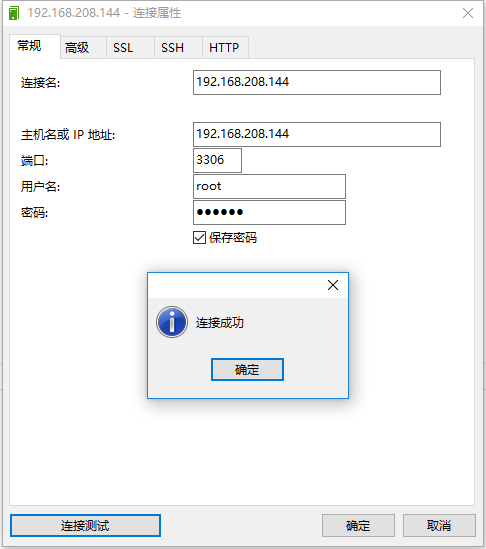
11、测试连接
参考资料:
http://www.linuxidc.com/Linux/2015-01/111744.htm
CentOS上安装MySQL的更多相关文章
- 在centos上安装mysql
本文依然是用的xftp上传gz文件,然后在xShell上操作的,如果没有安装使用这两个文件的请查阅之前的博客. 1.将下载好的文件用xftp上传到对应的位置. 2.解压文件:tar -zvxf m ...
- Linux1 在Linux(CentOS)上安装MySql详细记录
前记: 毕业两年了,前两天换了份工作,由以前的传统行业跳到了互联网行业.之前的公司一直在用WinServer2003+Tomcat+SqlServer/Oracle这套部署环境.对于Linux+To ...
- [Linux] 使用Yum在CentOS上安装MySQL
跟随官网上的安装教程:https://dev.mysql.com/doc/refman/8.0/en/linux-installation-yum-repo.html官网上还有一个QuickGuide ...
- [从零开始搭网站七]CentOS上安装Mysql
点击下面连接查看从零开始搭网站全系列 从零开始搭网站 通过前面6章,我们买好了服务器,配置了服务器连接,服务器上配置了JDK和Tomcat,准备了域名(这个我没教,自己去阿里/百度/腾讯买,买东西我相 ...
- Linux CentOS上安装 MySQL 8.0.16
前言: 因为我需要在我新安装的Linux CentOS系统服务器中安装和配置MySQL服务器,然而对于我们这种Linux使用小白而言在Linux系统中下载,解压,配置MySQL等一系列的操作还是有些耗 ...
- 使用yum方式在centOS上安装mysql
1.操作系统及MySQL版本 1.1 操作系统版本 CentOS release 6.5 (Final) 1.2 MySQL版本 mysql-5.1.73-3.el6_5.x86_64mysql-li ...
- 在CentOS上安装Mysql使用yum安装mysql
https://jingyan.baidu.com/article/c74d600079be530f6a595dc3.html
- 【linux系列】Centos下安装mysql数据库
前言 为了测试方便,通常我们会自己安装数据库,以下是在Centos上安装Mysql的操作. 一.检查自己是否安装了MySQL数据库 [root@s201 /home/mysql]#rpm -qa |g ...
- centOS上安装MySQL5.7
在centos上安装mysql,前提得有sudo的权限.没有的话先去跟管理员申请一个. STEP 1 - 安装MySQL 首先打开浏览器访问下 https://dev.mysql.com/downlo ...
随机推荐
- vs2010 使用SignalR 提高B2C商城用户体验(二)
vs2010 使用SignalR 提高B2C商城用户体验(二) 上一节,已经实现了,当前域内的通信,这一节中,介绍一下跨域的即时通信,既然要做,我们肯定要把这个推送及聊天服务器做为一个单独的服务器,以 ...
- 1044: [HAOI2008]木棍分割 - BZOJ
Description 有n根木棍, 第i根木棍的长度为Li,n根木棍依次连结了一起, 总共有n-1个连接处. 现在允许你最多砍断m个连接处, 砍完后n根木棍被分成了很多段,要求满足总长度最大的一段长 ...
- What are the advantages of logistic regression over decision trees?FAQ
What are the advantages of logistic regression over decision trees?FAQ The answer to "Should I ...
- PAT-乙级-1009. 说反话 (20)
1009. 说反话 (20) 时间限制 400 ms 内存限制 65536 kB 代码长度限制 8000 B 判题程序 Standard 作者 CHEN, Yue 给定一句英语,要求你编写程序,将句中 ...
- 对JAVA动态代理的理解
叫动态代理就代表着有“静态代理”这回事. 而且,通常“动态”至少听着更NB一点. 关键就在于不明白啥叫“动”,这个得跟“静”比较下. 在我的理解,静态代理得自己声明一个类,实现跟被代理对象同样的接口. ...
- 服务器部署_linux下部署jprofiler简单备忘
1.windows安装jprofiler 2.linux下安装jprofiler服务端,记好安装路径.假设是安装在/ex/bin/下 3. 配置tomcat的启动sh文件,在后面加入以下参数: -a ...
- NEERC 2014, Eastern subregional contest
最近做的一场比赛,把自己负责过的题目记一下好了. Problem B URAL 2013 Neither shaken nor stirred 题意:一个有向图,每个结点一个非负值,可以转移到其他结点 ...
- VC中支持中文的字符串比较函数
VS2008开发环境,多字符集和UNICODE字符集都可用. WCHAR * mbcsToUnicode(const char *zStr) { int nByte; WCHAR *zMbcsStr; ...
- 【转】五种开源协议的比较(BSD, Apache, GPL, LGPL, MIT)
当 Adobe.Microsoft.Sun 等一系列巨头开始表现出对”开源”的青睐时,”开源”的时代即将到来! 现今存在的开源协议很多,而经过 Open Source Initiative 组织通过批 ...
- Compiler options do not specify -mv64+, but configuration is for C64x+
2013-06-20 10:02:47 错误报告: "pin_connect_cfg.s62", ERROR! at line 365: [ ***** USER ERROR ...