
AngularJS的添加操作和列表操作
代码下载:https://files.cnblogs.com/files/xiandedanteng/agsAddList.rar
添加成员页面图示:
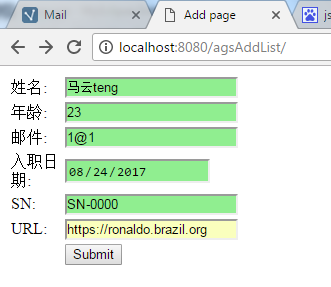
添加成员页面代码:
<%@ page language="java" contentType="text/html; charset=utf-8" pageEncoding="utf-8"%>
<%
String path = request.getContextPath();
String basePath = request.getScheme()+"://"+request.getServerName()+":"+request.getServerPort()+path+"/";
%>

<!DOCTYPE HTML PUBLIC "-//W3C//DTD HTML 4.01 Transitional//EN">
<html ng-app="notesApp">
  <head>
    <base href="<%=basePath%>">

    <title>Add page</title>

    <style>
    .username.ng-valid{
        background-color:lightgreen;
    }
    .username.ng-invalid{
        background-color:pink;
    }
    .userage.ng-valid{
        background-color:lightgreen;
    }
    .userage.ng-invalid{
        background-color:pink;
    }
    .usermail.ng-valid{
        background-color:lightgreen;
    }
    .usermail.ng-invalid{
        background-color:pink;
    }
    .userdate.ng-valid{
        background-color:lightgreen;
    }
    .userdate.ng-invalid{
        background-color:pink;
    }
    .usersn.ng-valid{
        background-color:lightgreen;
    }
    .usersn.ng-invalid{
        background-color:pink;
    }
    .userurl.ng-valid{
        background-color:lightgreen;
    }
    .userurl.ng-invalid{
        background-color:pink;
    }
  </style>

    <meta http-equiv="pragma" content="no-cache">
    <meta http-equiv="cache-control" content="no-cache">
    <meta http-equiv="expires" content="0">
    <meta http-equiv="keywords" content="keyword1,keyword2,keyword3">
    <meta http-equiv="description" content="This is my page">
    <meta http-equiv="Content-Type" content="text/html; charset=utf-8">
    <!--
    <link rel="stylesheet" type="text/css" href="styles.css">
    -->
    <script src="angular1.4.6.min.js"></script>
  </head>

  <body>
    <form ng-submit="ctrl.submit()" name="myForm" action="Add">
        <table>
            <tr>
                <td width="50px">姓名:</td>
                <td>
                    <input type="text" class="username" name="uname" ng-model="ctrl.user.name" required ng-minlength="4"/>
                </td>
                <td>
                    <span ng-show="myForm.uname.$error.required">This a required field</span>
                    <span ng-show="myForm.uname.$error.minlength">Minimum length required is 4</span>
                    <span ng-show="myForm.uname.$invalid">This field is invalid</span>
                </td>
            </tr>

            <tr>
                <td width="50px">年龄:</td>
                <td>
                    <input type="number" class="userage" name="uage" ng-model="ctrl.user.age" required  ng-minlength="2"/>
                </td>
                <td>
                    <span ng-show="myForm.uage.$error.required">This a required field</span>
                    <span ng-show="myForm.uage.$error.minlength">Minimum length required is 2</span>
                    <span ng-show="myForm.uage.$invalid">This field is invalid</span>
                </td>
            </tr>

            <tr>
                <td width="50px">邮件:</td>
                <td>
                    <input type="email" class="usermail" name="umail" ng-model="ctrl.user.mail" required  ng-minlength="3"/>
                </td>
                <td>
                    <span ng-show="myForm.umail.$error.required">This a required field</span>
                    <span ng-show="myForm.umail.$error.minlength">Minimum length required is 3</span>
                    <span ng-show="myForm.umail.$invalid">This field is invalid</span>
                </td>
            </tr>

            <tr>
                <td width="50px">入职日期:</td>
                <td>
                    <input type="date" class="userdate" name="udate" ng-model="ctrl.user.date" required  ng-minlength="8"/>
                </td>
                <td>
                    <span ng-show="myForm.udate.$error.required">This a required field</span>
                    <span ng-show="myForm.udate.$error.minlength">Minimum length required is 8</span>
                    <span ng-show="myForm.udate.$invalid">This field is invalid</span>
                </td>
            </tr>

            <tr>
                <td width="50px">SN:</td>
                <td>
                    <input type="text" class="usersn" name="usn" ng-model="ctrl.user.sn" ng-pattern="/^SN-\d{4}$/"/>
                </td>
                <td>
                    <span ng-show="myForm.udate.$invalid">This field is invalid</span>
                </td>
            </tr>

            <tr>
                <td width="50px">URL:</td>
                <td>
                    <input type="url" class="userurl" name="uurl" ng-model="ctrl.user.url" />
                </td>
                <td>
                    <span ng-show="myForm.uurl.$invalid">This field is invalid</span>
                </td>
            </tr>

            <tr>
                <td ></td>
                <td colspan="2"><input type="submit" value="Submit" ng-disabled="myForm.$invalid"/></td>
                <td>
            </tr>
        </table>
    </form>
  </body>
</html>

<script type="text/javascript" charset="UTF-8">
<!--
    angular.module('notesApp',[])
     .controller('MainCtrl',['$http',function($http){

           var self=this;

           self.submit=function(){
            document.forms[0].submit();
       };
     }]);
//-->
</script>
处理上传数据的Servlet:
package com.test;

import javax.servlet.RequestDispatcher;
import javax.servlet.ServletException;
import javax.servlet.http.HttpServlet;
import javax.servlet.http.HttpServletRequest;
import javax.servlet.http.HttpServletResponse;

public class AddServlet extends HttpServlet {
    private static final long serialVersionUID = 56890894234786L;

    public void doPost(HttpServletRequest request, HttpServletResponse response)
            throws ServletException, java.io.IOException {
        request.setCharacterEncoding("UTF-8");

        // 以post方式提交的表单编码格式默认为ISO-8859-1的编码格式,可能为中文的话需要转码
        String name=new String(request.getParameter("uname").getBytes("ISO8859-1"),"UTF-8");

        String age=request.getParameter("uage");
        String mail=request.getParameter("umail");
        String udate=request.getParameter("udate");
        String usn=request.getParameter("usn");
        String uurl=request.getParameter("uurl");

        Container.add(new Member(name,age,mail,udate,usn,uurl));

        RequestDispatcher dispatcher = request.getRequestDispatcher("list.jsp");
        dispatcher.forward(request, response);
        return;
    }

    public void doGet(HttpServletRequest request, HttpServletResponse response)
            throws ServletException, java.io.IOException {
        doPost(request, response);
    }
}
列表页面图示:
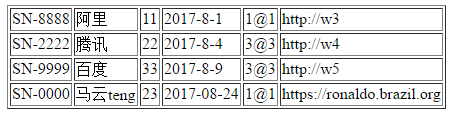
列表页面代码:
<%@ page language="java" import="java.util.*" pageEncoding="utf-8"%>
<%
String path = request.getContextPath();
String basePath = request.getScheme()+"://"+request.getServerName()+":"+request.getServerPort()+path+"/";
%>

<!DOCTYPE HTML PUBLIC "-//W3C//DTD HTML 4.01 Transitional//EN">
<html ng-app="notesApp">
  <head>
    <base href="<%=basePath%>">

    <title>My JSP 'index.jsp' starting page</title>
    <meta http-equiv="pragma" content="no-cache">
    <meta http-equiv="cache-control" content="no-cache">
    <meta http-equiv="expires" content="0">
    <meta http-equiv="keywords" content="keyword1,keyword2,keyword3">
    <meta http-equiv="description" content="This is my page">
    <meta http-equiv="Content-Type" content="text/html; charset=utf-8">

    <!--
    <link rel="stylesheet" type="text/css" href="styles.css">
    -->
    <script src="angular1.4.6.min.js"></script>
  </head>

  <body>
    <table ng-controller="MainCtrl as ctrl" border="1px">
        <tr ng-repeat="member in ctrl.items">
            <td><span ng-bind='member.sn'/></td>
            <td><span ng-bind='member.name'/></td>
            <td><span ng-bind='member.age'/></td>
            <td><span ng-bind='member.date'/></td>
            <td><span ng-bind='member.mail'/></td>
            <td><span ng-bind='member.url'/></td>
        </tr>
    </table>
  </body>
</html>

<script type="text/javascript"  charset="UTF-8">
<!--
    angular.module('notesApp',[])
     .controller('MainCtrl',['$http',function($http){

           var self=this;
           self.items=[];

        var url="/agsAddList/Members";
           $http.get(url).then(function(response){
               self.items=response.data;
           },function(errResponse){
               alert('error'+errResponse);
           });
     }]);
//-->
</script>
获得列表的Servlet:
package com.test;

import java.io.PrintWriter;
import java.util.List;

import javax.servlet.ServletException;
import javax.servlet.http.HttpServlet;
import javax.servlet.http.HttpServletRequest;
import javax.servlet.http.HttpServletResponse;

import net.sf.json.JSONArray;

public class MembersServlet extends HttpServlet {
    private static final long serialVersionUID = 56890894234786L;

    public void doPost(HttpServletRequest request, HttpServletResponse response)
            throws ServletException, java.io.IOException {
        request.setCharacterEncoding("UTF-8");
        response.setContentType("text/html;charset=UTF-8"); //   设置response的ContentType解决中文乱码

        PrintWriter out = response.getWriter();

        List<Member> ls=Container.getLs();

        JSONArray jArray=JSONArray.fromObject(ls);
        String json=jArray.toString();

        System.out.println("json="+json);
        out.print(json);
        out.flush();

        return;
    }

    public void doGet(HttpServletRequest request, HttpServletResponse response)
            throws ServletException, java.io.IOException {
        doPost(request, response);
    }
}
AngularJS的添加操作和列表操作的更多相关文章
- python连接redis、redis字符串操作、hash操作、列表操作、其他通用操作、管道、django中使用redis
今日内容概要 python连接redis redis字符串操作 redis之hash操作 redis之列表操作 redis其他 通用操作,管道 django中使用redis 内容详细 1.python ...
- redis hash操作 list列表操作
HSET key 子key 子value 192.168.11.5:6379> HSET stu1 name 'zhangmingda'(integer) 1192.168.11.5:6379& ...
- 004-redis-命令-哈希操作,列表操作
Redis hash 命令 下表列出了 redis hash 基本的相关命令: 序号 命令及描述 1 HDEL key field1 [field2] 删除一个或多个哈希表字段 2 HEXISTS k ...
- python基础操作_字符串操作_列表操作list
#字符串可以通过下表取值,如下程序 names='java python' print(names[0],names[5]) #使用for循环轮询所有name值 ''' for name in nam ...
- python3_列表(修改,添加和删除元素操作)
前言:列表的定义:列表是由一系列按特定顺序排列的元素组成.即列表是一个有序集合. 1.修改列表元素 由前言知列表是一个有序集合,因此在修改列表元素时我们需指定列表名和要修改的元素的索引,再指定该元素的 ...
- react实例之todo,做一个实时响应的列表操作
react实例之todo, 做一个实时响应的列表操作 在所有的mvc框架中,最常见的例子不是hello world,而是todo,由于reactjs的简单性,在不引用flux和redux的情况下,我们 ...
- Python学习笔记-Day2-Python基础之列表操作
列表的常用操作包括但不限于以下操作: 列表的索引,切片,追加,删除,切片等 这里将对列表的内置操作方法进行总结归纳,重点是以示例的方式进行展示. 使用type获取创建对象的类 type(list) 使 ...
- TCL语言笔记:TCL中的列表操作
一.介绍 列表则是具有特殊解释的字符串.Tcl 中的列表操作和其它 Tcl 命令一样具有相同的结构.列表可应用在诸如 foreach 这样的以列表为变元的循环命令中,也应于构建 eval 命令的延迟命 ...
- Smack[3]用户列表,头像,组操作,用户操作
用户列表 Smack主要使用Roster进行列表管理的 connection.getRoster(); /** * 返回所有组信息 <RosterGroup> * * @return Li ...
随机推荐
- [oldboy-django][2深入django]浏览器同源策略 + JSONP + cros
浏览器的同源策略: - 同源: 同方法,同域名,同端口 http://www.baidu.com:8000 http: 方法 www.baidu.com: 域名 8000: 端口 - 定义 网上解析非 ...
- [转]Ubuntu下添加开机启动脚本
作者: 王恒 发表于 2012年 11月 5日 1.方法一,编辑rc.loacl脚本 Ubuntu开机之后会执行/etc/rc.local文件中的脚本, 所以我们可以直接在/etc/rc.local中 ...
- Zookeeper ZooDefs.Ids
OPEN_ACL_UNSAFE : 完全开放的ACL,任何连接的客户端都可以操作该属性znode CREATOR_ALL_ACL : 只有创建者才有ACL权限 READ_ACL_UNSAFE:只能读 ...
- hihoCoder [Offer收割]编程练习赛83 D 生成树问题
题目 从 Kruskal 算法的角度来思考这个问题. 考虑 $n$ 个点的"空图"(即没有边的图). 先将 $m_2$ 条无权值的边加到图中,得到一个森林. 按边权从小到大的顺序枚 ...
- Hadoop体系所有组件默认端口列表
Why? Hadoop集群组件太多,默认端口无法记住,有事后需要查看,就在这里罗列下这里包含我们使用到的组件:HDFS, YARN, Hbase, Hive, ZooKeeper。 What? 端口 ...
- github的一些简单用法
关于 项目 上传 大多数人都是使用命令行上传 步骤分为以下几步: 在github上创建你的 repositories ->github.com - >右下角 new reopsi ...
- Nginx ServerName 配置说明(转)
Nginx强大的正则表达式支持,可以使server_name的配置变得很灵活,如果你要做多用户博客,那么每个用户拥有自己的二级域名也就很容易实现了. 下面我就来说说server_name的使用吧: s ...
- pyspider 爬虫教程(一):HTML 和 CSS 选择器
虽然以前写过 如何抓取WEB页面 和 如何从 WEB 页面中提取信息.但是感觉还是需要一篇 step by step 的教程,不然没有一个总体的认识.不过,没想到这个教程居然会变成一篇译文,在这个 ...
- maven中的继承和聚合的关系
maven中的继承和聚合的关系:两者的目的是不一样的,聚合的目的是能够快速的构建项目,继承的目的是减少重复配置.聚合:定义一个聚合模块,然后在pom文件中添加<module></mo ...
- android基本控件学习-----ProgressBar
ProgressBar(进度条)讲解 一.常用属性和基础使用实例 (1)常用属性: android:max:进度条的最大值 android:progress:进度条已完成进度值 android:pro ...