
MyBatis二级缓存配置
正如大多数持久层框架一样,MyBatis 同样提供了一级缓存和二级缓存的支持
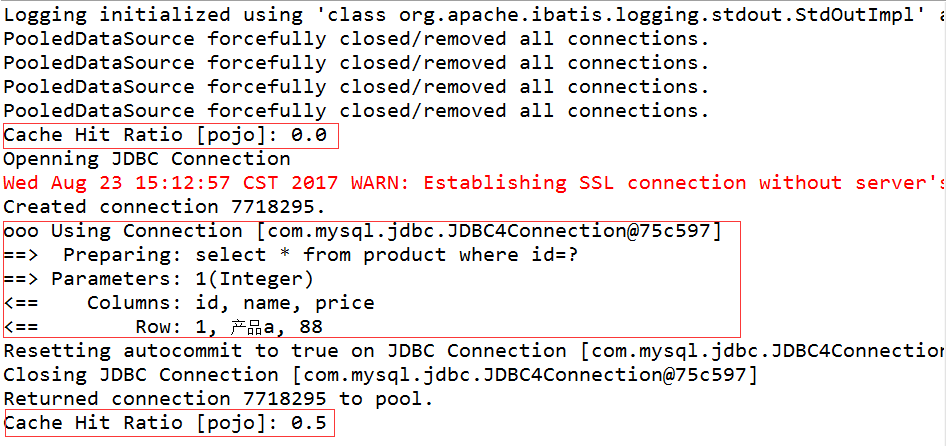
Mybatis二级缓存是SessionFactory,如果两次查询基于同一个SessionFactory,那么就从二级缓存中取数据,而不用到数据库里去取了。
1. 一级缓存: 基于PerpetualCache 的 HashMap本地缓存,其存储作用域为 Session,当 Session flush 或 close 之后,该Session中的所有 Cache 就将清空。
2. 二级缓存与一级缓存其机制相同,默认也是采用 PerpetualCache,HashMap存储,不同在于其存储作用域为 Mapper(Namespace),并且可自定义存储源,如 Ehcache。
启动二级缓存:
1.mybatis-config.xml添加
<setting name="cacheEnabled" value="true"/>
<?xml version="1.0" encoding="UTF-8"?>

<!DOCTYPE configuration

PUBLIC "-//mybatis.org//DTD Config 3.0//EN"

"http://mybatis.org/dtd/mybatis-3-config.dtd">

<configuration>

    <settings>

        <setting name="logImpl" value="STDOUT_LOGGING"/>

        <setting name="cacheEnabled" value="true"/><!-- 二级缓存 -->

    </settings>

    <typeAliases>

      <package name="pojo"/>

    </typeAliases>

    <environments default="development">

        <environment id="development">

            <transactionManager type="JDBC"/>

            <dataSource type="POOLED">

                <property name="driver" value="com.mysql.jdbc.Driver"/>

                <property name="url" value="jdbc:mysql://localhost:3306/lol?characterEncoding=UTF-8"/>

                <property name="username" value="root"/>

                <property name="password" value="root"/>

            </dataSource>

        </environment>

    </environments>

    <mappers>

        <mapper resource="pojo/Product.xml"/>

    </mappers>

</configuration>
2.在Product.xml(数据库关系映射)中增加 <cache/>
<?xml version="1.0" encoding="UTF-8"?>

<!DOCTYPE mapper

    PUBLIC "-//mybatis.org//DTD Mapper 3.0//EN"

    "http://mybatis.org/dtd/mybatis-3-mapper.dtd">

    <mapper namespace="pojo">

        <cache/>

        <insert id="addProduct" parameterType="Product" >

            insert into product (name, price) values (#{name}, #{price})

        </insert>

        <select id="listProduct" resultType="Product">

            select * from  product

        </select>

         <delete id="deleteProduct" parameterType="Product" >

            delete from product where id= #{id}

        </delete>

        <select id="getProduct" parameterType="_int" resultType="Product">

            select * from product where id=#{id}

        </select>

        <select id="listProductByIdAndName" resultType="Product">

            <bind name="likename" value="'%' + name + '%'" />

               select * from product

               <where>

                   <if test="name!=null">

                   and name like #{likename}

                   <if test="price!=null">

                   and price > #{price}

                   </if>

               </if>

               </where>

        </select>

    </mapper>
3.序列化Product.java(pojo类)
通常来说,二级缓存的机制里会有一个: 当缓存的个数达到某个数量的时候,把缓存对象保存在硬盘上。 如果要把对象保存在硬盘上,就必须实现序列化接口。
序列化相关知识:http://blog.csdn.net/wangloveall/article/details/7992448/
package pojo;

import java.io.Serializable;

public class Product implements Serializable{

    private int id;

    private String name;

    private float price;

    public int getId() {

        return id;

    }

    public void setId(int id) {

        this.id = id;

    }

    public String getName() {

        return name;

    }

    public void setName(String name) {

        this.name = name;

    }

    public float getPrice() {

        return price;

    }

    public void setPrice(float price) {

        this.price = price;

    }

}
4.测试类
package controller;

import java.io.IOException;

import java.io.InputStream;

import java.util.HashMap;

import java.util.List;

import java.util.Map;

import org.apache.ibatis.io.Resources;

import org.apache.ibatis.session.SqlSession;

import org.apache.ibatis.session.SqlSessionFactory;

import org.apache.ibatis.session.SqlSessionFactoryBuilder;

import pojo.Product;

public class TestMybatis {

    public static void main(String [] args) throws IOException{

        String resource = "mybatis-config.xml";

        InputStream inputStream = Resources.getResourceAsStream(resource);

        SqlSessionFactory sqlSessionFactory = new SqlSessionFactoryBuilder().build(inputStream);

        SqlSession session = sqlSessionFactory.openSession();

        Product p = session.selectOne("getProduct", 1);

        session.commit();

        session.close();

        SqlSession session1 = sqlSessionFactory.openSession();//二级缓存测试

        Product p2 = session1.selectOne("getProduct", 1);

        session1.commit();

        session1.close();

    }

}
5.结果
MyBatis二级缓存配置的更多相关文章
- Mybatis的二级缓存配置
一个项目中肯定会存在很多共用的查询数据,对于这一部分的数据,没必要每一个用户访问时都去查询数据库,因此配置二级缓存将是非常必要的. Mybatis的二级缓存配置相当容易,要开启二级缓存,只需要在你的 ...
- SpringMVC + MyBatis + Mysql + Redis(作为二级缓存) 配置
2016年03月03日 10:37:47 标签: mysql / redis / mybatis / spring mvc / spring 33805 项目环境: 在SpringMVC + MyBa ...
- SpringMVC +Spring + MyBatis + Mysql + Redis(作为二级缓存) 配置
转载:http://blog.csdn.net/xiadi934/article/details/50786293 项目环境: 在SpringMVC +Spring + MyBatis + MySQL ...
- 深入了解MyBatis二级缓存
深入了解MyBatis二级缓存 标签: mybatis二级缓存 2015-03-30 08:57 41446人阅读 评论(13) 收藏 举报 分类: Mybatis(51) 版权声明:版权归博主所 ...
- mybati缓存机制之二级缓存配置
二级缓存配置 在MyBatis的配置文件中开启二级缓存. <setting name="cacheEnabled" value="true"/> 在 ...
- mybatis二级缓存
二级缓存区域是根据mapper的namespace划分的,相同namespace的mapper查询数据放在同一个区域,如果使用mapper代理方法每个mapper的namespace都不同,此时可以理 ...
- 如何细粒度地控制你的MyBatis二级缓存(mybatis-enhanced-cache插件实现)
前几天网友chanfish 给我抛出了一个问题,笼统地讲就是如何能细粒度地控制MyBatis的二级缓存问题,酝酿了几天,觉得可以写个插件来实现这个这一功能.本文就是从问题入手,一步步分析现存的MyBa ...
- MyBatis 二级缓存全详解
目录 MyBatis 二级缓存介绍 二级缓存开启条件 探究二级缓存 二级缓存失效的条件 第一次SqlSession 未提交 更新对二级缓存影响 探究多表操作对二级缓存的影响 二级缓存源码解析 二级缓存 ...
- Springboot整合Ehcache 解决Mybatis二级缓存数据脏读 -详细
前面有写了一篇关于这个,但是这几天又改进了一点,就单独一篇在详细说明一下 配置 application.properties ,启用Ehcache # Ehcache缓存 spring.cache.t ...
随机推荐
- 构建工具是如何用 node 操作 html/js/css/md 文件的
构建工具是如何用 node 操作 html/js/css/md 文件的 从本质上来说,html/js/css/md ... 源代码文件都是文本文件,文本文件的内容都是字符串,对文本文件的操作其实就是对 ...
- 《avascript 高级程序设计(第三版)》 ---第二章 在HTML中使用Javascript
本章主要讲解了,怎么在HTML中使用: 1.<script src=""></script> 属性:defer="defer" 表示脚本 ...
- axios无法在ie9,10,11环境下运行的问题解决
npm install es6-promise --save-dev import promise from 'es6-promise'; promise.polyfill();
- Linux-Yum服务器搭建
Yum(全称为 Yellow dog Updater, Modified)是一个在Fedora和RedHat以及CentOS中的Shell前端软件包管理器.基于RPM包管理,能够从指定的服务器自动下载 ...
- linux命令学习笔记(54):ping命令
Linux系统的ping命令是常用的网络命令,它通常用来测试与目标主机的连通性,我们经常会说“ping一下某机器, 看是不是开着”.不能打开网页时会说“你先ping网关地址192.168.1.1试试” ...
- ACM学习历程—HDU1003 Max Sum(dp && 最大子序列和)
Description Given a sequence a[1],a[2],a[3]......a[n], your job is to calculate the max sum of a sub ...
- css 跳转电脑分辨率
因为我们经常在项目中要适配各种屏幕,为了方便前端的开发和测试.我们可以直接把电脑的分辨率调整到需要适配的最小的分辨率,其实还有一种更直接粗暴的方法.直接按F12打开控制台,在收拉浏览器就能看到目前的分 ...
- js跨域请求方式 ---- JSONP原理解析
这篇文章主要介绍了js跨域请求的5中解决方式的相关资料,需要的朋友可以参考下 跨域请求数据解决方案主要有如下解决方法: 1 2 3 4 5 JSONP方式 表单POST方式 服务器代理 H ...
- bzoj 4883 [Lydsy1705月赛]棋盘上的守卫——并查集(思路!)
题目:https://www.lydsy.com/JudgeOnline/problem.php?id=4883 把各行和各列看成n+m个点. 如果一下能防守行和列,就是最大匹配了.这是每两个左右部点 ...
- wxPython学习资料
[译]wxPython布局管理简介 https://www.pystack.org/wxpython_sizer/ 设计器.代码分离 http://book.douban.com/review/578 ...