
Keras实现MNIST分类
仅仅为了学习Keras的使用,使用一个四层的全连接网络对MNIST数据集进行分类,网络模型各层结点数为:784: 256: 128 : 10;
使用整体数据集的75%作为训练集,25%作为测试集,最终在测试集上的正确率也就只能达到92%,太低了:
              precision    recall  f1-score   support

         0.0       0.95      0.96      0.96      1721

         1.0       0.95      0.97      0.96      1983

         2.0       0.91      0.90      0.91      1793

         3.0       0.91      0.88      0.89      1833

         4.0       0.92      0.93      0.92      1689

         5.0       0.87      0.86      0.87      1598

         6.0       0.92      0.95      0.94      1699

         7.0       0.94      0.93      0.93      1817

         8.0       0.89      0.87      0.88      1721

         9.0       0.89      0.90      0.89      1646

   micro avg       0.92      0.92      0.92     17500

   macro avg       0.91      0.92      0.91     17500

weighted avg       0.92      0.92      0.92     17500
训练过程中,损失和正确率曲线:
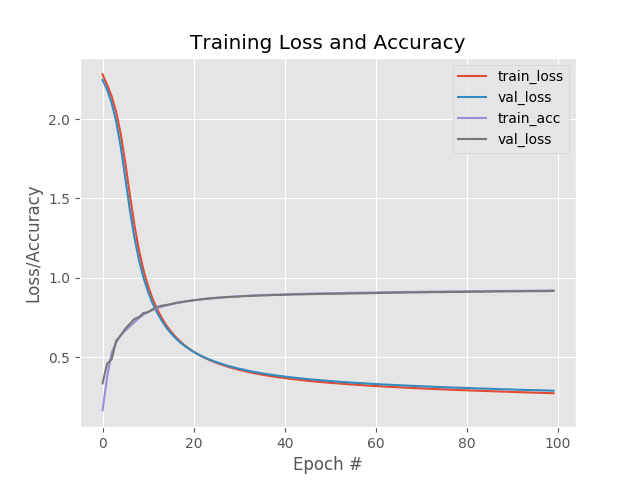
上面使用的优化方法是SGD,下面在保持所有参数不变的情况下,使用RMSpro进行优化,最后的结果看起来好了不少啊达到98%:
              precision    recall  f1-score   support

         0.0       0.99      0.99      0.99      1719

         1.0       0.99      0.99      0.99      1997

         2.0       0.99      0.97      0.98      1785

         3.0       0.97      0.98      0.97      1746

         4.0       0.98      0.98      0.98      1654

         5.0       0.97      0.97      0.97      1556

         6.0       0.99      0.99      0.99      1740

         7.0       0.98      0.97      0.98      1845

         8.0       0.97      0.98      0.97      1669

         9.0       0.96      0.97      0.97      1789

   micro avg       0.98      0.98      0.98     17500

   macro avg       0.98      0.98      0.98     17500

weighted avg       0.98      0.98      0.98     17500

这相差有些大了啊,损失一开始就比较低,正确率就比较高;
在执行一些epoch之后,训练集损失降低到一定程度并趋于平缓,而测试集的损失却在逐渐升高,看来是过拟合了啊。
也就是说大概在最初几个epoch的时候训练集的损失比较低,而且测试集的损失达到最低,正确率也都不错;应该就可以停止了。
代码:
#!/usr/bin/env python

# -*- coding: utf-8 -*-

# @Time : 19-5-9

"""

implement simple neural networks using the Keras libary

"""

__author__ = 'Zhen Chen'

# import the necessary packages

from sklearn.preprocessing import LabelBinarizer

from sklearn.model_selection import train_test_split

from sklearn.metrics import classification_report

from keras.models import Sequential

from keras.layers.core import Dense

from keras.optimizers import SGD

from sklearn import datasets

import matplotlib.pyplot as plt

import numpy as np

import argparse

# construct the argument parse and parse the arguments

parser = argparse.ArgumentParser()

parser.add_argument("-o", "--output", default="./Training Loss and Accuracy.png",

                    help="path to the output loss/accuracy plot")

args = parser.parse_args()

# grab the MNIST datset (if this is your first time running this

# script, the download may take a minute -- the 55MB MNIST datset

# will be downloaded

print("[INFO] loading MNIST (full) dataset...")

dataset = datasets.fetch_mldata("MNIST Original")

# scale the raw pixel intensities to the range [0, 1.0], then

# construct the training and testing splits

data = dataset.data.astype("float") / 255.0

(trainX, testX, trainY, testY) = train_test_split(data, dataset.target, test_size=0.25)

# convert the labels form integers to vectors

lb = LabelBinarizer()

trainY = lb.fit_transform(trainY)

testY = lb.fit_transform(testY)

# define the 784-256-128-10 architecture using Keras

model = Sequential()

model.add(Dense(256, input_shape=(784,), activation="sigmoid"))

model.add(Dense(128, activation="sigmoid"))

model.add(Dense(10, activation="softmax"))

# train the model using SGD

print("[INFO] training network...")

sgd = SGD(0.01)

model.compile(loss="categorical_crossentropy", optimizer=sgd, metrics=["accuracy"])

H = model.fit(trainX, trainY, validation_data=(testX, testY), epochs=100, batch_size=128)

# evaluate the network

print("[INFO] evaluating network...")

predictions = model.predict(testX, batch_size=128)

print(classification_report(testY.argmax(axis=1),

                            predictions.argmax(axis=1),

                            target_names=[str(x) for x in lb.classes_]))

# plot the training loss and accuracy

plt.style.use("ggplot")

plt.figure()

plt.plot(np.arange(0, 100), H.history["loss"], label="train_loss")

plt.plot(np.arange(0, 100), H.history["val_loss"], label="val_loss")

plt.plot(np.arange(0, 100), H.history["acc"], label="train_acc")

plt.plot(np.arange(0, 100), H.history["val_acc"], label="val_loss")

plt.title("Training Loss and Accuracy")

plt.xlabel("Epoch #")

plt.ylabel("Loss/Accuracy")

plt.legend()

plt.savefig(args.output)
Keras实现MNIST分类的更多相关文章
- 芝麻HTTP:TensorFlow LSTM MNIST分类
本节来介绍一下使用 RNN 的 LSTM 来做 MNIST 分类的方法,RNN 相比 CNN 来说,速度可能会慢,但可以节省更多的内存空间. 初始化 首先我们可以先初始化一些变量,如学习率.节点单元数 ...
- TensorFlow入门(三)多层 CNNs 实现 mnist分类
欢迎转载,但请务必注明原文出处及作者信息. 深入MNIST refer: http://wiki.jikexueyuan.com/project/tensorflow-zh/tutorials/mni ...
- keras实现mnist数据集手写数字识别
一. Tensorflow环境的安装 这里我们只讲CPU版本,使用 Anaconda 进行安装 a.首先我们要安装 Anaconda 链接:https://pan.baidu.com/s/1AxdGi ...
- 用Pytorch训练MNIST分类模型
本次分类问题使用的数据集是MNIST,每个图像的大小为\(28*28\). 编写代码的步骤如下 载入数据集,分别为训练集和测试集 让数据集可以迭代 定义模型,定义损失函数,训练模型 代码 import ...
- 利用CNN神经网络实现手写数字mnist分类
题目: 1)In the first step, apply the Convolution Neural Network method to perform the training on one ...
- keras如何求分类问题中的准确率和召回率
https://www.zhihu.com/question/53294625 由于要用keras做一个多分类的问题,评价标准采用precision,recall,和f1_score:但是keras中 ...
- 深度学习原理与框架-Tensorflow卷积神经网络-卷积神经网络mnist分类 1.tf.nn.conv2d(卷积操作) 2.tf.nn.max_pool(最大池化操作) 3.tf.nn.dropout(执行dropout操作) 4.tf.nn.softmax_cross_entropy_with_logits(交叉熵损失) 5.tf.truncated_normal(两个标准差内的正态分布)
1. tf.nn.conv2d(x, w, strides=[1, 1, 1, 1], padding='SAME') # 对数据进行卷积操作 参数说明:x表示输入数据,w表示卷积核, stride ...
- 深度学习原理与框架-Tensorflow卷积神经网络-神经网络mnist分类
使用tensorflow构造神经网络用来进行mnist数据集的分类 相比与上一节讲到的逻辑回归,神经网络比逻辑回归多了隐藏层,同时在每一个线性变化后添加了relu作为激活函数, 神经网络使用的损失值为 ...
- 深度学习之神经网络核心原理与算法-caffe&keras框架图片分类
之前我们在使用cnn做图片分类的时候使用了CIFAR-10数据集 其他框架对于CIFAR-10的图片分类是怎么做的 来与TensorFlow做对比. Caffe Keras 安装 官方安装文档: ht ...
随机推荐
- JAVA-三大语句(选择语句、条件语句、循环语句)
跳出指定的for循环体,和goto很像 1 K:for(int i=0;i<3;i++){//给这个for循环体取一个名字为K 2 for(int j=0;j<3;j++){ 3 if(j ...
- .NET中Eval()方法大全
<%# Bind("Subject") %> //绑定字段<%# Container.DataItemIndex + 1%> //实现自动编号<%# ...
- hdu 1002 A + B Problem II(大数)
题意:就是求a+b (a,b都不超过1000位) 思路:用数组存储 第一道大数的题目,虽然很水,纪念一下! 代码: #include<cstdio> #include<cstring ...
- Use trained sklearn model with pyspark
Use trained sklearn model with pyspark from pyspark import SparkContext import numpy as np from sk ...
- Linux下查找进程,kill进程
1. ps命令用来查找linux运行的进程,常用命令: ps aux | grep 进程名: eg:ps aux | grep admin 查找admin的进程 或者 ps -ef | grep j ...
- listen and translation exercise 51
You are supposed to be having fun now. I have to hand in my biology paper tomorrow. Listen, you litt ...
- 网络编程学习笔记-MAC地址和IP地址的关系
简单地说:ip地址是服务商给你的,mac地址是你的网卡物理地址. 一.IP地址 对于IP地址,相信大家都很熟悉,即指使用TCP/IP协议指定给主机的32位地址.IP地址由用点分隔开的4个8八位组构成, ...
- vim 编辑器IDE版
wget https://raw.github.com/ma6174/vim/master/setup.sh -O ma6174_vim_setup.sh && bash ma6174 ...
- hdu3518 Boring Counting[后缀排序]
裸的统计不同的重复出现子串(不重叠)种数的题.多次使用后缀排序要注意小细节.y数组在重复使用时一定要清空,看那个line25 +k就明白了 ,cnt也要清空,为什么就不说了 #include<b ...
- [转]script之defer&async
html5中script的async属性 我兴奋于html5的原因之一是一些久久未能实现的特性现在可以真正运用于实际项目中了. 如我们使用placeholder效果蛮久了但是那需要javascript ...