
PHP GD库---之商详合成分享图片
$item_pic = 'img/item.jpg';

$qcode_pic = 'img/qcode.png';

$user_pic = 'img/user.jpeg';

$item_title = "镇泰吹风机家用孕婴负离子护";

$item_title2 = "发蓝光大风力 家用";

$font_file = 'fonts/Microsoft_Yahei.ttf';

$item_price = '¥100.50';

$share_title = "来自邹喆的分享";

//创建画布

$percent = 0.5;

$width = 400;

$height = 700;

$image = imagecreatetruecolor($width, $height);

//创建背景颜色

$image_bg = imagecolorallocate($image, 255, 255, 255);

//创建字体颜色

$image_text_bg = imagecolorallocate($image, 0, 0, 0);

//创建价格颜色

$price_bg = imagecolorallocate($image, 255, 0, 0);

//创建灰色颜色

$qcode_bg = imagecolorallocate($image, 128, 138, 135);

//填充背景颜色

imagefill($image, 0, 0, $image_bg);

//把商品图片合成到画布商品

//先把商品图片换成图片流

list($item_pic_width, $item_pic_height) = getimagesize($item_pic);

$item_pic = imagecreatefromjpeg($item_pic);

$new_item_width = $item_pic_width * $percent;

$new_item_height = $item_pic_height * $percent;

//加入商品

imagecopyresized($image, $item_pic, 0, 120, 0, 0, $new_item_width, $new_item_height, $item_pic_width, $item_pic_height);

//加入商品标题

imagettftext($image, 12, 0, 10, 590, $image_text_bg, $font_file, $item_title);

imagettftext($image, 12, 0, 11, 590, $image_text_bg, $font_file, $item_title);

imagettftext($image, 12, 0, 25, 610, $image_text_bg, $font_file, $item_title2);

imagettftext($image, 12, 0, 26, 610, $image_text_bg, $font_file, $item_title2);

//加入商品价格

imagettftext($image, 20, 0, 30, 650, $price_bg, $font_file, $item_price);

//加入推荐者头像

list($user_pic_width, $user_pic_height) = getimagesize($user_pic);

$user_pic = imagecreatefromjpeg($user_pic);

$new_user_pic_width = $user_pic_width * $percent;

$new_user_pic_height = $user_pic_height * $percent;

imagecopyresampled($image, $user_pic, 80, 50, 0, 0, $new_user_pic_width, $new_user_pic_height, $user_pic_width, $user_pic_height);

//加入推荐者

imagettftext($image, 12, 0, 150, 100, $image_text_bg, $font_file, $share_title);

//加入二维码

list($qcode_pic_width, $qcode_pic_height) = getimagesize($qcode_pic);

$new_qcode_width = $qcode_pic_width;

$new_qcode_height = $qcode_pic_height;

$qcode_pic = imagecreatefrompng($qcode_pic);

imagecopyresized($image, $qcode_pic, 260, 550, 0, 0, $new_qcode_width, $new_qcode_height, $qcode_pic_width, $qcode_pic_height);

//加入二维码文字

imagettftext($image, 10, 0, 277, 679, $qcode_bg, $font_file, '长按识别二维码');

header("Content-type:image/jpeg");

imagejpeg($image);

imagejpeg($image, 'img/0.jpg');
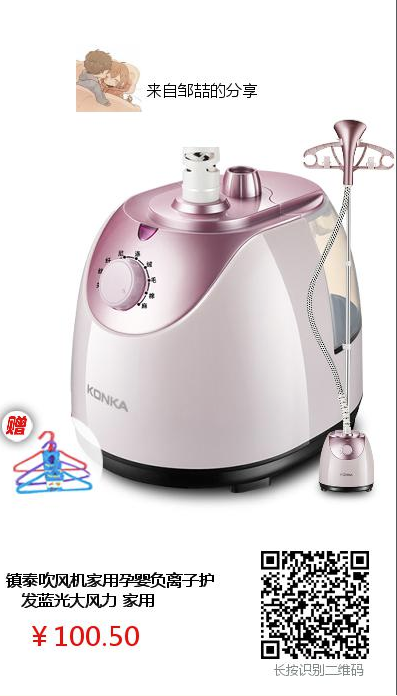
效果图:
PHP GD库---之商详合成分享图片的更多相关文章
- GD库imagecopyresampled()方法详解~
整理了一下GD库这个缩放,拉伸复制的方法 因为这个函数参数太多了~ imagecopyresampled() /* //拷贝部分图像并调整大小 bool imagecopyresampled ( ...
- PHP 使用GD库合成带二维码的海报步骤以及源码实现
PHP 使用GD库合成带二维码的海报步骤以及源码实现 在做微信项目开发过程中,经常会遇到图片合成的问题,比如将用户的二维码合成到宣传海报中,那么,遇到这种情况,利用PHP的GD库也是很容易实现的,实现 ...
- 【PHP】使用GD库实现 图像生成、缩放、logo水印和简单验证码
gd库是php最常用的图片处理库之一(另外一个是imagemagick),可以生成图片.验证码.水印.缩略图等等.要使用gd库首先需要开启gd库扩展, windows系统下需要在php.ini中将ex ...
- PHP 使用GD库合成带二维码和圆形头像的海报步骤以及源码实现
PHP 使用GD库合成带二维码和圆形头像的海报步骤以及源码实现 之前记录过一篇文章,不过那只是简单将二维码合成到海报中去,这次还要合成头像,而且是圆形.所需要素材就不一一列举,直接代码吧 1.先获取用 ...
- PHP中GD库的使用
1.基本步骤 <?php /** * Created by PhpStorm. * User: jiqing * Date: 18-4-9 * Time: 上午9:34 * 熟悉步骤 */ // ...
- PHP->利用GD库新建图像
1.确认php中GD库是否开启 在PHP配置文件php.ini中查找extension=php_gd2.dll,去掉前边的(分号) ';' 即可,一般php是默认开启的 2.绘画步骤 创建一个画布(画 ...
- GD库使用小结---1
因为一开始,“大家”都说一般任务中,用php操作图片不常见,像我们这种基本业务型的,就更用不到了,所以先别看,偶就没有看.现在有机会了自然要来玩一把. 以前学过C#的GDI+,交了课程设计后忘得一干二 ...
- PHP5 GD库生成图形验证码(汉字)
PHP5 GD库生成图形验证码且带有汉字的实例分享. 1,利用GD库函数生成图片,并在图片上写指定字符imagecreatetruecolor 新建一个真彩色图像imagecolorallocate ...
- GD库 图片缩略图 图片水印
/** * GD库 图片缩略图 *//*$image = imagecreatefromjpeg("1.jpg");var_dump($image);exit;$width = i ...
随机推荐
- 《四 spring源码》手写springmvc
手写SpringMVC思路 1.web.xml加载 为了读取web.xml中的配置,我们用到ServletConfig这个类,它代表当前Servlet在web.xml中的配置信息.通过web.xml ...
- springboot集成shiro实现身份认证
github地址:https://github.com/peterowang/shiro pom文件 <dependencies> <dependency> <group ...
- 用Node+wechaty写一个爬虫脚本每天定时给女(男)朋友发微信暖心话
wechatBot 微信每日说,每日自动发送微信消息给你心爱的人 项目介绍 灵感来源 在掘金看到了一篇<用Node + EJS写一个爬虫脚本每天定时女朋友发一封暖心邮件>后, 在评论区偶然 ...
- linux配置tomcat已service方式启动
1. 在/etc/init.d目录下新建文件,命名为tomcat2. 对tomcat文件进行编辑,执行 # cd /etc/init.d/ # vi tomcat 将下面代码粘上去 注意:下面代码ja ...
- MySQL查询示例
use test; create table t1(tid smallint(5) unsigned auto_increment,tname varchar(50),tkecheng varchar ...
- python基础教程总结15——6 CGI远程编辑
功能: 将文档作为普通网页显示: 在web表单的文本域内显示文档: 保存表单中的文本: 使用密码保护文档: 容易拓展,支持处理多余一个文档的情况 1.CGI CGI(Comment Gateway I ...
- Contour Features 边界特征
查找轮廓 findContours cv2.findContours(image, mode, method[, contours[, hierarchy[, offset]]]) → image ...
- NBear简介与使用图解
NBear简介与使用图解 框架类型:ORM映射框架 简介:NBear是一个基于.Net 2.0.C#2.0开放全部源代码的的软件开发框架类库.NBear的设计目标是尽最大努力减少开发人员的工作量,最大 ...
- 谈谈TCP的四次挥手
“挥手”是为了终止连接,TCP四次挥手的流程图如下: (在socket编程中,可以由客户端或服务端进行close操作来进行) 下面的图是由客户端主动关闭连接 MSL是什么?最长报文段寿命 ------ ...
- javaweb基础(19)_jsp标签
一.JSP标签介绍 JSP标签也称之为Jsp Action(JSP动作)元素,它用于在Jsp页面中提供业务逻辑功能,避免在JSP页面中直接编写java代码,造成jsp页面难以维护. 二.JSP常用标签 ...