
委托的BeginInvoke和EndInvoke方法
.NET Framework 允许异步调用任何方法,为了实现异步调用目标,需要定义与被调用方法具有相同签名的委托。公共语言运行时会自动使用适当的签名为该委托定义 BeginInvoke 和 EndInvoke 方法,也就是说委托的 BeginInvoke 和 EndInvoke 方法是自动生成的,无需定义。所谓的异步调用,指的是在新线程中执行被调用的方法。
BeginInvoke 方法启动异步调用, 该方法与要异步执行的方法具有相同的参数,还有另外两个可选参数。第一个参数是一个 AsyncCallback 委托,该委托引用在异步调用完成时要调用的方法。 第二个参数是一个用户定义的对象,该对象将信息传递到回调方法。BeginInvoke 立即返回,不等待异步调用完成。 BeginInvoke 返回一个 IAsyncResult,后者可用于监视异步调用的进度。
采用BeginInvoke 和 EndInvoke实现方法的异步调用共有四种方式,下面用演示代码分别说明。代码示例演示异步调用一个长时间运行的方法 TestMethod 的各种方式。 TestMethod 方法会显示一条控制台消息,说明该方法已开始处理,方法所在的线程,休眠了几秒钟,然后结束。 TestMethod 有一个 out 参数,用于说明此类参数添加到 BeginInvoke 和EndInvoke 的签名中的方式,可以按同样的方式处理 ref 参数。
        public static string TestMethod(int callDuration, out int threadId)

        {

            Console.WriteLine("方法的执行线程ID: {0}", Thread.CurrentThread.ManagedThreadId);

            Thread.Sleep(callDuration);

            threadId = Thread.CurrentThread.ManagedThreadId;

            return String.Format("My call time was {0}.", callDuration.ToString());

        }
定义相应的委托类型
public delegate string AsyncDelegate(int callDuration, out int threadId);
1 使用 EndInvoke阻塞调用线程,直到异步调用结束
异步执行方法的最简单方式是通过调用委托的 BeginInvoke 方法来开始执行方法,可以在在调用线程上执行一些其他操作,然后调用委托的 EndInvoke 方法。 EndInvoke 会阻塞调用线程,直到异步调用完成后才返回。
namespace TestInvoke

{

    public delegate string AsyncDelegate(int  callDuration, out int threadId);

    class Program

    {

        static void Main(string[] args)

        {

            //输出主线程ID

            Console.WriteLine("主线程ID:{0}", Thread.CurrentThread.ManagedThreadId);

            //创建委托

            AsyncDelegate asyncDel = new AsyncDelegate(TestMethod);

            int nThreadID = ;

            //异步执行TestMethod方法

            IAsyncResult result = asyncDel.BeginInvoke(, out nThreadID, null, null);

            //阻塞调用线程

            asyncDel.EndInvoke(out nThreadID, result);

            Console.ReadKey();

        }

        public static string TestMethod(int callDuration, out int threadId)

        {

            Console.WriteLine("方法的执行线程ID: {0}", Thread.CurrentThread.ManagedThreadId);

            Thread.Sleep(callDuration);

            threadId = Thread.CurrentThread.ManagedThreadId;

            return String.Format("My call time was {0}.", callDuration.ToString());

        }

    }

}
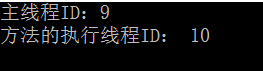
调用线程会被阻塞3秒钟,程序输出为:
2 使用 WaitHandle 等待异步调用
使用由 BeginInvoke 返回的 IAsyncResult 的 AsyncWaitHandle 属性来获取 WaitHandle。 异步调用完成时, WaitHandle 会收到信号,可以通过调用 WaitOne 方法等待它。
如果您使用 WaitHandle时,在调用 EndInvoke 检索结果之前,还可以执行其他处理。
        static void Main(string[] args)

        {

            //输出主线程ID

            Console.WriteLine("主线程ID:{0}", Thread.CurrentThread.ManagedThreadId);

            //创建委托

            AsyncDelegate asyncDel = new AsyncDelegate(TestMethod);

            int nThreadID = ;

            //异步执行TestMethod方法

            IAsyncResult result = asyncDel.BeginInvoke(, out nThreadID, null, null);

            //阻塞调用线程

            WaitHandle handle = result.AsyncWaitHandle;

            handle.WaitOne();

            //其他操作

            //终止异步调用,通过返回值取得调用结果

            string returnValue = asyncDel.EndInvoke(out nThreadID, result);

            Console.WriteLine("The call executed on thread {0}, with return value \"{1}\".",

                nThreadID, returnValue);

            Console.ReadKey();

        }
3轮询异步调用完成
可以使用由 BeginInvoke 返回的 IAsyncResult 的 IsCompleted 属性来判断异步调用何时完成。
        static void Main(string[] args)

        {

            //输出主线程ID

            Console.WriteLine("主线程ID:{0}", Thread.CurrentThread.ManagedThreadId);

            //创建委托

            AsyncDelegate asyncDel = new AsyncDelegate(TestMethod);

            int nThreadID = ;

            //异步执行TestMethod方法

            IAsyncResult result = asyncDel.BeginInvoke(, out nThreadID, null, null);

            //轮询异步执行状态

            while (true)

            {

                if (result.IsCompleted)

                {

                    break;

                }

                Thread.Sleep();

            }

            //终止异步调用,通过返回值取得调用结果

            string returnValue = asyncDel.EndInvoke(out nThreadID, result);

            Console.WriteLine("The call executed on thread {0}, with return value \"{1}\".",

                nThreadID, returnValue);

            Console.ReadKey();

        }
4 异步调用完成时执行回调方法
如果调用的线程不需要的异步执行函数的返回值,则可以在调用完成时执行回调方法,回调方法在 ThreadPool 里的异步线程上执行。
若要使用回调方法,必须将表示回调方法的 AsyncCallback 委托传递给 BeginInvoke。 也可以传递包含回调方法要使用的信息的对象。在回调方法中,可以将 IAsyncResult(回调方法的唯一参数)强制转换为 AsyncResult 对象。 然后,可以使用AsyncResult .AsyncDelegate 属性获取已用于启动调用的委托,以便可以调用 EndInvoke。
TestMethod 的 threadId 参数为 out 参数,因此 TestMethod 从不使用该参数的输入值。 如果 threadId 参数为 ref 参数,则该变量必须为类级别字段,这样才能同时传递给 BeginInvoke 和 EndInvoke。
传递给 BeginInvoke 的状态信息是一个格式字符串,所以状态信息必须强制转换为正确的类型才能被使用。
回调在 ThreadPool 线程上执行。 ThreadPool 线程是后台线程,这些线程不会在主线程结束后保持应用程序的运行,因此示例的主线程必须休眠足够长的时间以便回调完成。
       static void Main(string[] args)

        {

            //输出主线程ID

            Console.WriteLine("主线程ID:{0}", Thread.CurrentThread.ManagedThreadId);

            //创建委托

            AsyncDelegate asyncDel = new AsyncDelegate(TestMethod);

            int nThreadID = ;

            //异步执行TestMethod方法,使用回调函数并传入state参数

            IAsyncResult result = asyncDel.BeginInvoke(, out nThreadID,

                new AsyncCallback(AsyncCallCompleted), "测试参数传递");

            Console.ReadKey();

        }

        public static void AsyncCallCompleted(IAsyncResult ar)

        {

            Console.WriteLine("AsyncCallCompleted执行线程ID:{0}",Thread.CurrentThread.ManagedThreadId);

            //获取委托对象

            System.Runtime.Remoting.Messaging.AsyncResult result = (System.Runtime.Remoting.Messaging.AsyncResult)ar;

            AsyncDelegate asyncDel = (AsyncDelegate)result.AsyncDelegate;

            //获取BeginInvoke传入的的state参数

            string strState = (string)ar.AsyncState;

            Console.WriteLine("传入的字符串是{0}",strState);

            //结束异步调用

            int nThreadID;

            string strResult = asyncDel.EndInvoke(out nThreadID, ar);

            Console.WriteLine("\nThe call executed on thread {0}, with return value \"{1}\".",

               nThreadID, strResult);

        }

        public static string TestMethod(int callDuration, out int threadId)

        {

            Console.WriteLine("TestMethod方法的执行线程ID: {0}", Thread.CurrentThread.ManagedThreadId);

            Thread.Sleep(callDuration);

            threadId = Thread.CurrentThread.ManagedThreadId;

            return String.Format("My call time was {0}.", callDuration.ToString());

        }
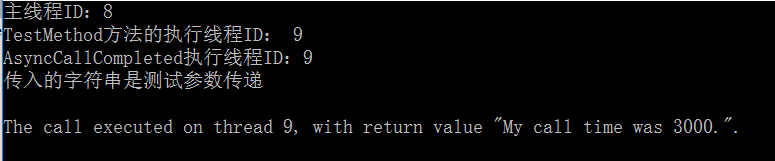
输出结果为
总结
除了第4种采用回调函数的方式外,其他三种方式均会阻塞调用线程。
委托的BeginInvoke和EndInvoke方法的更多相关文章
- 异步使用委托delegate --- BeginInvoke和EndInvoke方法
当我们定义一个委托的时候,一般语言运行时会自动帮委托定义BeginInvoke 和 EndInvoke两个方法,这两个方法的作用是可以异步调用委托. 方法BeginInvoke有两个参数: Async ...
- C#线程系列讲座(1):BeginInvoke和EndInvoke方法
一.C#线程概述 在操作系统中一个进程至少要包含一个线程,然后,在某些时候需要在同一个进程中同时执行多项任务,或是为了提供程序的性能,将要执行的任务分解成多个子任务执行.这就需要在同一个进程中开启多个 ...
- [转]BeginInvoke和EndInvoke方法浅析
开发语言:C#3.0 IDE:Visual Studio 2008 一.C#线程概述 在操作系统中一个进程至少要包含一个线程,然后,在某些时候需要在同一个进程中同时执行多项任务,或是为了提 ...
- delegate 中的BeginInvoke和EndInvoke方法
开发语言:C#3.0 IDE:Visual Studio 2008 一.C#线程概述 在操作系统中一个进程至少要包含一个线程,然后,在某些时候需要在同一个进程中同时执行多项任务,或是为了提供程序的性能 ...
- 转:C#线程系列讲座(1) BeginInvoke和EndInvoke方法
转载自:http://www.cnblogs.com/levin9/articles/2319248.html 开发语言:C#3.0IDE:Visual Studio 2008本系列教程主要包括如下内 ...
- 黄聪:C#多线程教程(1):BeginInvoke和EndInvoke方法,解决主线程延时Thread.sleep柱塞问题(转)
开发语言:C#3.0 IDE:Visual Studio 2008 本系列教程主要包括如下内容: 1. BeginInvoke和EndInvoke方法 2. Thread类 3. 线程池 4. 线 ...
- C# BeginInvoke和EndInvoke方法
转载自:BeginInvoke和EndInvoke方法 IDE:Visual Studio 2008 本系列教程主要包括如下内容:1. BeginInvoke和EndInvoke方法 2. Threa ...
- BeginInvoke和EndInvoke方法
本系列教程主要包括如下内容:1. BeginInvoke和EndInvoke方法 2. Thread类 3. 线程池 4. 线程同步基础 5. 死锁 6. 线程同步的7种方法 7. 如何在线程中访问G ...
- BeginInvoke与EndInvoke方法解决多线程接收委托返回值问题
BeginInvoke与EndInvoke方法解决多线程接收委托返回值问题 原文:http://www.sufeinet.com/thread-3707-1-1.html 大家可以先看看我上 ...
随机推荐
- Python基础知识学习_Day2
一.for循环 1.1功能及语法 for循环是迭代循环机制(while是条件循环),语法如下: for i in a b c: print(i) 1.2典型例子: 1.2.1猜年龄循环 realy_a ...
- SpringFramework_module
org.springframework : spring-aop:基于代理的AOP spring-aspects:基于切面的AspectJ spring-beans:beans spring-cont ...
- Maven pom项目部署
maven控制台运行程序 <plugin> <groupId>org.codehaus.mojo</groupId> <artifactId>exec- ...
- 返回变量的类型VarType函数
'vbEmpty 0 Empty(未初始化)'vbNull 1 Null(无有效数据)'vbInteger 2 整数'vbLong 3 长整数'vbSingle 4 单精度浮点数'vbDouble 5 ...
- 解决maven web项目Cannot detect Web Project version. Please specify version of Web Project through...的错误
前面已经创建maven web工程,但是问题来了,创建maven web工程之后会出现如下的错误,在pom.xml文件头部 有以下的错误 Description Resource Path Locat ...
- android从assets读取文件的方法
因为开发需要,经常要从工程的assets文件夹里面读取文件,现在贴一个方法以作记录: private void getFromAssets(String fileName, ArrayList< ...
- delphi 关键字
下面的关键字不能被重新定义或用作标志符:and array as asm begin case class const constructor destructor dispinterface div ...
- java.lang.OutOfMemoryError: Java heap space错误及处理办
默认方式启动Eclipse时,有关启动时JVM参数是在Eclipse安装目录下的eclipse.ini文件中指定的.在命令行下,也可以通过参数-vmargs来达到此目的.其命令格式为:eclipse ...
- github的使用与问题
GIT密钥的生成步骤 一 .设置Git的user name和email: $ git config --global user.name "name" $ git config - ...
- 查看源码利器之sublime text 3 配置 Ctags 插件
最近在看源码的时候发现sublime text 3是很给力的一款软件,小巧精致,这里着重讲解一下Ctags协助编译和跟踪函数 一.安装Package Control (如果Preferences &g ...