
ubuntu上安装vsftp-使用java进行匿名链接
检查环境:
1. 检查是否装过了ftp服务器
如果没有提示内容折,本机没有安装。
root@hadoops:~# rpm -qa|grep vsftpd
root@hadoops:~# rpm -qa|grep anonftp
2.全新安装:apt-get install vsftpd
重新安装:apt-get --reinstall install vsftpd
卸载并清除配置文件:apt-get -purge remove vsftpd
3. 我们可以通过pgrep vsftpd 来查看vsftpd服务器是否运行起来;
pgrep vsftpd 42484. 编辑配置文件/etc/vsftpd.conf. 打开配置文件后可以看到许多以“#”开始的行,这些行都是注释行,大多是帮助信息,可以仔细阅读。
# Example config file /etc/vsftpd.conf## The default compiled in settings are fairly paranoid. This sample file# loosens things up a bit, to make the ftp daemon more usable.# Please see vsftpd.conf.5 for all compiled in defaults.## READ THIS: This example file is NOT an exhaustive list of vsftpd options.# Please read the vsftpd.conf.5 manual page to get a full idea of vsftpd's# capabilities.### Run standalone? vsftpd can run either from an inetd or as a standalone# daemon started from an initscript.listen=YES## Run standalone with IPv6?# Like the listen parameter, except vsftpd will listen on an IPv6 socket# instead of an IPv4 one. This parameter and the listen parameter are mutually# exclusive.#listen_ipv6=YES## Allow anonymous FTP? (Disabled by default)anonymous_enable=YES## Uncomment this to allow local users to log in.local_enable=YES## Uncomment this to enable any form of FTP write command.write_enable=YES## Default umask for local users is 077. You may wish to change this to 022,# if your users expect that (022 is used by most other ftpd's)local_umask=000anon_umask=000## Uncomment this to allow the anonymous FTP user to upload files. This only# has an effect if the above global write enable is activated. Also, you will# obviously need to create a directory writable by the FTP user.anon_upload_enable=YESfile_open_mode=0755## Uncomment this if you want the anonymous FTP user to be able to create# new directories.anon_mkdir_write_enable=YES## Activate directory messages - messages given to remote users when they# go into a certain directory.dirmessage_enable=YES## If enabled, vsftpd will display directory listings with the time# in your local time zone. The default is to display GMT. The# times returned by the MDTM FTP command are also affected by this# option.use_localtime=YES## Activate logging of uploads/downloads.xferlog_enable=YES## Make sure PORT transfer connections originate from port 20 (ftp-data).connect_from_port_20=YES## If you want, you can arrange for uploaded anonymous files to be owned by# a different user. Note! Using "root" for uploaded files is not# recommended!#chown_uploads=YES#chown_username=whoever## You may override where the log file goes if you like. The default is shown# below.#xferlog_file=/var/log/vsftpd.log## If you want, you can have your log file in standard ftpd xferlog format.# Note that the default log file location is /var/log/xferlog in this case.xferlog_std_format=YES## You may change the default value for timing out an idle session.#idle_session_timeout=600## You may change the default value for timing out a data connection.#data_connection_timeout=120## It is recommended that you define on your system a unique user which the# ftp server can use as a totally isolated and unprivileged user.#nopriv_user=ftpsecure## Enable this and the server will recognise asynchronous ABOR requests. Not# recommended for security (the code is non-trivial). Not enabling it,# however, may confuse older FTP clients.#async_abor_enable=YES## By default the server will pretend to allow ASCII mode but in fact ignore# the request. Turn on the below options to have the server actually do ASCII# mangling on files when in ASCII mode.# Beware that on some FTP servers, ASCII support allows a denial of service# attack (DoS) via the command "SIZE /big/file" in ASCII mode. vsftpd# predicted this attack and has always been safe, reporting the size of the# raw file.# ASCII mangling is a horrible feature of the protocol.#ascii_upload_enable=YES#ascii_download_enable=YES## You may fully customise the login banner string:#ftpd_banner=Welcome to blah FTP service.## You may specify a file of disallowed anonymous e-mail addresses. Apparently# useful for combatting certain DoS attacks.#deny_email_enable=YES# (default follows)#banned_email_file=/etc/vsftpd.banned_emails## You may restrict local users to their home directories. See the FAQ for# the possible risks in this before using chroot_local_user or# chroot_list_enable below.#chroot_local_user=YES## You may specify an explicit list of local users to chroot() to their home# directory. If chroot_local_user is YES, then this list becomes a list of# users to NOT chroot().# (Warning! chroot'ing can be very dangerous. If using chroot, make sure that# the user does not have write access to the top level directory within the# chroot)#chroot_local_user=YES#chroot_list_enable=YES# (default follows)#chroot_list_file=/etc/vsftpd.chroot_list## You may activate the "-R" option to the builtin ls. This is disabled by# default to avoid remote users being able to cause excessive I/O on large# sites. However, some broken FTP clients such as "ncftp" and "mirror" assume# the presence of the "-R" option, so there is a strong case for enabling it.#ls_recurse_enable=YES## Customization## Some of vsftpd's settings don't fit the filesystem layout by# default.## This option should be the name of a directory which is empty. Also, the# directory should not be writable by the ftp user. This directory is used# as a secure chroot() jail at times vsftpd does not require filesystem# access.secure_chroot_dir=/var/run/vsftpd/empty## This string is the name of the PAM service vsftpd will use.pam_service_name=vsftpd## This option specifies the location of the RSA certificate to use for SSL# encrypted connections.rsa_cert_file=/etc/ssl/certs/ssl-cert-snakeoil.pem# This option specifies the location of the RSA key to use for SSL# encrypted connections.rsa_private_key_file=/etc/ssl/private/ssl-cert-snakeoil.keylocal_root=/home/ftpanon_root=/home/ftp
local_umask=000anon_umask=000
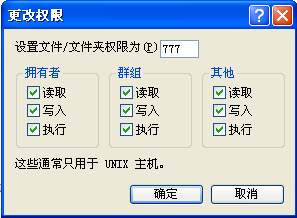
新建目录的权限就是777-022=755
新建文件的权根就是666-022=644

使用如下命令关闭ftp服务:
root@hadoops:~# killall vsftpd //或是 pkill vsftpd
root@hadoops:~# pgrep vsftpd //查看vsftpd服务器是否已经关闭

package com.csr.linux.util;import java.io.DataInputStream;import java.io.File;import java.io.FileInputStream;import java.io.FileOutputStream;import java.io.IOException;import java.io.OutputStream;import java.util.ArrayList;import java.util.List;import java.util.StringTokenizer;import com.csr.configSite.ConfigAll;import sun.net.TelnetInputStream;import sun.net.TelnetOutputStream;import sun.net.ftp.FtpClient;/*** ftp上传,下载* @author why 2009-07-30**/public class FtpUtil {private String ip = ConfigAll.ftpIp;private String username = ConfigAll.ftpUsername;private String password = ConfigAll.ftpPassword;private int port = -1;private String path = "";FtpClient ftpClient = null;OutputStream os = null;FileInputStream is = null;public FtpUtil(){ftpClient = new FtpClient();try {if(this.port != -1){ftpClient.openServer(this.ip,this.port);}else{ftpClient.openServer(this.ip);}ftpClient.login(this.username, this.password);if (this.path.length() != 0){ftpClient.cd(this.path);// path是ftp服务下主目录的子目录}ftpClient.binary();// 用2进制上传、下载System.out.println("已登录到\"" + ftpClient.pwd() + "\"目录");ftpClient.sendServer("quote PASV");// return true;}catch (IOException e){e.printStackTrace();// return false;}}/*** 连接ftp服务器** @throws IOException*/// public boolean connectServer(){// ftpClient = new FtpClient();// try {// if(this.port != -1){// ftpClient.openServer(this.ip,this.port);// }else{// ftpClient.openServer(this.ip);// }// ftpClient.login(this.username, this.password);// if (this.path.length() != 0){// ftpClient.cd(this.path);// path是ftp服务下主目录的子目录// }//// ftpClient.binary();// 用2进制上传、下载// System.out.println("已登录到\"" + ftpClient.pwd() + "\"目录");// ftpClient.sendServer("quote PASV");// return true;// }catch (IOException e){// e.printStackTrace();// return false;// }// }/*** 断开与ftp服务器连接** @throws IOException*/public boolean closeServer(){try{if (is != null) {is.close();}if (os != null) {os.close();}if (ftpClient != null) {ftpClient.closeServer();}System.out.println("已从服务器断开");return true;}catch(IOException e){e.printStackTrace();return false;}}/*** 检查文件夹在当前目录下是否存在* @param dir* @return*/private boolean isDirExist(String dir){String pwd = "";try {pwd = ftpClient.pwd();ftpClient.cd(dir);ftpClient.cd(pwd);}catch(Exception e){return false;}return true;}/*** 在当前目录下创建文件夹* @param dir* @return* @throws Exception*/private boolean createDir(String dir){try{ftpClient.ascii();StringTokenizer s = new StringTokenizer(dir, "/"); //signs.countTokens();String pathName = ftpClient.pwd();while(s.hasMoreElements()){pathName = pathName + "/" + (String) s.nextElement();try {ftpClient.sendServer("MKD " + pathName + "\r\n");} catch (Exception e) {e = null;return false;}ftpClient.readServerResponse();}ftpClient.binary();return true;}catch (IOException e1){e1.printStackTrace();return false;}}/*** ftp上传* 如果服务器段已存在名为filename的文件夹,该文件夹中与要上传的文件夹中同名的文件将被替换** @param filename 要上传的文件(或文件夹)名* @return* @throws Exception*/public boolean upload(String filename){String newname = "";if(filename.indexOf("/") > -1){newname = filename.substring(filename.lastIndexOf("/") + 1);}else{newname = filename;}return upload(filename, newname);}/*** ftp上传* 如果服务器段已存在名为newName的文件夹,该文件夹中与要上传的文件夹中同名的文件将被替换** @param fileName 要上传的文件(或文件夹)名* @param newName 服务器段要生成的文件(或文件夹)名* @return*/public boolean upload(String fileName, String newName){try{String savefilename = new String(fileName.getBytes("ISO-8859-1"), "GBK");File file_in = new File(savefilename);//打开本地待长传的文件if(!file_in.exists()){throw new Exception("此文件或文件夹[" + file_in.getName() + "]有误或不存在!");}if(file_in.isDirectory()){upload(file_in.getPath(),newName,ftpClient.pwd());}else{uploadFile(file_in.getPath(),newName);}if(is != null){is.close();}if(os != null){os.close();}return true;}catch(Exception e){e.printStackTrace();System.err.println("Exception e in Ftp upload(): " + e.toString());return false;}finally{try{if(is != null){is.close();}if(os != null){os.close();}}catch(IOException e){e.printStackTrace();}}}/*** 真正用于上传的方法* @param fileName* @param newName* @param path* @throws Exception*/private void upload(String fileName, String newName,String path) throws Exception{String savefilename = new String(fileName.getBytes("ISO-8859-1"), "GBK");File file_in = new File(savefilename);//打开本地待长传的文件if(!file_in.exists()){throw new Exception("此文件或文件夹[" + file_in.getName() + "]有误或不存在!");}if(file_in.isDirectory()){if(!isDirExist(newName)){createDir(newName);}ftpClient.cd(newName);File sourceFile[] = file_in.listFiles();for(int i = 0; i < sourceFile.length; i++){if(!sourceFile[i].exists()){continue;}if(sourceFile[i].isDirectory()){this.upload(sourceFile[i].getPath(),sourceFile[i].getName(),path+"/"+newName);}else{this.uploadFile(sourceFile[i].getPath(),sourceFile[i].getName());}}}else{uploadFile(file_in.getPath(),newName);}ftpClient.cd(path);}/*** upload 上传文件** @param filename 要上传的文件名* @param newname 上传后的新文件名* @return -1 文件不存在 >=0 成功上传,返回文件的大小* @throws Exception*/public long uploadFile(String filename, String newname) throws Exception{long result = 0;TelnetOutputStream os = null;FileInputStream is = null;try {java.io.File file_in = new java.io.File(filename);if(!file_in.exists())return -1;os = ftpClient.put(newname);result = file_in.length();is = new FileInputStream(file_in);byte[] bytes = new byte[1024];int c;while((c = is.read(bytes)) != -1){os.write(bytes, 0, c);}}finally{if(is != null){is.close();}if(os != null){os.close();}}return result;}/*** 从ftp下载文件到本地** @param filename 服务器上的文件名* @param newfilename 本地生成的文件名* @return* @throws Exception*/public long downloadFile(String filename, String newfilename){long result = 0;TelnetInputStream is = null;FileOutputStream os = null;try{is = ftpClient.get(filename);java.io.File outfile = new java.io.File(newfilename);os = new FileOutputStream(outfile);byte[] bytes = new byte[1024];int c;while ((c = is.read(bytes)) != -1) {os.write(bytes, 0, c);result = result + c;}}catch (IOException e){e.printStackTrace();}finally{try {if(is != null){is.close();}if(os != null){os.close();}} catch (IOException e) {e.printStackTrace();}}return result;}/*** 取得相对于当前连接目录的某个目录下所有文件列表** @param path* @return*/public List getFileList(String path){List list = new ArrayList();DataInputStream dis;try {dis = new DataInputStream(ftpClient.nameList(this.path + path));String filename = "";while((filename = dis.readLine()) != null){list.add(filename);}} catch (IOException e) {e.printStackTrace();}return list;}public static void main(String[] args){FtpUtil ftp = new FtpUtil();// ftp.connectServer();boolean result = ftp.upload("D:/2.xml", "/upload/2.xml");System.out.println(result?"上传成功!":"上传失败!");List list = ftp.getFileList("/upload");for(int i=0;i<list.size();i++){String name = list.get(i).toString();System.out.println(name);}ftp.closeServer();/**FTP远程命令列表USER PORT RETR ALLO DELE SITE XMKD CDUP FEATPASS PASV STOR REST CWD STAT RMD XCUP OPTSACCT TYPE APPE RNFR XCWD HELP XRMD STOU AUTHREIN STRU SMNT RNTO LIST NOOP PWD SIZE PBSZQUIT MODE SYST ABOR NLST MKD XPWD MDTM PROT在服务器上执行命令,如果用sendServer来执行远程命令(不能执行本地FTP命令)的话,所有FTP命令都要加上\r\nftpclient.sendServer("XMKD /test/bb\r\n"); //执行服务器上的FTP命令ftpclient.readServerResponse一定要在sendServer后调用nameList("/test")获取指目录下的文件列表XMKD建立目录,当目录存在的情况下再次创建目录时报错XRMD删除目录DELE删除文件*/}}

ubuntu上安装vsftp-使用java进行匿名链接的更多相关文章
- ZH奶酪:如何在Ubuntu上安装Java/管理多个JAVA/设置JAVA_HOME
0.简介 Java的地位及重要性,大家都懂的,很多软件都依赖于jdk,在Ubuntu上安装Java的选择有很多,openJDK,Oracle Jdk... 1.安装默认 JRE/JDK(可选) 这是最 ...
- 在Ubuntu上安装JDK、Ant、Jmeter和Jenkins
一.前期准备 1. 在win7下载VMware.Ubuntu(用迅雷下比较快) 2. 安装完VMware后新建虚拟机,选择iso: 3. 具体配置参考如下,至此Ubantu安装完成 二.在Ubuntu ...
- Ubuntu 上安装 Freemind 并支持中文
Ubuntu 上安装 Freemind 并支持中文 JAVA 运行时 Freemind 是一个使用 Java 编写的思维导图工具,在安装时,需要到 Java 运行时(使用 OpenJRE 或 Orac ...
- Ubuntu上安装jdk,Jboss
Ubuntu上安装jdk 1.使用wget命令或sft方式从oracle官方下载tar.gz格式的jdk1.7,由于ubuntu不支持rpm安装,需要转换,所以不选择rpm格式的jdk 2.使用tar ...
- Ubuntu上安装QQ2015
先不卖关子直接上图:Ubuntu 14.04.5 LTS Deb包下载地址: http://www.longene.org/download/WineQQ7.8-20151109-Longene.de ...
- 在 Linux ubuntu 上安装 *.sh 文件
简单说来就两步: 增加可执行权限 执行 事情是这样的,打算在 ubuntu 上安装一个 NetBeans IDE 来学习 Java,但是下载下来的文件是 .sh 格式的.图形界面下右键没有执行的选项. ...
- Ubuntu上安装与配置JDK1.8
Ubuntu上安装与配置JDK1.8 一.下载 下载JDK,由于是Ubuntu. 所以去官网下载tar.gz格式的就可以(ubuntu使用浏览器下载网速比較慢,所以推荐到window上下载好). ht ...
- ubuntu 下安装eclipse &java环境配置
前面有一篇的博客写的是ubuntu下安装eclipse和java环境的配置.当时是安装网上的攻略进行的 ,当然也是能够成功的. 近期把那台电脑送人了 ,仅仅好在自己的这台电脑上又一次安装一次了 ,唯一 ...
- [异常解决] ubuntu上安装JLink驱动遇到的坑及给后来者的建议
一.前言 最近将整个电脑格式化,改成了linux操作系统 希望这样能让自己在一个新的世界探索技术.提升自己吧- win上的工具用多了,就不想变化了- 继上一篇<ubuntu上安装虚拟机遇到的问题 ...
随机推荐
- Spring 与 mybatis整合 Error parsing Mapper XML. Cause: java.lang.NullPointerException
mapper配置文件中的namespace没有填:而且namespase的值应该填为:mapper的权限定名:否则还是会抛出异常 org.springframework.beans.factory.B ...
- 【kmp】 字符串最大周期
大侠住店 TimeLimit: 1 Second MemoryLimit: 32 Megabyte Totalsubmit: 116 Accepted: 64 Description 有一天晚上,一位 ...
- linux命令-sed,uniq,cut,wc
sort sort 命令对 File 参数指定的文件中的行排序,并将结果写到标准输出.如果 File 参数指定多个文件,那么 sort 命令将这些文件连接起来,并当作一个文件进行排序. sort语法 ...
- asm: Writing Inline Assembly
A usual IA includes these parts: asm [volatile] ( AssemblerTemplate : OutputOperands [ : InputOperan ...
- 获取spring bean的utils
<span style="font-size:10px;">package com.record.util; import org.springframework.be ...
- Python -- OOP高级 -- 元类
type()函数既可以返回一个对象的类型,又可以创建出新的类型 def fn(self, name="world"): print("Hello, %s!" % ...
- Compress a folder using powershell
There are many ways to compress a folder using powershell: Method 1: Using System.IO.Compression and ...
- zencart url特殊字符处理
1. 支持 在后台的seo url 将Outputw3c 改为false 2.删除特殊字符 这对于在少量的zen cart网站上处理少量的特殊字符可能还适用,实际上我们经常在导入产品数据时或者或少会带 ...
- 基于手机传感器数据使用 CNN 识别用户行为的 Tensroflow 实现
传感器数据集 这个项目使用了 WISDM (Wireless Sensor Data Mining) Lab 实验室公开的 Actitracker 的数据集. WISDM 公开了两个数据集,一个是在实 ...
- 提升html5的性能体验系列之二列表流畅滑动
App的顶部一般有titlebar,下面是list.常见的一个需求是要在list滚动时,titlebar不动.这个简单的需求,实现起来其实并不简单. 在普通web上的做法是使用div的滚动条,把lis ...