
使用MyEclipse构建MAVEN项目
这里用的是MyEclpise的自带的MAVEN插件。
Maven最好配置成你自己安装的那个,MyEclipse自带会有些许Bug。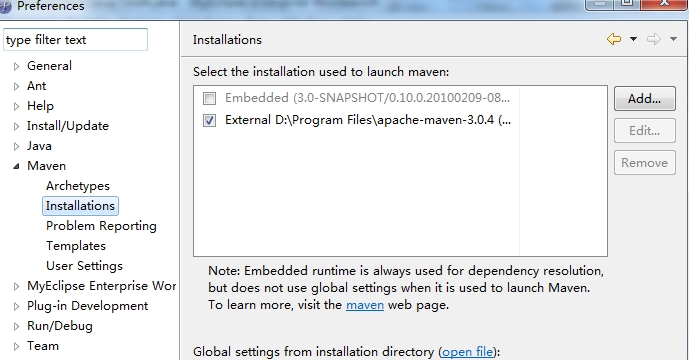
用nexus代理Maven的中央仓库,setting.xml的配置文件修改内容如下:
<mirrors>

     <mirror>

          <id>nexus</id>

          <mirrorOf>*</mirrorOf>

          <name>Nexus Mirror</name>

          <url>http://localhost:8081/nexus/content/groups/public</url>

     </mirror>

  </mirrors>

  <profiles>

     <profile>

      <id>nexus</id>

      <repositories>

        <repository>

          <id>central</id>

          <url>http://central</url>

          <releases><enabled>true</enabled></releases>

          <snapshots><enabled>true</enabled></snapshots>

        </repository>

      </repositories>

     <pluginRepositories>

        <pluginRepository>

          <id>central</id>

          <url>http://central</url>

          <releases><enabled>true</enabled></releases>

          <snapshots><enabled>true</enabled></snapshots>

        </pluginRepository>

      </pluginRepositories>

    </profile>

  </profiles>

  <activeProfiles>

    <activeProfile>nexus</activeProfile>

  </activeProfiles>
http://localhost:8081/nexus/content/groups/public 是仓库组的地址。
打下MyEclipse新建工程的界面,选择Maven下的Maven Project,打开如下图的向导: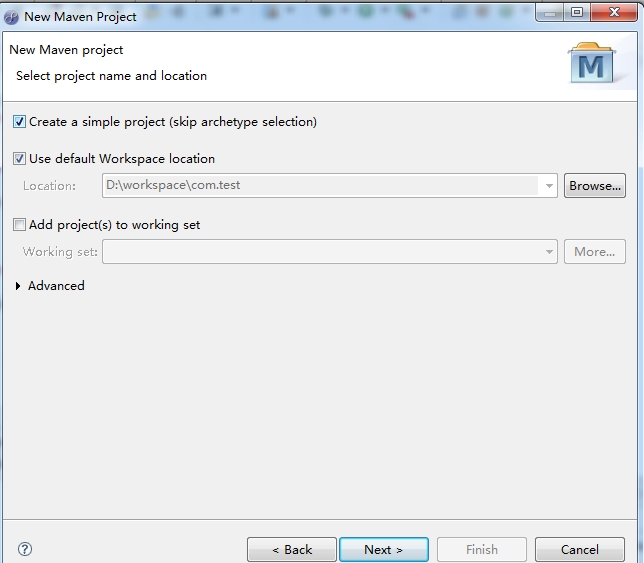
这里我们要选中create a simple project。
点击下一步,填写GAV相关内容。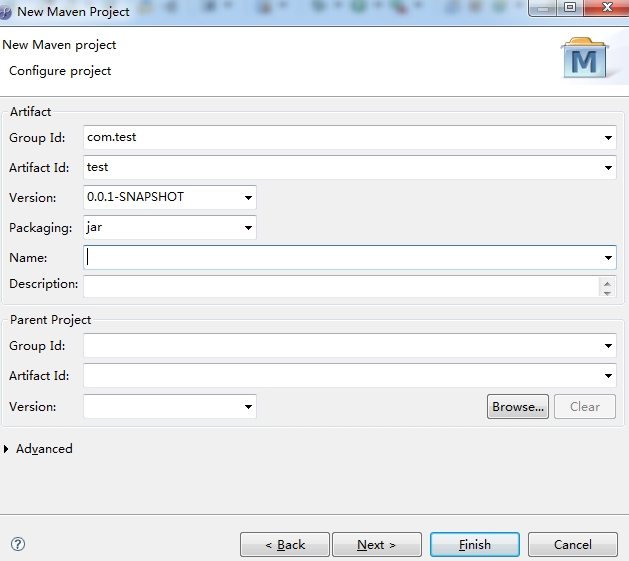
点击完成后,我们就已经成功创建了一个Maven project了。
工程的默认目录结构如下:
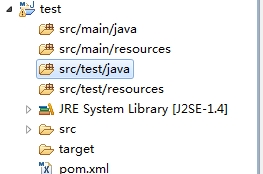
所有的Java源文件都要写在src/main/java目录下,所有的测试类都要写在src/test/java下面,这是Maven的默认值。
此时,pom.xml里只有默认的属性
<project xmlns="http://maven.apache.org/POM/4.0.0" xmlns:xsi="http://www.w3.org/2001/XMLSchema-instance" xsi:schemaLocation="http://maven.apache.org/POM/4.0.0 http://maven.apache.org/maven-v4_0_0.xsd">

  <modelVersion>4.0.0</modelVersion>

  <groupId>com.test</groupId>

  <artifactId>test</artifactId>

  <version>0.0.1-SNAPSHOT</version>

</project>
这是最精简的pom.xml了。
这时我们加入junit的支持,新建一个测试类。
在项目上右键Maven-Add Dependency,显示如下界面:
输入junit加入测试支持类库。
在src/test/java下新建一个测试类如下:
右键Run As ----- Maven test,进行测试,显示结果如下:

[INFO]
[INFO] ------------------------------------------------------------------------
[INFO] Building test 0.0.1-SNAPSHOT
[INFO] ------------------------------------------------------------------------
[INFO]
[INFO] --- maven-resources-plugin:2.5:resources (default-resources) @ test ---
[debug] execute contextualize
[WARNING] Using platform encoding (GBK actually) to copy filtered resources, i.e. build is platform dependent!
[INFO] Copying 0 resource
[INFO]
[INFO] --- maven-compiler-plugin:2.3.2:compile (default-compile) @ test ---
[INFO] Nothing to compile - all classes are up to date
[INFO]
[INFO] --- maven-resources-plugin:2.5:testResources (default-testResources) @ test ---
[debug] execute contextualize
[WARNING] Using platform encoding (GBK actually) to copy filtered resources, i.e. build is platform dependent!
[INFO] Copying 0 resource
[INFO]
[INFO] --- maven-compiler-plugin:2.3.2:testCompile (default-testCompile) @ test ---
[INFO] Nothing to compile - all classes are up to date
[INFO]
[INFO] --- maven-surefire-plugin:2.10:test (default-test) @ test ---
[INFO] Surefire report directory: D:\workspace\test\target\surefire-reports
-------------------------------------------------------
T E S T S
-------------------------------------------------------
Running com.TestRun
test a method
test b method
Tests run: 2, Failures: 0, Errors: 0, Skipped: 0, Time elapsed: 0.071 sec
Results :
Tests run: 2, Failures: 0, Errors: 0, Skipped: 0
[INFO] ------------------------------------------------------------------------
[INFO] BUILD SUCCESS
[INFO] ------------------------------------------------------------------------
[INFO] Total time: 1.847s
[INFO] Finished at: Tue Sep 11 14:20:59 CST 2012
[INFO] Final Memory: 3M/6M
[INFO] ------------------------------------------------------------------------
ok,一个基本的maven项目已经构建完成。我们还可以将现存的java项目利用myclipse方便的转换成maven project,此部分内容我们在下一节里讨论。
使用MyEclipse构建MAVEN项目的更多相关文章
- 使用MyEclipse构建MAVEN项目 - 我的漫漫程序之旅 - BlogJava
body { font-family: Microsoft YaHei UI,"Microsoft YaHei", Georgia,Helvetica,Arial,sans-ser ...
- maven(1)------使用myeclipse构建maven项目
maven官网:http://maven.apache.org/ 依据官网的说法,Maven是一个采用纯Java编写的开源项目管理工具,基于一个称为项目对象模型(POM)的概念,可以管理项目的生命周期 ...
- MyEclipse构建maven项目报错
直接上图: 这里有三种方案: 1.检查jdk版本:最好换成1.8版本 项目右键-->build path-->configure build Path; 1.2 点击 libraries ...
- maven - Eclipse构建maven项目
前面的博文已经介绍了如何安装maven,本文将记录如何在Eclipse下构建maven项目. 一.Eclipse maven插件安装 关于安装Eclipse maven插件,网上有很多方法,这里推荐一 ...
- Eclipse构建Maven项目
1. 安装m2eclipse插件 要用Eclipse构建Maven项目,我们需要先安装meeclipse插件 点击eclipse菜单栏Help->Eclipse Marketpl ...
- eclipse里面构建maven项目详解(转载)
本文来源于:http://my.oschina.net/u/1540325/blog/548530 eclipse里面构建maven项目详解 1 环境安装及分配 Maven是基于项目对象模 ...
- Maven实战(三)Eclipse构建Maven项目
1. 安装m2eclipse插件 要用Eclipse构建Maven项目,我们需要先安装meeclipse插件 点击eclipse菜单栏Help->Eclipse Marketplac ...
- 关于myeclipse中maven项目转换相关设置
关于myeclipse中maven项目转换相关设置 在myeclipse菜单中,Configure->Convert to Maven Project 这个菜单 如果没有的话,需要做如下设置: ...
- (转)Maven实战(三)Eclipse构建Maven项目
1. 安装m2eclipse插件 要用Eclipse构建Maven项目,我们需要先安装meeclipse插件 点击eclipse菜单栏Help->Eclipse Marketplac ...
随机推荐
- ISupportInitialize的用处
[译]ISupportInitialize的用处 [译]ISupportInitialize的用处 注:本文是对How ISupportInitialize Can Help的翻译.原文作者编 ...
- python alembic which comes from SQLalchemy
alembic it's tutorial: http://alembic.readthedocs.org/en/latest/tutorial.html
- 终于说再见了!Google Reader
终于说再见了!Google Reader 投递人 itwriter 发布于 2013-07-02 13:28 评论(5) 有760人阅读 原文链接 [收藏] « » 今天 15:00 左右,Go ...
- TensorFlow 入门之手写识别(MNIST) softmax算法
TensorFlow 入门之手写识别(MNIST) softmax算法 MNIST flyu6 softmax回归 softmax回归算法 TensorFlow实现softmax softmax回归算 ...
- 16Khz音频定时触发采样DMA存储过程
一.AD Setting 1.Calibration (ADCAL) 2.设定ADC Chennel与SCANDIR等,在低功耗应用方案,选择PCLK/4,并设置SMP(tCONV = Samplin ...
- android调用js
1.android中利用webview调用网页上的js代码. Android 中可以通过webview来实现和js的交互,在程序中调用js代码,只需要将webview控件的支持js的属性设置为true ...
- 办理布鲁克大学(本科)学历认证『微信171922772』Brock学位证成绩单使馆认证Brock University
办理布鲁克大学(本科)学历认证『微信171922772』Brock学位证成绩单使馆认证Brock University [寻-求-当-地-合-作-代-理-人-员] 丨Q微-1719-22772丨學丨历 ...
- angularjs 路由回退,返回到上一个路由
在现阶段比较流行的angularjs框架中:路由是一个比较重要的应用:angularjs的单页面是其强大功能之一: 所有的页面其实就只是在一个页面就实现的:angularjs通过对路由的控制来进行页面 ...
- sublime & atom 插件
1. autofilename(sublime) autocomplete-paths (atom): 自动路径 2. autoprefixer: 自动添加前缀 : https://github.c ...
- 第13章 MySQL高级编程
1.事务:一个或一系列的查询: 2.使用事务安全的表格类型(通过InnoDB): ①关闭自动提交: set autocommit=0; //若自动提交被打开,须使用如下语句开始一个事务: // st ...