
HTML,CSS,JS,JQ
CSS:
<style>
<!--属性选择器-->
    .container input[type="text"][name="txt"]{
        border: 3px solid red;
    }
<!--关联选择器-->
  .c1 #l1 a .cc1{}      空格:表示在某个标签的下一级,或者下下一级...去找某个或者某批标签
</style>
<div class="container">
    <input type="checkbox"/>
    <input type="radio"/>
    <input type="text" name="txt"/>
    <input type="file"/>
    <input type="submit"/>
    <input type="button"/>
    <input type="image"/>
</div>
CSS中margin和padding的区别:
<!--在CSS中margin是指从自身边框到另一个容器边框之间的距离,就是容器外距离。在CSS中padding是指自身边框到自身内部另一个容器边框之间的距离,就是容器内距离。-->
<div style="border: 1px solid red;with:300px;height: 300px" id="d1" padding: 20px>
    <div style="border: 1px solid yellow;margin: 20px;with:200px;height: 200px" id="d2"></div>
</div>
注:d1中padding内边距,当padding发生变化时,改变的是d1本身;d2中margin外边距,当margin发生变化时,改变的是d2本身

position
    fixed:固定在浏览器窗口的位置
    relative:相对位置
    absolute:一般与relative一起使用,相对于父级(relative)的绝对定位

<div id="content" style="height: 2000px;background-color: #ddd">
    <div style="background-color: beige;width: 300px;position:relative;height:300px;margin: 0 auto">
        <h1>修改数据</h1>
        <a style="position: absolute;right: 0;bottom: 0">absolute</a>
    </div>
</div>
<a style="position: fixed;right:30px;bottom: 30px;" href="#content">返回顶部</a>
margin: 0 auto 相对于父标签居中
div:不加"<div style="clear: both"></div>" 背景颜色红色不显示
div中 style="overflow:auto" 出现滚动条;style="overflow:hidden" 隐藏滚动条
<div style="background-color: red">
    <div style="float: left;">111</div>
    <div style="float: right;">222</div>
    <div style="clear: both"></div>
</div>

display:
none:          隐藏不显示
block:      变成块级标签
inline:     变成内联标签

body{
  margin:0 auto;
}    整个页面居中
JS:
var name = 'eric';           局部变量
name = 'alex';         全局变量
自执行函数:
(function (arg) {
    alert(arg);
})("888");
document.getElementById('l1');

document.getElementsByName('l1')

document.getElementsByTagName('div')
window.onload = function () {

}//页面加载完成

document.ready = function () {

}//页面框架加载完成
window.location.href = "http://www.baidu.com"
当前页面跳转

window.open('http://www.baidu.com')
打开新标签页跳转

JQ:
扩展方法:
$.extend({
    "erbi":function () {
        return "sb";
    }
});

alert($.erbi())
响应式:当页面宽度大于768px时,.cls样式生效
@media screen AND(min-width: 768px){
    .cls{
        background-color: red;
    }
}
圆角属性:border-radius: 50%;
伪类与伪元素
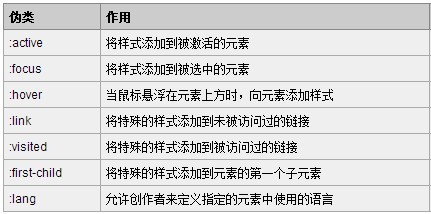
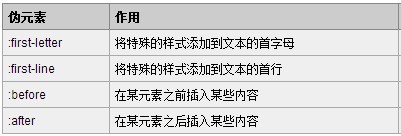
/*当鼠标移动到a标签上时,执行下面样式*/
.header .menu a:hover{
     background-color: green;
 }
以后遇到布局,float的问题时:
.clearfix:after{
    content: ".";
    visibility: hidden;
    display: block;
    height: 0;
    clear: both;
}
HTML,CSS,JS,JQ的更多相关文章
- 第一百六十六节,jQuery,基础 DOM 和 CSS 操作,元素内容,元素属性,css和class,元素宽度高度、偏移、滚动条
jQuery,基础 DOM 和 CSS 操作,元素内容,元素属性,css和class,元素宽度高度.偏移.滚动条 学习要点: 1.DOM 简介 2.设置元素及内容 3.元素属性操作 4.元素样式操作 ...
- javascript创建css、js,onload触发callback兼容主流浏览器的实现
http://www.fantxi.com/blog/archives/load-css-js-callback/ 由于需要写个函数,既可以加载css,又可以加载js,所以对各主流浏览器对加载js.c ...
- js随笔,css和js禁止网页选择文本,table的class样式使得td的class样式失效,jquery获得元素坐标
css使用user-select,user-select不是W3C标准,浏览器支持不完整:user-select有两个值,none用户不可以选择文本,text用户可以选择文本 body{-moz-us ...
- SSH框架整合,css、js会被过滤器过滤掉
如果是默认状态 <!--struts2过滤器--> <filter> <filter-name>struts2</filter-name> <fi ...
- 缓存处理后,F5刷新页面,css和js返回200,为什么不是304?
最近在Apache上做网站的静态资源缓存,但是各种配置之后,发现css和js返回的状态码都是200,为什么不是304? 找来找去在知乎上得到了答案. 来自知乎的一个回答 http://www.zhih ...
- 麦子学院bootstrap实战项目官网,后台,jquery.singlePageNav.min.js ,wow.min.js,animate.css使用
1.源码笔记 我的源码+笔记(很重要):链接: https://pan.baidu.com/s/1eSxgLV0 密码: 2pi2 感谢麦子学院项目相关视频:链接: https://pan.baidu ...
- 不带插件 ,自己写js,实现批量上传文件及进度显示
今天接受项目中要完成文件批量上传文件而且还要显示上传进度,一开始觉得这个应该不是很麻烦,当我在做的时候遇到了很多问题,很头疼啊. 不过看了别人写的代码,自己也测试过,发现网上好多都存在一些问题,并不是 ...
- 各种demo:css实现三角形,css大小梯形,svg使用
各种demo: 1.css实现正方形 思路:width为0:height为0:使用boder-width为正方形的边长的一半,不占任何字节:border-style为固体:border-color为正 ...
- 前端(各种demo)一:css实现三角形,css实现梯形,pop弹层,css伪类before,after使用,svg使用(持续更新中)
各种demo: 1.css实现正方形 思路:width为0:height为0:使用boder-width为正方形的边长的一半,不占任何字节:border-style为固体:border-color为正 ...
- 【shiro】使用shiro搭建的项目,页面引用js,报错:Uncaught SyntaxError: Unexpected token <
使用shiro搭建项目过程中,总是出现登录页面 登录第一次有效果,登陆第二次出现302状态码,第三次又有效果,第四次又没有效果的局面. 因此,采用ajax提交页面登录的用户名和密码,但是在引用js的过 ...
随机推荐
- Hadoop集成
Hadoop集成 长期以来,我每开个系列,只有兴趣写一篇,很难持之与恒.为了克服这个长久以来的性格弱点,以及梳理工作半年的积累.最近一个月会写两篇关于Mongo在地理大数据方面的实践和应用,一篇关 ...
- facebook .net sdk 应用
浅谈 facebook .net sdk 应用 今天看了一篇非常好的文章,就放在这里与大家分享一下,顺便也给自己留一份.这段时间一直在学习MVC,另外如果大家有什么好的建议或者学习的地方,也请告知 ...
- C# 求精简用一行代码完成的多项判断 重复赋值
C# 求精简用一行代码完成的多项判断 重复赋值 哈哈,说实话,个人看着这么长的三元操作也麻烦,但是我也只想到了这样三元判断句中执行方法体能够写到一行,追求的终极目的是,用一行实现这个过程,而且简单,由 ...
- IE回车的怪异行为
问题 IE浏览器在input中回车,会触发button按钮的click事件. 原因分析 IE浏览器中在input中回车相当于提交form,而button标签默认的类型是submit, 所以如果没有指定 ...
- C语言中数据类型的长度
面试中C里面int长度经常会被问到,下面总结一下作为资料: 首先看看一般规定: 标准c规定,int长度等于机器字长,short的表示范围不能大于int的表示范围,long的表示范围不能小于int的表示 ...
- C# 根据时间创建文件夹
string file = ((fileNameIndex)index).ToString(); if (!Directory.Exists(HttpContext.Current.Server.Ma ...
- asp.net内部原理3
asp.net内部原理(三) 第三个版本 (最详细的版本) 前言: 今天继续吧这个系列补齐,这几天公司的项目比较忙,回到家已经非常的累了,所以也没顾得上天天来这里分享一些东西和大家一起探讨,但是今天晚 ...
- windows服务1053错误排查
公司员工离职,接手他的任务,告诉我windows服务已经完成,没来得及测试.好吧,我接着做...... 服务生成后,运行bat文件.启动服务失败,提示错误编码1053.根据以往的经验,一般是三方面引起 ...
- 读取同一文件夹下多个txt文件中的特定内容并做统计
读取同一文件夹下多个txt文件中的特定内容并做统计 有网友在问,C#读取同一文件夹下多个txt文件中的特定内容,并把各个文本的数据做统计. 昨晚Insus.NET抽上些少时间,来实现此问题,加强自身的 ...
- SystemTray文字颜色问题
今天想给SystemTray的ForegroundColor设置为白色,但是模拟器正确,真机仍为黑色.经过一番折腾,发现是微软做了限制,背景是什么颜色,ForegroundColor就不能为什么颜色. ...