
angular-ui-bootstrap插件API - Pagination
Pagination:
案例
<!DOCTYPE html>
<html lang="en" ng-app="myApp">
<head>
<meta charset="UTF-8">
<title>Title</title>
<link rel="stylesheet" href='../node_modules/bootstrap/dist/css/bootstrap.css'>
<link rel="stylesheet" href='../node_modules/angular-ui-bootstrap/dist/ui-bootstrap-csp.css'>
<script src="../node_modules/angular/angular.min.js"></script>
<script src="../node_modules/angular-ui-bootstrap/dist/ui-bootstrap-tpls.js"></script>
<script>
angular.module('myApp',['ui.bootstrap'])
.controller('PaginationDemoCtrl', function ($scope, $log) {
$scope.totalItems = 64;
$scope.currentPage = 4; $scope.setPage = function (pageNo) {
$scope.currentPage = pageNo;
}; $scope.pageChanged = function() {
$log.log('Page changed to: ' + $scope.currentPage);
}; $scope.maxSize = 5;
$scope.bigTotalItems = 175;
$scope.bigCurrentPage = 1;
});
</script>
</head>
<body>
<div ng-controller="PaginationDemoCtrl">
<h4>Default</h4>
<uib-pagination total-items="totalItems" ng-model="currentPage" ng-change="pageChanged()"></uib-pagination>
<uib-pagination boundary-links="true" total-items="totalItems" ng-model="currentPage" class="pagination-sm" previous-text="‹" next-text="›" first-text="«" last-text="»"></uib-pagination>
<uib-pagination direction-links="false" boundary-links="true" total-items="totalItems" ng-model="currentPage"></uib-pagination>
<uib-pagination direction-links="false" total-items="totalItems" ng-model="currentPage" num-pages="smallnumPages"></uib-pagination>
<pre>The selected page no: {{currentPage}}</pre>
<button type="button" class="btn btn-info" ng-click="setPage(3)">Set current page to: 3</button> <hr />
<h4>Limit the maximum visible buttons</h4>
<h6><code>rotate</code> defaulted to <code>true</code>:</h6>
<uib-pagination total-items="bigTotalItems" ng-model="bigCurrentPage" max-size="maxSize" class="pagination-sm" boundary-links="true" num-pages="numPages"></uib-pagination>
<h6><code>rotate</code> defaulted to <code>true</code> and <code>force-ellipses</code> set to <code>true</code>:</h6>
<uib-pagination total-items="bigTotalItems" ng-model="bigCurrentPage" max-size="maxSize" class="pagination-sm" boundary-links="true" force-ellipses="true"></uib-pagination>
<h6><code>rotate</code> set to <code>false</code>:</h6>
<uib-pagination total-items="bigTotalItems" ng-model="bigCurrentPage" max-size="maxSize" class="pagination-sm" boundary-links="true" rotate="false"></uib-pagination>
<h6><code>boundary-link-numbers</code> set to <code>true</code> and <code>rotate</code> defaulted to <code>true</code>:</h6>
<uib-pagination total-items="bigTotalItems" ng-model="bigCurrentPage" max-size="maxSize" class="pagination-sm" boundary-link-numbers="true"></uib-pagination>
<h6><code>boundary-link-numbers</code> set to <code>true</code> and <code>rotate</code> set to <code>false</code>:</h6>
<uib-pagination total-items="bigTotalItems" ng-model="bigCurrentPage" max-size="maxSize" class="pagination-sm" boundary-link-numbers="true" rotate="false"></uib-pagination>
<pre>Page: {{bigCurrentPage}} / {{numPages}}</pre> </div>
</body>
</html>

uib-pagination 配置
boundary-linksC (Default:false) - 是否显示第一个/最后一个按钮<uib-pagination
total-items="totalItems"
ng-model="currentPage"
boundary-links="false">
</uib-pagination>
<uib-pagination

            total-items="totalItems"

            ng-model="currentPage"

            boundary-links="true">

    </uib-pagination>
boundary-link-numbers$ C (Default:false) - 是否总是显示第一个和最后一个页码。如果最大页码大于设置的最小显示页数,则会在最大或最小页面和中间页面之间增加一个按钮,内容为省略号,如果最大页码小于设置的最小显示页数,则不显示省略号按钮<uib-pagination
total-items="bigTotalItems"
ng-model="bigCurrentPage"
max-size="maxSize"
boundary-link-numbers="false"
boundary-links="true">
</uib-pagination>
<uib-pagination

            total-items="bigTotalItems"

            ng-model="bigCurrentPage"

            max-size="maxSize"

            boundary-link-numbers="true"

            boundary-links="true">

    </uib-pagination>
direction-links$ C (Default:true) - 是否显示之前/下一个按钮。<uib-pagination
total-items="bigTotalItems"
ng-model="bigCurrentPage"
direction-links="true">
</uib-pagination>
<uib-pagination

            total-items="bigTotalItems"

            ng-model="bigCurrentPage"

            direction-links="false">

    </uib-pagination>
first-textC (Default:First) - 第一个按钮的文本。force-ellipses$ C (Default:false) - 当总页数大于最大显示页数(max-size)显示省略号按钮<uib-pagination
total-items="bigTotalItems"
ng-model="bigCurrentPage"
max-size="maxSize"
force-ellipses="true">
</uib-pagination><br/>
<uib-pagination
total-items="bigTotalItems"
ng-model="bigCurrentPage"
max-size="maxSize"
force-ellipses="false">
</uib-pagination>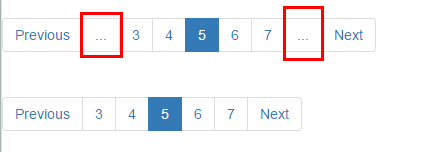
items-per-page$ C (Default:10) - 每页最大显示条数的数量。值小于1表明所有项目在一个页上。last-textC (Default:Last) - 最后一个按钮的文本。max-size$ (Default:null) - 限制分页按钮显示的数量大小。next-textC (Default:Next) - 下一个按钮的文本ng-change$ - 点击分页按钮触发的方法,可用于更改不同页面数据ng-disabled$ (Default:false) - 用于禁用分页组件。ng-model$ - 当前页数. 第一页为1(即从1开始计算而不是0).num-pages$ readonly (Default:angular.noop) - 一个可选的配置,显示页面总数(这是个只读项,并不是可以通过设置页面数和当前页配置分页).page-label(Default:angular.identity) - 可选的表达式,以覆盖基于传递当前页面索引的页标签。$scope.pageLabel = '^_^';
<uib-pagination

            total-items="bigTotalItems"

            ng-model="bigCurrentPage"

            boundary-links="true"

            boundary-link-numbers="true"

            max-size="maxSize"

            page-label="pageLabel">

    </uib-pagination>

    <p>{{pageLabel}}</p>
previous-textC (Default:Previous) - 上一个按钮的文本rotate$ C (Default:true) - 是否将当前激活页显示在中间。<uib-pagination
total-items="bigTotalItems"
ng-model="bigCurrentPage"
force-ellipses="'3'"
boundary-links="true"
boundary-link-numbers="true"
max-size="maxSize"
rotate="true">
</uib-pagination>
<uib-pagination
total-items="bigTotalItems"
ng-model="bigCurrentPage"
force-ellipses="'3'"
boundary-links="true"
boundary-link-numbers="true"
max-size="maxSize"
rotate="false">
</uib-pagination>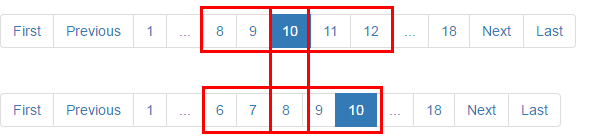
template-url(Default:uib/template/pagination/pagination.html) - 重写用于具有自定义模板提供的组件模板。total-items$ - 所有页中的项目总数
angular-ui-bootstrap插件API - Pagination的更多相关文章
- Angular -ui - BootStrap组件的解释以及使用
关于UI BootStrap UI BootStrap 是angularUI团队用纯粹angularJS语法编写的Bootstrap组件. 1. 关于ng-router(angular-router. ...
- angular分页插件tm.pagination 解决触发二次请求的问题
angular分页插件tm.pagination(解决触发二次请求的问题) DEMO: http://jqvue.com/demo/tm.pagination/index.html#?current ...
- jquery ui bootstrap日期插件
http://blog.csdn.net/php_897721669/article/details/7404527 搜索“jquery ui日期插件怎么显示年份”? $("#datepic ...
- 20个超棒的jQuery bootstrap 插件
1. Bootstrap File Input Bootstrap3.x 的一个增强版的HTML 5 文件选择控件,可以对图片文件和文本文件进行预览,以及其他功能.该插件增强了这些插件,并且将组件的初 ...
- Angular.js+Bootstrap实现手风琴菜单
说是Angular.js+Bootstrap实现手风琴菜单,其实就是用了Bootstrap的样式而已. 上一篇实现了表格+分页,接着学习实现的Demo. 主要练习自定义指令,向指令中传递参数,老规矩先 ...
- Bootstrap插件的使用
昨天,我偶然间发现了它——BootStrap插件,它是一一套功能强大的前端组件.说起来,我跟这插件还真算得上有缘,我本来并不是去找这个插件的,我本来是找BootStarp Paginator这个分页插 ...
- Bootstrap插件概述
前面的话 Bootstrap除了包含丰富的Web组件之外,如下拉菜单.按钮组.导航.分页等,还包括一些JavaScript的插件.插件为 Bootstrap 的组件赋予了“生命”.Bootstrap的 ...
- Easy UI常用插件使用
一.easy UI是类似于jQuery UI的插件库,它提供了丰富的各种常用插件:tree.datagrid... tree插件: 语法:$(selector).tree([settings]); 常 ...
- angular-ui-bootstrap插件API - Tabs
Tabs 案例 <!DOCTYPE html> <html lang="en" ng-app="myApp"> <head> ...
随机推荐
- Microsoft Push Notification Service(MPNS)的最佳体验
如何获得 Microsoft Push Notification Service(MPNS)的最佳体验 有很多同学抱怨MPNS的各种问题,其中包括服务超时.返回各种错误代码不知如何处理等等..今天我用 ...
- wpf中xps文档合并功能实现
跟着上一篇的xps文档套打的文章,近期一直在研究xps打印技术,其中用户提到了一个需求,要求能够多页面进行打印,我的想法是,先生成xps文件,然后将文件读取出来以后,合并成一个文件来处理. 如果要是直 ...
- Solr与MongoDB集成,实时增量索引
Solr与MongoDB集成,实时增量索引 一. 概述 大量的数据存储在MongoDB上,需要快速搜索出目标内容,于是搭建Solr服务. 另外一点,用Solr索引数据后,可以把数据用在不同的项目当中, ...
- [转]iOS: About diagnostic capabilities
Source:http://support.apple.com/kb/HT6331 Each of these diagnostic capabilities requires the user to ...
- General Structure of Quartz.NET and How To Implement It
General Structure of Quartz.NET and How To Implement It General Structure of Quartz.NET and How To ...
- 区别CSS中display:box;inline;none以及HTML中 <frame> 标签<table> 标签的 frame 属性
区别display:box:display:inline:display:none三者的不同 display:block的特点是: block是Display默认的值.总是在新行上开始:该对象随后的内 ...
- hdu1686
题目意思:找到上串在下串中有多少个 Problem Description The French author Georges Perec (1936–1982) once wrote a book, ...
- 限制某个进程只能在某个CPU上运行
首先可以调用GetSystemInfo查看有多少个CPU,再通过调用: BOOL WINAPI SetProcessAffinityMask( __in HANDLE hProcess, __in D ...
- 第一个windows 小游戏 贪吃蛇
最近用dx尝试做了一个小的贪吃蛇游戏,代码放到github上面:https://github.com/nightwolf-chen/MyFreakout 说一下自己实现的过程: 首先,我把蛇这个抽象成 ...
- Django入门实践(三)
Django入门实践(三) Django简单应用 前面简单示例说明了views和Template的工作过程,但是Django最核心的是App,涉及到App则会和Model(数据库)打交道.下面举的例子 ...