
Unity Shader——Writing Surface Shaders(3)——Surface Shader Lighting Examples
Surface Shader 光照例子
这里有一些自定义光照模型和Surface Shaders的例子。通常的Surface Shader例子在这里。
由于延迟光照在某些自定义的逐材质光照模型中表现得并不好,在下面大多数例子中,我们让shader只编译到正向渲染中。
漫反射(Diffuse)
让我们以使用内建Lambert光照模型的shader作为开始吧!
Shader "Example/Diffuse Texture" {

    Properties {

      _MainTex ("Texture", 2D) = "white" {}

    }

    SubShader {

      Tags { "RenderType" = "Opaque" }

      CGPROGRAM

      #pragma surface surf Lambert

      struct Input {

          float2 uv_MainTex;

      };

      sampler2D _MainTex;

      void surf (Input IN, inout SurfaceOutput o) {

          o.Albedo = tex2D (_MainTex, IN.uv_MainTex).rgb;

      }

      ENDCG

    }

    Fallback "Diffuse"

  }
下面是使用一张纹理贴图和不使用一张真实的纹理贴图的样子(此场景中有一个方向光)

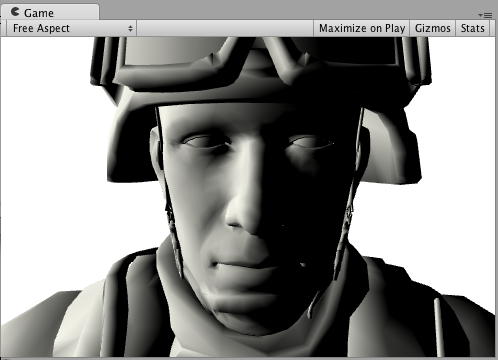
现在,我们来做个完全一样的,但是使用我们自己的光照模型,而不是内建Lambert光照模型。Surface Shader光照模型仅是一些我们需要编写的函数。这里有一个简单的Lambert光照模型。注意到只有CGPROGRAM部分发生了改变,周边的shader代码是完全一样的:
Shader "Example/Diffuse Texture" {

        Properties {

            _MainTex ("Texture", 2D) = "white" {}

        }

        SubShader {

        Tags { "RenderType" = "Opaque" }

        CGPROGRAM

          #pragma surface surf SimpleLambert

          half4 LightingSimpleLambert (SurfaceOutput s, half3 lightDir, half atten) {

              half NdotL = dot (s.Normal, lightDir);

              half4 c;

              c.rgb = s.Albedo * _LightColor0.rgb * (NdotL * atten * );

              c.a = s.Alpha;

              return c;

          }

        struct Input {

            float2 uv_MainTex;

        };

        sampler2D _MainTex;

        void surf (Input IN, inout SurfaceOutput o) {

            o.Albedo = tex2D (_MainTex, IN.uv_MainTex).rgb;

        }

        ENDCG

        }

        Fallback "Diffuse"

    }
所以我们的简单漫反射光照模型就是LightingSimpleLambert 函数。它通过计算表面法线和光线方向的点积来计算光照,然后应用光照衰减和颜色。
环绕漫反射(Diffuse Wrap)
这里是环绕漫反射——漫反射光照的修改版,即照明环绕在物体的边缘。它对用来仿照次表面散射效果很有用。因为只是CGPROGRAM 部分发生了改变,老生常谈一次,周边的shader代码就省略了:
 ...ShaderLab code...

    CGPROGRAM

    #pragma surface surf WrapLambert

    half4 LightingWrapLambert (SurfaceOutput s, half3 lightDir, half atten) {

        half NdotL = dot (s.Normal, lightDir);

        half diff = NdotL * 0.5 + 0.5;

        half4 c;

        c.rgb = s.Albedo * _LightColor0.rgb * (diff * atten * );

        c.a = s.Alpha;

        return c;

    }

    struct Input {

        float2 uv_MainTex;

    };

    sampler2D _MainTex;

        void surf (Input IN, inout SurfaceOutput o) {

        o.Albedo = tex2D (_MainTex, IN.uv_MainTex).rgb;

    }

    ENDCG

    ...ShaderLab code...

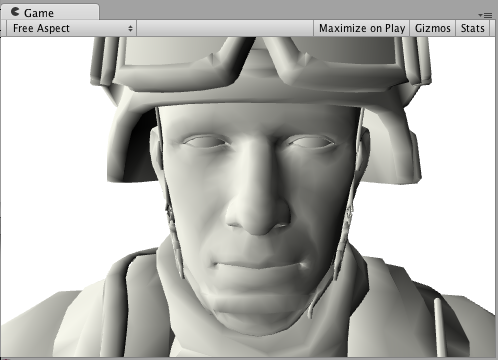
卡通渐变(Toon Ramp)
下面是一个"渐变(Ramp)"光照模型。它使用一张渐变纹理来定义表面怎样对光线和法线的夹角做出反应。这能用来实现多种效果,包括卡通光照。
...ShaderLab code...

    CGPROGRAM

    #pragma surface surf Ramp

    sampler2D _Ramp;

    half4 LightingRamp (SurfaceOutput s, half3 lightDir, half atten) {

        half NdotL = dot (s.Normal, lightDir);

        half diff = NdotL * 0.5 + 0.5;

        half3 ramp = tex2D (_Ramp, float2(diff)).rgb;

        half4 c;

        c.rgb = s.Albedo * _LightColor0.rgb * ramp * (atten * );

        c.a = s.Alpha;

        return c;

    }

    struct Input {

        float2 uv_MainTex;

    };

    sampler2D _MainTex;

    void surf (Input IN, inout SurfaceOutput o) {

        o.Albedo = tex2D (_MainTex, IN.uv_MainTex).rgb;

    }

    ENDCG

    ...ShaderLab code...



简单镜面(Simple Specular)
下面是一个简单镜面光照模型。这对于内置的BlinnPhong实际所做的内容来说非常简单。我们把它放在这来说明它是如何工作的。
  ...ShaderLab code...

    CGPROGRAM

    #pragma surface surf SimpleSpecular

    half4 LightingSimpleSpecular (SurfaceOutput s, half3 lightDir, half3 viewDir, half atten) {

        half3 h = normalize (lightDir + viewDir);

        half diff = max (, dot (s.Normal, lightDir));

        float nh = max (, dot (s.Normal, h));

        float spec = pow (nh, 48.0);

        half4 c;

        c.rgb = (s.Albedo * _LightColor0.rgb * diff + _LightColor0.rgb * spec) * (atten * );

        c.a = s.Alpha;

        return c;

    }

    struct Input {

        float2 uv_MainTex;

    };

    sampler2D _MainTex;

    void surf (Input IN, inout SurfaceOutput o) {

        o.Albedo = tex2D (_MainTex, IN.uv_MainTex).rgb;

    }

    ENDCG

    ...ShaderLab code...
解码光照贴图(Decoding Lightmaps)
我们将以这样一个shader作为开始:它模仿内置的光照贴图解码工作,使用Unity自带的DecodeLightmap函数解码lightmap中储存的数据信息,以及使用自带的UNITY_DIRBASIS宏定义方向光照贴图(Directional lightmap)的基本向量:
 Shader "Example/Standard Lightmap Decoding" {

        Properties {

            _MainTex ("Texture", 2D) = "white" {}

        }

        SubShader {

            Tags { "RenderType" = "Opaque" }

            CGPROGRAM

            #pragma surface surf Standard

            half4 LightingStandard (SurfaceOutput s, half3 lightDir, half atten) {

                half NdotL = dot (s.Normal, lightDir);

                half4 c; c.rgb = s.Albedo * _LightColor0.rgb * (NdotL * atten * );

                c.a = s.Alpha;

                return c;

            }

            inline fixed4 LightingStandard_SingleLightmap (SurfaceOutput s, fixed4 color) {

                half3 lm = DecodeLightmap (color);

                return fixed4(lm, );

            }

            inline fixed4 LightingStandard_DualLightmap (SurfaceOutput s, fixed4 totalColor, fixed4 indirectOnlyColor, half indirectFade) {

                half3 lm = lerp (DecodeLightmap (indirectOnlyColor), DecodeLightmap (totalColor), indirectFade);

                return fixed4(lm, );

            }

            inline fixed4 LightingStandard_StandardLightmap (SurfaceOutput s, fixed4 color, fixed4 scale, bool surfFuncWritesNormal) {

                UNITY_DIRBASIS

                half3 lm = DecodeLightmap (color);

                half3 scalePerBasisVector = DecodeLightmap (scale);

                if (surfFuncWritesNormal)

                {

                    half3 normalInRnmBasis = saturate (mul (unity_DirBasis, s.Normal));

                    lm *= dot (normalInRnmBasis, scalePerBasisVector);

                }

                return fixed4(lm, );

            }

            struct Input {

                float2 uv_MainTex;

            };

            sampler2D _MainTex;

            void surf (Input IN, inout SurfaceOutput o) {

                o.Albedo = tex2D (_MainTex, IN.uv_MainTex).rgb;

            }

            ENDCG

            }

        Fallback "Diffuse"

    }
现在,让我们为光照贴图中储存的光添加些色调映射(tone mapping):
Shader "Example/Tonemapped Lightmap Decoding" {

        Properties {

            _MainTex ("Texture", 2D) = "white" {}

            _Gain ("Lightmap tone-mapping Gain", Float) =

            _Knee ("Lightmap tone-mapping Knee", Float) = 0.5

            _Compress ("Lightmap tone-mapping Compress", Float) = 0.33

        }

        SubShader {

            Tags { "RenderType" = "Opaque" }

            CGPROGRAM

            #pragma surface surf Tonemapped

            half4 LightingTonemapped (SurfaceOutput s, half3 lightDir, half atten) {

                half NdotL = dot (s.Normal, lightDir);

                half4 c; c.rgb = s.Albedo * _LightColor0.rgb * (NdotL * atten * ); c.a = s.Alpha;

                return c;

            }

            half _Gain;

            half _Knee;

            half _Compress;

            inline half3 TonemapLight (half3 i) {

                i *= _Gain;

                return (i > _Knee)? (((i - _Knee)*_Compress)+_Knee): i;

            }

            inline fixed4 LightingTonemapped_SingleLightmap (SurfaceOutput s, fixed4 color) {

                half3 lm = TonemapLight(DecodeLightmap (color));

                return fixed4(lm, );

            }

            inline fixed4 LightingTonemapped_DualLightmap (SurfaceOutput s, fixed4 totalColor, fixed4 indirectOnlyColor, half indirectFade) {

                half3 lm = TonemapLight(lerp (DecodeLightmap (indirectOnlyColor), DecodeLightmap (totalColor), indirectFade));

                return fixed4(lm, );

            }

            inline fixed4 LightingTonemapped_StandardLightmap (SurfaceOutput s, fixed4 color, fixed4 scale, bool surfFuncWritesNormal) {

                UNITY_DIRBASIS

                half3 lm = TonemapLight(DecodeLightmap (color));

                half3 scalePerBasisVector = DecodeLightmap (scale);

                if (surfFuncWritesNormal)

                {

                    half3 normalInRnmBasis = saturate (mul (unity_DirBasis, s.Normal));

                    lm *= dot (normalInRnmBasis, scalePerBasisVector);

                }

                return fixed4(lm, );

            }

            struct Input {

                float2 uv_MainTex;

            };

            sampler2D _MainTex;

            void surf (Input IN, inout SurfaceOutput o) {

                o.Albedo = tex2D (_MainTex, IN.uv_MainTex).rgb;

            }

            ENDCG

        }

        Fallback "Diffuse"

    }
Unity Shader——Writing Surface Shaders(3)——Surface Shader Lighting Examples的更多相关文章
- Unity Shader——Writing Surface Shaders(1)——Surface Shader Examples
这里有Surface Shader的一些例子.下面的这些例子关注使用内建的光照模型:关于如何使用自定义光照模型的例子参见Surface Shader Lighting Examples. 简单 我们将 ...
- Unity Shader——Writing Surface Shaders(2)——Custom Lighting models in Surface Shaders
Surface Shader中的自定义光照模型 当你在编写 Surface Shaders 时,是在描述一个表面的属性(反射颜色.法线……),而且光的交互过程是由一个光照模型来计算的.内建的光照模型有 ...
- Unity Shader——Writing Surface Shaders(0)
从今天起,开始翻译Unity关于shader的官方文档.翻译水平比较一般,目的主要是通过翻译来提升对shader的见解,也让其他人更容易的了解shader.以下开始正文内容: 编写Surface Sh ...
- Writing Surface Shaders
[Writing Surface Shaders] Writing shaders that interact with lighting is complex. There are differen ...
- Unity Shaders Vertex & Fragment Shader入门
http://blog.csdn.net/candycat1992/article/details/40212735 三个月以前,在一篇讲卡通风格的Shader的最后,我们说到在Surface Sha ...
- Unity 的“Vertex Lit Rendering path“中 shader Pass 的注意事项
"MADFINGER/Environment/Unlit (Supports Lightmap)"是 ShadowGun 示例中最简单的 shader 了,如下: // Unlit ...
- 【Unity Shader实战】卡通风格的Shader(一)
写在前面 本系列其他文章: 卡通风格的Shader(二) 呜,其实很早就看到了这类Shader,实现方法很多,效果也有些许不一样.从这篇开始,陆续学习一下接触到的卡通类型Shader的编写. 本篇的最 ...
- Unity加载模块深度解析(Shader)
作者:张鑫链接:https://zhuanlan.zhihu.com/p/21949663来源:知乎著作权归作者所有.商业转载请联系作者获得授权,非商业转载请注明出处. 接上一篇 加载模块深度解析(二 ...
- Unity3D Shader官方教程翻译(十九)----Shader语法,编写表面着色器
Writing Surface Shaders Writing shaders that interact with lighting is complex. There are different ...
随机推荐
- MySQL默认数据库
欢迎和大家交流技术相关问题: 邮箱: jiangxinnju@163.com 博客园地址: http://www.cnblogs.com/jiangxinnju GitHub地址: https://g ...
- EditText设置文字改变时的监听
textWatcher = new TextChangeWatcher(); etQuerryInfo.addTextChangedListener(textWatcher); /** * 文字改变类 ...
- 类似qq的浮动窗口 ,随着滚轴的滚动,始终处于屏幕的中间(能看到运动的过程)
<!DOCTYPE html> <html> <head lang="en"> <meta charset="UTF-8&quo ...
- SQL Server 中的 NOLOCK 用法
大家都知道,每新建一个查询,都相当于创建一个会话,在不同的查询分析器里面进行的操作,可以影响到其他会话的查询,极端的情况可能会一直处于阻塞中,哪怕只是一个很简单的查询都“特别慢”. BEGIN TRA ...
- hadoop运行原理之Job运行(三) TaskTracker的启动及初始化
与JobTracker一样,TaskTracker也有main()方法,然后以线程的方式启动(继承了Runnable接口).main()方法中主要包含两步:一是创建一个TaskTracker对象:二是 ...
- ionic 安装遇到的问题以及解决方案
公司里要用到 Ionic 做移动App 混合开发 一个环境搭建折腾了好几天.一是公司权限问题,二是网络问题,你懂得. Ionic 环境搭建官网有教程.本来几行命令就能搞定的事,一旦遇到网络问题,就蛋疼 ...
- XCode6.0的iOS免证书真机测试方法(MAC及黑苹果均有效)
目前在XCode上开发的iOS程序只能在模拟器Simulator中运行,如果要放到真机上测试,需要苹果官方认证的开发者账号,购买开发者证书iDP,99美金一年啊!!! 作为刚开始学习iOS编程的菜鸟, ...
- MySQL表类型和存储引擎版本不一致解决方法
使用的是老版本的mysql客户端Navicate 8 ,mysql 服务端用的是mysql5.6的版本,在修改版本引擎的时候出现版本不对; mysql error ‘TYPE=MyISAM’ 解决办法 ...
- UML学习笔记1
UML概述:是一种为面向对象软件设计提供的建模语言. 构成:事物things关系relationshs图diagrams UML事物:构件事物 行为事物 分组事物 注释事物 UML关系:依赖depen ...
- 黑马程序员——【Java基础】——File类、Properties集合、IO包中的其他类
---------- android培训.java培训.期待与您交流! ---------- 一.File类 (一)概述 1.File类:文件和目录路径名的抽象表现形式 2.作用: (1)用来将文件或 ...