
035. asp.netWeb用户控件之四通过用户控件实现投票和结果分析
用户控件Vote.ascx代码
<%@ Control Language="C#" AutoEventWireup="true" CodeFile="vote.ascx.cs" Inherits="vote" %>

    <link href="style.css" rel="stylesheet" type="text/css" />

    <style type="text/css">

        .style1

        {

            font-size: small;

            color: #0066CC;

        }

    </style>

<div id="box">

  <table width="370" border="0">

    <tr>

      <td width="364" height="37" class="style1">您对本公司的售后服务是否满意?</td>

    </tr>

    <tr>

      <td height="106">

          <asp:RadioButtonList ID="RadioButtonList1" runat="server" Font-Size="9pt">

              <asp:ListItem Selected="True">非常满意</asp:ListItem>

              <asp:ListItem>基本满意</asp:ListItem>

              <asp:ListItem>不满意</asp:ListItem>

              <asp:ListItem>不发表意见</asp:ListItem>

          </asp:RadioButtonList>

        </td>

    </tr>

    <tr>

      <td height="30" align="center">

          <asp:ImageButton ID="ImageButton1" runat="server" ImageUrl="images/dc_03.gif"

              onclick="ImageButton1_Click" />

                <img src="data:images/dc_05.gif" width="82" height="33" onclick="window.location.replace('result.aspx')"  style="cursor:pointer"/></td>

    </tr>

  </table>

</div>
用户控件vote.ascx.cs代码:
public partial class vote : System.Web.UI.UserControl

{

    protected void Page_Load(object sender, EventArgs e)

    {

    }

    /// <summary>

    /// 从txt文件中读取投票数量

    /// </summary>

    /// <param name="P_str_path">要读取的txt文件的路径及名称</param>

    /// <returns>返回一个int类型的值,用来记录投票数量</returns>

    public static int readCount(string P_str_path)

    {

        int P_int_count = ;

        StreamReader streamread;

        streamread = File.OpenText(P_str_path);

        while (streamread.Peek() != -)

        {

            P_int_count = int.Parse(streamread.ReadLine());

        }

        streamread.Close();

        return P_int_count;

    }

    /// <summary>

    /// 写入投票数量

    /// </summary>

    /// <param name="P_str_path">要操作的txt文件的路径及名称</param>

    public static void addCount(string P_str_path)

    {

        int P_int_count = readCount(P_str_path);

        P_int_count += ;

        //将数据记录写入文件

        StreamWriter streamwriter = new StreamWriter(P_str_path, false);

        streamwriter.WriteLine(P_int_count);

        streamwriter.Close();

    }

    protected void ImageButton1_Click(object sender, ImageClickEventArgs e)

    {

        string P_str_IP = Request.UserHostAddress.ToString();

        HttpCookie oldCookie = Request.Cookies["userIP"];

        if (oldCookie == null)

        {

            int flag = RadioButtonList1.SelectedIndex;

            switch (flag)

            {

                case : addCount(Server.MapPath("result1.txt")); break;

                case : addCount(Server.MapPath("result2.txt")); break;

                case : addCount(Server.MapPath("result3.txt")); break;

                case : addCount(Server.MapPath("result4.txt")); break;

            }

            Page.ClientScript.RegisterStartupScript(this.GetType(), "", "alert('投票成功,谢谢您的参与!');", true);

            HttpCookie newCookie = new HttpCookie("userIP");    //定义新的Cookie对象

            newCookie.Expires = DateTime.MaxValue;

            //添加新的Cookie变量IPaddress,值为P_str_IP

            newCookie.Values.Add("IPaddress", P_str_IP);

            Response.AppendCookie(newCookie);            //将变量写入Cookie文件中

        }

        else

        {

            string P_str_oldIP = oldCookie.Values["IPaddress"];

            if (P_str_IP.Trim() == P_str_oldIP.Trim())

            {

                Page.ClientScript.RegisterStartupScript(this.GetType(), "", "alert('一个IP地址只能投一次票,谢谢您的参与!');", true);

            }

            else

            {

                HttpCookie newCookie = new HttpCookie("userIP");

                newCookie.Values.Add("IPaddress", P_str_IP);

                newCookie.Expires = DateTime.MaxValue;

                Response.AppendCookie(newCookie);

                int rflag = RadioButtonList1.SelectedIndex;

                switch (rflag)

                {

                    case : addCount("result1.txt"); break;

                    case : addCount("result2.txt"); break;

                    case : addCount("result3.txt"); break;

                    case : addCount("result4.txt"); break;

                }

                Page.ClientScript.RegisterStartupScript(this.GetType(), "", "alert('投票成功,谢谢您的参与!');", true);

            }

        }

    }

}
结果页面result.aspx代码:
<%@ Page Language="C#" AutoEventWireup="true"  CodeFile="Default.aspx.cs" Inherits="_Default" %>

<%@ Register src="vote.ascx" tagname="vote" tagprefix="uc1" %>

<!DOCTYPE html PUBLIC "-//W3C//DTD XHTML 1.0 Transitional//EN" "http://www.w3.org/TR/xhtml1/DTD/xhtml1-transitional.dtd">

<html xmlns="http://www.w3.org/1999/xhtml">

<head runat="server">

    <title>在线投票系统</title>

</head>

<body>

    <form id="form1" runat="server">

    <uc1:vote ID="vote1" runat="server" />

    </form>

</body>

</html>
结果页面result.aspx.cs代码:
public partial class Default2 : System.Web.UI.Page

{

    protected string M_str_rate1;

    protected string M_str_rate2;

    protected string M_str_rate3;

    protected string M_str_rate4;

    protected int P_int_count1;

    protected int P_int_count2;

    protected int P_int_count3;

    protected int P_int_count4;

    protected void Page_Load(object sender, EventArgs e)

    {

        P_int_count1 = readCount(Server.MapPath("result1.txt"));

        P_int_count2 = readCount(Server.MapPath("result2.txt"));

        P_int_count3 = readCount(Server.MapPath("result3.txt"));

        P_int_count4 = readCount(Server.MapPath("result4.txt"));

        int P_int_count = P_int_count1 + P_int_count2 + P_int_count3+P_int_count4;

        if (P_int_count == )

        {

            Response.Write("<script>alert('还没有人投过票!')</script>");

            lblresult.Text = "共有0人参与投票";

        }

        else

        {

            M_str_rate1 = (Convert.ToDouble(P_int_count1) *  / Convert.ToDouble(P_int_count)).ToString("0.00") + "%";

            M_str_rate2 = (Convert.ToDouble(P_int_count2) *  / Convert.ToDouble(P_int_count)).ToString("0.00") + "%";

            M_str_rate3 = (Convert.ToDouble(P_int_count3) *  / Convert.ToDouble(P_int_count)).ToString("0.00") + "%";

            M_str_rate4 = (Convert.ToDouble(P_int_count4) *  / Convert.ToDouble(P_int_count)).ToString("0.00") + "%";

            lblresult.Text = "共有" + P_int_count.ToString() + "人参与投票";

        }

    }

    /// <summary>

    /// 从txt文件中读取投票数量

    /// </summary>

    /// <param name="P_str_path">要读取的txt文件的路径及名称</param>

    /// <returns>返回一个int类型的值,用来记录投票数量</returns>

    public static int readCount(string P_str_path)

    {

        int P_int_count = ;

        StreamReader streamread;

        streamread = File.OpenText(P_str_path);

        while (streamread.Peek() != -)

        {

            P_int_count = int.Parse(streamread.ReadLine());

        }

        streamread.Close();

        return P_int_count;

    }

}
默认页面Default.aspx页面代码:
<%@ Page Language="C#" AutoEventWireup="true"  CodeFile="Default.aspx.cs" Inherits="_Default" %>

<%@ Register src="vote.ascx" tagname="vote" tagprefix="uc1" %>

<!DOCTYPE html PUBLIC "-//W3C//DTD XHTML 1.0 Transitional//EN" "http://www.w3.org/TR/xhtml1/DTD/xhtml1-transitional.dtd">

<html xmlns="http://www.w3.org/1999/xhtml">

<head runat="server">

    <title>在线投票系统</title>

</head>

<body>

    <form id="form1" runat="server">

    <uc1:vote ID="vote1" runat="server" />

    </form>

</body>

</html>
style.css代码:
#box {

    height: 195px;

    width: 370px;

    background-image: url(images/1.jpg);

    background-repeat: no-repeat;

    padding-top: 65px;

    padding-right: 45px;

    padding-left: 45px;

}

#box2 {

    height: 195px;

    width: 370px;

    background-image: url(images/2.jpg);

    background-repeat: no-repeat;

    padding-top: 65px;

    padding-right: 45px;

    padding-left: 45px;

}
用到的四个文件:
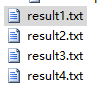
用到的几张图片:


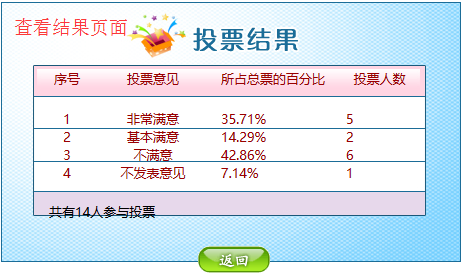
最终效果展示:

035. asp.netWeb用户控件之四通过用户控件实现投票和结果分析的更多相关文章
- 033. asp.netWeb用户控件之二将页面转换成web控件和使用Web控件显示热点新闻
访问Web用户控件的属性 ASP.NET提供的各种服务器控件都有其自身的属性和方法,程序开发人员可以灵活地使用服务器控件中的属性和方法开发程序.在用户控件中,程序开发人员也可以自行定义各种属性和方法, ...
- ASP.NET MVC中加载WebForms用户控件(.ascx)
原文:ASP.NET MVC中加载WebForms用户控件(.ascx) 问题背景 博客园博客中的日历用的是ASP.NET WebForms的日历控件(System.Web.UI.WebControl ...
- 【番外篇】ASP.NET MVC快速入门之免费jQuery控件库(MVC5+EF6)
目录 [第一篇]ASP.NET MVC快速入门之数据库操作(MVC5+EF6) [第二篇]ASP.NET MVC快速入门之数据注解(MVC5+EF6) [第三篇]ASP.NET MVC快速入门之安全策 ...
- JS获取用户控件中的子控件Id
用户控件 <asp:HiddenField ID="hfGradeId" runat="server" /> <asp:HiddenField ...
- asp.net web 开发登录相关操作的控件LoginName、LoginStatus和LoginView控件使用详解
http://book.51cto.com/art/200909/154039.htm http://book.51cto.com/art/200909/154041.htm ASP.NET提供了一套 ...
- ASP.NET MVC显示WebForm网页或UserControl控件
ASP.NET MVC显示WebForm网页或UserControl控件 学习与使用ASP.NET MVC这样久,还是对asp.net念念不忘.能否在asp.net mvc去显示aspx或是user ...
- 念念不忘,ASP.NET MVC显示WebForm网页或UserControl控件
学习与使用ASP.NET MVC这样久,还是对asp.net念念不忘.能否在asp.net mvc去显示aspx或是user control呢?这个灵感(算不上灵感,只能算是想法)是来自前些天有写过一 ...
- 【Asp.net之旅】--因自己定义控件注冊而引发的思考
前言 近期在开发远洋的SOA系统平台,开发使用的是.NET平台.对于Asp.net并不困难,但该系统的开发并非全然依靠Asp.net.而是自身封装好的框架.这套框架是远洋地产购买的微软的开发平台,项目 ...
- asp.net 弹出式日历控件 选择日期 Calendar控件
原文地址:asp.net 弹出式日历控件 选择日期 Calendar控件 作者:逸苡 html代码: <%@ Page Language="C#" CodeFile=&quo ...
随机推荐
- python核心编程第六章练习6-15
转换.(a)给出两个可识别格式的日期,比如MM/DD/YY或者DD/MM/YY格式.计算出两个日期之间的天数.(b)给出一个人的生日,计算此人从出生到现在的天数,包括所有的闰月.(c)还是上面的例子, ...
- 防止SVN冲突,Elipse资源同步介绍
灰色向右箭头: 本地修改了 灰色向右箭头且中间有白色减号: 本地删除了,服务器未删除 灰色向右且中间有个加号的箭头:本地比SVN上多出的文件 蓝色向左箭头:svn上修改过 蓝色向左且中间有个加号的箭头 ...
- bootstrap笔记-布局
1.通过文本对齐类,可以简单方便的将文字重新对齐. <p class="text-left">Left aligned text.</p> <p cl ...
- 连接英文字符集的ORACLE和调用存储过程问题及64位服务器连接ORACLE问题
部署在IIS上的webservice连接英文字符集的ORACLE数据库出现问题“未在本地计算机上注册"MSDAORA.1"提供程序”,解决方案如下: 原因:如错误,64位系统未注册 ...
- 关于Elasticsearch单个索引文档最大数量问题
因为ElasticSearch是一个基于Lucene的搜索服务器.Lucene的索引有个难以克服的限制,导致Elasticsearch的单个分片存在最大文档数量限制,一个索引分片的最大文档数量是20亿 ...
- good
1,将NodeList 转化成 Arrayvar divs = Array.from(document.querySelectorAll('div'));2,将 arguments 转化成 Array ...
- GIT(分布式版本控制系统)
Git是一款免费.开源的分布式版本控制系统,用于敏捷高效地处理任何或小或大的项目.[1] Git的读音为/gɪt/. Git是一个开源的分布式版本控制系统,用以有效.高速的处理从很小到非常大的项目版本 ...
- candence 知识积累4
一.PCB布局约束: 1.尺寸规划:PCB大小要合适,PCB太大印制线路长,阻抗增加.太小散热不好,易受干扰. 2.PCB尺寸确定后要确定特殊器件的位置. 3.尽可能缩短高频元器件之间的连线,设法减少 ...
- sql 跨域
1. 开通分布式查询权限 reconfigure reconfigure 2. 查询 ',NETACS.dbo.tb_car) a select * from opendatasource('SQLO ...
- 集合ArrayList
/*集合ArrayList * 例如: * 1.创建:ArrayList<Egg> myList = new ArrayList<Egg>(); * Egg类型的集合 ...