
JBOSS目录结构详细说明
一、下载与安装。
如何下载以及安装配置,请参考:Windows下JBOSS安装配置图文教程
二、现在主要了解一下JBOSS目录结构。
1. 主目录: E:\jboos\jboss-6.1.0.Final
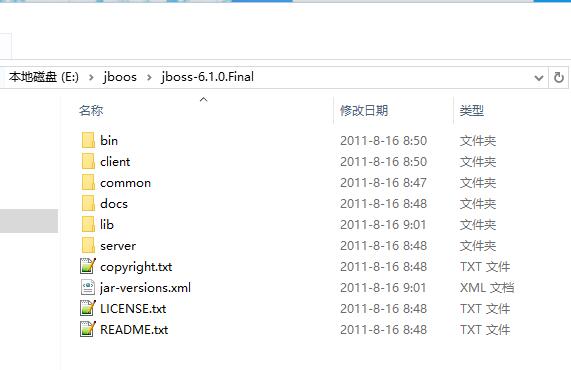
bin
开始和停止JBoss的地方。
其中有两个主要的批处理文件:run.bat和shutdown.bat。要启动JBoss只要执行run.bat文件即可;要停止JBoss必须执行带参数的shutdown.bat。
client
Stores configuration files and JAR files that may be used by a Java client application (running outside JBoss) or an external web container. You can select archives as required or use jbossall-client.jar.
保存Java客户端应用或外部web容器(在JBoss之外运行),所需的配置文件和Jar文件。
common
该子目录lib的jar包,整个jboss共享。
docs
Contains the XML DTDs used in JBoss for reference (these are also a useful source of documentation on JBoss configuration specifics). There are also example JCA (Java Connector Architecture) configuration files for setting up datasources for different databases (such as MySQL, Oracle, Postgres).
包含一些jboss的XML DTD文件,还有一些案例和文档。
lib
Contains startup JARs used by JBoss. Do not place your own JAR files in this directory.
包换JBoss所需的jar文件。不要把你自己的jar文件放在这个目录。
server
Contains the JBoss server configuration sets. Each of the subdirectories in here is a different server configuration. JBoss ships with minimal, default, production, and all configuration sets. The subdirectories and key configuration files contained in the default configuration set are discussed in more detail in subsequent sections.
包含JBoss服务器实例的配置集合。这里的每个子目录就是一个不同的服务器实例配置。
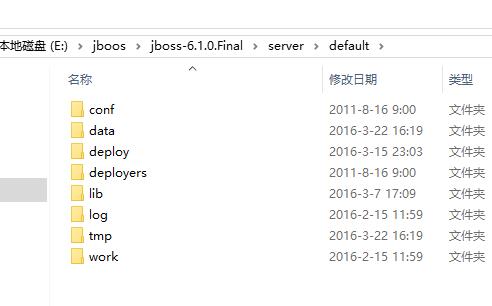
server目录下的文件夹:
--conf
The conf directory contains the jboss-service.xml bootstrap descriptor file for a given server configuration. This defines the core services that are fixed for the lifetime of the server.
conf目录中包含了这个服务器的启动描述文件jboss-service.xml。这个文件定义了服务器运行时间内提供那些固定的核心服务。
--data
The data directory is available for use by services that want to store content in the file system. It holds persistent data for services intended to survive a server restart. Serveral JBoss services, such as the embedded Hypersonic database instance, store data here.
服务中需要存储内容到文件系统的都会保存到data目录。JBoss内嵌的Hypersonic database的数据也是保存到这里的。
--deploy
The deploy directory contains the hot-deployable services (those which can be added to or removed from the running server). It also contains applications for the current server configuration. You deploy your application code by placing application packages (JAR, WAR and EAR files) in the deploy directory. The directory is constantly scanned for updates, and any modified components will be re-deployed automatically. This may be overridden through the URLDeploymentScanner URLs attribute.
deploy中包含可热部署的服务(可以在服务器运行时动态添加和删除)。当然这里还包含有这个服务器实例下的应用程序。你可以发布你的应用程序代码的压缩包(JAR,WAR和EAR文件)到这里。这里目录会被搜索更新,所有修改的组件都会被自动重新部署。
--lib
This directory contains JAR files (Java libraries that should not be hot deployed) needed by this server configuration. You can add required library files here for JDBC drivers etc. All JARs in this directory are loaded into the shared classpath at startup.
这个目录中包含这个服务器配置需要的JAR文件(这些java库不需要被热部署)。你可以添加需要的库文件到这里,如JDBC驱动等。所有的jar文件将在服务器启动的时候被加载到共享的classpath中。
--log
This is where the log files are written. JBoss uses the Jakarta log4j package for logging and you can also use it directly in your own applications from within the server. This may be overridden through the conf/log4j.xml configuration file.
日志文件会被写到这里。如果你要修改日志输出目录,可以通过配置conf/log4j.xml实现。
--tmp
The tmp directory is used for temporary storage by JBoss services. The deployer, for example, expands application archives in this directory.
tmp目录被用来提供JBoss服务的临时存储。
--work
This directory is used by Tomcat for compilation of JSPs.
提供给tomcat编译jsp文件用。
参考:http://www.cnblogs.com/phoebus0501/archive/2010/12/15/1907399.html
参考:疯狂java。
JBOSS目录结构详细说明的更多相关文章
- 【JBOSS】 JBOSS目录结构
JBOSS在默认情况下可以用3种方式启动minimal,default和all.三种模式内部的模块数量依次递增 例如: 1-执行JBOSS_HOME/bin/run.bat批量处理文件启动JBos ...
- JBoss目录结构说明
http://www.blogjava.net/livery/articles/262544.html $JBOSS-HOME/bin: 放置各种脚本文件以及相关文件,包括jb ...
- 详细的linux目录结构详细介绍
详细的linux目录结构详细介绍 --树状目录结构图 下面红色字体为比较重要的目录 1./目录 目录 描述 / 第一层次结构的根,整个文件系统层次结构的根目录 /bin/ 需要在单用户模式可用的必要命 ...
- linux的目录结构详细介绍
linux的目录结构详细介绍 1. /目录(根目录) 2./ect/目录 特定主机系统范围内的配置文件. 3./usr/目录 默认软件都会存于该目录下.用于存储只读用户数据的第二层次:包含绝大多数的用 ...
- vue-cli 目录结构详细讲解
https://juejin.im/post/5c3599386fb9a049db7351a8 vue-cli 目录结构详细讲解 目录 结构预览 ├─build // 保存一些webpack的初始化配 ...
- linux目录结构详细介绍
目录1.树状目录结构图2./目录3./etc/目录4./usr/目录5./var/目录6./proc/目录7./dev/目录 该文章主要来自于网络进行整理.目录结构参考地址:http://www.hu ...
- Centos目录结构详细版
使用linux也有一年多时间了 最近也是一直在维护网站系统主机 下面是linux目录结构说明 本人使用的是centos系统,很久没有发表博文了 近期会整理自己所用所了解知识点,发表linux相关的 ...
- (转) linux目录结构详细介绍
转自:http://yangrong.blog.51cto.com/6945369/1288072 目录 1.树状目录结构图 2./目录 3./etc/目录 4./usr/目录 5./var/目录 6 ...
- JBoss 目录结构
安装JBoss 会创建下列目录结构: 目录 描述 bin 启动和关闭JBoss 的脚本 client 客户端与JBoss 通信所需的Java 库(JARs) docs 配置的样本文件(数据库配置 ...
随机推荐
- 第 21 章 CSS3 文本效果
学习要点: 1.文本阴影 2.文本裁剪 3.文本描边 4.文本填充 主讲教师:李炎恢 本章主要探讨 HTML5 中 CSS3 中文本效果,其中也包含一些之前讲过的 CSS3 文本属性. 一.文本阴影 ...
- 说说web 2.0生态圈的那些事
先来说一道面试题吧,“说一下,web 2.0 和web 1.0的区别?” 官方的解释是这样的: Web1.0 的主要特点在于用户通过浏览器获取信息,Web2.0 则更注重用户的交互作用,用户既是网站内 ...
- Linux命令详解之—more命令
Linux more命令同cat命令一样,多用来查看文件内容,本文就为大家介绍下Linux more命令的用法. 更多Linux命令详情请看:Linux命令速查手册 Linux的more命令类似 ca ...
- mysql 导入text 到数据库
load data local infile 'f:/PhoneLocation_201601.327665.txt' into table sys_t_phone_area fields termi ...
- [翻译] Autofac 控制范围和生命周期
原文链接:http://docs.autofac.org/en/latest/lifetime/index.html Lifetime 是指服务的实例在程序中存活多久 – 从最初的实例化到清理(dis ...
- java RSA加解密以及用途
在公司当前版本的中间件通信框架中,为了防止非授权第三方和到期客户端的连接,我们通过AES和RSA两种方式的加解密策略进行认证.对于非对称RSA加解密,因为其性能耗费较大,一般仅用于认证连接,不会用于每 ...
- 带给您灵感的25个最新鲜的 HTML5 网站
感谢 HTML5 带来的惊人的先进特性,在未来几年,HTML5 将会继续发挥巨大的推动作用,不仅是在 Web 应用中,网页设计领域也会有新的变革.今天,我们在这里集合了能够带给您灵感的25个最新鲜的 ...
- html4基础知识梳理
基础的html知识,只放Xmind的截图. 第一部分: 第二部分: 某些标签的使用示例及注意事项,在印象笔记里.
- react native 学习资料整理
入门教程 深入浅出 React Native:使用 JavaScript 构建原生应用 http://www.appcoda.com/react-native-introduction/ 中文版 h ...
- 我的Android第一章:Android环境搭建
今天是Android第一天的学习,对于学习任何一门课程时我们都要对该课程要有基本的了解和认识,了解该课程学点什么内容,学了这门知识我门能够做些什么,这也是对于我们这些刚入门的学习人员来说是一个必须要弄 ...