
ios基础篇(二十)—— UIBezierPath绘制
UIBezierPath类可以创建基于矢量的路径,可以定义简单的形状,如椭圆或者矩形,或者有多个直线和曲线段组成的形状。
一、UIBezierPath使用:
1、创建path;
2、添加路径到path;
3、将path绘制出来;
 //创建path

     path = [UIBezierPath bezierPath];

     //添加路径

     [path moveToPoint:(CGPoint){,}];

     [path addLineToPoint:(CGPoint){,}];

     //将path绘制出来

     [path stroke];
二、实例
1、绘制多边形
注意:这个类要继承自UIView。
 #import "Draw.h"

 @interface Draw (){

 UIBezierPath *path;

 }

 @end

 - (void)drawRect:(CGRect)rect {

     //线条颜色

     UIColor *color = [UIColor orangeColor];

     [color set];

     //创建path

     path = [UIBezierPath bezierPath];

     //设置线宽

     path.lineWidth = ;

     //线条拐角

     path.lineCapStyle = kCGLineCapRound;

     //终点处理

     path.lineJoinStyle = kCGLineJoinRound;

     [path moveToPoint:(CGPoint){,}];

     [path addLineToPoint:(CGPoint){,}];

     [path addLineToPoint:(CGPoint){,}];

     [path addLineToPoint:(CGPoint){,}];

     [path addLineToPoint:(CGPoint){,}];

     [path addLineToPoint:(CGPoint){,}];

     [path closePath];

     //根据坐标点连线

     [path stroke];

 }
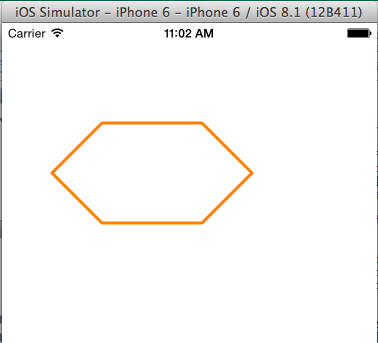
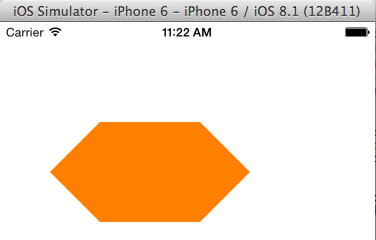
如果修改最后一句代码将[path stroke]改成[path fill];
下面来看看区别,
2、绘制矩形
+ (UIBezierPath *)bezierPathWithRect:(CGRect)rect;
 - (void)drawRect:(CGRect)rect {

     //线条颜色

     UIColor *color = [UIColor orangeColor];

     [color set];

     //创建path

     //rect四个值分别为(x、y、矩形长,矩形宽)

     path = [UIBezierPath bezierPathWithRect:(CGRect){,,,}];

     //设置线宽

     path.lineWidth = ;

     //线条拐角

     path.lineCapStyle = kCGLineCapRound;

     //终点处理

     path.lineJoinStyle = kCGLineJoinRound;

     //根据坐标点连线

     [path stroke];

 }

3、绘制圆形或椭圆形
绘制圆形或椭圆形,我们我用
+ (UIBezierPath *)bezierPathWithOvalInRect:(CGRect)rect;
 - (void)drawRect:(CGRect)rect {

     //线条颜色

     UIColor *color = [UIColor orangeColor];

     [color set];

     //添加路径

     path = [UIBezierPath bezierPathWithOvalInRect:(CGRect){,,,}];

     path.lineWidth = ;

     //线条拐角

     path.lineCapStyle = kCGLineCapRound;

     //终点处理

     path.lineJoinStyle = kCGLineJoinRound;

     //根据坐标点连线

     [path stroke];

 }
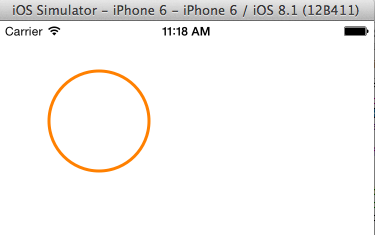
下面改变rect值,
path = [UIBezierPath bezierPathWithOvalInRect:(CGRect){50,50,100,50}];

4、绘制弧线
绘制弧线用方法:
+ (UIBezierPath *)bezierPathWithArcCenter:(CGPoint)center
radius:(CGFloat)radius
startAngle:(CGFloat)startAngle
endAngle:(CGFloat)endAngle
clockwise:(BOOL)clockwise;
其中 Center:圆弧的中心;
radius:半径;
startAngle:开始角度;
endAngle:结束角度;
clockwise:是否顺时针方向;
#import "Draw.h"

//定义PI值

#define PI 3.14159265359

@interface Draw (){

UIBezierPath *path;

}

- (void)drawRect:(CGRect)rect {

    //线条颜色

    UIColor *color = [UIColor orangeColor];

    [color set];

    //添加路径

    path = [UIBezierPath bezierPathWithArcCenter:(CGPoint){,}

                                          radius:

                                      startAngle:

                                        endAngle:PI*0.5

                                       clockwise:YES

            ];

    path.lineWidth = ;

    //线条拐角

    path.lineCapStyle = kCGLineCapRound;

    //终点处理

    path.lineJoinStyle = kCGLineJoinRound;

    //根据坐标点连线

    [path stroke];

}

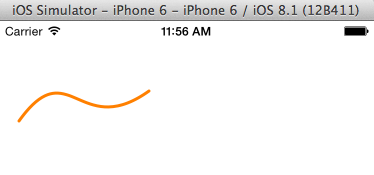
5、二次贝塞尔曲线和三次贝塞尔曲线的绘制
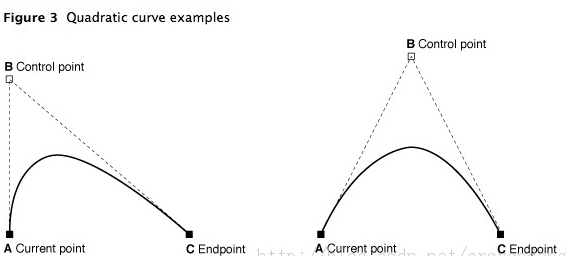
曲线段在当前点开始,在指定的点结束;曲线的形状有开始点,结束点,一个或者多个控制点的切线定义。
下图显示了两种曲线类型的相似,以及控制点和curve形状的关系。
(1) 绘制二次贝塞尔曲线
方法:- (void)addQuadCurveToPoint:(CGPoint)endPoint controlPoint:(CGPoint)controlPoint;
 - (void)drawRect:(CGRect)rect {

     //线条颜色

     UIColor *color = [UIColor orangeColor];

     [color set];

     //添加路径

     path = [UIBezierPath bezierPath];

     path.lineWidth = ;

     //线条拐角

     path.lineCapStyle = kCGLineCapRound;

     //终点处理

     path.lineJoinStyle = kCGLineJoinRound;

     [path moveToPoint:(CGPoint){,}];

     [path addQuadCurveToPoint:(CGPoint){,} controlPoint:(CGPoint){,}];

     //根据坐标点连线

     [path stroke];

 }

(2) 绘制三次贝塞尔曲线
方法:- (void)addCurveToPoint:(CGPoint)endPoint controlPoint1:(CGPoint)controlPoint1 controlPoint2:(CGPoint)controlPoint2;

 - (void)drawRect:(CGRect)rect {

     //线条颜色

     UIColor *color = [UIColor orangeColor];

     [color set];

     //添加路径

     path = [UIBezierPath bezierPath];

     path.lineWidth = ;

     //线条拐角

     path.lineCapStyle = kCGLineCapRound;

     //终点处理

     path.lineJoinStyle = kCGLineJoinRound;

     [path moveToPoint:(CGPoint){,}];

     [path addCurveToPoint:(CGPoint){,} controlPoint1:(CGPoint){,} controlPoint2:(CGPoint){,}];

     //根据坐标点连线

     [path stroke];

 }
ios基础篇(二十)—— UIBezierPath绘制的更多相关文章
- ios基础篇(十四)——UITableView(二)属性及基本用法
上一篇说了UITableView的重用机制,让我们对UITableView有了简单了解,下面说说UITableView的属性及常见方法. 一.属性 1.frame:设置控件的尺寸和大小 2.backg ...
- ios基础篇(十二)——UINavgationController的使用(三)ToolBar
UIToolBar存在于UINavigationController导航栏控制器中,而且默认被隐藏:设置UINavigationController的toolbarHidden属性可显示UIToolB ...
- ios基础篇(十六)——UIWebView的基本使用
UIWebView是内置的浏览器控件,可以用它来浏览网页.打开文档等.UIWebView是一个混合体,具体的功能控件内置的,实现一些基本的功能.UIWebView可以查看Html网页,pdf文件,do ...
- ioS基础篇(十九)——UIResponder简析
UIResponder类定义了对象相应和控制事件的接口,他是UIApplication.UIView的超类,这类的实例通常被称为应答对象. 一.Responder对象 在iOS系统中,能够响应并处理事 ...
- ios基础篇(十八)——Delegate 、NSNotification 和 KVO用法及其区别
一.Delegate Delegate本质是一种程序设计模型,iOS中使用Delegate主要用于两个页面之间的数据传递.iphone中常用@protocol和delegate的机制来实现接口的功能. ...
- iOS基础篇(十五)——UIScrollView的基本用法
滚动视图(UIScrollView)通常用于显示内容尺寸大于屏幕尺寸的视图. 一.基本属性 1.CGSize contentSize :设置UIScrollView的滚动范围 2.CGPoint co ...
- ios基础篇(十)——UINavgationController的使用(一)UIBarButtonItem的添加
UINavigationController又被成为导航控制器,继承自UIViewController,以栈的方式管理所控制的视图控制器,下面就详细说一下UINavigationController的 ...
- php基础篇-二维数组排序 array_multisort
原文:php基础篇-二维数组排序 array_multisort 对2维数组或者多维数组排序是常见的问题,在php中我们有个专门的多维数组排序函数,下面简单介绍下: array_multisort(a ...
- C#学习基础概念二十五问
C#学习基础概念二十五问 1.静态变量和非静态变量的区别?2.const 和 static readonly 区别?3.extern 是什么意思?4.abstract 是什么意思?5.internal ...
- ios基础篇(二十五)—— Animation动画(UIView、CoreAnimation)
Animation主要分为两类: 1.UIView属性动画 2.CoreAnimation动画 一.UIView属性动画 UIKit直接将动画集成到UIView类中,实现简单动画的创建过程.UIVie ...
随机推荐
- Flume -- 开源分布式日志收集系统
Flume是Cloudera提供的一个高可用的.高可靠的开源分布式海量日志收集系统,日志数据可以经过Flume流向需要存储终端目的地.这里的日志是一个统称,泛指文件.操作记录等许多数据. 一.Flum ...
- OleContainer控件介绍
OLEContainer 控件的主要属性 1) AllowInPlace property AllowInPlace:Boolean; 这个属性用于决定启动O ...
- javascript设计模式简介
- 【转】ACM/ICPC生涯总结暨退役宣言—alpc55
转自:http://hi.baidu.com/accplaystation/item/ca4c2ec565fa0b7fced4f811 ACM/ICPC生涯总结暨退役宣言—alpc55 前言 早就该写 ...
- 0523 Scrum 项目6.0
团队名称:√3 团队目标:全力完成这次的项目 团队口号:我要改变世界,改变自己!!! 演讲稿:我们的产品 鸡汤精选 是为了解决 当下社会出现的太多的负能量使得人们的内心十分 的痛苦, 他们需要强大的正 ...
- Using MSBuild to publish a VS 2012 SSDT .sqlproj database project
http://blog.danskingdom.com/using-msbuild-to-publish-a-vs-2012-ssdt-sqlproj-database-project-the-sam ...
- AjaxFormSubmit使用demo
官网:http://jquery.malsup.com/form/#download 下载地址 $("#form1").ajaxSubmit({ success: function ...
- DDL、DML、DCL的理解
1.DDL 1-1.DDL的概述 DDL(Data Definition Language 数据定义语言)用于操作对象和对象的属性,这种对象包括数据库本身,以 ...
- 结合Apache和Tomcat实现集群和负载均衡 JK 方式
本文基本参考自 轻松实现Apache,Tomcat集群和负载均衡,经由实操经历记录而成,碰到些出入,以及个别地方依据个人的习惯,所以在一定程度上未能保持原文的完整性,还望原著者海涵. 因原文中有较多的 ...
- [转]Struts1.x系列教程(1):用MyEclipse开发第一个Struts程序
转载地址:http://www.blogjava.net/nokiaguy/archive/2009/01/13/251101.html 本系列教程将详细介绍Struts 1.x的基本原理和使用方法, ...