
WCF初探-10:WCF客户端调用服务
创建WCF 服务客户端应用程序需要执行下列步骤:
- 获取服务终结点的服务协定、绑定以及地址信息
- 使用该信息创建 WCF 客户端
- 调用操作
- 关闭该 WCF 客户端对象
WCF客户端调用服务存在以下特点:
- 服务和客户端使用托管属性、接口和方法对协定进行建模。 若要连接客户端应用程序中的服务,则需要获取该服务协定的类型信息。通常,我们使用Svcutil.exe(ServiceModel Metadata Utility Tool)来完成,也可以直接在客户端项目上引用服务地址完成。它们会从服务中下载元数据,并使用您选择的语言将其转换到托管源代码文件中,同时还创建一个您可用于配置 WCF 客户端对象的客户端应用程序配置文件
- WCF 客户端是表示某一个WCF服务的一个本地对象,客户端可以使用这种形式与远程服务进行通信。 WCF 客户端类型可以实现目标服务协定,因此当您创建一个服务协定,并对其进行配置后,就可以直接使用客户端对象调用服务操作。 WCF 运行时将方法调用转换为消息,然后将这些消息发送到服务,侦听回复,并将这些值作为返回值或 out 参数(或 ref 参数)返回到 WCF 客户端对象中。
- 创建并配置了客户端对象后,请创建一个 try/catch 块,如果该对象是本地对象,则以相同的方式调用操作,然后关闭 WCF 客户端对象。 当客户端应用程序调用第一个操作时,WCF 将自动打开基础通道,并在回收对象时关闭基础通道。 (或者,还可以在调用其他操作之前或之后显式打开和关闭该通道。)
- 不应该使用 using 块来调用WCF服务方法。因为C# 的“using”语句会导致调用 Dispose()。 它等效于 Close(),当发生网络错误时可能会引发异常。 由于对 Dispose() 的调用是在“using”块的右大括号处隐式发生的,因此导致异常的根源往往会被编写代码和阅读代码的人所忽略。 这是应用程序错误的潜在根源。
WCF客户端调用服务方式:
- WCF通信机制由它自身复杂的体系结构所决定,但WCF服务给我们提供了两种不同的机制来创建客户端程序调用,一种是ClientBase<TChannel>类,另一种是ChannelFactory<TChannel> 类。
- ClientBase<TChannel>:创建客户端代理类的基类,客户端代理类通过继承该基类,调用WCF的内部通信机制来实现WCF客户端与服务端的通信。代理类是一个公开单个CLR接口来表示服务契约的CLR类,代理类和服务契约很相似,但是他有着附加的方法来管理代理的生命周期和连接服务。通过visual studio 右键添加服务引用和通过svcutil.exe命令行工具生成的客户端都属于这种方式。(如果不熟悉svcutil.exe,请参照WCF初探-1:认识WCF)
- ChannelFactory<TChannel>:使用通道工厂类取决于你是否拥有描述服务契约的本地接口。最大的好处是你可以已扩展的方式更容易的修改通道的通信机制,如果你需要共享服务和客户端之间的契约组件,那么使用ChannelFactory<TChannel>可以更有效的节省时间,但客户端必须完成对服务契约组件的引用。
- ClientBase<TChannel>和ChannelFactory<TChannel>的差异:
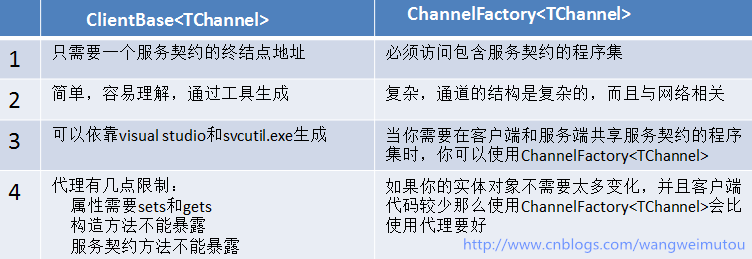
WCF客户端调用服务示例:
- 解决方案如下图所示:

- 工程结构说明:
Service:类库程序,定义服务契约和实现,里面包含User数据契约和GetInfo()获取用户信息的服务契约方法。
IUserInfo.cs的代码如下:
using System.ServiceModel;

using System.Collections.Generic;

using System.Runtime.Serialization;

namespace Service

{

    [ServiceContract]

    public interface IUserInfo

    {

        [OperationContract]

        User[] GetInfo(int? id=null);

    }

    [DataContract]

    public class User

    {

        [DataMember]

        public int ID { get; set; }

        [DataMember]

        public string Name { get; set; }

        [DataMember]

        public int Age { get; set; }

        [DataMember]

        public string Nationality { get; set; }

    }

}
UserInfo.cs的代码如下:
using System;

using System.Collections.Generic;

using System.Linq;

using System.Text;

namespace Service

{

    public class UserInfo:IUserInfo

    {

        public User[] GetInfo(int? id=null)

        {

            List<User> Users = new List<User>();

            Users.Add(new User { ID = , Name = "JACK", Age = , Nationality = "CHINA" });

            Users.Add(new User { ID = , Name = "TOM", Age = , Nationality = "JAPAN" });

            Users.Add(new User { ID = , Name = "SMITH", Age = , Nationality = "KOREA" });

            Users.Add(new User { ID = , Name = "ALENCE", Age = , Nationality = "INDIA" });

            Users.Add(new User { ID = , Name = "JOHN", Age = , Nationality = "SINGAPORE" });

            if (id != null)

            {

                return Users.Where(x => x.ID == id).ToArray();

            }

            else

            {

                return Users.ToArray();

            }

        }

    }

}
Host:控制台应用程序,添加对Service程序集的引用,寄宿服务程序。
Program.cs代码如下
using System;

using System.Collections.Generic;

using System.Linq;

using System.Text;

using Service;

using System.ServiceModel;

namespace Host

{

    class Program

    {

        static void Main(string[] args)

        {

            using (ServiceHost host = new ServiceHost(typeof(UserInfo)))

            {

                host.Opened += delegate { Console.WriteLine("服务已经启动,按任意键终止!"); };

                host.Open();

                Console.Read();

            }

        }

    }

}
App.config代码如下:
<?xml version="1.0"?>

<configuration>

    <system.serviceModel>

        <services>

            <service name="Service.UserInfo" behaviorConfiguration="mexBehavior">

                <host>

                    <baseAddresses>

                        <add baseAddress="http://localhost:1234/UserInfo/"/>

                    </baseAddresses>

                </host>

                <endpoint address="" binding="wsHttpBinding" contract="Service.IUserInfo" />

                <endpoint address="mex" binding="mexHttpBinding" contract="IMetadataExchange"/>

            </service>

        </services>

        <behaviors>

            <serviceBehaviors>

                <behavior name="mexBehavior">

                    <serviceMetadata httpGetEnabled="true"/>

                    <serviceDebug includeExceptionDetailInFaults="true"/>

                </behavior>

            </serviceBehaviors>

        </behaviors>

    </system.serviceModel>

</configuration>
Client1:控制台应用程序,添加对服务终结点地址http://localhost:1234/UserInfo/的引用,设置服务命名空间为UserInfoServiceRef,生成客户端代理类和配置文件代码后,完成Client1对服务的调用。
Program.cs的代码如下:
using System;

using System.Collections.Generic;

using System.Linq;

using System.Text;

using Client1.UserInfoServiceRef;

namespace Client1

{

    class Program

    {

        static void Main(string[] args)

        {

            UserInfoClient proxy = new UserInfoClient();

            User[] Users = proxy.GetInfo(null);

            Console.WriteLine("{0,-10}{1,-10}{2,-10}{3,-10}","ID","Name","Age","Nationality");

            for(int i=;i<Users.Length;i++)

            {

                  Console.WriteLine("{0,-10}{1,-10}{2,-10}{3,-10}",

                    Users[i].ID.ToString(),

                    Users[i].Name.ToString(),

                    Users[i].Age.ToString(),

                    Users[i].Nationality.ToString());

            }

            Console.Read();

        }

    }

}
Client2:控制台应用程序,使用svcutil.exe工具生成客户端代理类,在命令行中输入以下命令:
1.在运行中输入cmd打开命令行,输入 cd C:\Program Files (x86)\Microsoft SDKs\Windows\v7.0A\Bin
2.输入svcutil.exe /out:f:\ UserInfoClient.cs /config:f:\App.config http://localhost:1234/UserInfo/ (注意:端口号改成本机服务寄宿的端口号)
3.将生成的App.config和UserInfoClient.cs复制到Client2的工程目录下,完成Program.cs代码,代码和Client1的代码一样。
Client3:控制台应用程序,添加对Service程序集的引用,完成Program.cs代码,代码如下:
using System;

using System.Collections.Generic;

using System.Linq;

using System.Text;

using Service;

using System.ServiceModel;

using System.ServiceModel.Channels;

namespace Client3

{

    class Program

    {

        static void Main(string[] args)

        {

            EndpointAddress address = new EndpointAddress("http://localhost:1234/UserInfo");

            WSHttpBinding binding = new WSHttpBinding();

            ChannelFactory<IUserInfo> factory = new ChannelFactory<IUserInfo>(binding,address);

            IUserInfo channel = factory.CreateChannel();

            User[] Users = channel.GetInfo(null);

            Console.WriteLine("{0,-10}{1,-10}{2,-10}{3,-10}", "ID", "Name", "Age", "Nationality");

            for (int i = ; i < Users.Length; i++)

            {

                Console.WriteLine("{0,-10}{1,-10}{2,-10}{3,-10}",

                  Users[i].ID.ToString(),

                  Users[i].Name.ToString(),

                  Users[i].Age.ToString(),

                  Users[i].Nationality.ToString());

            }

            ((IChannel)channel).Close();

            factory.Close();

            Console.Read();

        }

    }

}
查看服务运行结果,结果如下图所示:

- 客户端代理类,我们以svcutil.exe生成的代理类文件为例子,查看UserInfoClient.cs,代码如下:
namespace Service

{

    using System.Runtime.Serialization;

    [System.Diagnostics.DebuggerStepThroughAttribute()]

    [System.CodeDom.Compiler.GeneratedCodeAttribute("System.Runtime.Serialization", "3.0.0.0")]

    [System.Runtime.Serialization.DataContractAttribute(Name="User", Namespace="http://schemas.datacontract.org/2004/07/Service")]

    public partial class User : object, System.Runtime.Serialization.IExtensibleDataObject

    {

        private System.Runtime.Serialization.ExtensionDataObject extensionDataField;

        private int AgeField;

        private int IDField;

        private string NameField;

        private string NationalityField;

        public System.Runtime.Serialization.ExtensionDataObject ExtensionData

        {

            get

            {

                return this.extensionDataField;

            }

            set

            {

                this.extensionDataField = value;

            }

        }

        [System.Runtime.Serialization.DataMemberAttribute()]

        public int Age

        {

            get

            {

                return this.AgeField;

            }

            set

            {

                this.AgeField = value;

            }

        }

        [System.Runtime.Serialization.DataMemberAttribute()]

        public int ID

        {

            get

            {

                return this.IDField;

            }

            set

            {

                this.IDField = value;

            }

        }

        [System.Runtime.Serialization.DataMemberAttribute()]

        public string Name

        {

            get

            {

                return this.NameField;

            }

            set

            {

                this.NameField = value;

            }

        }

        [System.Runtime.Serialization.DataMemberAttribute()]

        public string Nationality

        {

            get

            {

                return this.NationalityField;

            }

            set

            {

                this.NationalityField = value;

            }

        }

    }

}

[System.CodeDom.Compiler.GeneratedCodeAttribute("System.ServiceModel", "3.0.0.0")]

[System.ServiceModel.ServiceContractAttribute(ConfigurationName="IUserInfo")]

public interface IUserInfo

{

    [System.ServiceModel.OperationContractAttribute(Action="http://tempuri.org/IUserInfo/GetInfo", ReplyAction="http://tempuri.org/IUserInfo/GetInfoResponse")]

    Service.User[] GetInfo(System.Nullable<int> id);

}

[System.CodeDom.Compiler.GeneratedCodeAttribute("System.ServiceModel", "3.0.0.0")]

public interface IUserInfoChannel : IUserInfo, System.ServiceModel.IClientChannel

{

}

[System.Diagnostics.DebuggerStepThroughAttribute()]

[System.CodeDom.Compiler.GeneratedCodeAttribute("System.ServiceModel", "3.0.0.0")]

public partial class UserInfoClient : System.ServiceModel.ClientBase<IUserInfo>, IUserInfo

{

    public UserInfoClient()

    {

    }

    public UserInfoClient(string endpointConfigurationName) :

            base(endpointConfigurationName)

    {

    }

    public UserInfoClient(string endpointConfigurationName, string remoteAddress) :

            base(endpointConfigurationName, remoteAddress)

    {

    }

    public UserInfoClient(string endpointConfigurationName, System.ServiceModel.EndpointAddress remoteAddress) :

            base(endpointConfigurationName, remoteAddress)

    {

    }

    public UserInfoClient(System.ServiceModel.Channels.Binding binding, System.ServiceModel.EndpointAddress remoteAddress) :

            base(binding, remoteAddress)

    {

    }

    public Service.User[] GetInfo(System.Nullable<int> id)

    {

        return base.Channel.GetInfo(id);

    }

}
我们可以看到客户端代理类中有着数据契约、服务契约,并且客户端代理类UserInfoClient继承ClientBase<IUserInfo>, IUserInfo,通过WCF内部通道机制完成对服务的调用。
public Service.User[] GetInfo(System.Nullable<int> id)
{
returnbase.Channel.GetInfo(id);
}
- ChannelFactory<IUserInfo>通道工厂通过:
EndpointAddress address = new EndpointAddress("http://localhost:1234/UserInfo");
WSHttpBinding binding = new WSHttpBinding();
ChannelFactory<IUserInfo> factory = new ChannelFactory<IUserInfo>(binding,address);
IUserInfochannel = factory.CreateChannel();
创建通道,完成对WCF服务的调用,注意:此处的工厂虽然提供了很多重载的方法,但我们这里属于客户端代码编程,因此我们读取不到配置文件信息,所以我把终结点信息
和绑定信息写到了代码中,如果想通过ChannelFactory<IUserInfo>读取配置文件信息,我们需要手动实现其扩展机制。这里以后的博文再做讨论
- 总结:我们通过实际的例子完成了对WCF客户端调用服务的几种方式的验证,也完成了代理类和通道工厂对服务调用的相关概念的诠释,在后面的博文中我将介绍客户端调用WCF服务的其他特性。
WCF初探-10:WCF客户端调用服务的更多相关文章
- WCF系列教程之WCF客户端调用服务
1.创建WCF客户端应用程序需要执行下列步骤 (1).获取服务终结点的服务协定.绑定以及地址信息 (2).使用该信息创建WCF客户端 (3).调用操作 (4).关闭WCF客户端对象 二.操作实例 1. ...
- WCF 客户端调用服务操作的两种方法
本节的主要内容:1.通过代理类的方式调用服务操作.2.通过通道的方式调用服务操作.3.代码下载 一.通过代理类的方式调用服务操作(两种方式添加代理类) 1.手动编写代理类,如下: 客户端契约: usi ...
- motan源码分析四:客户端调用服务
在第一章中,我们分析了服务的发布与注册,本章中将简单的分析一下客户端调用服务的代码及流程,本文将以spring加载的方式进行分析. 1.在DemoRpcClient类的main()方法中加载类: Ap ...
- java 从零开始手写 RPC (03) 如何实现客户端调用服务端?
说明 java 从零开始手写 RPC (01) 基于 socket 实现 java 从零开始手写 RPC (02)-netty4 实现客户端和服务端 写完了客户端和服务端,那么如何实现客户端和服务端的 ...
- jdk的wsimport方法实现webservice客户端调用服务
1.配置好jdk环境,打开命令行,输入wsimport回车能看到很多该命令的参数, -s:要生成客户端代码的存储路径 -p:对生成的代码从新打包 这两个最常用. 在打开的命令行中输入:wsimport ...
- signalR客户端调用服务端方法失败
现象: 在VS中修改集线器代码后,重新生成解决方案,客户端js调用服务端方法提示undefined. 检查后台代码未发现错误. 检查js代码未发现错误(方法名称符合小驼峰规范). 解决方法: 先清理解 ...
- 客户端调用服务端webservice的端口问题
今天有一个同事过来问:他有一个程序在A服务器上调第三方B服务器短信发送服务接口(webservice),无论是否发送成功,服务接口都会返回状态.现在客户要做每一个服务器 做入站端口管控,一切不必要的端 ...
- WCF初探-11:WCF客户端异步调用服务
前言: 在上一篇WCF初探-10:WCF客户端调用服务 中,我详细介绍了WCF客户端调用服务的方法,但是,这些操作都是同步进行的.有时我们需要长时间处理应用程序并得到返回结果,但又不想影响程序后面代码 ...
- WCF初探文章列表
WCF初探-1:认识WCF WCF初探-6:WCF服务配置 WCF初探-2:手动实现WCF程序 WCF初探-7:WCF服务配置工具使用 WCF初探-3:WCF消息交换模式之单向模式 WCF初探-8:W ...
随机推荐
- box-flex不均分问题
解决box-flex不均等分的问题 我想当你上手css3的时候后一定为他的强大而感到震惊,但是震惊之后带来的一定是苦恼,因为他太TM变态了! 我之所以这么说是因为我今天写box-flex的时候遇到了一 ...
- 同事的游戏项目--Robocode-学习链接
Robocode机器人库学习链接:http://www.pudn.com/search_db.asp?keyword=Robocode 官网 :http://robocode.sourceforge. ...
- Mysql 获取当前时间函数 (类似于sql server 中的 getDate())
1 获得当前日期+时间(date + time)函数:now() 2 获得当前日期+时间(date + time)函数:sysdate() sysdate() 日期时间函数跟 now() 类似,不同之 ...
- little alchemy攻略
一个造物游戏: acidrain=rain+smoke airlplain=metal+bird alcohol=fruit+time algae=plant+water allergy=dust+h ...
- 【转】ecshop后台语言项执行漏洞详解
该漏洞需要能登录ecshop后台权限,简单修改下语言项目,即可在网站植入木马后门. 以下是详细分析 1.登陆到ecshop台后,选择模板管理,语言项编辑,搜索用户信息 为什么要搜索用户 该漏洞需要能登 ...
- IIS7的集成模式下如何让自定义的HttpModule不处理静态文件(.html .css .js .jpeg等)请求
今天将开发好的ASP.NET站点部署到客户的服务器上后,发现了一个非常头疼的问题,那么就是IIS7的应用程序池是集成模式的话,ASP.NET项目中自定义的HttpModule会处理静态文件(.html ...
- CoordinatorLayout 自定义Behavior并不难,由简到难手把手带你飞
先来看看最终的效果~~ 本文同步至博主的私人博客wing的地方酒馆 嗯..一个是头像上移的 另一个是模仿UC浏览器的. (PД`q.)你不是说!有三款的吗,怎么只有两款!!!! 不要急嘛... 说了从 ...
- awk改变了OFS,$0却没变化
一个文件1.txt,内容如下 a b c d e 目的把列变行,输出为: a b c d e 脚本如下: awk 'BEGIN{RS="";FS="\n";OF ...
- 游戏引擎PushButtonEngine简介
PushButtonEngine是一个开源的模块化游戏引擎,你可以通过https://github.com/PushButtonLabs/PushButtonEngine得到其代码和相关文档.下面我将 ...
- 【iOS】Foundation框架 学习笔记
1.数组 OC数组不能存放nil值OC数组只能存放OC对象.不能存放非OC对象类型,比如int.struct.enum等 ====================================== ...