
Extract Stylish styles and save as JSON format
Introduction
Stylish is a easy browser extension/plugin for users to customizing the web page styling using CSS/3. It is available in Google Chrome, Firefox, Safari, Opera, and many Chromium-based browsers and really easy to hide the annoying ads out of sight.(different from ad-blocker). but the most abominable is that it doesn't provide a export/import feature.
Background
The Stylish extension for Google Chrome or Chromium-based browsers lacks export/import feature. This article is to introduce a way to extract the saved styles in Stylish as Json to a file for backing up.
Using the code
The Stylish extension located at Library/Application Support/Google/Chrome/Default/Extensions/fjnbnpbmkenffdnngjfgmeleoegfcffe.
The files for storage of the saved styles are JS files. The storage-websql.js file is a controller to store the styles into SQLite3 database file using Javascript and WebSQL tech. The storage.js is to store the data using local storage IndexedDB.
The CSS code, name and url submitted are processed and stored to database named stylish. [ the mapping of dbname and the data file is specified in the Databases.db in Default/databases/. Databases.db is a SQLite3 db file.]. The data file is in the folder databases/chrome-extension_fjnbnpbmkenffdnngjfgmeleoegfcffe_0 as specified in field origin. And the data file is named a number as specified by id in table Databases, which stores all the databases mapping used by JS.
➜  databases sqlite3 Databases.db

SQLite version 3.7.17 2013-05-20 00:56:22

Enter ".help" for instructions

Enter SQL statements terminated with a ";"

sqlite> .tables

Databases  meta

sqlite> .explain

sqlite> select * from Databases;

id    origin         name  desc  esti

----  -------------  ----  ----  ----

1     chrome-extension_fjnbnpbmkenffdnngjfgmeleoegfcffe_0  stylish  Stylish Styles  5242880

4     chrome-extension_dhdgffkkebhmkfjojejmpbldmpobfkfo_0  tmStorage  TM Storage  31457280

10    https_passport.weibo.com_0  ufp         1024

11    https_bbs.fudan.edu.cn_0  PersistJS Test  Persistent database test.  204800

12    https_bbs.fudan.edu.cn_0  https___bbs_fudan_edu_cn_bbs  Persistent storage for https___bbs_fudan_edu_cn_bbs  204800
The databases/chrome-extension_fjnbnpbmkenffdnngjfgmeleoegfcffe_0/1 is a SQLite3 db file, which, in my case, contains nothing. So the data is not saved in this db file.
Another location for storage is Default/IndexedDB/, which also has a folder named chrome-extension_fjnbnpbmkenffdnngjfgmeleoegfcffe_0
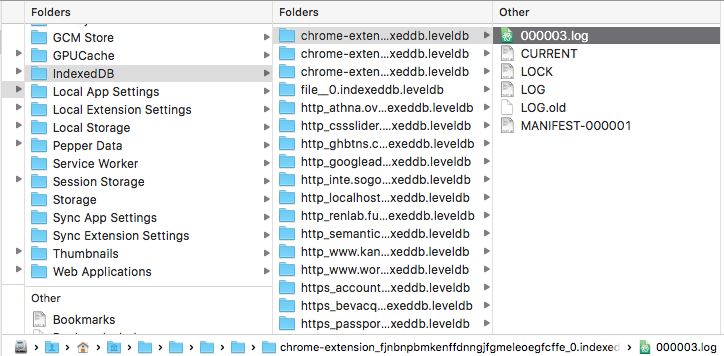
While all the data, the styles user saved, are in this file, but it's encrypted. If you open it using Sublime Text 3, it may looks like:
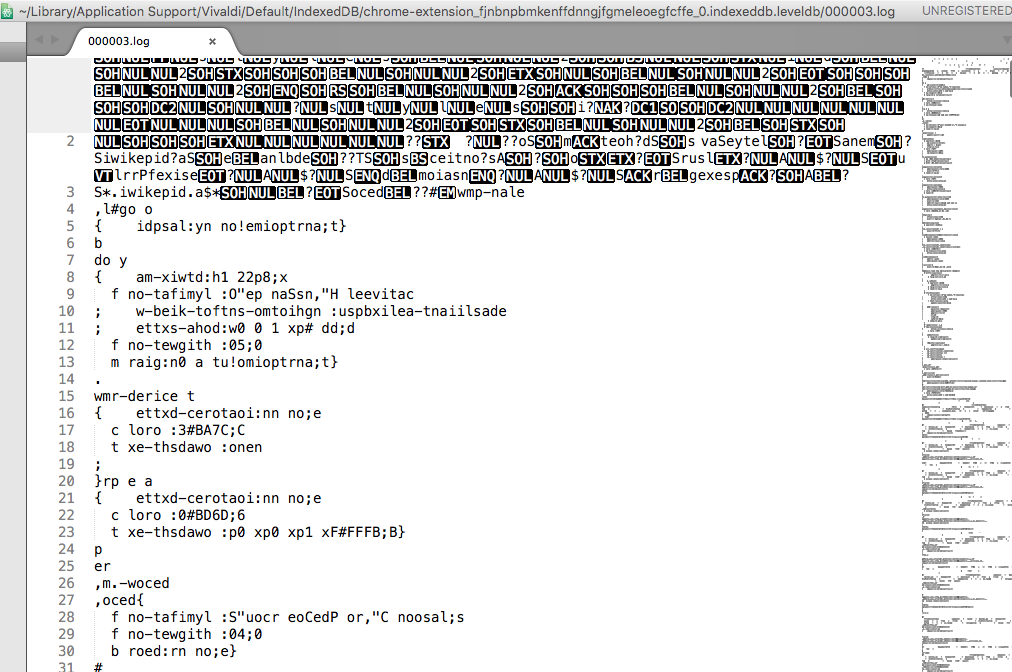
So I checked the parser, storage.js and found something useful.
- The
getDatabaseusesvar dbOpenRequest = window.indexedDB.open("stylish", 2)to get the db object. - on success, parse
e.target.resultto callback function - in function
getStyles,getDatabasedef is called. - the result of
db.transaction(["styles"], "readonly")thentx.objectStore("styles")is the data. - I checked the results of each step and finally all is clear.
- open the manage page of Stylish and open the Console and run the following code in it.
var db, dbOpenRequest = window.indexedDB.open("stylish", 3); // change to 2 if 3 failed

dbOpenRequest.onsuccess = function(e) {

  db = e.target.result;

};

var tx = db.transaction(["styles"], "readwrite");

var os = tx.objectStore("styles");

var all = [];

os.openCursor().onsuccess = function(event) {

  var cursor = event.target.result;

  if (cursor) {

    var s = cursor.value

    s.id = cursor.key

    all.push(cursor.value);

    cursor.continue();

  }

};
And then
for(var i=0;i< all.length;i++){

  var cur = all[i];

  console.log(JSON.parse()cur.name,cur.sections[0].code,cur.sections[0].domains,cur.sections[0].regexps,cur.sections[0].urlPrefixes,cur.sections[0].urls)

}

// or

console.log(JSON.stringify(all));

// This is better
The result,
[ The name is the description of a style, all the properties of sections are the CSS code and the rules you specified ]
[

    {

        "originalMd5": "",

        "updateUrl": "",

        "enabled": true,

        "name": "有道词典",

        "id": 2,

        "md5Url": "",

        "sections": [

            {

                "regexps": [

                    ".*youdao\\.com.*"

                ],

                "urlPrefixes": [],

                "urls": [],

                "domains": [],

                "code": "#topImgAd,\n#Ads,\n#ads,\n#baidu-adv,\n#follow{\n    display:none!important;\n    float:none;\n  }\n#results-contents{\n\twidth:inherit!important;\n}\n#results,\n#collinsResult .ol .collinsMajorTrans{\n\twidth:100%;\n    float:none;\n}"

            }

        ],

        "url": "",

        "method": "saveStyle"

    },

    {

        "originalMd5": "",

        "updateUrl": "",

        "enabled": true,

        "name": "cnet.com",

        "id": 3,

        "md5Url": "",

        "sections": [

            {

                "regexps": [],

                "urlPrefixes": [],

                "urls": [],

                "domains": [

                    "cnet.com"

                ],

                "code": "#adunit,\n#videoPromo,\n#mpu-plus-top-5738382253301,\n#leader-top-5738382253301\n.ad-mpu-plus-top{\n    display: none!important;\n}\n\niframe,\n.ad-leader-top>div, .ad-leader-top>iframe, .ad-leader-top>table, .ad-leader-plus-top>div, .ad-leader-plus-top>iframe, .ad-leader-plus-top>table, .ad-leader-middle>div, .ad-leader-middle>iframe, .ad-leader-middle>table, .ad-leader-middle2>div, .ad-leader-middle2>iframe, .ad-leader-middle2>table, .ad-leader-bottom>div, .ad-leader-bottom>iframe, .ad-leader-bottom>table, .ad-leader-inc>div, .ad-leader-inc>iframe, .ad-leader-inc>table{\n\tdisplay: none!important;\n}\n"

            }

        ],

        "url": "",

        "method": "saveStyle"

    },

    {

        "originalMd5": "",

        "updateUrl": "",

        "enabled": true,

        "name": "沪江英语",

        "id": 4,

        "md5Url": "",

        "sections": [

            {

                "regexps": [],

                "urlPrefixes": [],

                "urls": [],

                "domains": [

                    "hjenglish.com",

                    "hujiang.com"

                ],

                "code": ".lamu_banner,\n.top_banner,\n.fix_questionnaire_btn,\n.animated,\n.bounceIn,\n.wx_entrance_box,\n.daily_tasks_list,\n.pass_add_ad1,\n.add_ban_y_sign,\n.bottomActive1212,\n.news_overly,\n.news_overly_c,\n.footer_go_top,\n#footer-ft,\n.sub-qr-box,\n.sub-qr-bubble-big,\n.header_board_tip,\n.header_board_tip2{\n    display:none!important;\n}\n"

            }

        ],

        "url": "",

        "method": "saveStyle"

    },

    {

        "originalMd5": "",

        "updateUrl": "",

        "enabled": true,

        "name": "今日头条",

        "id": 5,

        "md5Url": "",

        "sections": [

            {

                "regexps": [],

                "urlPrefixes": [],

                "urls": [],

                "domains": [

                    "toutiao.com"

                ],

                "code": "#pagelet-iad,\n#pagelet-hotpgc,\n#pagelet-hotgallery,\n#pagelet-hotvideo,\n#pagelet-tbad,\n.dtag,\n.hotgallery_show{\ndisplay:none!important;\n}"

            }

        ],

        "url": "",

        "method": "saveStyle"

    }

]
backup
to back up the data regularly, just archive the folder chrome-extension_fjnbnpbmkenffdnngjfgmeleoegfcffe_0 under IndexedDB using 7z or tar and mv it to iCloud or Dropbox/baiduyun/360yun ... to sync and cron.
#!/bin/bash

dest=$HOME"/YunPan/iMac 20160501/Google Chrome/Stylish/"

path=$HOME"/Library/Application Support/Google/Chrome/Default/IndexedDB"

ext="chrome-extension_fjnbnpbmkenffdnngjfgmeleoegfcffe_0.indexeddb.leveldb"

dt=$(date +%Y,%m,%d-%H,%M,%S)

filename='ggc_stylish_'$dt'.7z'

cd "$path"

/usr/local/bin/7z a "$filename" "$ext"

if [[ $? != 0 ]];then

    echo "$dt Error with 7z." >> "${dest}backup.log"

    exit

fi

mv "$filename" "$dest"

if [[ $? != 0 ]];then

    echo "$dt Error with mv." >> "${dest}backup.log"

    exit

fi

cd "$dest"

echo "$dt Done with bu." >> "backup.log"
# file default.cron

## weekly 6:30am

30 6 * * 1 /Users/ruili/Bin/cron.d/scripts/ggc_stylish_weekly.sh
run crontab default.cron and crontab -l
Extract Stylish styles and save as JSON format的更多相关文章
- npm安装依赖包 --save-dev 和 --save; package.json的devDependencies和dependencies 的区别!
以前一直在纠结一个npm安装的包依赖管理的问题.是这样的: 我们在使用npm install 安装模块或插件的时候,有两种命令把他们写入到 package.json 文件里面去,他们是:--save- ...
- wcf datetime json format
wcf 内置的json序列化工具,有时需要替换,或者特殊情况的处理,需要修改. 我也遇到了Dto属性类型是datetime,json的反序列化 和 序列号不友好. 这是国外网站的一个方案:Replac ...
- 安装json format插件
更多工具->扩展->搜索:son format插件 这样得到的json数据以一种美观的样式显示.
- 最新版ABP 动态WebAPI 日期转json带T的解决方案| ABP DateTIme Json format
ABP动态webapi返回的json数据中,日期时间带T还有毫秒数的问题,在以往的版本中可以使用下面方法解决: 在XXXAbpWebApiModule中加上下面的代码: 很老的很老的版本有效: pub ...
- mac jq for json format
mac jq #1.安装 brew install jq #2.创建文件 echo '{"name": "Ruby"}' > ./test.json #3 ...
- 【441】JSON format
Ref: json -- JSON encoder and decoder JSON(JavaScript Object Notation) can help us to see data mor ...
- json format validator
http://la5u.org/archives/542 http://stedolan.github.io/jq/download/ https://linuxtoy.org/archives/jq ...
- [转]在SqlServer 中解析JSON数据
在Sqlserver中可以直接处理Xml格式的数据,但因为项目需要所以要保存JSON格式的数据到Sqlserver中在博客:Consuming JSON Strings in SQL Server ...
- Consuming JSON Strings in SQL Server
https://www.simple-talk.com/sql/t-sql-programming/consuming-json-strings-in-sql-server/ Consuming JS ...
随机推荐
- linux下获取本机IP
转载:http://blog.chinaunix.net/uid-20593763-id-1620213.html 源代码级Unix/Linux 通用网卡IP地址获取方法 在Unix和Linux系统下 ...
- [LintCode] Mini Twitter 迷你推特
Implement a simple twitter. Support the following method: postTweet(user_id, tweet_text). Post a twe ...
- android-ProgressBar
制定ProgressBar显示风格 * 参考系统自带的进度条 * ProgressBar分类 * 可以精确显示进度(可以显示刻度和百分比) * 不可以精确显示进度 * 标题上ProgressBar的设 ...
- TFS任务更新
由于不熟悉TFS任务更新的操作,花了四五个小时一个个的新建任务.下图是部分更新的任务截图: 每个任务的估计时间为3~5小时,每位成员的任务总时长均为19~20小时. 项目完成需要的总时间为135小时.
- sql语句左右表连接理解
一句话,左连接where只影响坐标,右连接where只影响右表
- Java XML解析工具 dom4j介绍及使用实例
Java XML解析工具 dom4j介绍及使用实例 dom4j介绍 dom4j的项目地址:http://sourceforge.net/projects/dom4j/?source=directory ...
- linux一些名词
硬链接: 同一个索引节点的两个文件 ln a b //创建a的连接文件b,删除a,不失效软连接: 不同索引节点,相当于一个快捷方式ln -s a b,删除a,b失效 网络协议: 网络协议就是通信规则的 ...
- 【iCore3 双核心板】例程三十:U_DISK_IAP_FPGA实验——更新升级FPGA
实验指导书及代码包下载: http://pan.baidu.com/s/1jH1TiKY iCore3 购买链接: https://item.taobao.com/item.htm?id=524229 ...
- 【五子棋AI循序渐进】关于VCT,VCF的思考和核心代码
前面几篇发布了一些有关五子棋的基本算法,其中有一些BUG也有很多值得再次思考的问题,在框架和效果上基本达到了一个简单的AI的水平,当然,我也是初学并没有掌握太多的高级技术.对于这个程序现在还在优化当中 ...
- 多线程 - CountDownLatch
一个同步辅助类,在完成一组正在其他线程中执行的操作之前,它允许一个或多个线程一直等待. 用给定的计数 初始化 CountDownLatch.由于调用了 countDown() 方法,所以在当前计数到达 ...