
sharepoint 修改AD密码
sharepoint 修改AD密码
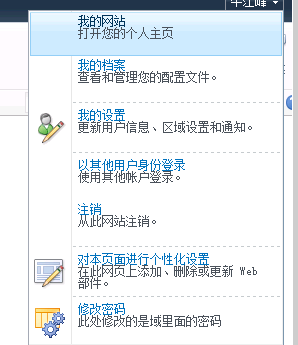
下面是添加添加“空元素”代码:
第一个<CustomAction>是添加修改密码项目
第二个<CustomAction>是添加js修改脚本
<?xml version="1.0" encoding="utf-8"?>

<Elements xmlns="http://schemas.microsoft.com/sharepoint/">

  <CustomAction

      Id="{F93B1F84-1DBE-4C10-82E3-2CA47346359E}"

      Title="修改密码"

      Description="此处修改的是域里面的密码"

      Sequence=""

      Location="Microsoft.SharePoint.StandardMenu"

      GroupId="PersonalActions"

      ImageUrl="~sitecollection/_layouts/images/menulistsettings.gif">

    <UrlAction Url="javascript:portal_openModalDialog();"/>

  </CustomAction>

  <CustomAction Id="ScriptLink.jQuery"

                Title="ScriptLink.jQuery"

                Location="ScriptLink"

                ScriptBlock=" function portal_openModalDialog() {

                      var options = SP.UI.$create_DialogOptions();

                      options.width = ;

                      options.height = ;

                      options.url = '/_layouts/updatepassword.aspx';

                      options.dialogReturnValueCallback = Function.createDelegate(null, portal_modalDialogClosedCallback);

                      SP.UI.ModalDialog.showModalDialog(options);

                    }

                    //SP.UI.ModalDialog.commonModalDialogClose(SP.UI.DialogResult.OK, 1); //关闭函数

                    function portal_modalDialogClosedCallback(result, value) {

                        if (value == '') {

                            SP.UI.Notify.addNotification('修改成功');

                        }

                        else if(value == ''){

                            SP.UI.Notify.addNotification('修改失败,请重新修改');

                        }

                    }

                    function closeDialog() {

                        SP.UI.ModalDialog.commonModalDialogClose(SP.UI.DialogResult.cancel, );

                    }

                  "

   />

</Elements>
以下是update.aspx
using System;

using Microsoft.SharePoint;

using Microsoft.SharePoint.WebControls;

using System.DirectoryServices.AccountManagement;

namespace ChangePassword.Layouts

{

    public partial class updatepassword : LayoutsPageBase

    {

        protected void Page_Load(object sender, EventArgs e)

        {

            lblMassage.Text = "";

        }

        private string _userName;

        private string _domainName;

        private PrincipalContext _principalContext;

        private UserPrincipal _userPrincipal;

        protected void btnUpdate_Click(object sender, EventArgs e)

        {

            _userName = SPContext.Current.Web.CurrentUser.LoginName;

            if (_userName.IndexOf("\\") > )

            {

                try

                {

                    if (_userName.Contains("|"))

                    {

                        _domainName = _userName.Split('\\')[].Split('|')[];

                    }

                    else

                    {

                        _domainName = _userName.Split('\\')[];

                    }

                    _userName = _userName.Split('\\')[];

                    _principalContext = new PrincipalContext(ContextType.Domain, _domainName, _userName, txtOldPwd.Text);

                    //这个方法也容易出问题,如果旧密码输入错误,这查找也会出错,

                    _userPrincipal = UserPrincipal.FindByIdentity(_principalContext, _userName);

                    if (_userPrincipal != null)

                    {

                        //这一点容易出错,是有关密码策略的问题

                        //密码不满足密码策略的要求。检查最小密码长度、密码复杂性和密码历史的要求。 (异常来自 HRESULT:0x800708C5)

                        _userPrincipal.ChangePassword(txtOldPwd.Text, txtNewPwd.Text);

                        _userPrincipal.Save();

                        Response.Write(

                            "<script type=\"text/javascript\">window.frameElement.commonModalDialogClose(1, 1);</script>");

                    }

                }

                catch (Exception ex)

                {

                    lblMassage.Text = ex.Message;

                }

            }

        }

    }

}
<%@ Assembly Name="$SharePoint.Project.AssemblyFullName$" %>

<%@ Import Namespace="Microsoft.SharePoint.ApplicationPages" %>

<%@ Register Tagprefix="SharePoint" Namespace="Microsoft.SharePoint.WebControls" Assembly="Microsoft.SharePoint, Version=14.0.0.0, Culture=neutral, PublicKeyToken=71e9bce111e9429c" %>

<%@ Register Tagprefix="Utilities" Namespace="Microsoft.SharePoint.Utilities" Assembly="Microsoft.SharePoint, Version=14.0.0.0, Culture=neutral, PublicKeyToken=71e9bce111e9429c" %>

<%@ Register Tagprefix="asp" Namespace="System.Web.UI" Assembly="System.Web.Extensions, Version=3.5.0.0, Culture=neutral, PublicKeyToken=31bf3856ad364e35" %>

<%@ Import Namespace="Microsoft.SharePoint" %>

<%@ Assembly Name="Microsoft.Web.CommandUI, Version=14.0.0.0, Culture=neutral, PublicKeyToken=71e9bce111e9429c" %>

<%@ Page Language="C#" AutoEventWireup="true" CodeBehind="updatepassword.aspx.cs" Inherits="ChangePassword.Layouts.updatepassword" DynamicMasterPageFile="~masterurl/default.master" %>

<asp:Content ID="PageHead" ContentPlaceHolderID="PlaceHolderAdditionalPageHead" runat="server">

</asp:Content>

<asp:Content ID="Main" ContentPlaceHolderID="PlaceHolderMain" runat="server">

<table cellpadding="" cellspacing="" border="">

    <tr>

        <td>旧密码:</td>

        <td><asp:TextBox ID="txtOldPwd" runat="server"></asp:TextBox></td>

    </tr>

     <tr>

        <td>新密码:</td>

        <td><asp:TextBox ID="txtNewPwd" runat="server"></asp:TextBox></td>

    </tr>

     <tr>

        <td>确认密码:</td>

        <td><asp:TextBox ID="txtConfirmPwd" runat="server"></asp:TextBox></td>

    </tr>

    <tr>

        <td><asp:Button ID="btnUpdate" runat="server" Text="修改" OnClick="btnUpdate_Click" /></td>

        <td><asp:Button ID="btnCancel" runat="server" Text="取消" OnClientClick="closeDialog()" /></td>

    </tr>

</table>

<br />

    <asp:Label ID="lblMassage" runat="server" ForeColor="Red" Text=""></asp:Label>

</asp:Content>

<asp:Content ID="PageTitle" ContentPlaceHolderID="PlaceHolderPageTitle" runat="server">

修改密码

</asp:Content>

<asp:Content ID="PageTitleInTitleArea" ContentPlaceHolderID="PlaceHolderPageTitleInTitleArea" runat="server" >

我的应用程序页

</asp:Content>
sharepoint 修改AD密码的更多相关文章
- 在泛微系统中修改AD密码的配置
参照文档: Windows server 2008 R2 安装AD域证书:https://blog.csdn.net/zhuyongru/article/details/81107839 配置泛微OA ...
- Python 修改AD密码
前提条件: AD 已开启证书服务(最重要的一句话). import ldap3 SERVER = 'adserver' BASEDN = "DC=example,DC=com" U ...
- 烦烦烦SharePoint2013 以其他用户登录和修改AD域用户密码
sharepoint默认是没有修改AD密码 和切换 用户的功能,这里我用future的方式来实现. 部署wsp前: 部署后 点击以其他用户身份登录 点击修改用户密码: 这里的扩展才菜单我们用Custo ...
- SharePoint2013 以其他用户登录和修改AD域用户密码 功能
sharepoint默认是没有修改AD密码 和切换 用户的功能,这里我用future的方式来实现. 部署wsp前: 部署后: 点击以其他用户身份登录 点击修改用户密码: 这里的扩展才菜单我们用Cust ...
- SharePoint中修改密码的WEB Part之终极版:即可以修改AD,又可以修改本机用户密码的Web Part!!
转:http://www.cnblogs.com/dosboy/archive/2007/08/01/838859.html 在网上查了那么多SharePoint密码修改的第三方开发,都有问题.总结下 ...
- sharepoint修改密码
增加SharePoint2010修改域密码功能 前提SharePoint2010的用户基于AD的,因此修改密码是修改了AD的密码,当然也可以修改本机密码(非域的密码).这里我们讨论修改域密码.我们修改 ...
- java修改AD域用户密码使用SSL连接方式
正常情况下,JAVA修改AD域用户属性,只能修改一些普通属性, 如果要修改AD域用户密码和userAccountControl属性就得使用SSL连接的方式修改, SSL连接的方式需要操作以下步骤: 1 ...
- C#修改AD账号及密码
在使用AD域环境搭建的账号系统修改密码的时候比较麻烦一般需要管理员在域环境去进行对用户的密码进行修改. 以下就是用来查询和修改AD域密码的方法. 1 /// <summary> 2 /// ...
- 增加SharePoint2010修改域密码功能
转:http://blog.163.com/hr_test/blog/static/16485210720137953131694/ 前提 SharePoint2010的用户基于AD的,因此修改密码是 ...
随机推荐
- 利用Solr服务建立的站内搜索雏形---solr1
最近看完nutch后总感觉像好好捯饬下solr,上次看到老大给我展现了下站内搜索我便久久不能忘怀.总觉着之前搭建的nutch配上solr还是有点呆板,在nutch爬取的时候就建立索引到solr服务下, ...
- Azure ARM (1) UI初探
<Windows Azure Platform 系列文章目录> 在笔者之前的文章中,我们使用国内由世纪互联运维的Azure China,管理界面地址是:https://manage.win ...
- [New Portal]Windows Azure Virtual Machine (11) 在本地使用Hyper-V制作虚拟机模板,并上传至Azure (1)
<Windows Azure Platform 系列文章目录> 本章介绍的内容是将本地Hyper-V的VHD,上传到Azure数据中心,作为自定义的虚拟机模板. 注意:因为在制作VHD的最 ...
- Microsoft Azure News(1) 新的数据中心Japan East, Japan West and Brazil South
<Windows Azure Platform 系列文章目录> 微软官方博客今天表示,微软宣布将在日本东部(埼玉县)和日本西部(大阪)提供Windows Azure服务.就在最近,微软为W ...
- 利用开源软件strongSwan实现支持IKEv2的企业级IPsec VPN,并结合FreeRadius实现AAA协议(下篇)
续篇—— 利用开源软件strongSwan实现支持IKEv2的企业级IPsec VPN,并结合FreeRadius实现AAA协议(上篇) 上篇文章写了如何构建一个支持IKEv2的VPN,本篇记录的是如 ...
- Hyperledger区块数据的访问
简介 本文介绍了访问Hyperledger区块数据的几种方法. REST API Hyperledger提供了多个REST API (https://hyperledger-fabric.readth ...
- HTML5五种客户端离线存储方案
最近折腾HTML5游戏需要离线存储功能,便把目前可用的几种HTML5存储方式研究了下,基于HT for Web写了个综合的实例,分别利用了Cookie.WebStorage.IndexedDB以及Fi ...
- CSS3魔法堂:认识@font-face和Font Icon
一.前言 过去我们总通过图片来美化站点的LOGO.标题.图标等,而现在我们可以通过@font-face获取另一种更灵活的美化方式. 二.看看例子 /* 定义 */ @font-face { font- ...
- 【Swift学习】Swift编程之旅---扩展(二十四)
扩展就是向一个已有的类.结构体或枚举类型添加新功能,包含属性和方法,如果你定义了一个扩展向一个已有类型添加新功能,那么这个新功能对该类型的所有已有实例中都是可用的,即使它们是在你的这个扩展的前面定义的 ...
- JAVA - 多线程 两种方法的比较
一.继承Thread类 实现方法: (1).首先定义一个类去继承Thread父类,重写父类中的run()方法.在run()方法中加入具体的任务代码或处理逻辑.(2).直接创建一个ThreadDemo2 ...