
ORA-07445&ORA-00108错误案例
由于需要ORACLE的UAT测试环境,克隆了虚拟机后,修改IP地址后,启动实例遇到了ORA-07445 &ORA-00108错误.
案例环境:
SQL> select * from v$version;
BANNER
----------------------------------------------------------------
Oracle Database 10g Release 10.2.0.4.0 - 64bit Production
PL/SQL Release 10.2.0.4.0 - Production
CORE 10.2.0.4.0 Production
TNS for Linux: Version 10.2.0.4.0 - Production
NLSRTL Version 10.2.0.4.0 - Production
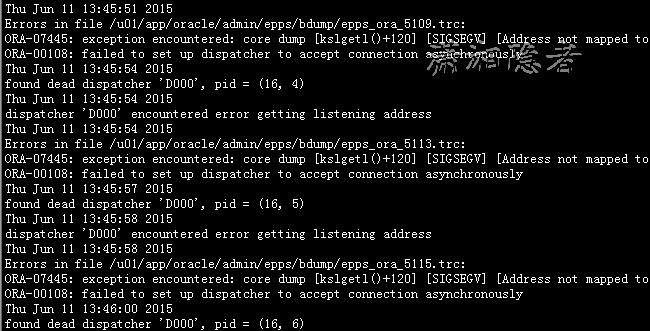
告警日志文件alert里面出现如下错误信息:
Thu Jun 11 13:45:51 2015
Errors in file /u01/app/oracle/admin/epps/bdump/epps_ora_5109.trc:
ORA-07445: exception encountered: core dump [kslgetl()+120] [SIGSEGV] [Address not mapped to object] [0x000000208] [] []
ORA-00108: failed to set up dispatcher to accept connection asynchronously
Thu Jun 11 13:45:54 2015
found dead dispatcher 'D000', pid = (16, 4)
Thu Jun 11 13:45:54 2015
dispatcher 'D000' encountered error getting listening address
Thu Jun 11 13:45:54 2015
Errors in file /u01/app/oracle/admin/epps/bdump/epps_ora_5113.trc:
ORA-07445: exception encountered: core dump [kslgetl()+120] [SIGSEGV] [Address not mapped to object] [0x000000208] [] []
ORA-00108: failed to set up dispatcher to accept connection asynchronously
Thu Jun 11 13:45:57 2015
found dead dispatcher 'D000', pid = (16, 5)
Thu Jun 11 13:45:58 2015
dispatcher 'D000' encountered error getting listening address
Thu Jun 11 13:45:58 2015
Errors in file /u01/app/oracle/admin/epps/bdump/epps_ora_5115.trc:
ORA-07445: exception encountered: core dump [kslgetl()+120] [SIGSEGV] [Address not mapped to object] [0x000000208] [] []
ORA-00108: failed to set up dispatcher to accept connection asynchronously
Thu Jun 11 13:46:00 2015
found dead dispatcher 'D000', pid = (16, 6)
Thu Jun 11 13:46:01 2015
dispatcher 'D000' encountered error getting listening address
Thu Jun 11 13:46:01 2015
Errors in file /u01/app/oracle/admin/epps/bdump/epps_ora_5117.trc:
ORA-07445: exception encountered: core dump [kslgetl()+120] [SIGSEGV] [Address not mapped to object] [0x000000208] [] []
ORA-00108: failed to set up dispatcher to accept connection asynchronously
[oracle@getlnx01uat ~]$ more /u01/app/oracle/admin/epps/bdump/epps_ora_5109.trc
/u01/app/oracle/admin/epps/bdump/epps_ora_5109.trc
Oracle Database 10g Release 10.2.0.4.0 - 64bit Production
ORACLE_HOME = /u01/app/oracle/product/10.2.0/db_1
System name: Linux
Node name: getlnx01uat.esquel.com
Release: 2.6.32-200.13.1.el5uek
Version: #1 SMP Wed Jul 27 21:02:33 EDT 2011
Machine: x86_64
Instance name: epps
Redo thread mounted by this instance: 1
Oracle process number: 16
Unix process pid: 5109, image: oracle@getlnx01uat.esquel.com (D000)
Warning: keltnfy call to ldmInit failed with error 46
*** 2015-06-11 13:45:51.950
network error encountered getting listening address:
NS Primary Error: TNS-12533: TNS:illegal ADDRESS parameters
NS Secondary Error: TNS-12560: TNS:protocol adapter error
NT Generic Error: TNS-00503: Illegal ADDRESS parameters
OPIRIP: Uncaught error 108. Error stack:
ORA-00108: failed to set up dispatcher to accept connection asynchronously
Exception signal: 11 (SIGSEGV), code: 1 (Address not mapped to object), addr: 0x208, PC: [0x75f178, kslgetl()+120]
*** 2015-06-11 13:45:51.954
ksedmp: internal or fatal error
ORA-07445: exception encountered: core dump [kslgetl()+120] [SIGSEGV] [Address not mapped to object] [0x000000208] [] []
ORA-00108: failed to set up dispatcher to accept connection asynchronously
Current SQL information unavailable - no session.
............................................
解决方法:
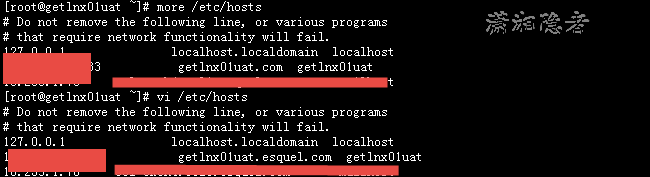
在ORA-07445[kslgetl()+120]/ORA-00108错误解决这篇文章了解到可能是主机名不能被正常访问导致,于是从下面验证后,发现是自己不小心编辑/etc/hosts
[oracle@getlnx01uat ~]$ hostname
getlnx01uat.esquel.com
[oracle@getlnx01uat ~]$ ping getlnx01uat.esquel.com
PING getlnx01uat.esquel.com (192.168.xxx.xxx) 56(84) bytes of data.
64 bytes from getlnx01uat.esquel.com (192.168.xxx.xxx): icmp_seq=1 ttl=64 time=0.032 ms
64 bytes from getlnx01uat.esquel.com (192.168.xxx.xxx): icmp_seq=2 ttl=64 time=0.039 ms
64 bytes from getlnx01uat.esquel.com (192.168.xxx.xxx): icmp_seq=3 ttl=64 time=0.049 ms
^C
--- getlnx01uat.esquel.com ping statistics ---
3 packets transmitted, 3 received, 0% packet loss, time 1999ms
rtt min/avg/max/mdev = 0.032/0.040/0.049/0.007 ms
[oracle@getlnx01uat ~]$
[oracle@getlnx01uat bdump]$ ls -l /etc/hosts
-rw-r--r-- 1 root root 260 Jun 11 13:52 /etc/hosts
[oracle@getlnx01uat bdump]$ hostname
getlnx01uat.esquel.com
[oracle@getlnx01uat bdump]$ ping getlnx01uat.esquel.com
ping: unknown host getlnx01uat.esquel.com
[oracle@getlnx01uat bdump]$ more /etc/hosts
# Do not remove the following line, or various programs
# that require network functionality will fail.
127.0.0.1 localhost.localdomain localhost
xxxx getlnx01uat.com getlnx01uat
如上所示,hostname为getlnx01uat.com,这个可能是我编辑/etc/hosts时,不小心误删除了一些hostname一些字符。编辑修改hostname后,重启数据库问题解决
[root@getlnx01uat ~]# more /etc/hosts
# Do not remove the following line, or various programs
# that require network functionality will fail.
127.0.0.1 localhost.localdomain localhost
xxx.xxx.xxx.xxx getlnx01uat.esquel.com getlnx01uat
参考资料:
http://www.xifenfei.com/2271.html
ORA-07445&ORA-00108错误案例的更多相关文章
- expdp错误案例
转自:https://www.cnblogs.com/kerrycode/p/3960328.html Oracle数据泵(Data Dump)使用过程当中经常会遇到一些奇奇怪怪的错误案例,下面总结一 ...
- oracle的listener.ora sqlnet.ora tnsnames.ora三个文件的关联性
学习:http://www.cnblogs.com/william-lee/archive/2010/10/20/1856261.html 之前因为安装的是windows server 2008 r2 ...
- ORACLE RAC 下非缺省端口监听配置(listener.ora tnsnames.ora)
不论是单实例还是RAC,对于非缺省端口下(1521)的监听器,pmon进程不会将service/instance注册到监听器,即不会实现动态注册.与单实例相同,RAC非缺省端口的监听器也是通过设置参数 ...
- listener.ora/sqlnet.ora/tnsnames.ora配置文件详解
oracle网络配置 三个配置文件 listener.ora.sqlnet.ora.tnsnames.ora ,都是放在$ORACLE_HOME/network/admin目录下. 英文说明: The ...
- jquery ajax 总是还未等到success回调就刷掉了,就进入了onError函数的错误案例分析
jquery ajax 总是还未等到success回调就刷掉了,就进入了onError函数的错误案例分析: 同样的请求同时请求了2次,然后第二次的请求把第一次的给刷掉了! (比如:<div on ...
- MySQL数据库“十宗罪”【十大经典错误案例】
原文作者:张甦 来源:http://blog.51cto.com/sumongodb 今天就给大家列举 MySQL 数据库中,最经典的十大错误案例,并附有处理问题的解决思路和方法,希望能给刚入行,或数 ...
- cocos2dx 3.1从零学习(四)——内存管理(错误案例分析)
本篇内容文字比較较多,可是这些都是建立在前面三章写代码特别是传值的时候崩溃的基础上的.可能表达的跟正确的机制有出入,还请指正. 假设有不理解的能够联系我.大家能够讨论一下,共同学习. 首先明白一个事实 ...
- http500:服务器内部错误案例详解(服务器代码语法错误或者逻辑错误)
http500:服务器内部错误案例详解(服务器代码语法错误或者逻辑错误) 一.总结 服务器内部错误可能是服务器中代码运行的时候的语法错误或者逻辑错误 二.http500:服务器内部错误案例详解 只是一 ...
- gtid 1032错误案例
gtid 1032错误案例 大致背景: 分别在主从上删除了系统冗余账号. mysql> delete from mysql.user where host='::1';Query OK, 1 r ...
随机推荐
- csharp: Export DataTable to Excel using OpenXml 2.5 in asp.net
//https://www.microsoft.com/en-us/download/details.aspx?id=5124 Open XML SDK 2.0 for Microsoft Offic ...
- 2016暑假多校联合---Substring(后缀数组)
2016暑假多校联合---Substring Problem Description ?? is practicing his program skill, and now he is given a ...
- 高性能的分布式服务框架 Dubbo
我思故我在,提问启迪思考! 1. 什么是Dubbo? 官网:http://dubbo.io/,DUBBO是一个分布式服务框架,致力于提供高性能和透明化的RPC远程服务调用方案,以及作为SOA服务治理的 ...
- 深入webx框架(li)
目录 1.Webx简介 2.创建webx应用 一.Webx简介 Webx本质上就是一个Web框架,它建立在Java Servlet API基础之上.上图所示是webx的架构图.webx本身类似于s ...
- JavaWeb前端基础复习笔记系列 一
课程:孔浩前端视频教程(CMS内容管理系统case) 1.背景知识 ASPCMS,是一个基于asp的CMS.类似于Jeecms是基于Java的.aspcms:http://www.aspcms.com ...
- Java新集合示意图
Java的新集合实际上只有3个集合组件:①Map ②List ③Set 在Java 1.2后应该尽量避免使用Hashtable,Vector 和Stack: 假如在一个列表中部进行大量的插入和删除操作 ...
- Django messages框架
一.简介 在网页应用中,你经常需要在处理完表单或其它类型的用户输入后,显示一个通知消息(也叫做“flash message”)给用户 对于这个功能,Django 提供基于Cookie 和会话的消息,无 ...
- ENVI【非监督分类】
非监督分类的概念: 非监督分类,又称“聚类分析或者点群分析”.在多光谱图像中搜寻.定义其自然相似光谱集群的过程.它不必对图像地物获取先验知识,仅依靠图像上不同地物光谱信息进行特征提取,在统计特征的差别 ...
- 使用 WordPress 主题制作的20个精美网页
WordPress 是一款个人博客系统,并逐步演化成一款内容管理系统软件,它是使用 PHP 语言和 MySQL 数据库开发的.用户可以在支持 PHP 和 MySQL 数据库的服务器上使用自己的博客.这 ...
- HTML5 Content Editable实践
基于此开发文档:https://developer.mozilla.org/zh-CN/docs/Web/Guide/HTML/Content_Editable 问题:通过contenteditabl ...