
asp.net core 使用protobuf
在一些性能要求很高的应用中,使用protocol buffer序列化,优于Json。而且protocol buffer向后兼容的能力比较好。
由于Asp.net core 采用了全新的MiddleWare方式,因此使用protobuf序列化,只需要使用Protobuf-net修饰需要序列化的对象,并在MVC初始化的时候增加相应的Formatter就可以了。
MVC Controller 的Action返回对象时,MVC回根据用户的Request Header里面的MIME选择对应的Formater来序列化返回对象( Serialize returned object)。MVC具有默认的Json Formater,这个可以不用管。
这里有一个直接可以运行的例子,具有Server和Client代码 https://github.com/damienbod/AspNetMvc6ProtobufFormatters
但是,这里面有一个很严重的问题。 看下面的例子。
例如我们需要序列化的对象时ApparatusType,服务端的定义(使用了EntityFramework)是这样的:
using System;

using System.Collections.Generic;

using System.ComponentModel.DataAnnotations;

using ProtoBuf;

namespace Hammergo.Data

{

    [ProtoContract]

    public partial class ApparatusType

    {

        public ApparatusType()

        {

            this.Apps = new List<App>();

        }

        [ProtoMember()]

        public System.Guid Id { get; set; }

        [ProtoMember()]

        [MaxLength()]

        public string TypeName { get; set; }

        [ProtoIgnore]

        public virtual ICollection<App> Apps { get; set; }

    }

}
属于ProtoBuf 的三个修饰为
[ProtoContract]
[ProtoMember(1)]
 [ProtoMember(2)]
其他的不用管,在客户端定义是这样的
using System;

using System.Collections.Generic;

using ProtoBuf;

namespace Hammergo.Poco

{

    [ProtoContract]

    public class ApparatusType

    {

        [ProtoMember(1)]

        public virtual System.Guid Id { get; set; }

        [ProtoMember(2)]

        public virtual string TypeName { get; set; }

    }

}
这里使用了Virtual关键字,是为了生成POCO的代理类,以跟踪状态,没有这个要求可以不使用。
如果使用https://github.com/damienbod/AspNetMvc6ProtobufFormatters 的方案就会发现
如果ASP.NET 的action返回List<AppratusType>,在客户端使用
var result = response.Content.ReadAsAsync<List<Hammergo.Poco.ApparatusType>>(new[] { new ProtoBufFormatter() }).Result;
就会抛出异常,ReadAsAsync ProtoBuf Formatter No MediaTypeFormatter is available to read
大意是没有 相应的MediaTypeFormatter来供ReadAsAsync来使用,
检查https://github.com/damienbod/AspNetMvc6ProtobufFormatters 的方案,发现它调用了https://github.com/WebApiContrib/WebApiContrib.Formatting.ProtoBuf里面的ProtoBufFormatter.cs ,这个里面有一个错误。
using System;

using System.IO;

using System.Linq;

using System.Net;

using System.Net.Http;

using System.Net.Http.Formatting;

using System.Net.Http.Headers;

using System.Reflection;

using System.Threading.Tasks;

using ProtoBuf;

using ProtoBuf.Meta;

namespace WebApiContrib.Formatting

{

    public class ProtoBufFormatter : MediaTypeFormatter

    {

        private static readonly MediaTypeHeaderValue mediaType = new MediaTypeHeaderValue("application/x-protobuf");

        private static Lazy<RuntimeTypeModel> model = new Lazy<RuntimeTypeModel>(CreateTypeModel);

        public static RuntimeTypeModel Model

        {

            get { return model.Value; }

        }

        public ProtoBufFormatter()

        {

            SupportedMediaTypes.Add(mediaType);

        }

        public static MediaTypeHeaderValue DefaultMediaType

        {

            get { return mediaType; }

        }

        public override bool CanReadType(Type type)

        {

            return CanReadTypeCore(type);

        }

        public override bool CanWriteType(Type type)

        {

            return CanReadTypeCore(type);

        }

        public override Task<object> ReadFromStreamAsync(Type type, Stream stream, HttpContent content, IFormatterLogger formatterLogger)

        {

            var tcs = new TaskCompletionSource<object>();

            try

            {

                object result = Model.Deserialize(stream, null, type);

                tcs.SetResult(result);

            }

            catch (Exception ex)

            {

                tcs.SetException(ex);

            }

            return tcs.Task;

        }

        public override Task WriteToStreamAsync(Type type, object value, Stream stream, HttpContent content, TransportContext transportContext)

        {

            var tcs = new TaskCompletionSource<object>();

            try

            {

                Model.Serialize(stream, value);

                tcs.SetResult(null);

            }

            catch (Exception ex)

            {

                tcs.SetException(ex);

            }

            return tcs.Task;

        }

        private static RuntimeTypeModel CreateTypeModel()

        {

            var typeModel = TypeModel.Create();

            typeModel.UseImplicitZeroDefaults = false;

            return typeModel;

        }

        private static bool CanReadTypeCore(Type type)

        {

            return type.GetCustomAttributes(typeof(ProtoContractAttribute)).Any();

        }

    }

}
private static bool CanReadTypeCore(Type type)这个有问题,它只能识别有ProtoContract的类,没法识别其对应的IEnumerable<T>,修改这个方法就可以了。如下:
        private static bool CanReadTypeCore(Type type)

        {

            bool isCan = type.GetCustomAttributes(typeof(ProtoContractAttribute)).Any();

            if (!isCan && typeof(IEnumerable).IsAssignableFrom(type))

            {

                var temp = type.GetGenericArguments().FirstOrDefault();

                isCan = temp.GetCustomAttributes(typeof(ProtoContractAttribute)).Any();

            }

            return isCan;

        }
下面我给出,关键的代码片段:
使用了一个辅助Library,结构如下图:
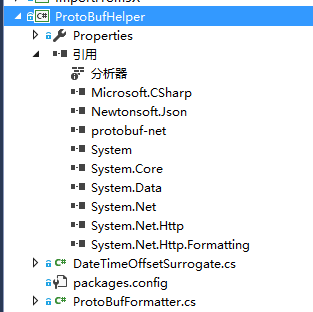
DateTimeOffsetSurrogate.cs的代码如下:
using System;

using System.Collections.Generic;

using System.Linq;

using System.Threading.Tasks;

using ProtoBuf;

namespace ProtoBufHelper

{

    [ProtoContract]

    public class DateTimeOffsetSurrogate

    {

        [ProtoMember()]

        public long DateTimeTicks { get; set; }

        [ProtoMember()]

        public short OffsetMinutes { get; set; }

        public static implicit operator DateTimeOffsetSurrogate(DateTimeOffset value)

        {

            return new DateTimeOffsetSurrogate

            {

                DateTimeTicks = value.Ticks,

                OffsetMinutes = (short)value.Offset.TotalMinutes

            };

        }

        public static implicit operator DateTimeOffset(DateTimeOffsetSurrogate value)

        {

            return new DateTimeOffset(value.DateTimeTicks, TimeSpan.FromMinutes(value.OffsetMinutes));

        }

    }

}
ProtoBufFormatter.cs 的代码如下:
using System;

using System.Collections;

using System.IO;

using System.Linq;

using System.Net;

using System.Net.Http;

using System.Net.Http.Formatting;

using System.Net.Http.Headers;

using System.Reflection;

using System.Threading.Tasks;

using ProtoBuf;

using ProtoBuf.Meta;

namespace ProtoBufHelper

{

    public class ProtoBufFormatter : MediaTypeFormatter

    {

        private static readonly MediaTypeHeaderValue mediaType = new MediaTypeHeaderValue("application/x-protobuf");

        private static Lazy<RuntimeTypeModel> model = new Lazy<RuntimeTypeModel>(CreateTypeModel);

        public static RuntimeTypeModel Model

        {

            get { return model.Value; }

        }

        public ProtoBufFormatter()

        {

            SupportedMediaTypes.Add(mediaType);

        }

        public static MediaTypeHeaderValue DefaultMediaType

        {

            get { return mediaType; }

        }

        public override bool CanReadType(Type type)

        {

            var temp = CanReadTypeCore(type);

            return temp;

        }

        public override bool CanWriteType(Type type)

        {

            return CanReadTypeCore(type);

        }

        public override Task<object> ReadFromStreamAsync(Type type, Stream stream, HttpContent content, IFormatterLogger formatterLogger)

        {

            var tcs = new TaskCompletionSource<object>();

            try

            {

                object result = Model.Deserialize(stream, null, type);

                tcs.SetResult(result);

            }

            catch (Exception ex)

            {

                tcs.SetException(ex);

            }

            return tcs.Task;

        }

        public override Task WriteToStreamAsync(Type type, object value, Stream stream, HttpContent content, TransportContext transportContext)

        {

            var tcs = new TaskCompletionSource<object>();

            try

            {

                Model.Serialize(stream, value);

                tcs.SetResult(null);

            }

            catch (Exception ex)

            {

                tcs.SetException(ex);

            }

            return tcs.Task;

        }

        private static RuntimeTypeModel CreateTypeModel()

        {

            var typeModel = TypeModel.Create();

            typeModel.UseImplicitZeroDefaults = false;

            typeModel.Add(typeof(DateTimeOffset), false).SetSurrogate(typeof(DateTimeOffsetSurrogate));

            return typeModel;

        }

        private static bool CanReadTypeCore(Type type)

        {

            bool isCan = type.GetCustomAttributes(typeof(ProtoContractAttribute)).Any();

            if (!isCan && typeof(IEnumerable).IsAssignableFrom(type))

            {

                var temp = type.GetGenericArguments().FirstOrDefault();

                isCan = temp.GetCustomAttributes(typeof(ProtoContractAttribute)).Any();

            }

            return isCan;

        }

    }

}
这样就可以设置ASP.NET Core端的代码:
添加ProtobufInputFormatter.cs 和 ProtobufOutputFormatter.cs 代码分别如下:
using System;

using System.Threading.Tasks;

using Microsoft.AspNetCore.Mvc;

using Microsoft.AspNetCore.Mvc.Formatters;

using Microsoft.Net.Http.Headers;

using ProtoBuf.Meta;

using ProtoBufHelper;

namespace DamService

{

    public class ProtobufInputFormatter : InputFormatter

    {

        private static Lazy<RuntimeTypeModel> model = new Lazy<RuntimeTypeModel>(CreateTypeModel);

        public static RuntimeTypeModel Model

        {

            get { return model.Value; }

        }

        public override Task<InputFormatterResult> ReadRequestBodyAsync(InputFormatterContext context)

        {

            var type = context.ModelType;

            var request = context.HttpContext.Request;

            MediaTypeHeaderValue requestContentType = null;

            MediaTypeHeaderValue.TryParse(request.ContentType, out requestContentType);

            object result = Model.Deserialize(context.HttpContext.Request.Body, null, type);

            return InputFormatterResult.SuccessAsync(result);

        }

        public override bool CanRead(InputFormatterContext context)

        {

            return true;

        }

        private static RuntimeTypeModel CreateTypeModel()

        {

            var typeModel = TypeModel.Create();

            typeModel.UseImplicitZeroDefaults = false;

            typeModel.Add(typeof(DateTimeOffset), false).SetSurrogate(typeof(DateTimeOffsetSurrogate));

            return typeModel;

        }

    }

}
using System;

using System.Text;

using System.Threading.Tasks;

using Microsoft.AspNetCore.Mvc.Formatters;

using Microsoft.Net.Http.Headers;

using ProtoBuf.Meta;

using ProtoBufHelper;

namespace DamService

{

    public class ProtobufOutputFormatter :  OutputFormatter

    {

        private static Lazy<RuntimeTypeModel> model = new Lazy<RuntimeTypeModel>(CreateTypeModel);

        public string ContentType { get; private set; }

        public static RuntimeTypeModel Model

        {

            get { return model.Value; }

        }

        public ProtobufOutputFormatter()

        {

            ContentType = "application/x-protobuf";

            SupportedMediaTypes.Add(MediaTypeHeaderValue.Parse("application/x-protobuf"));

            //SupportedEncodings.Add(Encoding.GetEncoding("utf-8"));

        }

        private static RuntimeTypeModel CreateTypeModel()

        {

            var typeModel = TypeModel.Create();

            typeModel.UseImplicitZeroDefaults = false;

            typeModel.Add(typeof(DateTimeOffset), false).SetSurrogate(typeof(DateTimeOffsetSurrogate));

            return typeModel;

        }

        public override Task WriteResponseBodyAsync(OutputFormatterWriteContext context)

        {

            var response = context.HttpContext.Response;

            Model.Serialize(response.Body, context.Object);

            return Task.FromResult(response);

        }

    }

}
在Startup.cs中
public void ConfigureServices(IServiceCollection services) 方法中这样添加MVC中间件
services.AddMvc(options =>
{
options.InputFormatters.Add(new ProtobufInputFormatter());
options.OutputFormatters.Add(new ProtobufOutputFormatter());
options.FormatterMappings.SetMediaTypeMappingForFormat("protobuf", MediaTypeHeaderValue.Parse("application/x-protobuf"));
});
整个Startup.cs代码
using System;

using System.Collections.Generic;

using System.Linq;

using System.Threading.Tasks;

using Microsoft.AspNetCore.Builder;

using Microsoft.AspNetCore.Hosting;

using Microsoft.AspNetCore.Identity.EntityFrameworkCore;

using Microsoft.EntityFrameworkCore;

using Microsoft.Extensions.Configuration;

using Microsoft.Extensions.DependencyInjection;

using Microsoft.Extensions.Logging;

using DamService.Data;

using DamService.Models;

using DamService.Services;

using System.Net;

using Microsoft.AspNetCore.Diagnostics;

using Microsoft.AspNetCore.Http;

using Microsoft.Net.Http.Headers;

namespace DamService

{

    public class Startup

    {

        public Startup(IHostingEnvironment env)

        {

            var builder = new ConfigurationBuilder()

                .SetBasePath(env.ContentRootPath)

                .AddJsonFile("appsettings.json", optional: true, reloadOnChange: true)

                .AddJsonFile($"appsettings.{env.EnvironmentName}.json", optional: true);

            if (env.IsDevelopment())

            {

                // For more details on using the user secret store see http://go.microsoft.com/fwlink/?LinkID=532709

                builder.AddUserSecrets();

            }

            builder.AddEnvironmentVariables();

            Configuration = builder.Build();

        }

        public IConfigurationRoot Configuration { get; }

        // This method gets called by the runtime. Use this method to add services to the container.

        public void ConfigureServices(IServiceCollection services)

        {

            // Add framework services.

            services.AddDbContext<ApplicationDbContext>(options =>

                options.UseSqlServer(Configuration.GetConnectionString("DefaultConnection")));

            services.AddScoped(provider => new Hammergo.Data.DamWCFContext(Configuration.GetConnectionString("OdataDBConnectionString")));

            services.AddIdentity<ApplicationUser, IdentityRole>()

                .AddEntityFrameworkStores<ApplicationDbContext>()

                .AddDefaultTokenProviders();

            services.AddMvc(options =>

            {

                options.InputFormatters.Add(new ProtobufInputFormatter());

                options.OutputFormatters.Add(new ProtobufOutputFormatter());

                options.FormatterMappings.SetMediaTypeMappingForFormat("protobuf", MediaTypeHeaderValue.Parse("application/x-protobuf"));

            });

            // Add application services.

            //services.AddTransient<IEmailSender, AuthMessageSender>();

            //services.AddTransient<ISmsSender, AuthMessageSender>();

        }

        // This method gets called by the runtime. Use this method to configure the HTTP request pipeline.

        public void Configure(IApplicationBuilder app, IHostingEnvironment env, ILoggerFactory loggerFactory)

        {

            loggerFactory.AddConsole(Configuration.GetSection("Logging"));

            loggerFactory.AddDebug();

            //if (env.IsDevelopment())

            //{

            //    app.UseDeveloperExceptionPage();

            //    app.UseDatabaseErrorPage();

            //    app.UseBrowserLink();

            //}

            //else

            //{

            //    app.UseExceptionHandler("/Home/Error");

            //}

            app.UseExceptionHandler(_exceptionHandler);

            app.UseStaticFiles();

            app.UseIdentity();

            // Add external authentication middleware below. To configure them please see http://go.microsoft.com/fwlink/?LinkID=532715

            app.UseMvc(routes =>

            {

                routes.MapRoute(

                    name: "default",

                    template: "{controller=Home}/{action=Index}/{id?}");

            });

        }

        private void _exceptionHandler(IApplicationBuilder builder)

        {

            builder.Run(

              async context =>

                 {

                     context.Response.StatusCode = (int)HttpStatusCode.InternalServerError;

                     context.Response.ContentType = "text/plain";

                     var error = context.Features.Get<IExceptionHandlerFeature>();

                     if (error != null)

                     {

                         await context.Response.WriteAsync(error.Error.Message).ConfigureAwait(false);

                     }

                 });

        }

    }

}
上面的
services.AddScoped(provider => new Hammergo.Data.DamWCFContext(Configuration.GetConnectionString("OdataDBConnectionString")));是我自己的数据库连接,可以使用自己的,也可以不用,我用的是EntityFrameWork 6.1.3 不是core,目前core还有一些功能没有,暂时不使用。
添加一个测试用的Controller,
using System;

using System.Linq;

using Microsoft.AspNetCore.Mvc;

using Microsoft.Extensions.Logging;

using Hammergo.Data;

using System.Linq.Expressions;

using System.Data.Entity;

using System.Collections.Generic;

using System.Threading.Tasks;

namespace DamService.Controllers

{

    public class AppsController : Controller

    {

        private readonly DamWCFContext _dbContext;

        private readonly ILogger _logger;

        public AppsController(

           DamWCFContext dbContext,

        ILoggerFactory loggerFactory)

        {

            _dbContext = dbContext;

            _logger = loggerFactory.CreateLogger<AccountController>();

        }

        [HttpGet]

        public async Task<List<App>> Top10()

        {

            return await _dbContext.Apps.Take(10).ToListAsync();

        }

    }

}
客户端测试代码:
            var client = new HttpClient { BaseAddress = new Uri("http://localhost.Fiddler:40786/") };

            client.DefaultRequestHeaders.Accept.Add(new MediaTypeWithQualityHeaderValue("application/x-protobuf"));

            HttpResponseMessage response = null;

            //test top 10

            string uri = "Apps/Top10";

            Trace.WriteLine("\n Test {0}.", uri);

            response = client.GetAsync(uri).Result;

            if (response.IsSuccessStatusCode)

            {

                var result = response.Content.ReadAsAsync<List<Hammergo.Poco.App>>(new[] { new ProtoBufFormatter() }).Result;

                Assert.AreEqual(result.Count, 10, "反序列化失败");

                Console.WriteLine("{0} test success!", uri);

            }

            else

            {

                var message = response.Content.ReadAsStringAsync().Result;

                Console.WriteLine("{0} ({1})\n message: {2} ", (int)response.StatusCode, response.ReasonPhrase, message);

            }
http://localhost.Fiddler:40786/ 这里40786为服务端口,Fiddler表示使用了Fiddler代理,这样在使用时需要开启Fiddler,如果不使用Fidller,将URI修改为:
http://localhost:40786/
asp.net core 使用protobuf的更多相关文章
- 插上腾飞的翅膀:为asp.net core添加protobuf支持
没时间解释了,快上车. 通过NuGet获取Zaabee.AspNetCoreProtobuf Install-Package Zaabee.AspNetCoreProtobuf 在Startup.cs ...
- ASP.NET Core 使用 Redis 和 Protobuf 进行 Session 缓存
前言 上篇博文介绍了怎么样在 asp.net core 中使用中间件,以及如何自定义中间件.项目中刚好也用到了Redis,所以本篇就介绍下怎么样在 asp.net core 中使用 Redis 进行资 ...
- asp.net core 使用 Redis 和 Protobuf
asp.net core 使用 Redis 和 Protobuf 前言 上篇博文介绍了怎么样在 asp.net core 中使用中间件,以及如何自定义中间件.项目中刚好也用到了Redis,所以本篇就介 ...
- 《ASP.NET Core跨平台开发从入门到实战》Web API自定义格式化protobuf
<ASP.NET Core跨平台开发从入门到实战>样章节 Web API自定义格式化protobuf. 样章 Protocol Buffers 是一种轻便高效的结构化数据存储格式,可以用于 ...
- ASP.NET Core 缓存技术 及 Nginx 缓存配置
前言 在Asp.Net Core Nginx部署一文中,主要是讲述的如何利用Nginx来实现应用程序的部署,使用Nginx来部署主要有两大好处,第一是利用Nginx的负载均衡功能,第二是使用Nginx ...
- ASP.NET Core 文件上传
前言 上篇博文介绍了怎么样在 asp.net core 使用 Redis 和 Protobuf 进行 Session缓存.本篇的是开发过程中使用的一个小功能,怎么做单文件和多文件上传. 如果你觉得对你 ...
- asp.net core 3.0 gRPC框架小试
什么是gRPC gRPC是google开源的一个高性能.跨语言的RPC框架,基于HTTP2协议,采用ProtoBuf 定义的IDL. gRPC 的主要优点是: 现代高性能轻量级 RPC 框架. 协定优 ...
- ASP.NET Core 3.0 上的gRPC服务模板初体验(多图)
早就听说ASP.NET Core 3.0中引入了gRPC的服务模板,正好趁着家里电脑刚做了新系统,然后装了VS2019的功夫来体验一把.同时记录体验的过程.如果你也想按照本文的步骤体验的话,那你得先安 ...
- 【分享】Asp.net Core相关教程及开源项目
入门 全新的ASP.NET: https://www.cnblogs.com/Leo_wl/p/5654828.html 在IIS上部署你的ASP.NET Core项目: https://www.c ...
随机推荐
- spring mvc 第四天【注解实现springmvc 配合使用Exception Resolver 的配置】
Tips:这里使用具体springmvc的异常处理只是拿一个简单的案例来说明问题,并不做实用,如有需求可做更改: 这里演示的仅是能够实现service验证的一种方案,如有更好的请留言我会努力学习!! ...
- Markdown 快速入门
使用Markdown编辑器:MarkdownPad 2 标题: # 标题 ## 标题 ### 标题 #### 标题 ##### 标题 ###### 标题 效果: 标题 标题 标题 标题 标题 标题 下 ...
- 【css3】浏览器内核及其兼容性
浏览器内核分类如下: 1.Webkit内核: 使用此引擎内核的浏览器有:Safari(包括移动版和桌面版).Chrome.其私有属性的前缀是-webkit-. 2.Gecko内核: 使用此引擎内核的浏 ...
- iOS基础-NSString及NSMutableString剖析
一.NSString头文件 NSString : NSObject 实现协议: NSCopying/NSMutableCopying/NSSecureCoding 类别: //扩展类别 NSStrin ...
- ubuntu locale 语言设置
第一步,编辑文件 代码: sudo gedit /var/lib/locales/supported.d/local 写入相关内容,比如写入如下内容: 代码: zh_CN.UTF-8 UTF-8zh ...
- varnish
html,body,div,span,applet,object,iframe,h1,h2,h3,h4,h5,h6,p,blockquote,pre,a,abbr,acronym,address,bi ...
- MAVEN解决Cannot change version of project facet Dynamic web module to 2.5
我们用Eclipse创建Maven结构的web项目的时候选择了Artifact Id为maven-artchetype-webapp,由于这个catalog比较老,用的servlet还是2.3的,而一 ...
- [php-src]Php扩展的内存泄漏处理思路
内容均以php5.6.14为例. 一. 封装函数时产生 memory leaks. [weichen@localhost www]$ php .php [,] [Tue Jul :: ] Script ...
- Freemarket学习整理。
导入freemarker.jar包 把word文档另存为xml格式,2007以上版本支持. 编写代码,把路径更改为xml所在路径. 把需要更改的地方写成${}形式. package Document. ...
- 深入研究C语言 第二篇(续)
1. 关于如下的程序,关于结构体的拷贝,拷贝是拷贝到内存中的什么地方? 我们进入debug进行反汇编,单步等操作跟踪查看.发现: 在main中,我们看到call 0266应该对应的是转跳到func处执 ...