
iOS 后台处理
iOS 后台处理的常见用途
1、进入后台时候删除资源:应用处于挂起状态的时候所占用的资源越少,该应用被iOS终止的风险就越低。通过从内存中清理那些易于重新创建的资源,可以增加应用驻留内存的机会,因此可以大幅加快重启速度。
2、进入后台时候保存状态:保存与用户执行的操作相关的所有信息,这样的话,用户下次回来的时候,依然可以恢复到他们离开时的进度。
3、延时执行,请求更多的后台时间:如果进入后台花费了很多时间,应用可能会从内存中移除,如果应用正在进行文件传输,没有能够完成的话,将会带来很多不便。我们可以将applicationDidEnterBackground 作为平台,告诉系统,你还有额外的工作要做,然后启动一个程序块,真正的执行该工作。
例解:
@property (strong, nonatomic) UILabel *label;

@property (strong, nonatomic) UIImage *smiley;

@property (strong, nonatomic) UIImageView *smileyView;

@property (strong, nonatomic) UISegmentedControl *segmentedControl;
@implementation BIDViewController {

    BOOL animate;

}
- (void)viewDidLoad

{

    [super viewDidLoad];

    CGRect bounds = self.view.bounds;

    CGRect labelFrame = CGRectMake(bounds.origin.x, CGRectGetMidY(bounds) - ,

                                   bounds.size.width, );

    //转动的Label

    self.label = [[UILabel alloc] initWithFrame:labelFrame];

    self.label.font = [UIFont fontWithName:@"Helvetica" size:];

    self.label.text = @"Bazinga!";

    self.label.textAlignment = NSTextAlignmentCenter;

    self.label.backgroundColor = [UIColor clearColor];

    //笑脸

    CGRect smileyFrame = CGRectMake(CGRectGetMidX(bounds) - ,

                                    CGRectGetMidY(bounds)/ - ,

                                    , );

    self.smileyView = [[UIImageView alloc] initWithFrame:smileyFrame];

    self.smileyView.contentMode = UIViewContentModeCenter;

    NSString *smileyPath = [[NSBundle mainBundle] pathForResource:@"smiley"

                                                           ofType:@"png"];

    self.smiley = [UIImage imageWithContentsOfFile:smileyPath];

    self.smileyView.image = self.smiley;

    //分段器

    self.segmentedControl = [[UISegmentedControl alloc] initWithItems:

                             [NSArray arrayWithObjects:

                              @"One", @"Two", @"Three", @"Four", nil]] ;

    self.segmentedControl.frame = CGRectMake(bounds.origin.x + ,

                                             ,

                                             bounds.size.width - , );

    [self.view addSubview:self.segmentedControl];

    [self.view addSubview:self.smileyView];

    [self.view addSubview:self.label];

    NSNumber *indexNumber = [[NSUserDefaults standardUserDefaults]

                             objectForKey:@"selectedIndex"];

    if (indexNumber) {

        NSInteger selectedIndex = [indexNumber intValue];

        self.segmentedControl.selectedSegmentIndex = selectedIndex;

    }

    //通知

    NSNotificationCenter *center = [NSNotificationCenter defaultCenter];

    [center addObserver:self

               selector:@selector(applicationWillResignActive)

                   name:UIApplicationWillResignActiveNotification

                 object:nil];

    [center addObserver:self

               selector:@selector(applicationDidBecomeActive)

                   name:UIApplicationDidBecomeActiveNotification

                 object:nil];

    [center addObserver:self

               selector:@selector(applicationDidEnterBackground)

                   name:UIApplicationDidEnterBackgroundNotification

                 object:nil];

    [center addObserver:self

               selector:@selector(applicationWillEnterForeground)

                   name:UIApplicationWillEnterForegroundNotification

                 object:nil];

}
//Label 向下转动

- (void)rotateLabelDown

{

    [UIView animateWithDuration:0.5

                     animations:^{

                         self.label.transform = CGAffineTransformMakeRotation(M_PI);

                     }

                     completion:^(BOOL finished){

                         [self rotateLabelUp];

                     }];

}

//Label 向上转动

- (void)rotateLabelUp

{

    [UIView animateWithDuration:0.5

                     animations:^{

                         self.label.transform = CGAffineTransformMakeRotation();

                     }

                     completion:^(BOOL finished){

                         if (animate) {

                             [self rotateLabelDown];

                         }

                     }];

}
//离开活动状态

- (void)applicationWillResignActive

{

    NSLog(@"VC: %@", NSStringFromSelector(_cmd));

    animate = NO;

}

//进入活动状态

- (void)applicationDidBecomeActive

{

    NSLog(@"VC: %@", NSStringFromSelector(_cmd));

    animate = YES;

    [self rotateLabelDown];

}
//后台运行

- (void)applicationDidEnterBackground

{

    NSLog(@"VC: %@", NSStringFromSelector(_cmd));

    //先获取共享的UIApplication 实例。

    UIApplication *app = [UIApplication sharedApplication];

    //声明了taskId变量、并用__block修饰。

    __block UIBackgroundTaskIdentifier taskId;

    //告诉系统,需要更多的时间来完成某件事,并承诺在完成之后告诉它。如果系统判定我们运行了太久时间并决定停止运行,可以调用我们做为参数提供的程序块

    taskId = [app beginBackgroundTaskWithExpirationHandler:^{

        NSLog(@"Background task ran out of time and was terminated.");

        [app endBackgroundTask:taskId];

    }];

    //如果系统返回的值是UIBackgroundTaskInvalid,表明系统没有为我们提供任何多余的时间。

    if (taskId == UIBackgroundTaskInvalid) {

        NSLog(@"Failed to start background task!");

        return;

    }

    //

    dispatch_async(dispatch_get_global_queue(DISPATCH_QUEUE_PRIORITY_DEFAULT, ),

    ^{

        NSLog(@"Starting background task with %f seconds remaining",

              app.backgroundTimeRemaining);

        self.smiley = nil;

        self.smileyView.image = nil;

        //存储segmentedControl的位置

        NSInteger selectedIndex = self.segmentedControl.selectedSegmentIndex;

        [[NSUserDefaults standardUserDefaults] setInteger:selectedIndex

                                                   forKey:@"selectedIndex"];

        //模拟一个25秒的过程

        [NSThread sleepForTimeInterval:];

        NSLog(@"Finishing background task with %f seconds remaining",

              app.backgroundTimeRemaining);

        //告诉系统,我们已经完成

        [app endBackgroundTask:taskId];

    });

}
//进入前台

- (void)applicationWillEnterForeground

{

    NSLog(@"VC: %@", NSStringFromSelector(_cmd));

    NSString *smileyPath = [[NSBundle mainBundle] pathForResource:@"smiley"

                                                           ofType:@"png"];

    self.smiley = [UIImage imageWithContentsOfFile:smileyPath];

    self.smileyView.image = self.smiley;

}
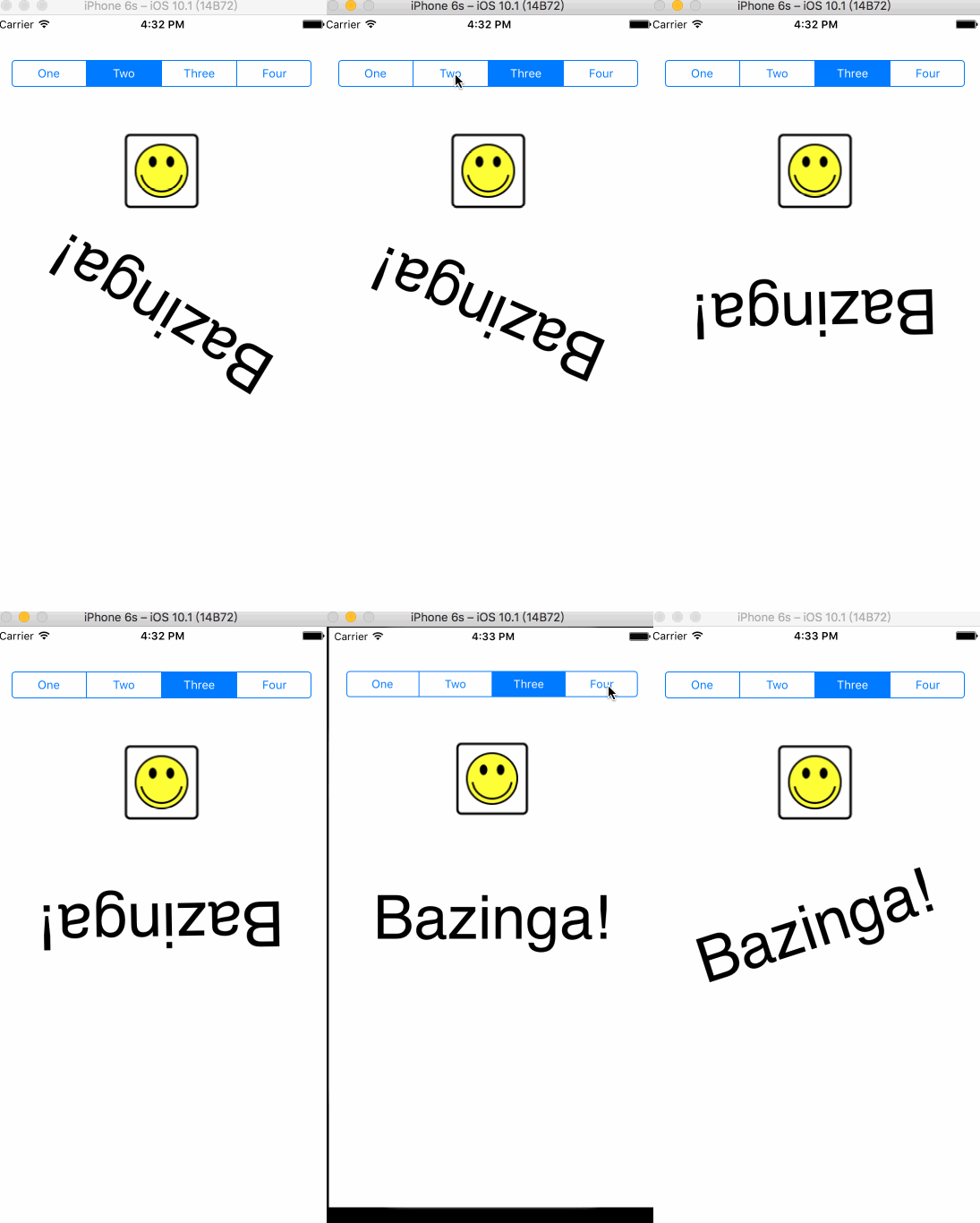
运行效果:
iOS 后台处理的更多相关文章
- iOS后台定位实现
iOS后台定位实现 (2013-01-24 16:43:12) 工作中碰到一个定位的应用场景:app需要在后台运行,实时上传用户地理位置. 苹果对iOS的规范性在提升了app的品质的同时也 ...
- iOS 后台运行 类型
iOS后台运行,需要有特定的类型才可以进行.这些内容并不是一直不变的,苹果也在逐步的更新这些内容. 本文内容是2015年11月03日时苹果支持的后台运行类型. 这是官方连接地址 其中较为重要的是下面这 ...
- iOS后台运行
http://www.cocoachina.com/bbs/read.php?tid=149564 文一 我从苹果文档中得知,一般的应用在进入后台的时候可以获取一定时间来运行相关任务,也就是说可以在后 ...
- IOS 后台执行
在IOS后台执行是本文要介绍的内容,大多数应用程序进入后台状态不久后转入暂停状态.在这种状态下,应用程序不执行任何代码,并有可能在任意时候从内存中删除.应用程序提供特定的服务,用户可以请求后台执行时间 ...
- iOS 后台运行实现 --备用
文一 我从苹果文档中得知,一般的应用在进入后台的时候可以获取一定时间来运行相关任务,也就是说可以在后台运行一小段时间. 还有三种类型的可以运行在后以,1.音乐2.location 3.voip 文二 ...
- iOS 后台定位被拒注意事项
iOS 后台定位被拒的原因很简单就是没有达到苹果对后台定位的要求. 本地要求: 1.在plist文件中添加字段 "Privacy - Location Always Usage Descri ...
- iOS 后台持续定位详解(支持ISO9.0以上)
iOS 后台持续定位详解(支持ISO9.0以上) #import <CoreLocation/CoreLocation.h>并实现CLLocationManagerDelegate 代理, ...
- IOS后台执行
大多数应用程序进入后台状态不久后转入暂停状态.在这种状态下,应用程序不执行任何代码,并有可能在任意时候从内存中删除.应用程序提供特定的服务,用户可以请求后台执行时间,以提供这些服务. 判断是否支持多线 ...
- iOS后台解析
iOS后台 上个月给小妹买了一台6s 她问我双击 Home 键之后 弹出的那些应用会不会耗电 我找到一篇文章 正好说的就是这个问题 摘要翻译一下 原文地址 http://www.speirs.org/ ...
随机推荐
- MVVM TextBox的键盘事件
MVVM下RichTextBox的键盘回车事件设置为发送,不是回车 xmlns:i="http://schemas.microsoft.com/expression/2010/interac ...
- 基于Oracle安装Zabbix
软件版本 Oracle Enterprise Linux 7.1 64bit Oracle Enterprise Edition 12.1.0.2 64bit Zabbix 3.2.1 准备工作 上传 ...
- iOS开发之Alamofire源码深度解析
今天博客中的Alamofire源码的版本是以现在最新的3.4版本为例.上篇博客系统的对NSURLSession相关的东西进行了详细的解析,详情请看<详解NSURLSession>,为了就是 ...
- iOS开发之多种Cell高度自适应实现方案的UI流畅度分析
本篇博客的主题是关于UI操作流畅度优化的一篇博客,我们以TableView中填充多个根据内容自适应高度的Cell来作为本篇博客的使用场景.当然Cell高度的自适应网上的解决方案是铺天盖地呢,今天我们的 ...
- CRL快速开发框架系列教程五(使用缓存)
本系列目录 CRL快速开发框架系列教程一(Code First数据表不需再关心) CRL快速开发框架系列教程二(基于Lambda表达式查询) CRL快速开发框架系列教程三(更新数据) CRL快速开发框 ...
- 关于.NET参数传递方式的思考
年关将近,整个人已经没有了工作和写作的激情,估计这个时候很多人跟我差不多,该相亲的相亲,该聚会喝酒的聚会喝酒,总之就是没有了干活的心思(我有很多想法,但就是叫不动我的手脚,所以我只能看着别人在做我想做 ...
- [原] KVM 虚拟化原理探究(5)— 网络IO虚拟化
KVM 虚拟化原理探究(5)- 网络IO虚拟化 标签(空格分隔): KVM IO 虚拟化简介 前面的文章介绍了KVM的启动过程,CPU虚拟化,内存虚拟化原理.作为一个完整的风诺依曼计算机系统,必然有输 ...
- 异步 HttpContext.Current 为空null 另一种解决方法
1.场景 在导入通讯录过程中,把导入的失败.成功的号码数进行统计,然后保存到session中,客户端通过轮询显示状态. 在实现过程中,使用的async调用方法,出现HttpContext.Curren ...
- IL异常处理
异常处理在程序中也算是比较重要的一部分了,IL异常处理在C#里面实现会用到一些新的方法 1.BeginExceptionBlock:异常块代码开始,相当于try,但是感觉又不太像 2.EndExcep ...
- 值得注意的ibatis动态sql语法格式
一.Ibatis常用动态sql语法,简单粗暴用一例子 <select id="iBatisSelectList" parameterClass="java.util ...