
angular利用ui-router登录检查
angular利用ui-router进行登录检查
SAP都会有这个问题,session过期或者页面被刷新的情况下应该进入登录页.
监听ui-router的satte事件可以实现当state切换的时候检查登录情况
监听state变化处理页面刷新
    //添加事件监听

    $rootScope.$on('$stateChangeStart', function(event, toState, toParams, fromState, fromParams) {

        if (toState.name == 'register') return; // 如果是进入登录界面则允许

        // 如果用户不存在

        if (!$rootScope.session || !$rootScope.seccion.session_id) {

            event.preventDefault(); // 取消默认跳转行为

            $state.go("register", { from: fromState.name, w: 'notLogin' }); //跳转到登录界面

        }

    });
HttpProvider的Interceptor处理过期session
intercepto拦截器,可以处理所有的请求结果,能够实现:基于状态码统一的错误处理
如何注册interceptor:https://docs.angularjs.org/api/ng/service/$http#interceptors
//register interceptor as sercice

app.factory('UserInterceptor', ["$q","$rootScope",function ($q,$rootScope) {

    return {

        request:function(config){

            config.headers["TOKEN"] = $rootScope.user.token;

            return config;

        },

        responseError: function (response) {

            var data = response.data;

            // 判断错误码,如果是未登录

            if(data["errorCode"] == "500999"){

                // 清空用户本地token存储的信息

                $rootScope.user = {token:""};

                // 全局事件,方便其他view获取该事件,并给以相应的提示或处理

                $rootScope.$emit("userIntercepted","notLogin",response);

            }

            // 如果是登录超时

            if(data["errorCode"] == "500998"){

                $rootScope.$emit("userIntercepted","sessionOut",response);

            }

            return $q.reject(response);

        }

    };

}]);

//push interceptor to interceptor list

app.config(function ($httpProvider) {

    $httpProvider.interceptors.push('UserInterceptor');

});

$rootScope.$on('userIntercepted',function(errorType){

    // 跳转到登录界面,这里我记录了一个from,这样可以在登录后自动跳转到未登录之前的那个界面

    $state.go("login",{from:$state.current.name,w:errorType});

});
相关
UI-State Events
$stateChangeCancel
$stateChangeError
$stateChangeStart
$stateChangeSuccess
$stateNotFound
Directive Hooks
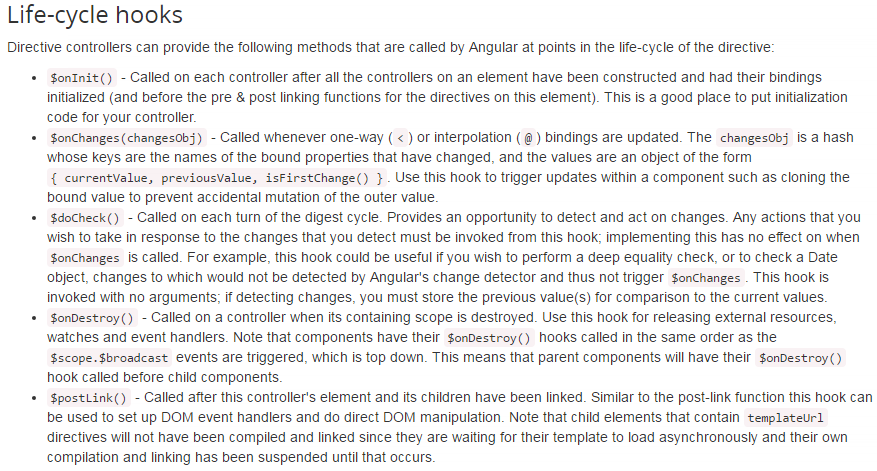
详情:https://docs.angularjs.org/api/ng/service/$compile#life-cycle-hooks
angular.module('do-check-module', [])

.component('app', {

  template:

    'Month: <input ng-model="$ctrl.month" ng-change="$ctrl.updateDate()">' +

    'Date: {{ $ctrl.date }}' +

    '<test date="$ctrl.date"></test>',

  controller: function() {

    this.date = new Date();

    this.month = this.date.getMonth();

    this.updateDate = function() {

      this.date.setMonth(this.month);

    };

  }

})

.component('test', {

  bindings: { date: '<' },

  template:

    '<pre>{{ $ctrl.log | json }}</pre>',

  controller: function() {

    var previousValue;

    this.log = [];

    //hook here

    this.$doCheck = function() {

      var currentValue = this.date && this.date.valueOf();

      if (previousValue !== currentValue) {

        this.log.push('doCheck: date mutated: ' + this.date);

        previousValue = currentValue;

      }

    };

  }

});
参考:
https://ui-router.github.io/docs/latest/modules/ng1_state_events.html
https://github.com/angular-ui/ui-router/wiki#state-change-events
http://www.brafox.com/post/2015/javascript/angularjs/angularjs-router-interceptor.html
angular利用ui-router登录检查的更多相关文章
- angular 的ui.router 定义不同的state 对应相同的url
Angular UI Router: Different states with same URL? The landing page of my app has two states: home-p ...
- angular中的 登录检查 和 过期Session清理
angular利用ui-router进行登录检查 SAP都会有这个问题,session过期或者页面被刷新的情况下应该进入登录页. 监听ui-router的satte事件可以实现当state切换的时候检 ...
- AngularJS 使用 UI Router 实现表单向导
Today we will be using AngularJS and the great UI Router and the Angular ngAnimate module to create ...
- angular : $location & $state(UI router)的关系
次序:angular 的 location会先跑 $rootScope.$on("$locationChangeStart", function (scope, newUrl, o ...
- angular ui.router 路由传参数
angular已经用了一段时间了,最近在做路由,做一下笔记. 路由跳转的时候进行穿参 ui.router方式 <a ui-sref="edit({id:5})"> 编辑 ...
- angular路由——ui.route
angular路由 使用案例 <!DOCTYPE html> <html lang="en"> <head> <meta charset= ...
- 【原创】ui.router源码解析
Angular系列文章之angular路由 路由(route),几乎所有的MVC(VM)框架都应该具有的特性,因为它是前端构建单页面应用(SPA)必不可少的组成部分. 那么,对于angular而言,它 ...
- ngRoute 与ui.router区别
angular路由 路由 (route) ,几乎所有的 MVC(VM) 框架都应该具有的特性,因为它是前端构建单页面应用 (SPA) 必不可少的组成部分. 那么,对于 angular 而言,它自然也有 ...
- Angular.js之Router学习笔记
<!DOCTYPE html><html lang="en"><head> <meta charset="UTF-8" ...
随机推荐
- flask_用户信息和头像
一.用户信息页 1.创建视图函数(microblog.py) @app.route('/user/<nickname>') @login_required def user(nicknam ...
- ubuntu gcc-5 安装
安装了一个ubuntu 15.10,没有集成vim,很失望,先安装个vim,sudo apt-get install vim. 开始获取g++-5: $ sudo add-apt-repository ...
- IIS 部署 node.js ---- 基础安装部署
一些可能有用的相关文章: https://blogs.msdn.microsoft.com/scott_hanselman/2011/11/28/window-iisnode-js/ http://b ...
- Asp.Net异步编程-使用了异步,性能就提升了吗?
Asp.Net异步编程 写在前面的话,很久没有写Blog了,不对,其实一致就没有怎么写过.今天有空,我也来写一篇Blog 随着.Net4.5的推出,一种新的编程方式简化了异步编程,在网上时不时的也看到 ...
- Thinkphp内置截取字符串函数
Thinkphp内置了一个可以媲美smarty的模板引擎,给我们带来了很大的方便.调用函数也一样,可以和smarty一样调用自己需要的函数,而官方也内置了一些常用的函数供大家调用. 比如今天我们说的截 ...
- java 基础题 很基础, 很有趣
都是一些非常非常基础的题,是我最近参加各大IT公司笔试后靠记忆记下来的,经过整理献给与我一样参加各大IT校园招聘的同学们,纯考Java基础功底, 老手们就不用进来了,免得笑话我们这些未出校门的孩纸们, ...
- 好玩儿的Game
1. 种类: 威佐夫游戏, Bash游戏, Nim游戏, 等. 2. 理论: 胜态一定可以通过某种策略走向必败态; 而必败态采取任何策略都将走向胜态. 用图论的话来说, 因为必败态只能走向胜态, 所以 ...
- 完美获取N卡A卡的显存大小(使用OpenGL)
// 基于扩展NVX_gpu_memory_info extension UINT QueryNVidiaCardMemory() { __try { int iVal = 0; glGet ...
- JUnit Assert方法总结
junit中的assert方法全部放在Assert类中,总结一下junit类中assert方法的分类.1.assertTrue/False([String message,]boolean condi ...
- Redis主从复制深入剖析
Redis是一个开源的,遵守BSD许可协议的key/value缓存系统,并由其高效的响应速度以及丰富的数据结构而闻名.Redis在京东的使用也是非常普遍的,包括很多关键业务上的 使用,由于Redis官 ...