
CSS学习总结(二)
一、id及class选择符
id和class的名称是由用户自定义的。id号可以唯一地标识html元素,为元素指定样式。id选择符以#来定义。
1、id选择符 注:在网页中,每个id名只能是唯一不重复的。
<head>

    <meta charset="UTF-8">

    <title>Document</title>

    <style type="text/css">

        #title2{   /*#后的是id名称*/

            background-color: red;

            font-family: "微软雅黑";

        }

    </style>

</head>

<body>

    <h2 id="title1">我是标题2</h2>

    <h2 id="title2">我也是标题2</h2>

</body>
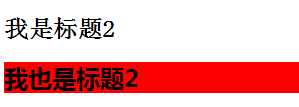
2、class选择符 注:class与id不同,class可以重复使用,定义一类的元素。class选择符以.来定义。
<!doctype html>

<html lang="en">

<head>

    <meta charset="UTF-8">

    <title>Document</title>

    <style type="text/css">

        .pp{  /*将同一个class名的元素都选中了*/

            background-color: blue;

            font-family: "微软雅黑";

        }

    </style>

</head>

<body>

    <p class="pp">这是个段落</p>

    <h3 class="pp">这是个标题</h3>

</body>

</html>
这是个段落
这是个标题
二、伪类选择符
伪类选择符比较多,如下表所示:
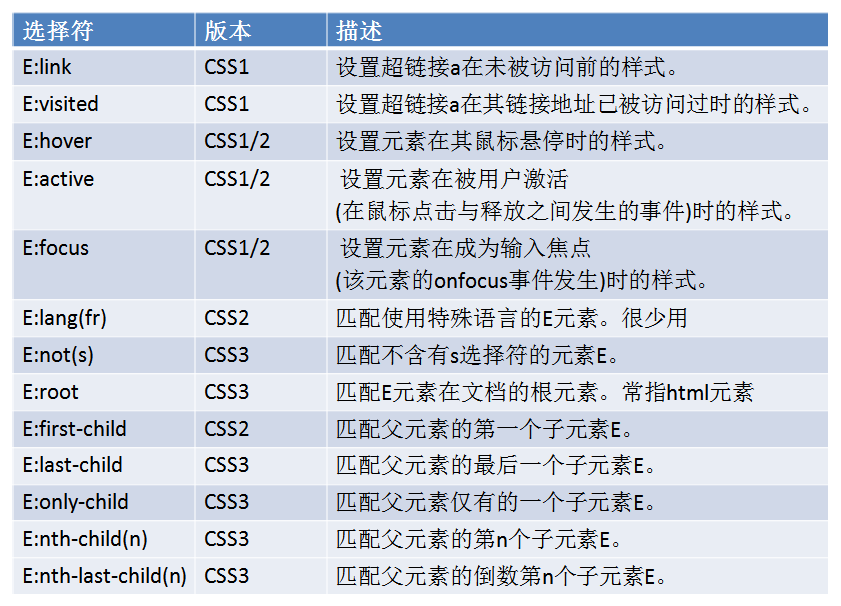
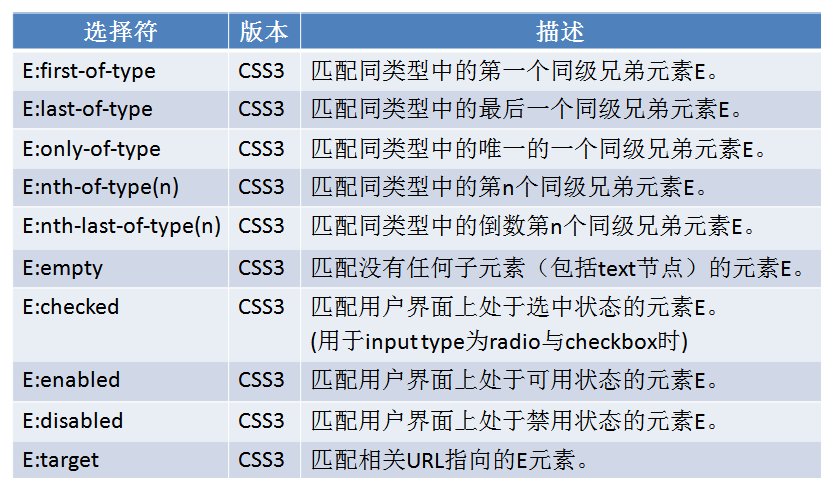
下面简单举几个例子说明:
(一)、E:link、E:hover、E:visited
<!doctype html>

<html lang="en">

<head>

    <meta charset="UTF-8">

    <title>Document</title>

    <style type="text/css">

       #div1 a:link{

            background-color: red;    /*设置链接a在未访问前的样式为红色背景色*/ }

        }

       #div1 a:visited{

            background-color: blue;/*设置链接a在访问后的样式的背景色为蓝色*/

        }

       #div1 a:hover{

            text-decoration: none; /*当鼠标悬停在链接上时,链接的下划线消失*/

        }

    </style>

</head>

<body>

    <div id="div1">

        <a href="#">点击链接</a>

    </div>

</body>

</html>
(二)、E:first-child、E:last-child
注:这里可能会存在误区。要记住E元素是子元素,而不是父元素。所以这里要设置第一个li的样式就是li:first-child,而不是ul:first-child。而且必须是排在第一的元素才会被选中。E:last-child同理可得。
<!doctype html>

<html lang="en">

<head>

    <meta charset="UTF-8">

    <title>Document</title>

    <style type="text/css">

      .ul li:first-child{color:red;} /*第一个*/

      .ul li:last-child{color:blue;} /*最后一个*/

      .ul li:nth-child(2){color:yellow;}/*第二个*/

       /*倒数第二个*/

      .ul li:nth-last-child(2){color:yellow;}

    </style>

</head>

<body>

        <ul class="ul">

            <li>test1</li>

            <li>test2</li>

            <li>test3</li>

            <li>test4</li>

            <li>test5</li>

        </ul>

</body>

</html>
- test1
- test2
- test3
- test4
- test5
(三)、E:nth-child(n)
<!doctype html>

<html lang="en">

<head>

    <meta charset="UTF-8">

    <title>Document</title>

    <style type="text/css">

   /*奇数*/

     .ul2 li:nth-child(odd){background-color:#ccc;}

     .ul2 li:nth-child(2n+1){border-left:2px solid red;}

    /* 偶数 */

     .ul2 li:nth-child(even){background-color:#0F7CCF;}

     .ul2 li:nth-child(2n){border-left:2px solid black;}

    /* 3的倍数 */

     .ul2 li:nth-child(3n){color:red;font-weight:bold;}

    </style>

</head>

<body>

        <ul class="ul2">

             <li>哈哈</li>

             <li>呵呵</li>

             <li>嘻嘻</li>

             <li>啊啊</li>

             <li>哦哦</li>

             <li>嗯嗯</li>

        </ul>

</body>

</html>
- 哈哈
- 呵呵
- 嘻嘻
- 啊啊
- 哦哦
- 嗯嗯
(四)、E:first-of-type。
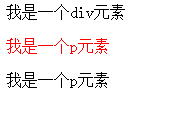
注:要与E:first-child区分开。E:first-child 要求E元素是第一个子元素,但E:first-of-type不是,该选择符总是能命中父元素的第1个为E的子元素,不论第1个子元素是否为E。
<!doctype html>

<html lang="en">

<head>

    <meta charset="UTF-8">

    <title>Document</title>

    <style type="text/css">

    p:first-of-type {

    color: #f00;

        }

    </style>

</head>

<body>

    <div class="test">

    <div>我是一个div元素</div>

    <p>我是一个p元素</p>

    <p>我是一个p元素</p>

</div>

</body>

</html>
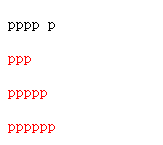
(五)、E:not(s)
<!DOCTYPE html>

<html lang="zh-cn">

    <head>

        <meta charset="utf-8" />

        <title></title>

        <style type="text/css">

            p:not(.abc) {   /*设置除类名为.abc的元素的其他元素颜色*/

                color: #f00;

            }

        </style>

    </head>

    <body>

        <p class="abc">pppp p</p>

        <p id="abc">ppp</p>

        <p class="abcd">ppppp</p>

        <p>pppppp</p>

    </body>

</html>
CSS学习总结(二)的更多相关文章
- css学习笔记二
下面来总结一下盒子模型,流式布局,浮动布局,层布局(定位布局). 1.盒子模型 有二种:IE盒子模型 和 标准w3c盒子模型 1)IE的盒子模型的content包含了padding和border 2) ...
- CSS学习笔记二:css 画立体图形
继上一次学了如何去运用css画平面图形,这一次学如何去画正方体,从2D向着3D学习,虽然有点满,但总是一个过程,一点一点积累,然后记录起来. Transfrom3D 在这一次中运用到了一下几种属性: ...
- Html+css学习笔记二 标题
学习新标签,标题 <html> <head> <title>tags</title> </head> <body> <h1 ...
- CSS学习(二)
<!DOCTYPE html> <html> <head> <meta charset="{CHARSET}"> <title ...
- CSS学习(二)- 有关 hasLayout 和 BFC
1. hasLayout 概念说明 ‘Layout’ 可以被某些 CSS property(特性)不可逆的触发,而某些 HTML 元素本身就具有 layout . ‘Layout’ 在 IE 中可以通 ...
- 5月28日 python学习总结 CSS学习(二)
CSS属性相关 宽和高 width属性可以为元素设置宽度. height属性可以为元素设置高度. 块级标签才能设置宽度,内联标签的宽度由内容来决定. 字体属性 文字字体 font-family可以把多 ...
- CSS学习(二):背景图片如何定位?
我们都知道background-position属性用来指定背景图片应该出现的位置,可以使用关键字.绝对值和相对值进行指定.在CSS Sprites中,这个属性使用比较频繁,使用过程中,我常混淆,经常 ...
- css学习笔记二之inline-block
1.inline-block是CSS2.1中新增的盒类型,在div中将display属性设定为"inline-block",则div显示效果与设置display属性为"i ...
- CSS 学习路线(二)选择器
选择器 规则结构: 分两个基本部分 选择器(selector)和声明块(declaration block) 组成 声明块:由一个或多个声明组成,每一个声明都是属性-值对 选择器分为:元素选择器,类选 ...
- CSS学习(二)选择符
元素选择符:以元素名作为选择符(span{ color: red; }) 群组选择符:将两个选择符用逗号隔开构成群组(span, div{ color: red; }) 通用选择符:通用选择符(*)将 ...
随机推荐
- td中绝对定位div的垂直居中问题
一.需求 典型的注册页面设计一般是一个三列多行的表格,左列为表单项label,中列为文本框,右列为填写说明和验证提示.如下图 因为整个表单的视觉重心在左中两列,所以在考虑表单整体相对页面水平居中和注册 ...
- velocity分页模板
以前用后台java拼接分页代码,不利于修改.找到一份velocity模板. <!-- 分页模板 --> #macro(pager $url $pager) <url class=&q ...
- JAVA 设计模式 解释器模式
用途 解释器模式 (Interpreter) 定义一个语言,定义它的文法的一种表示. 并定义一个解释器,这个解释器使用该表示来解释语言中的句子. 解释器模式是一种行为型模式. 结构
- 【Swift学习】Swift编程之旅---集合类型之字典(八)
字典是一种存储相同类型多重数据的存储器.每个值(value)都关联独特的键(key),键作为字典中的这个值数据的标识符.和数组中的数据项不同,字典中的数据项并没有具体顺序. 字典写作Dictionar ...
- div模拟textarea实现高度自增长
今天突然有位前端的朋友问我textarea怎么实现高度随内容自增长,我一下子懵了,首先想到的是用js改变textarea的高度,但是百度了很多参考代码效果都不是很理想. 因为之前实际项目中用的text ...
- IOS 通用颜色快速生成代码
通常情况下我们是直接使用类似于#EE1289这样的代码来直接表示RGB颜色的.但是在IOS语言中,它的颜色表示方式比较另类,他是使用一个0-1的小数来表示颜色值的.这样的实现,或许能够表示更多的颜色值 ...
- 【转载】8天学通MongoDB——第八天 驱动实践
作为系列的最后一篇,得要说说C#驱动对mongodb的操作,目前驱动有两种:官方驱动和samus驱动,不过我个人还是喜欢后者, 因为提供了丰富的linq操作,相当方便. 官方驱动:https://gi ...
- LINQ to SQL语句(3)之Count/Sum/Min/Max/Avg
适用场景:统计数据吧,比如统计一些数据的个数,求和,最小值,最大值,平均数. Count 说明:返回集合中的元素个数,返回INT类型:不延迟.生成SQL语句为:SELECT COUNT(*) FROM ...
- Winform开发框架中实现同时兼容多种数据库类型处理
在很多应用系统里面,虽然一般采用一种数据库运行,但是由于各种情况的需要,可能业务系统会部署在不同类型的数据库上,如果开发的系统能够很方便支持多种数据库的切换,那可以为我们减少很多烦恼,同时提高系统的适 ...
- 全动态Portlet点击后选中样式
1 背景概述 在配置公司云平台的帮助信息过程中,由于使用的全动态portlet的数据URL获取到的是静态数据,没有办法在后台做选中的逻辑判断,所以需要在前台来控制选中列表的样式,这里将对前台选中列表 ...