
缩略信息是: sending message to a Handler on a dead thread 我是用IntentService时报的
稍微纤细一点儿的信息是: Handler (android.os.Handler) {215ddea8} sending message to a Handler on a dead thread。
在另一次在IntentService里使用MediaPlayer 播放铃声也再现错误,信息是:Handler) {42414500} sending message to a Handler on a dead thread。
本次的完整信息是:
W/ActivityManager( 1394): getTasks: caller 10034 is using old GET_TASKS but privileged; allowing

W/MessageQueue( 7666): Handler (android.os.Handler) {215ddea8} sending message to a Handler on a dead thread

W/MessageQueue( 7666): java.lang.IllegalStateException: Handler (android.os.Handler) {215ddea8} sending message to a Handler on a dead thread

W/MessageQueue( 7666):  at android.os.MessageQueue.enqueueMessage(MessageQueue.java:325)

W/MessageQueue( 7666):  at android.os.Handler.enqueueMessage(Handler.java:635)

W/MessageQueue( 7666):  at android.os.Handler.sendMessageAtTime(Handler.java:604)

W/MessageQueue( 7666):  at android.os.Handler.sendMessageDelayed(Handler.java:574)

W/MessageQueue( 7666):  at android.os.Handler.postDelayed(Handler.java:398)

W/MessageQueue( 7666):  at com.bandwidthx.library.l.a(SourceFile:367)

W/MessageQueue( 7666):  at com.bandwidthx.library.l.B(SourceFile:357)

W/MessageQueue( 7666):  at com.bandwidthx.library.BxApproval.aZ(SourceFile:4563)

W/MessageQueue( 7666):  at com.bandwidthx.library.BxApproval.aT(SourceFile:4440)

W/MessageQueue( 7666):  at com.bandwidthx.library.BxApproval.aS(SourceFile:4431)

W/MessageQueue( 7666):  at com.bandwidthx.library.BxApproval.aG(SourceFile:4044)

W/MessageQueue( 7666):  at com.bandwidthx.library.l.a(SourceFile:1320)

W/MessageQueue( 7666):  at com.bandwidthx.library.l.j(SourceFile:1275)

W/MessageQueue( 7666):  at com.bandwidthx.library.q.w(SourceFile:2280)

W/MessageQueue( 7666):  at com.bandwidthx.library.q.a(SourceFile:3399)

W/MessageQueue( 7666):  at com.bandwidthx.library.q.a(SourceFile:3103)

W/MessageQueue( 7666):  at com.bandwidthx.library.q$1.a(SourceFile:1959)

W/MessageQueue( 7666):  at com.bandwidthx.library.q$1.doInBackground(SourceFile:1928)

W/MessageQueue( 7666):  at android.os.AsyncTask$2.call(AsyncTask.java:292)

W/MessageQueue( 7666):  at java.util.concurrent.FutureTask.run(FutureTask.java:237)

W/MessageQueue( 7666):  at android.os.AsyncTask$SerialExecutor$1.run(AsyncTask.java:231)

W/MessageQueue( 7666):  at java.util.concurrent.ThreadPoolExecutor.runWorker(ThreadPoolExecutor.java:1112)

W/MessageQueue( 7666):  at java.util.concurrent.ThreadPoolExecutor$Worker.run(ThreadPoolExecutor.java:587)

W/MessageQueue( 7666):  at java.lang.Thread.run(Thread.java:818)
估计Looper啊,MessageQueue之类的,已经被你们说烂了。
我就简单概括一句(当然下面也有很详细的)
一旦一个线程的消息循环退出后,不能再给其发送消息,否则会有RuntimeException抛出。
就是你一般性看到的:
"RuntimeException: Handler{xxxx} sending message to a Handler on a dead thread"。
一般性的,如果是你实现自己的Looper和Handler,建议在Looper.prepare()后,调用Looper.myLooper()来获取对这个线程Looper的引用。
用途:0. 可以调用quit()终止服务线程 1. 接收消息时检查消息循环是否已经退出
值得一说的是: 线程终止了,有时候并不是你自己终止的,很可能能是系统的某个正常的时序导致的(只是你没有注意到这个次序,然后写代码的时候没有注意)
上面已经说清楚了,下面是详细信息&啰嗦分界线(下面再多说也就这么回事儿,别往下看了,下面就说一个简单的案例)
案例:(使用 IntentService 的发送短信,代码如下)
在IntentService内部实际是开启的一个工作线程。
@Override

protected void onHandleIntent(Intent intent) {

    Bundle data = intent.getExtras();

    String[] recipients = null;

    String message = getString(R.string.unknown_event);

    String name = getString(R.string.app_name);

    if (data != null && data.containsKey(Constants.Services.RECIPIENTS)) {

        recipients = data.getStringArray(Constants.Services.RECIPIENTS);

        name = data.getString(Constants.Services.NAME);

        message = data.getString(Constants.Services.MESSAGE);

        for (int i = 0; i < recipients.length; i++) {

            if(!StringUtils.isNullOrEmpty(recipients[i])) {

                try {

                    Intent sendIntent = new Intent(this, SMSReceiver.class);

                    sendIntent.setAction(Constants.SMS.SEND_ACTION);

                    PendingIntent sendPendingIntent = PendingIntent.getBroadcast(getApplicationContext(), 0, sendIntent, PendingIntent.FLAG_UPDATE_CURRENT);

                    Intent deliveryIntent = new Intent(this, SMSReceiver.class);

                    deliveryIntent.setAction(Constants.SMS.DELIVERED_ACTION);

                    PendingIntent deliveryPendingIntent = PendingIntent.getBroadcast(getApplicationContext(), 0, deliveryIntent, PendingIntent.FLAG_UPDATE_CURRENT);

                    SmsManager.getDefault().sendTextMessage(recipients[i].trim(), null, "[" + name + "] " + message, sendPendingIntent, deliveryPendingIntent);

                } catch (Exception e) {

                    Log.e(TAG, "sendTextMessage", e);

                    e.printStackTrace();

                    Toast.makeText(this, e.getMessage(), Toast.LENGTH_LONG).show();

                    MainActivity.instance.writeToLogFile(e.getMessage(), System.currentTimeMillis());

                }

            }

        }

    }

}
(明眼人一看就知道,那个catch语句写的有问题)
catch (Exception e) {

     Log.e(TAG, "sendTextMessage", e);

     e.printStackTrace();

     Toast.makeText(this, e.getMessage(), Toast.LENGTH_LONG).show();

     MainActivity.instance.writeToLogFile(e.getMessage(), System.currentTimeMillis());

}
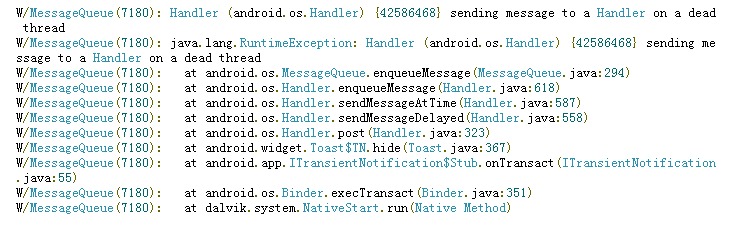
结果就报错了:
Google了一下资料,网址上是这么说的:
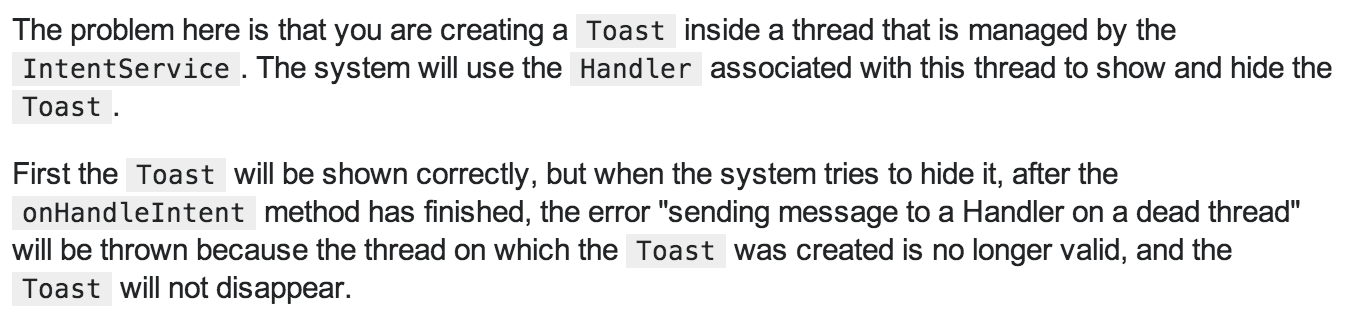
(大意翻译: 原因是你在一个由intentService控制生命周期的线程种创建了toast,手机先会显示这个toast,之后还是用这个线程的handler去隐藏&关闭这个toast;但是当onHandleIntent结束的时候,这个线程就挂了,然后绑定在这个线程上的handler也就不存在了,完事儿这个toast就关闭不了了,怎么办呢?发给主线程吧,它的toast的Handeler还存活,可以隐藏toast)
解决方案呢?(简单,粗暴)

哪些问题还有什么没有说?
为什么会向一个死线程发消息呢?
因为onHandleIntent(Intent intent)结束了这个线程也就没有了,到底怎么回事儿?
handler没有了,所以cannot hide toast?
如果我没有记错的话,这个toast的生命周期应该是NotificationManagerService控制的吧?
(IntentService源码剖析)----TODO
(Toast生命周期源码剖析)----TODO
缩略信息是: sending message to a Handler on a dead thread 我是用IntentService时报的的更多相关文章
- W/MessageQueue: Handler (android.os.Handler) {4241f8f8} sending message to a Handler on a dead thread
缩略信息是: sending message to a Handler on a dead thread 我是用IntentService时报的 稍微纤细一点儿的信息是: Handler (andro ...
- java.lang.RuntimeException: Handler (com.***.behavior.BEvent$1) {421bca80} sending message to a Hand
java.lang.RuntimeException: Handler (com.***.behavior.BEvent$1) {421bca80} sending message to a Hand ...
- Error when sending message to topic test with key: null, value: 2 bytes with error: (org.apache.kafka.clients.producer.internals.ErrorLoggingCallback)
windows下使用kafka遇到这个问题: Error when sending message to topic test with key: null, value: 2 bytes with ...
- Android图片与缩略
/** * 将图片文件原比例缩略.并使其不超过最大宽.高 * @param path : 图片文件 * @param requestW : 缩略后最大宽度 * @param requestH : 缩略 ...
- 利用FFmpeg生成视频的缩略视频 v8.3
目前生成视频缩略图的工具大多数是生成静态的图片,为了解决这样的局限性,这 次春节期间搞了个利用 FFMpeg 能生成缩略动态视频的批处理. 把 Make_NxM_videos.bat LED_font ...
- cas单点注销失败Error Sending message to url endpoint
最近在做cas单点登录时,由于是单点登录.必然会涉及到单点注销,然而在做单点注销时由于对cas注销机制不了解加之测试条件所致,所有测试都是在本机下完成(机器性能较低,没用虚拟机):导致折腾了很久.网上 ...
- SDUST作业10 Problem J: 提取缩略词
Description 在英文文献中,尤其是专业文献中,经常有很多的缩略词,如CPU代表Central Processing Unit等.为了方便学习,Qili决定从一批英文论文中提取出所有的缩略词以 ...
- jquery插件--多行文本缩略
1.webkit内核多行缩略样式 text-overflow:ellipsis; display:-webkit-box; -webkit-line-clamp:3; -webkit-box-orie ...
- getElementById的缩略
谁都知道document.getElementById这个方法写起来比较麻烦,所以有时候我们会使用jq或者自己写一个小函数去封装,但是我这次说的缩略不同于往常的函数封装 在以前,我做过很多这样的尝试, ...
随机推荐
- pyspider 简单应用之快速问医生药品抓取(一)
网址:http://yp.120ask.com/search/-0-0--0-0-0-0.html from pyspider.libs.base_handler import * class Han ...
- [NOIP2011] 选择客栈
题目描述 丽江河边有n 家很有特色的客栈,客栈按照其位置顺序从 1 到n 编号.每家客栈都按照某一种色调进行装饰(总共 k 种,用整数 0 ~ k-1 表示),且每家客栈都设有一家咖啡店,每家咖啡店均 ...
- Search for a Range
Given a sorted array of integers, find the starting and ending position of a given target value. You ...
- 使用游戏引擎photon打造一款特殊的远程控制软件
前言 本文主要是介绍photon引擎的一些基本用法,以及使用游戏引擎开发远控的优势 0x1 有一段时候对做游戏的unity开发有些兴趣,在找游戏服务端引擎的时候,突然发现了这款歪果人开发的游戏引擎ph ...
- 【转】Java出现No enclosing instance of type E is accessible. Must qualify the allocation with an enclosing
最近在看Java,在编译写书上一个例子时,由于书上的代码只有一部分,于是就自己补了一个内部类.结果编译时出现:No enclosing instance of type E is accessible ...
- CefSharp 初用遇到的一些问题及解决方法
之前用WebBrowser,打开网页很卡,但因为并是太要求速度和体验,所以可以显示html就可以了.但是,现在要求显示速度,最主要问题是WebBrowser控件的UserAgent,其实并不完全是IE ...
- jQuery中,$('#main') 与 document.getElementById('main')是什么样的关系-转
$('#main')[0]和document.getElementById('main')两个一模一样.解释:$('#main'):是一个jquery写法,#main是一个过滤器表示方法,表示查找一个 ...
- AngularJS中的Provider们:Service和Factory等的区别
引言 看了很多文章可能还是不太说得出AngularJS中的几个创建供应商(provider)的方法(factory(),service(),provider())到底有啥区别,啥时候该用啥,之前一直傻 ...
- javascript序列化和反序列化
一. JavaScript中的对象序列化(Serialize)和反序列化(Deserialize),简单实例: var obj = {id: 1, name: 'yoyo', age: undefin ...
- MyBatis学习(三)、动态SQL语句
三.动态SQL语句 有些时候,sql语句where条件中,需要一些安全判断,例如按某一条件查询时如果传入的参数是空,此时查询出的结果很可能是空的,也许我们需要参数为空时,是查出全部的信息.使用Orac ...