
Appium swipe实现屏幕滑动
在 Appium 中提供 swipe() 方法来模拟用户滑动屏幕。
swipe() 实现过程 是先通过在屏幕上标记两个坐标,然后再从开始坐标移动到结束坐标。
先看下 swipe 方法定义:
    def swipe(self, start_x, start_y, end_x, end_y, duration=None):

        """Swipe from one point to another point, for an optional duration.

        Args:

            start_x (int): x-coordinate at which to start

            start_y (int): y-coordinate at which to start

            end_x (int): x-coordinate at which to stop

            end_y (int): y-coordinate at which to stop

            duration (:obj:`int`, optional): time to take the swipe, in ms.

        Usage:

            driver.swipe(100, 100, 100, 400)

        Returns:

            `appium.webdriver.webelement.WebElement`

        """
start_x:开始坐标 x 轴
start_y:开始坐标 y 轴
end_x:结束坐标 x 轴
end_y:结束坐标 y 轴
duration:开始坐标移动到结束坐标的时间,默认 None
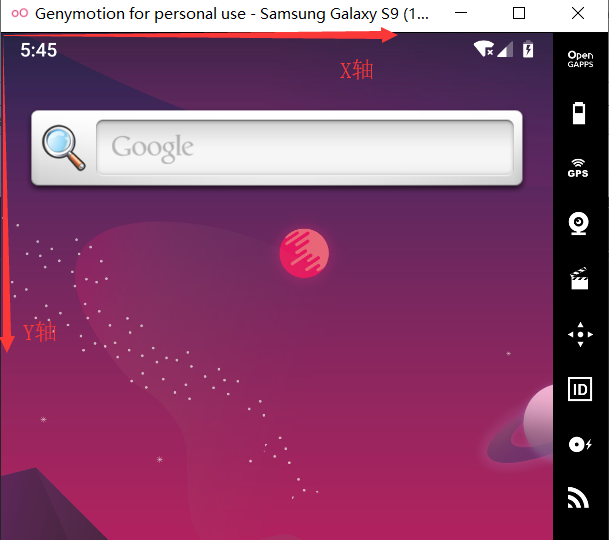
坐标原点位于屏幕左上角
一段简单代码:
from appium import webdriver

desired_caps = {

                'platformName': 'Android',

                'deviceName': '192.168.41.101:5555',

                'platformVersion': '9.0',

                # apk包名

                'appPackage': 'com.gem.tastyfood',

                # apk的launcherActivity

                'appActivity': 'com.gem.tastyfood.LaunchActivity'

                }

if __name__=='__main__':

    driver = webdriver.Remote('http://127.0.0.1:4723/wd/hub', desired_caps)

    x = driver.get_window_size()["width"]

    y = driver.get_window_size()["height"]

    #向左滑动

    driver.swipe(x*0.9,y*0.5,x*0.1,y*0.5,duration=2000)
可以将 左滑、右滑、上滑、下滑 写成方法,方便调用:
from appium import webdriver

desired_caps = {

                'platformName': 'Android',

                'deviceName': '192.168.41.101:5555',

                'platformVersion': '9.0',

                # apk包名

                'appPackage': 'com.gem.tastyfood',

                # apk的launcherActivity

                'appActivity': 'com.gem.tastyfood.LaunchActivity'

                }

# 向左滑动。y轴保持不变,X轴:由大变小

def swipe_left(driver,star_x=0.9,stop_x=0.1,duration=2000):

    x1 = int(x*star_x)

    y1 = int(y*0.5)

    x2 = int(x*stop_x)

    y2 = int(y*0.5)

    driver.swipe(x1,y1,x2,y2,duration)

# 向右滑动。y轴保持不变,X轴:由小变大

def swipe_right(driver,star_x=0.1,stop_x=0.9,duration=2000):

    x1 = int(x*star_x)

    y1 = int(y*0.5)

    x2 = int(x*stop_x)

    y2 = int(y*0.5)

    driver.swipe(x1,y1,x2,y2,duration)

# 向上滑动。x轴保持不变,y轴:由大变小

def swipe_up(driver,star_y=0.9,stop_y=0.1,duration=2000):

    x1 = int(x*0.5)

    y1 = int(y*star_y)

    x2 = int(x*0.5)

    y2 = int(y*stop_y)

    driver.swipe(x1,y1,x2,y2,duration)

# 向下滑动。x轴保持不变,y轴:由小变大

def swipe_down(driver,star_y=0.1,stop_y=0.9,duration=2000):

    x1 = int(x*0.5)

    y1 = int(y*star_y)

    x2 = int(x*0.5)

    y2 = int(y*stop_y)

    driver.swipe(x1,y1,x2,y2,duration)

if __name__=='__main__':

    driver = webdriver.Remote('http://127.0.0.1:4723/wd/hub', desired_caps)

    x = driver.get_window_size()["width"]

    y = driver.get_window_size()["height"]

    swipe_left(driver)

    swipe_right(driver)

    swipe_up(driver)

    swipe_down(driver)
Appium swipe实现屏幕滑动的更多相关文章
- APPium+Python+iOS屏幕滑动方法对比
最近在学习appium自动化,对iOS手机进行滑动操作进行总结: 1.mobile:scroll;该方法在实际使用调用时,会滚动2次.执行时间很长. 向下滚动整个屏幕driver.execute_sc ...
- appium(屏幕滑动)
class handleswipe(): """ 屏幕滑动操作 """ def __init__(self, driver, functio ...
- Appium左右、上下滑动(Java)
网上很多文章都说用swipe来左右滑动,你把代码一贴,结果报错,看半天,原来是java-client中swipe早就被废除了!!!下面介绍一种Java写法来左右上下滑动: 首先,创建一个Swipe类 ...
- 【Android Developers Training】 70. 使用ViewPager实现屏幕滑动
注:本文翻译自Google官方的Android Developers Training文档,译者技术一般,由于喜爱安卓而产生了翻译的念头,纯属个人兴趣爱好. 原文链接:http://developer ...
- Appium 点击屏幕
由于版本变更,appium 点击屏幕方法已经改变, TouchAction action = new TouchAction(driver); Duration duration = Duration ...
- python+Appium自动化:app滑动操作swipe
swipe Appium使用滑动操作用到了swipe方法,定义如下: swipe(self, start_x, start_y, end_x, end_y, duration=None) 从一个点滑动 ...
- 使用python实现appium的屏幕滑动
前些日子写一个滑动手机页面的小脚本,看到大家给的内容都是swipe方法,这里对swipe方法做一个小介绍: Swipe(int start x,int start y,int end x,int y, ...
- 【转】使用python实现appium的屏幕滑动
前些日子写一个滑动手机页面的小脚本,看到大家给的内容都是swipe方法,这里对swipe方法做一个小介绍: Swipe(int start x,int start y,int end x,int y, ...
- Appium Android 屏幕滑动
随机推荐
- 解决centos下tomcat启动太慢 & JDBC连接oracle太慢的问题
近期遇到一个非常奇怪的问题,也不知道改了什么,tomcat启动非常慢,以前几秒就启动好了,现在要30秒左右. 而且,通过jdbc连接oracle数据库也非常慢,以前建立一个连接只要几十毫秒,现在也要1 ...
- 【51Nod1769】Clarke and math2(数论,组合数学)
[51Nod1769]Clarke and math2(数论,组合数学) 题面 51Nod 题解 考虑枚举一个\(i_k\),枚举一个\(i\),怎么计算\(i_k\)对\(i\)的贡献. 把\(\f ...
- [反汇编]函数开始部分利用mov ebx,esp找到返回地址(_KTRAP_FRAME结构)
我们理解call原理,首先将返回地址压入栈中,之后执行调用. 因此,在一个函数开始部分,esp依旧是上一个栈帧的esp,此时esp指向返回地址. 这就意味着使用 mov ebx,esp,之后 [ebx ...
- Java开发桌面程序学习(12)——Javafx 悬浮窗提示 tooptip
Javafx 悬浮窗提示 tooptip 鼠标悬浮在某个控件,弹出提示,效果如下: 代码: //control是某个控件 Tooltip.install(control, new Tooltip(&q ...
- 用 Python 监控知乎和微博的热门话题
前言 文的文字及图片来源于网络,仅供学习.交流使用,不具有任何商业用途,版权归原作者所有,如有问题请及时联系我们以作处理. 作者: TED Crossin的编程教室 PS:如有需要Python学习资料 ...
- SpringMVC详解------参数绑定
SpringMVC详解------参数绑定 转载于:https://blog.csdn.net/swebin/article/details/92795422 目录 1.SpringMVC 参数绑定 ...
- VectorMap.js 矢量地图库 – 快速入门
VectorMap.js是一个开源地图渲染JavaScript库, 可以使用WebGL或者HTML5两种方式进行交互式矢量地图 (包括“矢量瓦片地图”,一般性矢量数据地图)和 栅格瓦片地图的渲染. W ...
- [UIApplication sharedApplication].keyWindow.rootViewController
一般来说 [UIApplication sharedApplication].keyWindow.rootViewController 会在 appDelegate 中初始化,并且整个应用运行过程中都 ...
- Python、PyCharm、django环境搭建
本文又名—— 响应式页面——从无到有(一) 事情是这样的,期末小组作业,需要我把大佬们写的页面搞成响应式的,但是我连py都没用过,只好现学…… 文章目录 一.前言 1.1 环境介绍 1.2 前期尝试 ...
- MySQL通过SHOW TABLE STATUS查看库中所有表的具体信息
有时候我们想看下指定库下所有表的使用情况,比如,查询表的Table大小,什么时候创建的,数据最近被更新的时间(即最近一笔insert/update/delete的时间).这些信息对我们进行库表维护很有 ...