
Redis自动化安装以及集群实现
#!/bin/bash

set -e

if [ $# -lt  ]; then

        echo "$(basename $0): Missing script argument"

        echo "$(installdir $0) [installfilename] [port] "

        exit

fi

PotInUse=`netstat -anp |  awk '{print $4}'  | grep $ | wc -l`

if [ $PotInUse -gt  ];then

  echo "ERROR" $ "Port is used by another process!"

  exit

fi

basedir=$

installdir=$

installfilename=$

port=$

cd $basedir

tar -zxvf $installfilename.tar.gz  >/dev/null >& &

cd $installfilename

mkdir -p $installdir

make PREFIX=$installdir install

sleep 1s

cp $basedir/redis.conf $installdir

sed -i "s/instance_port/$port/g"  $installdir/redis.conf

sleep 1s

cd $installdir

./bin/redis-server redis.conf >/dev/null >& &
配置文件模板
################################## INCLUDES ###################################

# include /path/to/local.conf

# include /path/to/other.conf

################################## MODULES #####################################

# loadmodule /path/to/my_module.so

# loadmodule /path/to/other_module.so

################################## NETWORK #####################################

bind 127.0.0.1 & your ip

port instance_port

tcp-backlog 511

timeout 0

tcp-keepalive 300

################################# GENERAL #####################################

daemonize yes

supervised no

pidfile ./redis_instance_port.pid

loglevel notice

logfile ./redis_log.log

databases 16

always-show-logo yes

################################ SNAPSHOTTING  ################################

save 900 1

save 300 10

save 60 10000

stop-writes-on-bgsave-error yes

rdbcompression yes

rdbchecksum yes

dbfilename dump.rdb

dir ./

################################# REPLICATION #################################

# masterauth <master-password>

replica-serve-stale-data yes

replica-read-only yes

repl-diskless-sync no

repl-diskless-sync-delay 5

repl-disable-tcp-nodelay no

replica-priority 100

################################## SECURITY ###################################

requirepass your_passwrod

################################### CLIENTS ####################################

# maxclients 10000

############################## MEMORY MANAGEMENT ################################

# maxmemory <bytes>

# maxmemory-policy noeviction

# maxmemory-samples 5

# replica-ignore-maxmemory yes

############################# LAZY FREEING ####################################

lazyfree-lazy-eviction no

lazyfree-lazy-expire no

lazyfree-lazy-server-del no

replica-lazy-flush no

############################## APPEND ONLY MODE ###############################

appendonly no

appendfilename "appendonly.aof"

# appendfsync always

appendfsync everysec

# appendfsync no

no-appendfsync-on-rewrite no

auto-aof-rewrite-percentage 100

auto-aof-rewrite-min-size 64mb

aof-load-truncated yes

aof-use-rdb-preamble yes

################################ LUA SCRIPTING  ###############################

lua-time-limit 5000

################################ REDIS CLUSTER  ###############################

cluster-enabled yes

# cluster-replica-validity-factor 10

# cluster-require-full-coverage yes

# cluster-replica-no-failover no

########################## CLUSTER DOCKER/NAT support  ########################

################################## SLOW LOG ###################################

slowlog-log-slower-than 10000

slowlog-max-len 128

################################ LATENCY MONITOR ##############################

latency-monitor-threshold 0

############################# EVENT NOTIFICATION ##############################

notify-keyspace-events ""

############################### ADVANCED CONFIG ###############################

hash-max-ziplist-entries 512

hash-max-ziplist-value 64

list-max-ziplist-size -2

list-compress-depth 0

set-max-intset-entries 512

zset-max-ziplist-entries 128

zset-max-ziplist-value 64

hll-sparse-max-bytes 3000

stream-node-max-bytes 4096

stream-node-max-entries 100

activerehashing yes

client-output-buffer-limit normal 0 0 0

client-output-buffer-limit replica 256mb 64mb 60

client-output-buffer-limit pubsub 32mb 8mb 60

# client-query-buffer-limit 1gb

# proto-max-bulk-len 512mb

hz 10

dynamic-hz yes

aof-rewrite-incremental-fsync yes

rdb-save-incremental-fsync yes

########################### ACTIVE DEFRAGMENTATION #######################

# Enabled active defragmentation

# activedefrag yes

# Minimum amount of fragmentation waste to start active defrag

# active-defrag-ignore-bytes 100mb

# Minimum percentage of fragmentation to start active defrag

# active-defrag-threshold-lower 10

# Maximum percentage of fragmentation at which we use maximum effort

# active-defrag-threshold-upper 100

# Minimal effort for defrag in CPU percentage

# active-defrag-cycle-min 5

# Maximal effort for defrag in CPU percentage

# active-defrag-cycle-max 75

# Maximum number of set/hash/zset/list fields that will be processed from

# the main dictionary scan

# active-defrag-max-scan-fields 1000
安装示例
sh redis_install.sh /usr/local/redis/ /usr/local/redis5/redis9008/ redis-5.0.4 9008
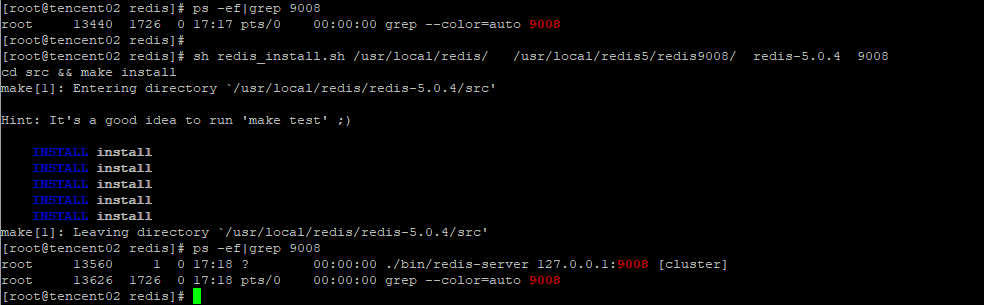
Redi实例的目录结构

基于Python的Redis自动化集群实现
基于Python的自动化集群实现,初始化节点为node_1~node_6,节点实例需要为集群模式,三主三从,自动化集群,分配slots,加入从节点,3秒钟左右完成
import redis

#master

node_1 = {'host': '127.0.0.1', 'port': 9001, 'password': '***'}

node_2 = {'host': '127.0.0.1', 'port': 9002, 'password': '***'}

node_3 = {'host': '127.0.0.1', 'port': 9003, 'password': '***'}

#slave

node_4 = {'host': '127.0.0.1', 'port': 9004, 'password': '***'}

node_5 = {'host': '127.0.0.1', 'port': 9005, 'password': '***'}

node_6 = {'host': '127.0.0.1', 'port': 9006, 'password': '***'}

redis_conn_1 = redis.StrictRedis(host=node_1["host"], port=node_1["port"], password=node_1["password"])

redis_conn_2 = redis.StrictRedis(host=node_2["host"], port=node_2["port"], password=node_2["password"])

redis_conn_3 = redis.StrictRedis(host=node_3["host"], port=node_3["port"], password=node_3["password"])

# cluster meet

redis_conn_1.execute_command("cluster meet {0} {1}".format(node_2["host"],node_2["port"]))

redis_conn_1.execute_command("cluster meet {0} {1}".format(node_3["host"],node_3["port"]))

print('#################flush slots #################')

redis_conn_1.execute_command('cluster flushslots')

redis_conn_2.execute_command('cluster flushslots')

redis_conn_3.execute_command('cluster flushslots')

print('#################add slots#################')

for i in range(0,16383+1):

    if i <= 5461:

        try:

            redis_conn_1.execute_command('cluster addslots {0}'.format(i))

        except:

            print('cluster addslots {0}'.format(i) +' error')

    elif 5461 < i and i <= 10922:

        try:

            redis_conn_2.execute_command('cluster addslots {0}'.format(i))

        except:

            print('cluster addslots {0}'.format(i) + ' error')

    elif 10922 < i:

        try:

            redis_conn_3.execute_command('cluster addslots {0}'.format(i))

        except:

            print('cluster addslots {0}'.format(i) + ' error')

print()

print('#################cluster status#################')

print()

print('##################'+str(node_1["host"])+':'+str(node_1["port"])+'##################')

print(str(redis_conn_1.execute_command('cluster info'), encoding = "utf-8").split("\n")[0])

print('##################'+str(node_2["host"])+':'+str(node_2["port"])+'##################')

print(str(redis_conn_1.execute_command('cluster info'), encoding = "utf-8").split("\n")[0])

print('##################'+str(node_3["host"])+':'+str(node_3["port"])+'##################')

print(str(redis_conn_1.execute_command('cluster info'), encoding = "utf-8").split("\n")[0])

#slave cluster meet

redis_conn_1.execute_command("cluster meet {0} {1}".format(node_4["host"],node_4["port"]))

redis_conn_2.execute_command("cluster meet {0} {1}".format(node_5["host"],node_5["port"]))

redis_conn_3.execute_command("cluster meet {0} {1}".format(node_6["host"],node_6["port"]))

#cluster nodes

print(str(redis_conn_1.execute_command('cluster nodes'), encoding = "utf-8"))

############################add salve in cluster##########################################

#slave cluster meet

print('################# cluster meet slave #################')

redis_conn_1.execute_command("cluster meet {0} {1}".format(node_4["host"],node_4["port"]))

redis_conn_2.execute_command("cluster meet {0} {1}".format(node_5["host"],node_5["port"]))

redis_conn_3.execute_command("cluster meet {0} {1}".format(node_6["host"],node_6["port"]))

sleep(5)

print('################# add slave in cluster #################')

# get 主节点的node_id,按照主节点的顺序依次添加到主节点dict_cluster_nodes中,确保主从按照list中的顺序一一对应

redis_conn_1 = redis.StrictRedis(host=node_1["host"], port=node_1["port"], password=node_1["password"], decode_responses=True)

dict_cluster_nodes = redis_conn_1.cluster('nodes')

print(dict_cluster_nodes)

dict_master_node_id = {}

for m_node in master_node:

    for key, values in dict_cluster_nodes.items():

        if key[0:key.index('@')] == str(m_node["host"])+':'+str(m_node["port"]):

            dict_master_node_id[key[0:key.index('@')]] = values['node_id']

            # 输出示例

            '''

            {

                '127.0.0.1:9001': '84f0c3a21ab6dd6965923915434cc62fc0f5cc2b',

                '127.0.0.1:9002': 'b584f695eb9c1552c25f92e28a50c9ce62ad9ee9',

                '127.0.0.1:9001': 'b95898c17761b448ea88bb9682bac9b69b045adc'

            }

            '''

# 依次添加slave节点

# 如何确保主从于list中的节点一一对应?

# 在主节点上任意一个节点上get 集群的node的时候,按照master节点顺序构造dict_cluster_nodes,然后遍历dict_cluster_nodes的时候自然就一一对应了。

node_index = 0

for s_node in slave_node:

    slave_redis_conn = redis.StrictRedis(host=s_node["host"], port=s_node["port"], password=s_node["password"])

    print(str(s_node["host"])+':'+str(s_node["port"]) + ' slave of----->' + str(master_node[node_index]["host"])+':'+str(master_node[node_index]["port"]))

    repl_command = 'cluster replicate ' + dict_master_node_id[str(master_node[node_index]["host"])+':'+str(master_node[node_index]["port"])]

    print(repl_command)

    slave_redis_conn.execute_command(repl_command)

    node_index = node_index + 1

    '''

    127.0.0.1:9004 slave of-----> 127.0.0.1:9001

    cluster replicate 84f0c3a21ab6dd6965923915434cc62fc0f5cc2b

    127.0.0.1:9005 slave of-----> 127.0.0.1:9002

    cluster replicate b584f695eb9c1552c25f92e28a50c9ce62ad9ee9

    127.0.0.1:9006 slave of-----> 127.0.0.1:9003

    cluster replicate b95898c17761b448ea88bb9682bac9b69b045adc

    '''
示例

这样一个Redis的集群,从实例的安装到集群的安装,环境依赖本身没有问题的话,基本上1分钟之内可以完成这个搭建过程。
Redis自动化安装以及集群实现的更多相关文章
- [k8s]kubespray(ansible)自动化安装k8s集群
kubespray(ansible)自动化安装k8s集群 https://github.com/kubernetes-incubator/kubespray https://kubernetes.io ...
- Redis单机安装以及集群搭建
今天主要来看一下Redis的安装以及集群搭建(我也是第一次搭建). 环境:CentOS 7.1,redis-5.0.7 一.单机安装 1.将Redis安装包放置服务器并解压 2.进入redis安装目录 ...
- linux下redis的安装和集群搭建
一.redis概述 1.1.目前redis支持的cluster特性: 1):节点自动发现. 2):slave->master 选举,集群容错. 3):Hot resharding:在线分片. 4 ...
- Redis集合 安装 哨兵集群 配置
redis相关 redis基础 redis发布订阅 redis持久化RDB与AOF redis不重启,切换RDB备份到AOF备份 redis安全配置 redis主从同步 redis哨兵集群 redis ...
- 利用ansible书写playbook在华为云上批量配置管理工具自动化安装ceph集群
首先在华为云上购买搭建ceph集群所需云主机: 然后购买ceph所需存储磁盘 将购买的磁盘挂载到用来搭建ceph的云主机上 在跳板机上安装ansible 查看ansible版本,检验ansible是否 ...
- Centos7下安装redis实战(单机版以及集群)
一.背景 因项目需要,要引入redis做缓存,就在centos7下亲自安装了一遍redis,刚好趁着这个机会就来把redis的概念以及单机版和集群版redis安装步骤记录下来,在此和大家一起分享. 二 ...
- Redis 3.0 Cluster集群配置
Redis 3.0 Cluster集群配置 安装环境依赖 安装gcc:yum install gcc 安装zlib:yum install zib 安装ruby:yum install ruby 安装 ...
- 分布式缓存技术redis学习系列(四)——redis高级应用(集群搭建、集群分区原理、集群操作)
本文是redis学习系列的第四篇,前面我们学习了redis的数据结构和一些高级特性,点击下面链接可回看 <详细讲解redis数据结构(内存模型)以及常用命令> <redis高级应用( ...
- redis + 主从 + 持久化 + 分片 + 集群 + spring集成
Redis是一个基于内存的数据库,其不仅读写速度快,每秒可以执行大约110000的写操作,81000的读取操作,而且其支持存储字符串,哈希结构,链表,集合丰富的数据类型.所以得到很多开发者的青睐.加之 ...
随机推荐
- 基于 Jenkins Pipeline 自动化部署
最近在公司推行Docker Swarm集群的过程中,需要用到Jenkins来做自动化部署,Jenkins实现自动化部署有很多种方案,可以直接在jenkins页面写Job,把一些操作和脚本都通过页面设置 ...
- 1005 csp-s 60 凉凉
T1 嘟嘟噜 上来一看数据范围1e9就蒙蔽,然后不知所措的打了一个 $ O(n)$的无脑算法,由于本人真的脑小,导致O(n)的柿子推了好长时间,导致心态崩了,然后........ 今天能明白了log的 ...
- Python实现王者荣耀小助手(一)
简单来说网络爬虫,是指抓取万维网信息的程序或者脚本,Python在网络爬虫有很大优势,今天我们用Python实现获取王者荣耀相关数据,做一个小助手: 前期准备,环境搭建: Python2.7 sys模 ...
- Android音频开发(1):基础知识
Android音频开发(1):基础知识 导读 人的说话频率基本上为300Hz~3400Hz,但是人耳朵听觉频率基本上为20Hz~20000Hz. 对于人类的语音信号而言,实际处理一般经过以下步骤: 人 ...
- 字符串模拟大数相加——Java实现
本题是CVTE二面编程题,首先考虑返回值肯定是一个字符串(int会有溢出可能),并且两个字符串只含数字,不含”+“.”-“这种. 代码如下: public static String add(Stri ...
- 802.11n速率集
- JVM 中你不得不知的一些参数
有的同学虽然写了一段时间 Java 了,但是对于 JVM 却不太关注.有的同学说,参数都是团队规定好的,部署的时候也不用我动手,关注它有什么用,而且,JVM 这东西,听上去就感觉很神秘很高深的样子,还 ...
- 小程序的基本概念-生命周期(组件 wxml)
一.组件生命周期:一个组件从创建开始到使用中最后被销毁的过程 ---onLoad事件:组件(创建成功并且加载完成)触发一次 (1)当此事件触发发送请求获取数据 (2)获取其他组件传递数据(option ...
- HTML中的表格标签
表格是网页制作中使用最多的工具之一,在制作网页时,使用表格可以更清晰地排列数据.但是在实际制作过程中,表格更多用在网页布局的定位上.很多网页都是以表格布局的.这是因为表格在文本和图像的位置控制方面 ...
- suseoj 1209: 独立任务最优调度问题(动态规划)
1209: 独立任务最优调度问题 时间限制: 1 Sec 内存限制: 128 MB提交: 3 解决: 2[提交][状态][讨论版][命题人:liyuansong] 题目描述 用2台处理机A和B处理 ...