
SpringBoot返回JSON
1、SpringBoot返回JSON简介
随着web开发前后端分离技术的盛行,json是目前主流的前后端数据交互方式,使用json数据进行交互需要对json数据进行转换解析,需要用到一些json处理器,常用的json处理器有:
- jackson-databind,SpringBoot默认的json处理器
- Gson,是Google的一个开源框架
- fastjson,目前解析速度最快的开源解析框架,由阿里开发
下面分别介绍如何在SpringBoot中整合三大json解析框架。
2、整合jackson-databind
Jackson-databind是SpringBoot默认集成在web依赖中的框架,因此我们只需要引入spring-boot-starter-web依赖,就可以返回json数据:
接着上篇文章中的demo继续修改demo,先看下代码框架:

下面开始修改demo,返回json数据,首先在pojo下创建一个Good实体类,并且可以通过注解来解决日期格式等需求:
package com.gongsir.springboot02.pojo;

import com.fasterxml.jackson.annotation.JsonFormat;

import com.fasterxml.jackson.annotation.JsonIgnore;

import java.util.Date;

public class Good {

    private Integer id;

    private String name;

    @JsonIgnore

    private Double price;

    @JsonFormat(pattern = "yy-MM-dd")

    private Date dealDate;

    public Integer getId() {

        return id;

    }

    public void setId(Integer id) {

        this.id = id;

    }

    public String getName() {

        return name;

    }

    public void setName(String name) {

        this.name = name;

    }

    public Double getPrice() {

        return price;

    }

    public void setPrice(Double price) {

        this.price = price;

    }

    public Date getDealDate() {

        return dealDate;

    }

    public void setDealDate(Date dealDate) {

        this.dealDate = dealDate;

    }

}
然后在controller包下创建一个GoodController,在方法上加上@ResponseBody注解(也可以直接使用@RestController注解整个类)即可返回json信息:
@Controller

@RequestMapping(value = "/good")

public class GoodController {

    @GetMapping(path = "/get")

    @ResponseBody

    public Good getGood(){

        Good good = new Good();

        good.setId(1);

        good.setName("MacBook Pro 2019");

        good.setPrice(16999.99);

        good.setDealDate(new Date());

        return good;

    }

}
此时可以使用浏览器或者postman工具来查看结果,运行项目,调用http://localhost:8080/good/get接口:

3、整合Gson
使用Gson需要将SpringBoot默认依赖的jackson-databind除去,然后引入Gson:
        <dependency>

            <groupId>org.springframework.boot</groupId>

            <artifactId>spring-boot-starter-web</artifactId>

            <!--除去jackson-databind依赖-->

            <exclusions>

                <exclusion>

                    <groupId>com.fasterxml.jackson.core</groupId>

                    <artifactId>jackson-databind</artifactId>

                </exclusion>

            </exclusions>

        </dependency>

        <!--引入Gson依赖-->

        <dependency>

            <groupId>com.google.code.gson</groupId>

            <artifactId>gson</artifactId>

        </dependency>
创建一个gson配置:
package com.gongsir.springboot02.configuration;

import com.google.gson.Gson;

import com.google.gson.GsonBuilder;

import org.springframework.context.annotation.Bean;

import org.springframework.context.annotation.Configuration;

import org.springframework.http.converter.json.GsonHttpMessageConverter;

import java.lang.reflect.Modifier;

@Configuration

public class GsonConfig {

    @Bean

    GsonHttpMessageConverter gsonHttpMessageConverter(){

        GsonHttpMessageConverter gsonHttpMessageConverter = new GsonHttpMessageConverter();

        GsonBuilder builder = new GsonBuilder();

        //设置解析的日期格式

        builder.setDateFormat("yyyy-MM-dd");

        //设置忽略字段,忽略修饰符为protected的字段属性

        builder.excludeFieldsWithModifiers(Modifier.PROTECTED);

        Gson gson = builder.create();

        gsonHttpMessageConverter.setGson(gson);

        return gsonHttpMessageConverter;

    }

}
修改Good,java:
package com.gongsir.springboot02.pojo;

import java.util.Date;

public class Good {

    protected Integer id;

    private String name;

    private Double price;

    private Date dealDate;

    public Integer getId() {

        return id;

    }

    public void setId(Integer id) {

        this.id = id;

    }

    public String getName() {

        return name;

    }

    public void setName(String name) {

        this.name = name;

    }

    public Double getPrice() {

        return price;

    }

    public void setPrice(Double price) {

        this.price = price;

    }

    public Date getDealDate() {

        return dealDate;

    }

    public void setDealDate(Date dealDate) {

        this.dealDate = dealDate;

    }

}
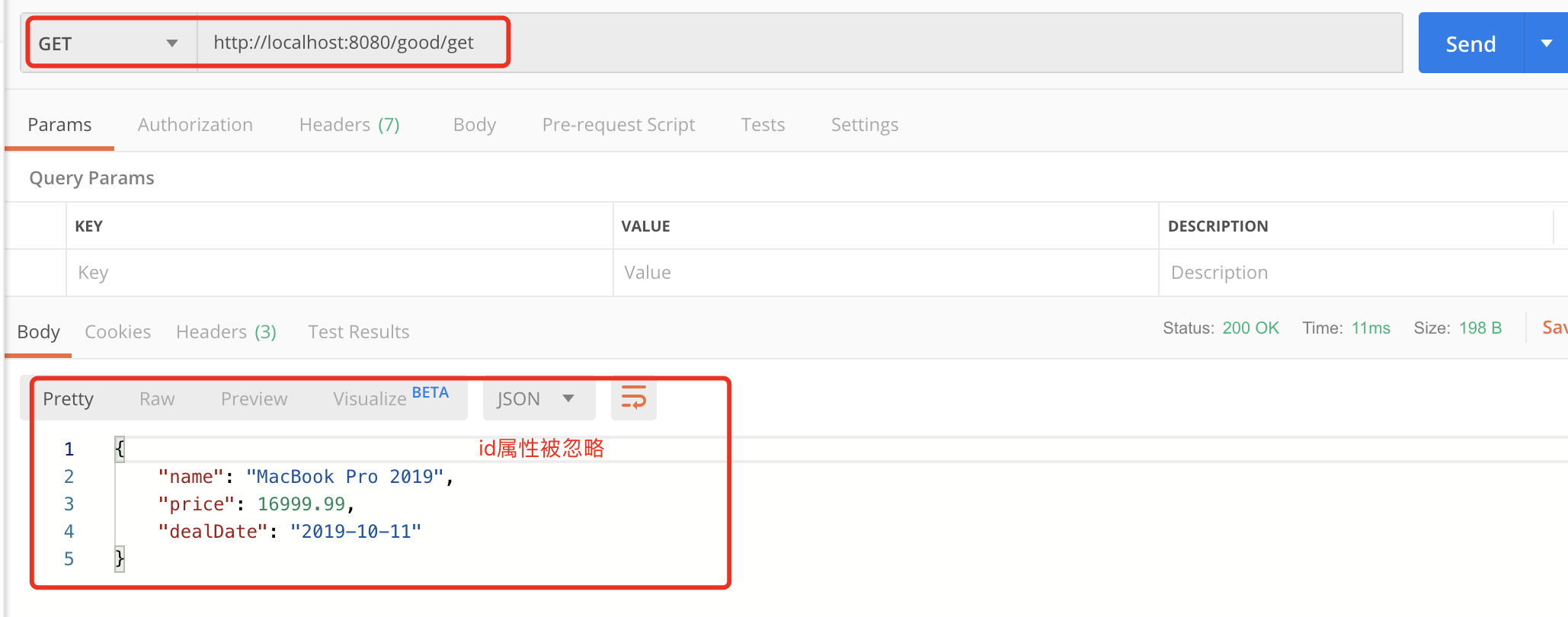
启动项目,再次访问http://localhost:8080/good/get接口:
4、整合fastjson
引入fastjson依赖,修改刚刚的pom.xml:
        <dependency>

            <groupId>org.springframework.boot</groupId>

            <artifactId>spring-boot-starter-web</artifactId>

            <!--除去jackson-databind依赖-->

            <exclusions>

                <exclusion>

                    <groupId>com.fasterxml.jackson.core</groupId>

                    <artifactId>jackson-databind</artifactId>

                </exclusion>

            </exclusions>

        </dependency>

        <!--引入fastjson依赖-->

        <dependency>

            <groupId>com.alibaba</groupId>

            <artifactId>fastjson</artifactId>

            <version>1.2.47</version>

        </dependency>
配置fastjson有两种方法,方法一:自定义MyFastjsonConfig,提供FastJsonHttpMessageConverter Bean:
package com.gongsir.springboot02.configuration;

import com.alibaba.fastjson.serializer.SerializerFeature;

import com.alibaba.fastjson.support.config.FastJsonConfig;

import com.alibaba.fastjson.support.spring.FastJsonHttpMessageConverter;

import org.springframework.context.annotation.Bean;

import org.springframework.context.annotation.Configuration;

import org.springframework.http.MediaType;

import java.nio.charset.Charset;

import java.util.ArrayList;

import java.util.List;

@Configuration

public class MyFastjsonConfig {

    @Bean

    FastJsonHttpMessageConverter fastJsonHttpMessageConverter(){

        FastJsonHttpMessageConverter converter = new FastJsonHttpMessageConverter();

        FastJsonConfig config = new FastJsonConfig();

        //升级之后的fastjson(1.2.28之后的版本)需要手动配置MediaType,否则会报错

        List<MediaType> supportedMediaTypes = new ArrayList<>();

        supportedMediaTypes.add(MediaType.APPLICATION_JSON);

        supportedMediaTypes.add(MediaType.APPLICATION_JSON_UTF8);

        supportedMediaTypes.add(MediaType.APPLICATION_ATOM_XML);

        supportedMediaTypes.add(MediaType.APPLICATION_FORM_URLENCODED);

        supportedMediaTypes.add(MediaType.APPLICATION_OCTET_STREAM);

        supportedMediaTypes.add(MediaType.APPLICATION_PDF);

        supportedMediaTypes.add(MediaType.APPLICATION_RSS_XML);

        supportedMediaTypes.add(MediaType.APPLICATION_XHTML_XML);

        supportedMediaTypes.add(MediaType.APPLICATION_XML);

        supportedMediaTypes.add(MediaType.IMAGE_GIF);

        supportedMediaTypes.add(MediaType.IMAGE_JPEG);

        supportedMediaTypes.add(MediaType.IMAGE_PNG);

        supportedMediaTypes.add(MediaType.TEXT_EVENT_STREAM);

        supportedMediaTypes.add(MediaType.TEXT_HTML);

        supportedMediaTypes.add(MediaType.TEXT_MARKDOWN);

        supportedMediaTypes.add(MediaType.TEXT_PLAIN);

        supportedMediaTypes.add(MediaType.TEXT_XML);

        converter.setSupportedMediaTypes(supportedMediaTypes);

        config.setDateFormat("yyyy-MM-dd");

        config.setCharset(Charset.forName("UTF-8"));

        config.setSerializerFeatures(

                //json格式化

                SerializerFeature.PrettyFormat,

                //输出value为null的数据

                SerializerFeature.WriteMapNullValue

        );

        converter.setFastJsonConfig(config);

        return converter;

    }

}
方法二:实现WebMvcConfigurer接口,重写configureMessageConverters方法:
package com.gongsir.springboot02.configuration;

import com.alibaba.fastjson.serializer.SerializerFeature;

import com.alibaba.fastjson.support.spring.FastJsonHttpMessageConverter;

import org.springframework.context.annotation.Configuration;

import org.springframework.http.MediaType;

import org.springframework.http.converter.HttpMessageConverter;

import org.springframework.web.servlet.config.annotation.WebMvcConfigurer;

import java.nio.charset.Charset;

import java.util.ArrayList;

import java.util.List;

@Configuration

public class FastJsonConfig implements WebMvcConfigurer {

    @Override

    public void configureMessageConverters(List<HttpMessageConverter<?>> converters) {

        FastJsonHttpMessageConverter converter = new FastJsonHttpMessageConverter();

        com.alibaba.fastjson.support.config.FastJsonConfig config = new com.alibaba.fastjson.support.config.FastJsonConfig();

        //升级之后的fastjson(1.2.28之后的版本)需要手动配置MediaType,否则会报错

        List<MediaType> supportedMediaTypes = new ArrayList<>();

        supportedMediaTypes.add(MediaType.APPLICATION_JSON);

        supportedMediaTypes.add(MediaType.APPLICATION_JSON_UTF8);

        supportedMediaTypes.add(MediaType.APPLICATION_ATOM_XML);

        supportedMediaTypes.add(MediaType.APPLICATION_FORM_URLENCODED);

        supportedMediaTypes.add(MediaType.APPLICATION_OCTET_STREAM);

        supportedMediaTypes.add(MediaType.APPLICATION_PDF);

        supportedMediaTypes.add(MediaType.APPLICATION_RSS_XML);

        supportedMediaTypes.add(MediaType.APPLICATION_XHTML_XML);

        supportedMediaTypes.add(MediaType.APPLICATION_XML);

        supportedMediaTypes.add(MediaType.IMAGE_GIF);

        supportedMediaTypes.add(MediaType.IMAGE_JPEG);

        supportedMediaTypes.add(MediaType.IMAGE_PNG);

        supportedMediaTypes.add(MediaType.TEXT_EVENT_STREAM);

        supportedMediaTypes.add(MediaType.TEXT_HTML);

        supportedMediaTypes.add(MediaType.TEXT_MARKDOWN);

        supportedMediaTypes.add(MediaType.TEXT_PLAIN);

        supportedMediaTypes.add(MediaType.TEXT_XML);

        converter.setSupportedMediaTypes(supportedMediaTypes);

        config.setDateFormat("yyyy-MM-dd");

        config.setCharset(Charset.forName("UTF-8"));

        config.setSerializerFeatures(

                //json格式化

                SerializerFeature.PrettyFormat,

                //输出value为null的数据

                SerializerFeature.WriteMapNullValue

        );

        converter.setFastJsonConfig(config);

        //将converter加入到converters

        converters.add(converter);

    }

}
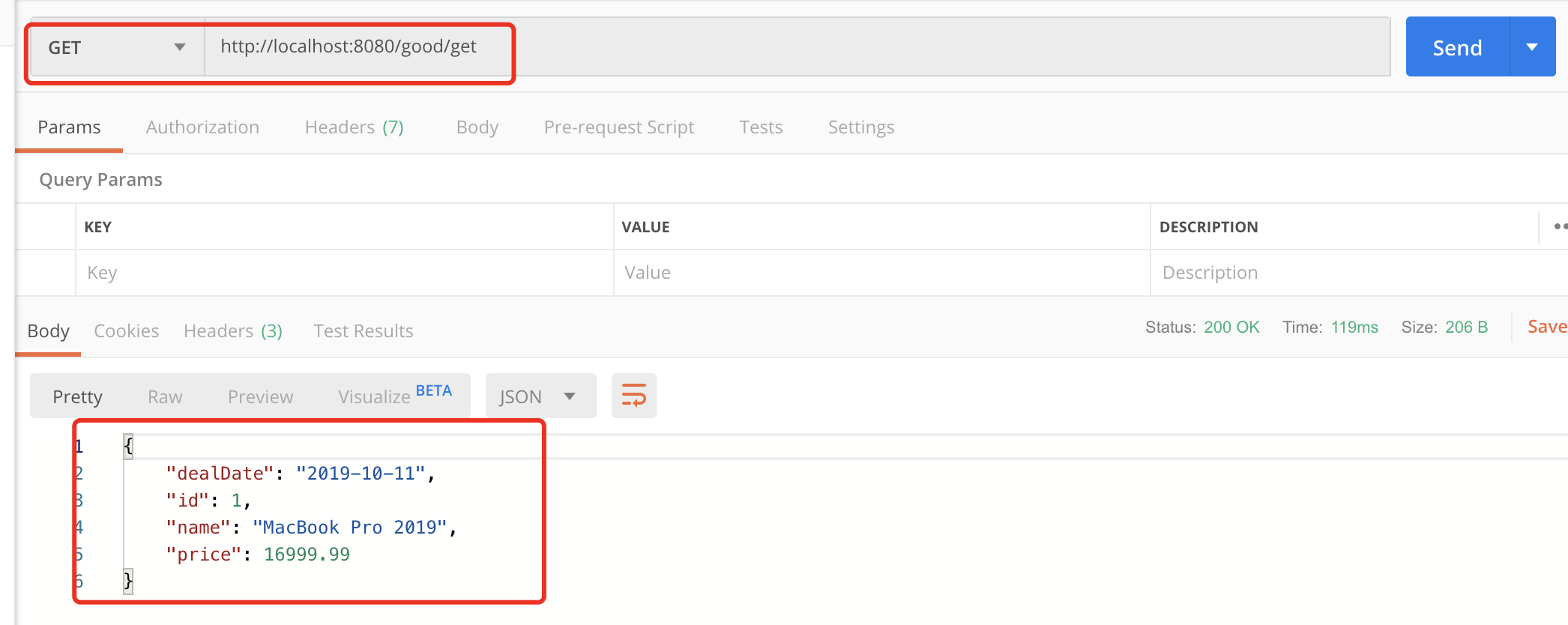
启动项目,再次调用接口:
SpringBoot返回JSON的更多相关文章
- springboot - 返回JSON error 从自定义的 ErrorController
使用AbstractErrorController(是ErrorController的实现),返回json error. 1.概览 2.基于<springboot - 映射 /error 到自定 ...
- springboot 返回json字符串格式化问题
在idea中yml文件中添加以下注解就可以格式化json字符串效果 spring: jackson: serialization: indent-output: true 原返回json格式为: {& ...
- [转] SpringBoot返回json 数据以及数据封装
作者:武哥 来源:武哥聊编程 https://mp.weixin.qq.com/s/QZk0sKxBX4QZiCTHQIA6pg 1. Spring Boot关于Json的知识点 在项目开 ...
- SpringBoot返回json和xml
有些情况接口需要返回的是xml数据,在springboot中并不需要每次都转换一下数据格式,只需做一些微调整即可. 新建一个springboot项目,加入依赖jackson-dataformat-xm ...
- SpringBoot 返回json 字符串(jackson 及 fast json)
一.jackson 1.Controller 类加注解@RestController 这个注解相当于@Controller 这个注解加 @ResponseBody 2.springBoot 默认使 ...
- SpringBoot 返回Json实体类属性大小写问题
今天碰到的问题,当时找了半天为啥前台传参后台却接收不到,原来是返回的时候返回小写,但是前台依旧大写传参. 查了很多后发现其实是json返回的时候把首字母变小写了,也就是Spring Boot中Jack ...
- SpringBoot返回JSON日期格式问题
SpringBoot中默认返回的日期格式类似于这样: "birth": 1537407384500 或者是这样: "createTime": "201 ...
- 【springBoot】springBoot返回json的一个问题
首先看下面的代码 @Controller @RequestMapping("/users") public class UserController { @RequestMappi ...
- SpringBoot返回json格式到浏览器上,出现乱码问题
在对应的Controller上的requestMapping中添加: @RestController@EnableAutoConfiguration@RequestMapping(value = &q ...
随机推荐
- CF - 1130 E Wrong Answer
PS:换了一种方式 希望大家喜欢 2333 /** code by: zstu wxk time: 2019/03/01 Problem Link: http://codeforces.com/con ...
- POJ 1182 食物链(经典并查集) (多组输入有时乱加也会错!)
多组输入有时乱加也会错! 这次用多组输入竟然,不用竟然对了,所以以后做题目,若是答案错误,先看加上或者删掉多组输入,看对不对 食物链 Time Limit: 1000MS Memory Lim ...
- “玲珑杯”ACM比赛 Round #11 B -- 萌萌哒的第二题
DESCRIPTION 一条东西走向的河两边有都排着工厂,北边有n间工厂A提供原材料,南边有n间工厂B进行生产.现在需要在工厂A和工厂B之间建运输桥以减少运输成本.可是每个工厂B只能接受最多6个工厂A ...
- 关于git使用的几点理解
1.git为分布式的版本控制系统,有远程仓库和本地仓库,远程仓库和本地仓库之间建立关联关系后,可将本地仓库的更新push(相当于是内容同步)到远程仓库进行保存,远程仓库的作用相当于一个最终代码备份的地 ...
- 纯JS实现在一个字符串b中查找另一个字符串a出现的所有位置,并且不使用字符串的方法(递归)
问题:判断字符串A在中所有出现字符串B中(长度大于1)的索引.不得使用字符串方法indexof,substring等 有小伙伴在面试遇到了这个问题,乍一看如果使用使用字符串方法indexof,subs ...
- linux ubuntu 18首次使用root权限
第一次获得root密码: sudo passwd root 切换成root用户,获得root权限 exit 退出,回到初始用户
- java中public,private,protected和default的区别
类中的数据成员和成员函数据具有的访问权限包括:public.private.protect.default(包访问权限) 作用域 当前类 同一package 子孙类 其他pac ...
- Elasticsearch(7) --- 复合查询
Elasticsearch(7) ---复合查询 复合查询有:bool query(布尔查询).boosting query(提高查询).constant_score(固定分数查询).dis_max( ...
- Spotlight on Oracle注册码破解(亲测可用)
了解到该工具监控十分强大,该工具优点: 我就是为了监控一个Oracle数据库,查阅各种资料,真是费了十牛二虎之力,才破解完成.#_# 在客户端安装好了,连接监控的服务器,提示得要注册码,这外国的软件基 ...
- (六十八)c#Winform自定义控件-DEMO整理
前提 入行已经7,8年了,一直想做一套漂亮点的自定义控件,于是就有了本系列文章. GitHub:https://github.com/kwwwvagaa/NetWinformControl 码云:ht ...