
SpringBoot返回JSON
1、SpringBoot返回JSON简介
随着web开发前后端分离技术的盛行,json是目前主流的前后端数据交互方式,使用json数据进行交互需要对json数据进行转换解析,需要用到一些json处理器,常用的json处理器有:
- jackson-databind,SpringBoot默认的json处理器
- Gson,是Google的一个开源框架
- fastjson,目前解析速度最快的开源解析框架,由阿里开发
下面分别介绍如何在SpringBoot中整合三大json解析框架。
2、整合jackson-databind
Jackson-databind是SpringBoot默认集成在web依赖中的框架,因此我们只需要引入spring-boot-starter-web依赖,就可以返回json数据:
接着上篇文章中的demo继续修改demo,先看下代码框架:

下面开始修改demo,返回json数据,首先在pojo下创建一个Good实体类,并且可以通过注解来解决日期格式等需求:
package com.gongsir.springboot02.pojo;

import com.fasterxml.jackson.annotation.JsonFormat;

import com.fasterxml.jackson.annotation.JsonIgnore;

import java.util.Date;

public class Good {

    private Integer id;

    private String name;

    @JsonIgnore

    private Double price;

    @JsonFormat(pattern = "yy-MM-dd")

    private Date dealDate;

    public Integer getId() {

        return id;

    }

    public void setId(Integer id) {

        this.id = id;

    }

    public String getName() {

        return name;

    }

    public void setName(String name) {

        this.name = name;

    }

    public Double getPrice() {

        return price;

    }

    public void setPrice(Double price) {

        this.price = price;

    }

    public Date getDealDate() {

        return dealDate;

    }

    public void setDealDate(Date dealDate) {

        this.dealDate = dealDate;

    }

}
然后在controller包下创建一个GoodController,在方法上加上@ResponseBody注解(也可以直接使用@RestController注解整个类)即可返回json信息:
@Controller

@RequestMapping(value = "/good")

public class GoodController {

    @GetMapping(path = "/get")

    @ResponseBody

    public Good getGood(){

        Good good = new Good();

        good.setId(1);

        good.setName("MacBook Pro 2019");

        good.setPrice(16999.99);

        good.setDealDate(new Date());

        return good;

    }

}
此时可以使用浏览器或者postman工具来查看结果,运行项目,调用http://localhost:8080/good/get接口:

3、整合Gson
使用Gson需要将SpringBoot默认依赖的jackson-databind除去,然后引入Gson:
        <dependency>

            <groupId>org.springframework.boot</groupId>

            <artifactId>spring-boot-starter-web</artifactId>

            <!--除去jackson-databind依赖-->

            <exclusions>

                <exclusion>

                    <groupId>com.fasterxml.jackson.core</groupId>

                    <artifactId>jackson-databind</artifactId>

                </exclusion>

            </exclusions>

        </dependency>

        <!--引入Gson依赖-->

        <dependency>

            <groupId>com.google.code.gson</groupId>

            <artifactId>gson</artifactId>

        </dependency>
创建一个gson配置:
package com.gongsir.springboot02.configuration;

import com.google.gson.Gson;

import com.google.gson.GsonBuilder;

import org.springframework.context.annotation.Bean;

import org.springframework.context.annotation.Configuration;

import org.springframework.http.converter.json.GsonHttpMessageConverter;

import java.lang.reflect.Modifier;

@Configuration

public class GsonConfig {

    @Bean

    GsonHttpMessageConverter gsonHttpMessageConverter(){

        GsonHttpMessageConverter gsonHttpMessageConverter = new GsonHttpMessageConverter();

        GsonBuilder builder = new GsonBuilder();

        //设置解析的日期格式

        builder.setDateFormat("yyyy-MM-dd");

        //设置忽略字段,忽略修饰符为protected的字段属性

        builder.excludeFieldsWithModifiers(Modifier.PROTECTED);

        Gson gson = builder.create();

        gsonHttpMessageConverter.setGson(gson);

        return gsonHttpMessageConverter;

    }

}
修改Good,java:
package com.gongsir.springboot02.pojo;

import java.util.Date;

public class Good {

    protected Integer id;

    private String name;

    private Double price;

    private Date dealDate;

    public Integer getId() {

        return id;

    }

    public void setId(Integer id) {

        this.id = id;

    }

    public String getName() {

        return name;

    }

    public void setName(String name) {

        this.name = name;

    }

    public Double getPrice() {

        return price;

    }

    public void setPrice(Double price) {

        this.price = price;

    }

    public Date getDealDate() {

        return dealDate;

    }

    public void setDealDate(Date dealDate) {

        this.dealDate = dealDate;

    }

}
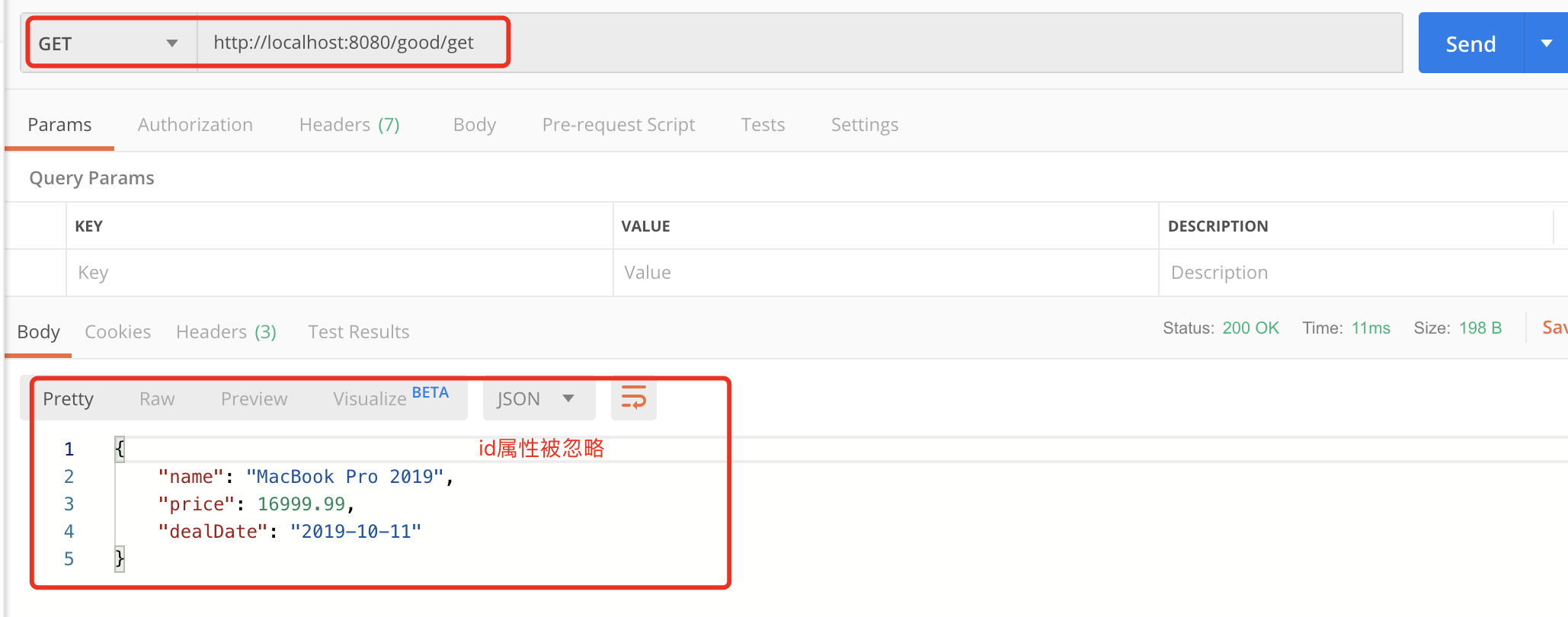
启动项目,再次访问http://localhost:8080/good/get接口:
4、整合fastjson
引入fastjson依赖,修改刚刚的pom.xml:
        <dependency>

            <groupId>org.springframework.boot</groupId>

            <artifactId>spring-boot-starter-web</artifactId>

            <!--除去jackson-databind依赖-->

            <exclusions>

                <exclusion>

                    <groupId>com.fasterxml.jackson.core</groupId>

                    <artifactId>jackson-databind</artifactId>

                </exclusion>

            </exclusions>

        </dependency>

        <!--引入fastjson依赖-->

        <dependency>

            <groupId>com.alibaba</groupId>

            <artifactId>fastjson</artifactId>

            <version>1.2.47</version>

        </dependency>
配置fastjson有两种方法,方法一:自定义MyFastjsonConfig,提供FastJsonHttpMessageConverter Bean:
package com.gongsir.springboot02.configuration;

import com.alibaba.fastjson.serializer.SerializerFeature;

import com.alibaba.fastjson.support.config.FastJsonConfig;

import com.alibaba.fastjson.support.spring.FastJsonHttpMessageConverter;

import org.springframework.context.annotation.Bean;

import org.springframework.context.annotation.Configuration;

import org.springframework.http.MediaType;

import java.nio.charset.Charset;

import java.util.ArrayList;

import java.util.List;

@Configuration

public class MyFastjsonConfig {

    @Bean

    FastJsonHttpMessageConverter fastJsonHttpMessageConverter(){

        FastJsonHttpMessageConverter converter = new FastJsonHttpMessageConverter();

        FastJsonConfig config = new FastJsonConfig();

        //升级之后的fastjson(1.2.28之后的版本)需要手动配置MediaType,否则会报错

        List<MediaType> supportedMediaTypes = new ArrayList<>();

        supportedMediaTypes.add(MediaType.APPLICATION_JSON);

        supportedMediaTypes.add(MediaType.APPLICATION_JSON_UTF8);

        supportedMediaTypes.add(MediaType.APPLICATION_ATOM_XML);

        supportedMediaTypes.add(MediaType.APPLICATION_FORM_URLENCODED);

        supportedMediaTypes.add(MediaType.APPLICATION_OCTET_STREAM);

        supportedMediaTypes.add(MediaType.APPLICATION_PDF);

        supportedMediaTypes.add(MediaType.APPLICATION_RSS_XML);

        supportedMediaTypes.add(MediaType.APPLICATION_XHTML_XML);

        supportedMediaTypes.add(MediaType.APPLICATION_XML);

        supportedMediaTypes.add(MediaType.IMAGE_GIF);

        supportedMediaTypes.add(MediaType.IMAGE_JPEG);

        supportedMediaTypes.add(MediaType.IMAGE_PNG);

        supportedMediaTypes.add(MediaType.TEXT_EVENT_STREAM);

        supportedMediaTypes.add(MediaType.TEXT_HTML);

        supportedMediaTypes.add(MediaType.TEXT_MARKDOWN);

        supportedMediaTypes.add(MediaType.TEXT_PLAIN);

        supportedMediaTypes.add(MediaType.TEXT_XML);

        converter.setSupportedMediaTypes(supportedMediaTypes);

        config.setDateFormat("yyyy-MM-dd");

        config.setCharset(Charset.forName("UTF-8"));

        config.setSerializerFeatures(

                //json格式化

                SerializerFeature.PrettyFormat,

                //输出value为null的数据

                SerializerFeature.WriteMapNullValue

        );

        converter.setFastJsonConfig(config);

        return converter;

    }

}
方法二:实现WebMvcConfigurer接口,重写configureMessageConverters方法:
package com.gongsir.springboot02.configuration;

import com.alibaba.fastjson.serializer.SerializerFeature;

import com.alibaba.fastjson.support.spring.FastJsonHttpMessageConverter;

import org.springframework.context.annotation.Configuration;

import org.springframework.http.MediaType;

import org.springframework.http.converter.HttpMessageConverter;

import org.springframework.web.servlet.config.annotation.WebMvcConfigurer;

import java.nio.charset.Charset;

import java.util.ArrayList;

import java.util.List;

@Configuration

public class FastJsonConfig implements WebMvcConfigurer {

    @Override

    public void configureMessageConverters(List<HttpMessageConverter<?>> converters) {

        FastJsonHttpMessageConverter converter = new FastJsonHttpMessageConverter();

        com.alibaba.fastjson.support.config.FastJsonConfig config = new com.alibaba.fastjson.support.config.FastJsonConfig();

        //升级之后的fastjson(1.2.28之后的版本)需要手动配置MediaType,否则会报错

        List<MediaType> supportedMediaTypes = new ArrayList<>();

        supportedMediaTypes.add(MediaType.APPLICATION_JSON);

        supportedMediaTypes.add(MediaType.APPLICATION_JSON_UTF8);

        supportedMediaTypes.add(MediaType.APPLICATION_ATOM_XML);

        supportedMediaTypes.add(MediaType.APPLICATION_FORM_URLENCODED);

        supportedMediaTypes.add(MediaType.APPLICATION_OCTET_STREAM);

        supportedMediaTypes.add(MediaType.APPLICATION_PDF);

        supportedMediaTypes.add(MediaType.APPLICATION_RSS_XML);

        supportedMediaTypes.add(MediaType.APPLICATION_XHTML_XML);

        supportedMediaTypes.add(MediaType.APPLICATION_XML);

        supportedMediaTypes.add(MediaType.IMAGE_GIF);

        supportedMediaTypes.add(MediaType.IMAGE_JPEG);

        supportedMediaTypes.add(MediaType.IMAGE_PNG);

        supportedMediaTypes.add(MediaType.TEXT_EVENT_STREAM);

        supportedMediaTypes.add(MediaType.TEXT_HTML);

        supportedMediaTypes.add(MediaType.TEXT_MARKDOWN);

        supportedMediaTypes.add(MediaType.TEXT_PLAIN);

        supportedMediaTypes.add(MediaType.TEXT_XML);

        converter.setSupportedMediaTypes(supportedMediaTypes);

        config.setDateFormat("yyyy-MM-dd");

        config.setCharset(Charset.forName("UTF-8"));

        config.setSerializerFeatures(

                //json格式化

                SerializerFeature.PrettyFormat,

                //输出value为null的数据

                SerializerFeature.WriteMapNullValue

        );

        converter.setFastJsonConfig(config);

        //将converter加入到converters

        converters.add(converter);

    }

}
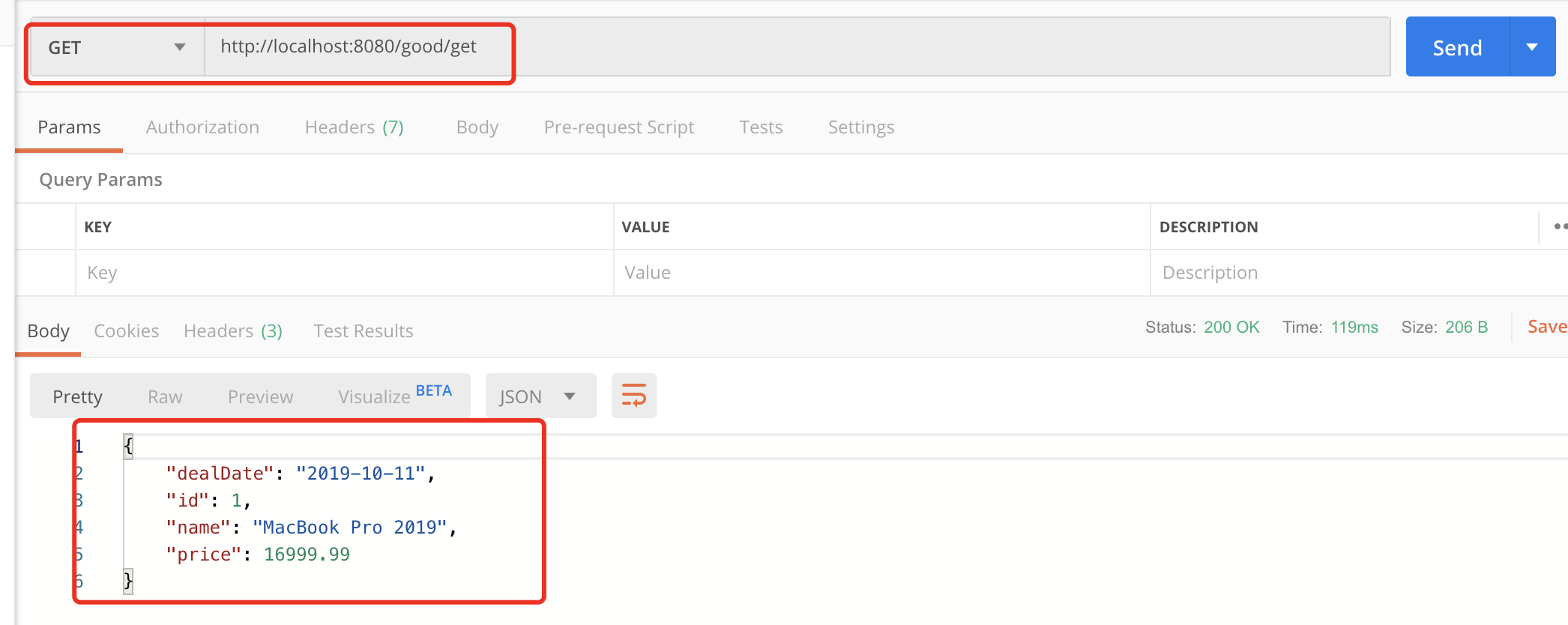
启动项目,再次调用接口:
SpringBoot返回JSON的更多相关文章
- springboot - 返回JSON error 从自定义的 ErrorController
使用AbstractErrorController(是ErrorController的实现),返回json error. 1.概览 2.基于<springboot - 映射 /error 到自定 ...
- springboot 返回json字符串格式化问题
在idea中yml文件中添加以下注解就可以格式化json字符串效果 spring: jackson: serialization: indent-output: true 原返回json格式为: {& ...
- [转] SpringBoot返回json 数据以及数据封装
作者:武哥 来源:武哥聊编程 https://mp.weixin.qq.com/s/QZk0sKxBX4QZiCTHQIA6pg 1. Spring Boot关于Json的知识点 在项目开 ...
- SpringBoot返回json和xml
有些情况接口需要返回的是xml数据,在springboot中并不需要每次都转换一下数据格式,只需做一些微调整即可. 新建一个springboot项目,加入依赖jackson-dataformat-xm ...
- SpringBoot 返回json 字符串(jackson 及 fast json)
一.jackson 1.Controller 类加注解@RestController 这个注解相当于@Controller 这个注解加 @ResponseBody 2.springBoot 默认使 ...
- SpringBoot 返回Json实体类属性大小写问题
今天碰到的问题,当时找了半天为啥前台传参后台却接收不到,原来是返回的时候返回小写,但是前台依旧大写传参. 查了很多后发现其实是json返回的时候把首字母变小写了,也就是Spring Boot中Jack ...
- SpringBoot返回JSON日期格式问题
SpringBoot中默认返回的日期格式类似于这样: "birth": 1537407384500 或者是这样: "createTime": "201 ...
- 【springBoot】springBoot返回json的一个问题
首先看下面的代码 @Controller @RequestMapping("/users") public class UserController { @RequestMappi ...
- SpringBoot返回json格式到浏览器上,出现乱码问题
在对应的Controller上的requestMapping中添加: @RestController@EnableAutoConfiguration@RequestMapping(value = &q ...
随机推荐
- codeforces 822 D. My pretty girl Noora(dp+素数筛)
题目链接:http://codeforces.com/contest/822/problem/D 题解:做这题首先要推倒一下f(x)假设第各个阶段分成d1,d2,d3...di组取任意一组来说,如果第 ...
- C#开发BIMFACE系列24 服务端API之获取模型数据9:获取单个房间信息
系列目录 [已更新最新开发文章,点击查看详细] 大厦建筑模型中,基本上包含多个楼层,每个楼层包含多个房间等信息.在<C#开发BIMFACE系列21 服务端API之获取模型数据6:获取单模 ...
- Windows下升级Zabbix Agent
这段时间因工作上不太忙,就着手升级下zabbix,从3升级到最新版4.2,服务器端升级还挺快,就是客户端比较耗时了,往往就是看的越简单的东西越耗时间啊. Windows版本的zabbix agent下 ...
- Go pprof性能调优
在计算机性能调试领域里,profiling 是指对应用程序的画像,画像就是应用程序使用 CPU 和内存的情况. Go语言是一个对性能特别看重的语言,因此语言中自带了 profiling 的库,这篇文章 ...
- 聊聊JavaScript异步中的macrotask和microtask
前言 首先来看一个JavaScript的代码片段: console.log(1); setTimeout(() => { console.log(2); Promise.resolve().th ...
- Linux系统卡死后紧急处理
前言:Linux系统卡死了的情况有很多,最常见的是系统负载过高导致的.还可以运行内存耗用极大的程序(如虚拟机),也会迅速提升系统负载.注意:不能再试图依赖任何图形界面的东西,如 Gnome的系统监视器 ...
- 正则表达式(RegExp)
前言:先来了解一下基础知识.再细说正则表达式~ 转义字符 ---- \ 转义字符会将与之相邻的字符转换含义. 例如说,希望在一个字符串中输出 “ 号,那么就可以使用在双引号前加入 \ ,这样就能 ...
- 重写一下ArrayList
其实重写不难,下面是我重写时定义的一些接口. /** * 重写实现一个list * @author <u>zhoujx</u> * */ public interface My ...
- Hadoop集群常用的shell命令
Hadoop集群常用的shell命令 Hadoop集群常用的shell命令 查看Hadoop版本 hadoop -version 启动HDFS start-dfs.sh 启动YARN start-ya ...
- 苹果系统IOS第三方管理工具——imazing 优秀
iMazing 是一款 Windows.macOS 平台的 iPhone.iPad 管理工具,可以进行文件.音乐.视频传输,备份与还原数据,并且可以管理已安装应用,比如重新安装那些已下架的应用,是「史 ...